Close
0%
0%

Magnetic Road Transport System for TT Scale Layout

Magnetic Road Transport System for TT Scale Layout — DIY Control on ESP32

Similar projects worth following
DIY magnetic road transport for TT scale layouts. ESP32 controlled, 3D printed. Independent vehicle control, no guide wires.

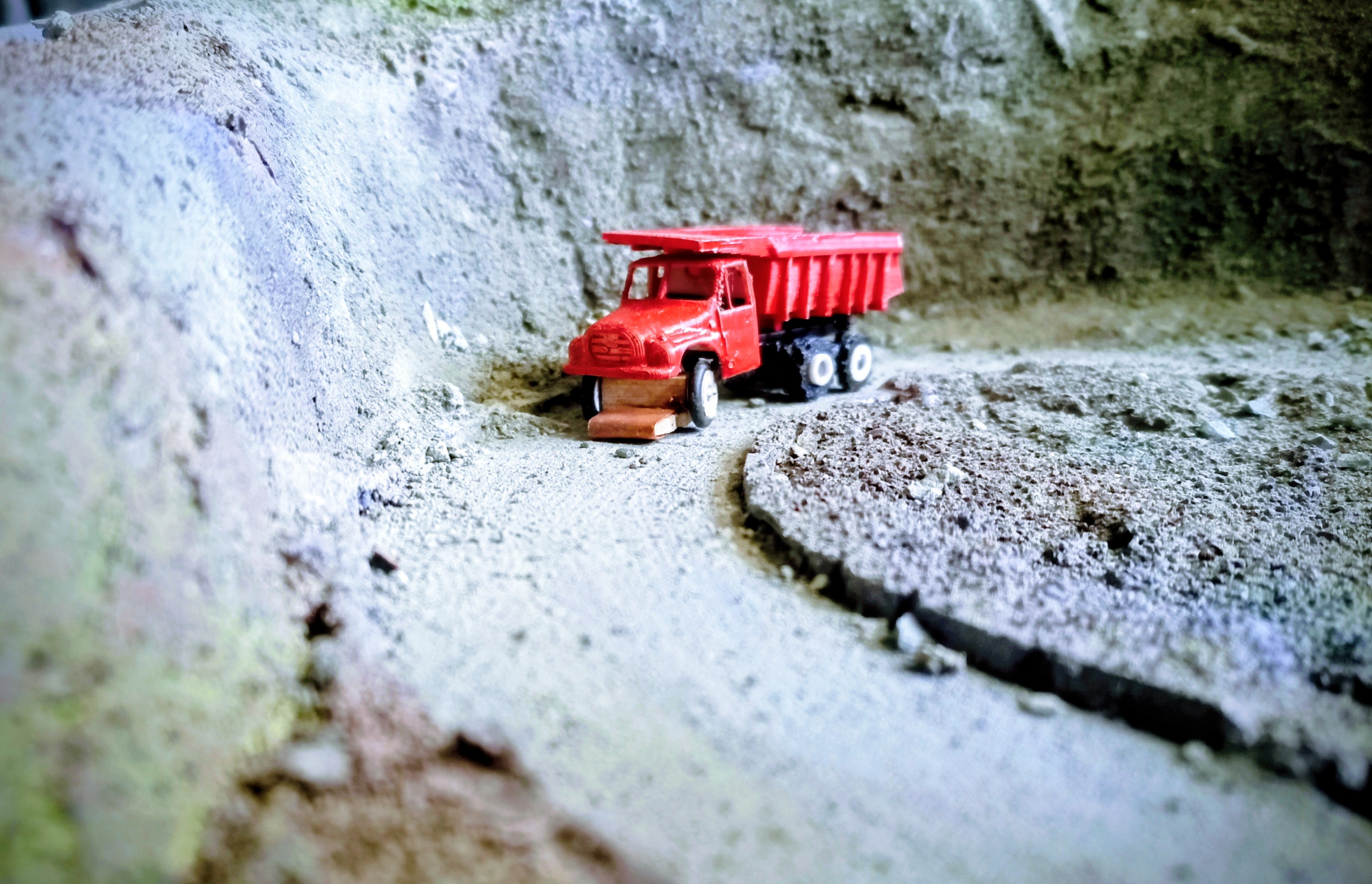
Tatra 148 S1 dumper

Magnetic Road Transport System for TT Scale Layout — DIY Control on ESP32

Autonomous road transport system for TT scale model railway layout. The goal is complete control of both rail and road traffic without DCC, built on ESP32, with maximum use of 3D printing. The purpose is to create a complex traffic simulation — traffic jams, intersection operations, bus transport with stops, realistic vehicle behavior.

Commercial road transport systems in model railways work on a guide-wire principle with fixed distances and constant speed. The result is almost comical — when one vehicle slows down in a curve, every vehicle behind it slows down too. That is not traffic, that is a parade. The goal of this project is to simulate traffic as it actually works — each vehicle decides independently, accelerates, brakes and reacts to the situation on the route regardless of the others.

Drive Principle

A hidden track runs beneath the road surface. A carriage with a DC motor, ESP32-C3 and neodymium magnets travels along this track. The magnets pull the vehicle model through the road surface. The model itself is hollow — no motor, no electronics inside. All drive and control is below the road. The overall control logic is identical to rail operations. In theory, DCC decoders and accessories can be used to control the magnetic carriages, so there is no need to abandon DCC control logic.

Control Architecture

Three layers:

Slave — ESP32-C3 inside the carriage. Receives instructions, handles acceleration and braking ramps locally. Communication via ESP-NOW.

Master — ESP32-S3. Manages traffic rules — block occupancy, turnout and signal states, vehicle position based on hall sensors, timetable execution.

Top layer — software running on dedicated hardware. Builds and adjusts the timetable, responds to operational situations. When a delay occurs, it recalculates the entire schedule — rearranges crossings, adjusts priorities, generates announcements. Master executes, top layer decides.

If the top layer fails, the system continues operating at master level using the last valid timetable.

Test Polygon

Quarry — approximately two meters of road, switchbacks, Y junction. Purpose: verification of mechanics, electronics, control software and materials before building the full layout. Terrain is 3D printed.

Current state: manual control via buttons (FWD, BWD, STOP) and potentiometer for speed.

Target: three carriages in fully automatic operation overnight without intervention.
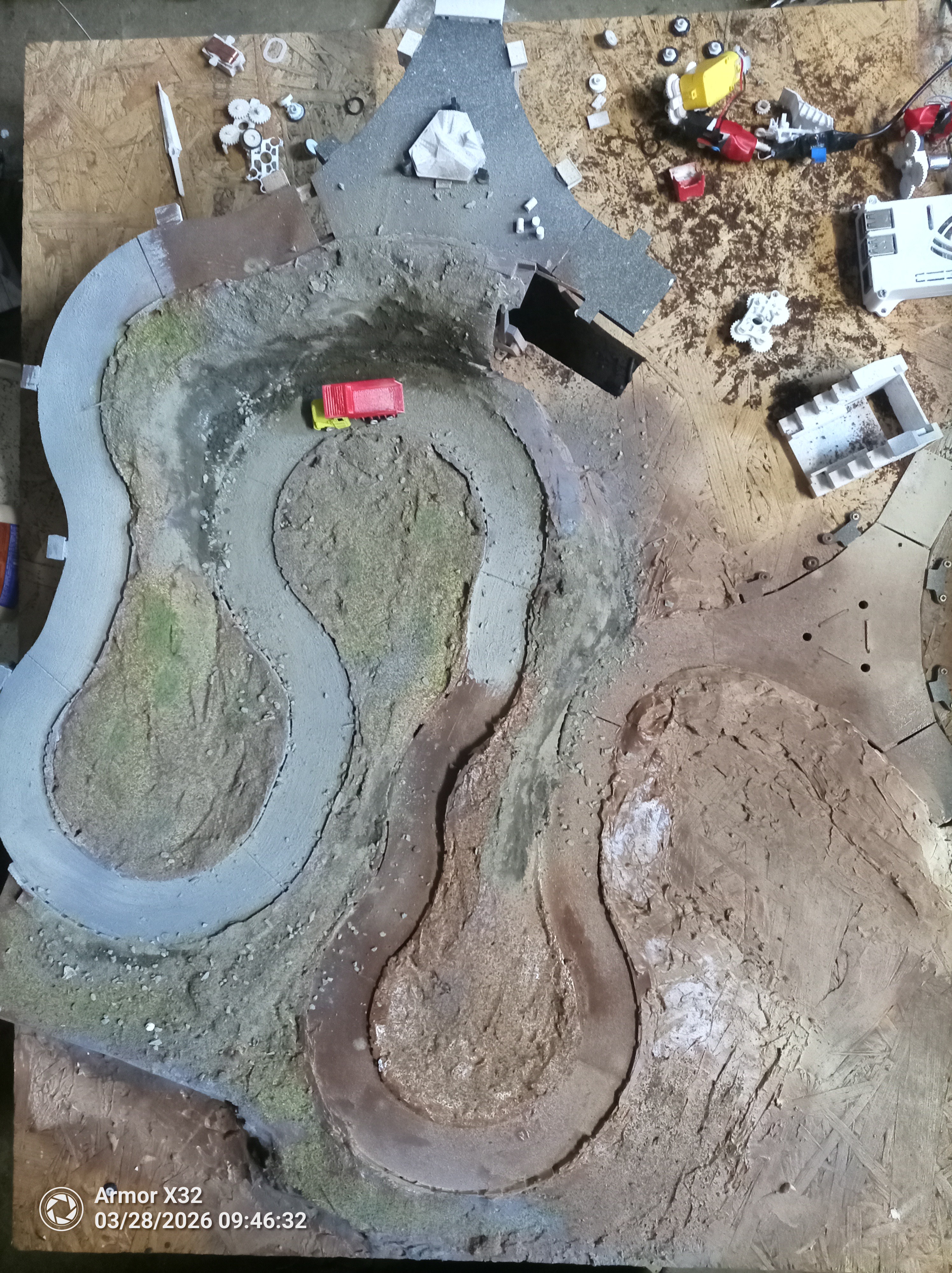
Quarry test polygon — top view

Why I Am Publishing This

I have been working on this for four years. After this long, I see things the way I am used to seeing them, not the way they are. I am looking for a fresh perspective on the mechanics, electronics and the overall approach.
  • Local Positioning System (LPS)

    Olda2 hours ago 0 comments

    I’ve been trying to improve how accurately I can determine vehicle positions on the layout. The original approach was purely theoretical – position estimated from speed and direction (dead reckoning), with occasional corrections using Hall sensors.

    I also experimented with other approaches (e.g. ultrasonic), but those quickly turned into a dead end – too complex, unreliable, and without any real benefit.

    In the end, I settled on something that could be described as a local “GPS-like” system – a simple LPS based on RSSI using ESP-NOW.

    Implementation

    On the test quarry layout I’m currently running:

    • 2× ESP32 (low master, top master)
    • 2× ESP32-C3 placed in the corners of the layout

    Each vehicle (worker) uses an ESP32-C3 that periodically broadcasts a simple packet with its ID.

    The corner nodes receive this packet and evaluate signal strength. The result is four RSSI values (in dBm), which are then used to estimate the vehicle’s position within a predefined track.

    Why this makes sense

    RSSI on its own is noisy and inaccurate. Dead reckoning alone drifts over time. Hall sensors are precise, but only at specific points.

    So instead of relying on a single method, I combine:

    • theoretical position (speed + direction)
    • corrections from Hall sensors
    • continuous correction from the LPS

    The result is not an exact position, but a stable estimate that is continuously refined.

    frequent imprecise measurements + occasional precise corrections = usable reality

    Result

    The goal is not millimeter accuracy.

    At vehicle speeds around 2 cm/s, the system allows me to:

    • predict vehicle positions
    • control spacing between vehicles
    • smoothly approach target points (loading, unloading)

    For controlled operation, this is more important than absolute precision.

    Context

    On paper, this is a bad solution. It combines imprecise methods and ignores “cleaner” approaches.

    In this specific context (low speed, constrained space, known trajectory), it makes sense and performs better than trying to force a perfectly accurate solution using a single method.

    Conclusion

    The goal here is not to find the most accurate positioning method, but one that enables:

    • stable system behavior
    • smooth operation
    • predictable interaction between vehicles

    In other words:

    I’m not solving “where exactly it is”, but “how the system behaves as a whole”

  • Update: PC monitoring application

    Olda6 days ago 0 comments

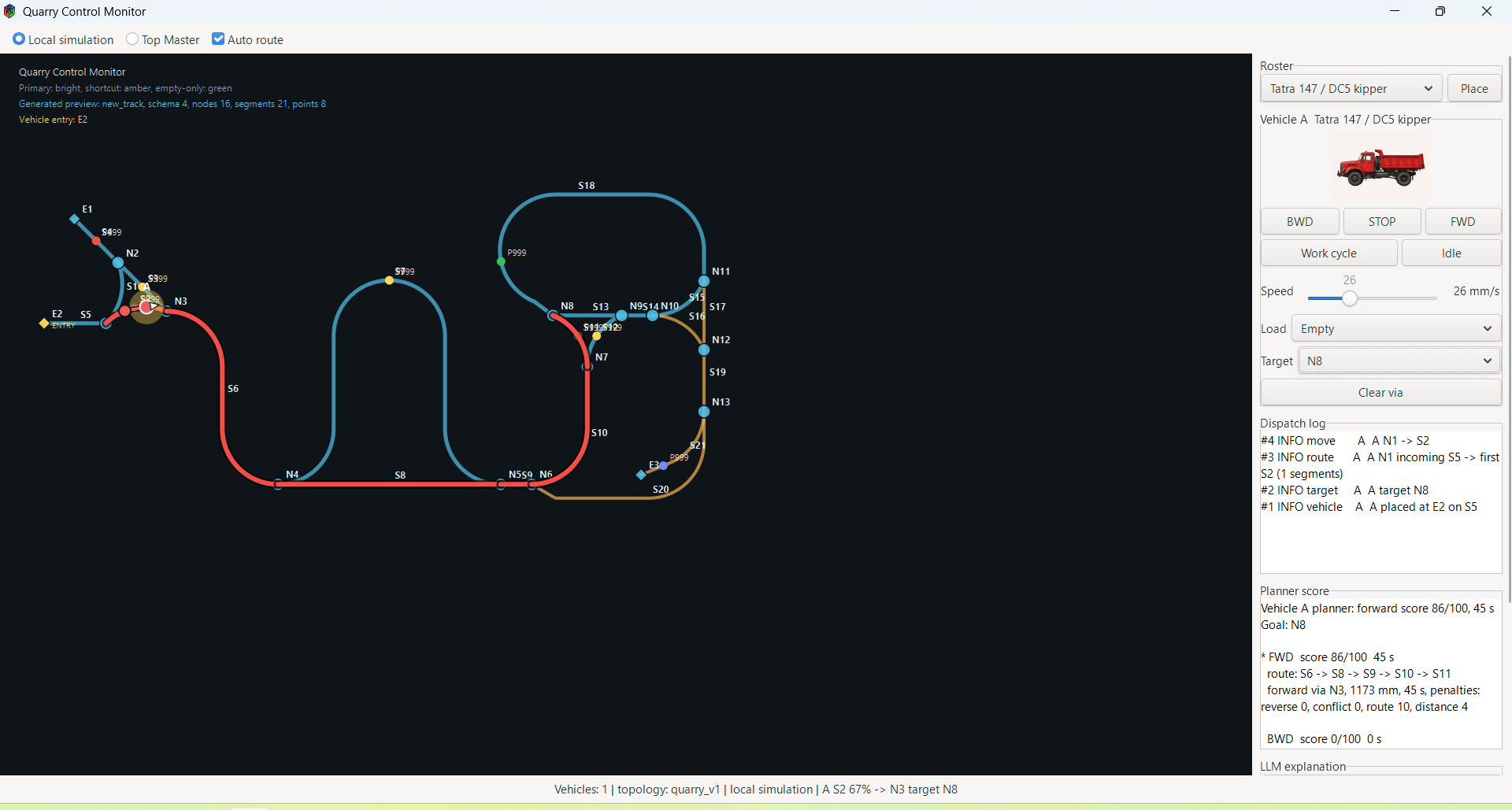
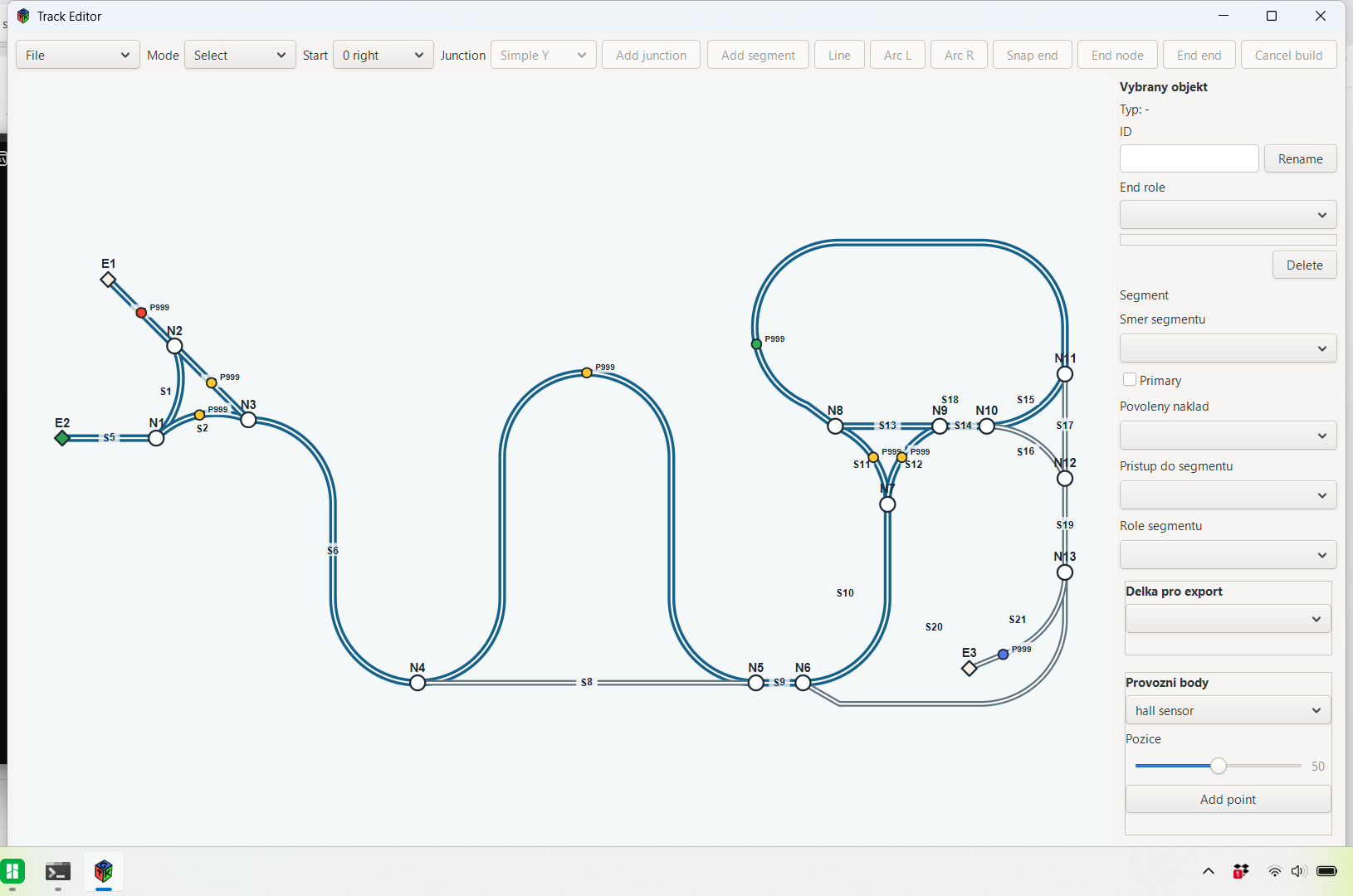
    I've added a PC application to the system, written in C (GTK3 + Cairo, compiled in MSYS2 for Windows). The goal was to get realtime visualization of the vehicle position on the track, without depending on any proprietary tool.

    What the application does:

    It renders the quarry track from 200 control points, which are refined at runtime into 800 interpolated points for a smoother curve. The vehicle is displayed as an arrow with smooth rotation based on the tangent to the track. The arrow color indicates the mode — blue for manual control, cyan for automatic, orange during safety stop, red in the local simulator.

    Communication with the top master (ESP32) runs over HTTP — the ESP provides a /data endpoint with JSON payload (position, speed, direction, hall states, safety stop). The application fetches data in a separate thread via libcurl with a 2s timeout, so the GUI doesn't freeze when the ESP doesn't respond.

    Hall sensors and track behavior:

    There are five hall sensors placed along the track, between the end points and the middle. Both the application and the low master evaluate hall state themselves — meaning they detect changes in the magnetic field, not its absolute level. This matters because each hall has a slightly different polarity depending on how it was mounted. Instead of looking for a common level, the system simply watches for transitions. On top of that there's debouncing in a time window, so short transient spikes are ignored and only a stable change is propagated to the system.

    Basic vehicle behavior is built on top of the hall sensors. When the vehicle reaches one of the end halls, safety stop kicks in — the vehicle halts and the system waits for user intervention. When the user presses a direction button after 5 seconds, safety stop is released.

    Local simulator:

    The biggest added value is the local mode. Flipping a switch disconnects the application from the ESP and the vehicle is controlled by FWD/BWD/STOP buttons plus a throttle slider. This let me tune the visualization, end-of-track detection, arrow rotation and overall UX without having to wire up the ESP and run the hardware. Nice side effect — when the ESP is running and WiFi drops, the application doesn't crash and keeps the last known state, or you can switch to manual testing.

    End-of-track rotation:

    I was solving a topological issue — the track is visually a one-way line, but physically the vehicle reverses. Instead of the arrow just flipping back and forth along the same line (nonsense), I implemented a state machine: the vehicle reaches the end, stops for 2s, then smoothly rotates 180° over 3s, and waits for another user input. This way the visualization behaves the way an observer intuitively expects.

  • Karosa ŠM11 test

    Olda04/07/2026 at 15:54 0 comments

    First test drive — bus on magnetic track

    Test drive of a bus on the magnetic track in the quarry test polygon. The purpose was to verify curve clearance with an extended chassis. This is the first long chassis on this track, so the key question was whether it would fit through the switchbacks at all. Manual control.

    The bus has an issue with the front axle lifting the chassis in curves — currently unsolved due to the constraints of TT scale, but it´s in progress :)

    Next step — automatic position tracking system. In traditional DCC, you only know that a train is somewhere within a block, not where exactly. This system aims to track vehicle position continuously along the entire route with reasonable accuracy, using hall sensor pairs as reference points and speed-based interpolation between them.

View all 3 project logs

Enjoy this project?

Share

Discussions

Similar Projects

Does this project spark your interest?

Become a member to follow this project and never miss any updates