Close
0%
0%

HYPER S3 ROCKET + Power Protect Precise Portable

Get ready for a fun event and challenge yourself to a whole new world of water rocket engineering & any other projects you can dream of

Similar projects worth following
Some projects, especially in schools, need that bit of extra power, protection, precision, and portability. I couldn't find a solution anywhere, so I made it and want to share this journey with you.

STORY of the HYPER S3 ROCKET and the STEM FORGE Rockets & Engineering Challenge

A water rocket's whole flight is over in a handful of seconds: launch, apogee, parachute, touchdown. Blink and you've missed the data.

As a technology and engineering teacher, I wanted my students to see every one of those seconds. I wanted an immersive water-rocket challenge with data logging, onboard sensors, and automated parachute deployment. But no commercial option fit the bill. Everything was too restrictive, too expensive, or lacked safety & customizability.

So I did what any maker-educator would do (having a previous life in micro-electronics engineering). I consulted fellow engineering teachers, researched rocketry physics, telemetry, battery safety, and a whole lot more, then designed a flight-capable, battery-vaulted, development board from scratch (with future options to expand).
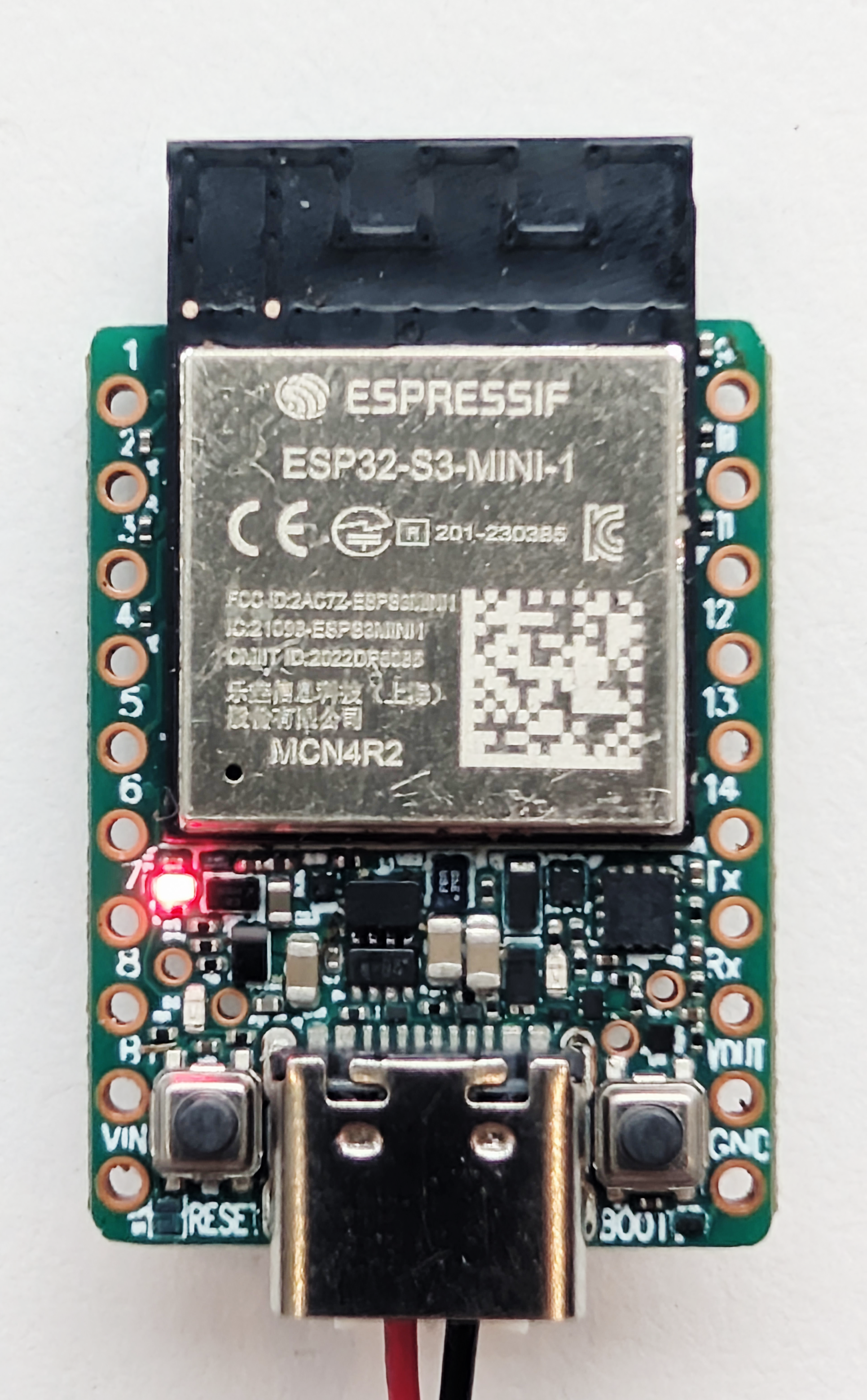
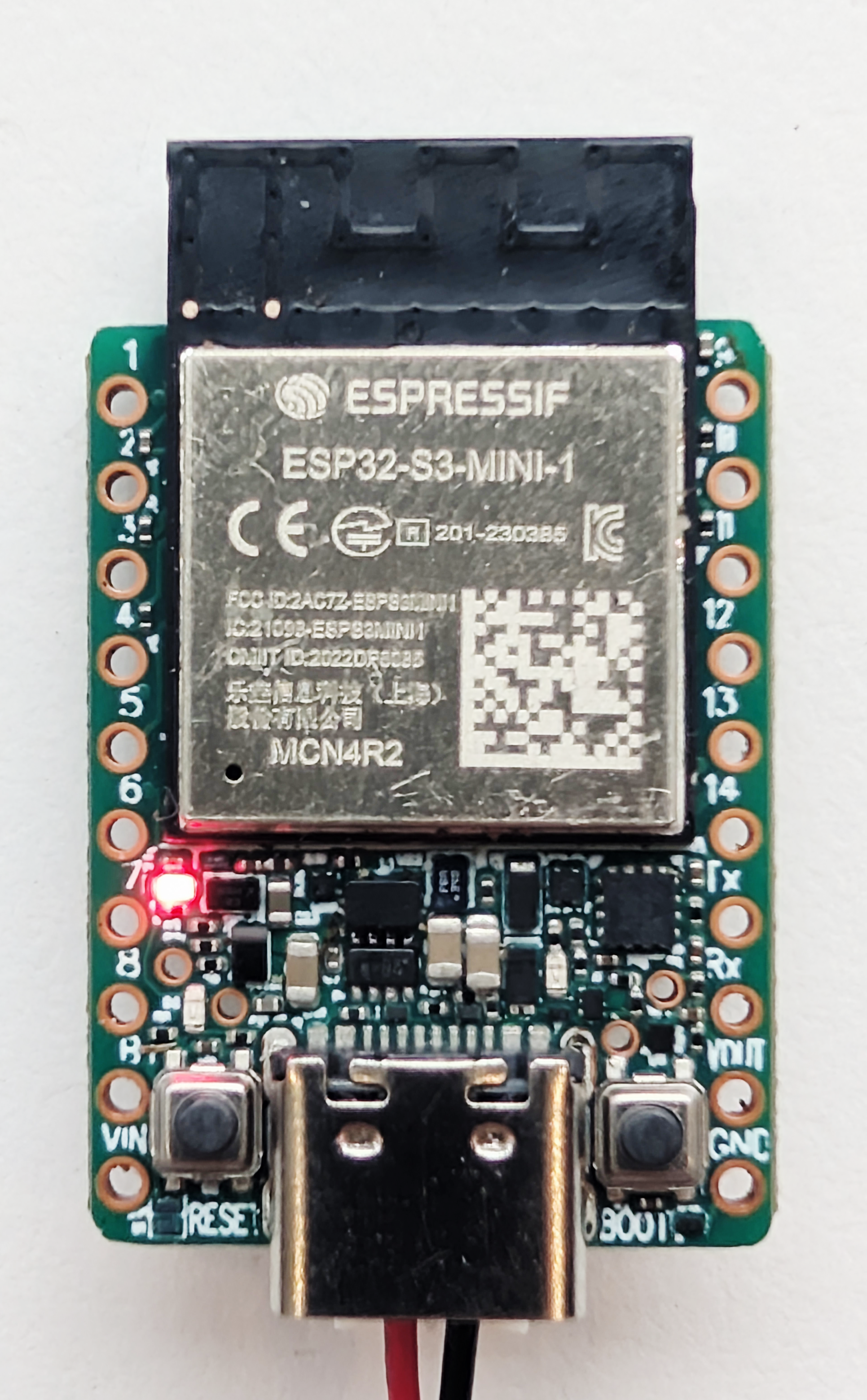
The result is the HYPER S3 ROCKET: a 4 gram, 20 mm × 33.5 mm ESP32-S3 board built around four ideas:

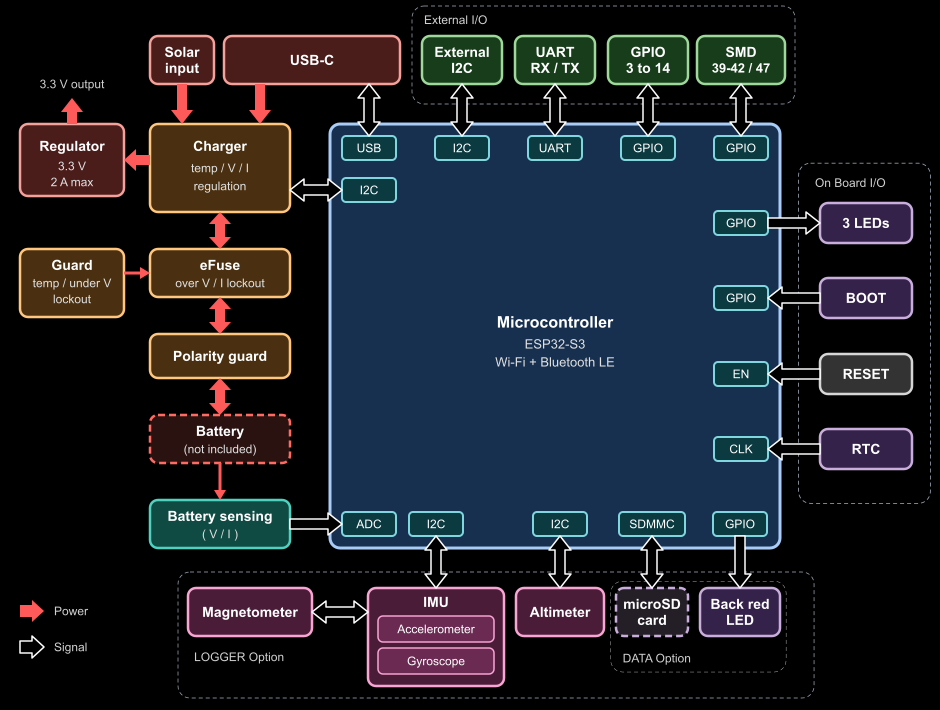
  • Power: a dual-core 240 MHz ESP32-S3 and a 2 A, 3.3 V buck-boost rail that keeps the processor alive when servos and radios surge, charged from USB-C or a solar panel.
  • Protect: a hardware "double safety vault" that guards the battery on both charge and discharge, even if your code crashes.
  • Precise: a nano-power MEMS real-time clock, an optional 10-DoF motion and altitude sensor array, and a fast 4-bit MicroSD logger.
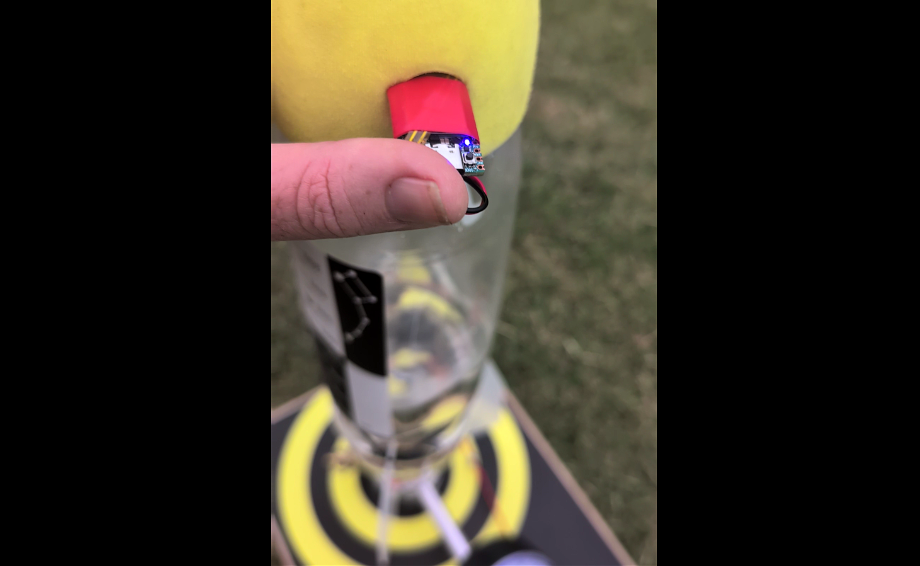
  • Portable: small and light enough to ride inside a soda-bottle rocket nose cone, or solder flat onto your own board as a castellated module.

It was engineered for water-rocket telemetry, but it packs a serious punch for any battery and solar project my students can dream of. I want you to have this option too so I'm crowd-funding this through Crowd Supply and Mouser Electronics.

This project page is made as a structured guide for anyone who wants to learn to build with microcontrollers, batteries and solar panels, but I have focused the story here on my original project needs - the STEMFORGE Rockets & Engineering Challenge.
 Hope you enjoy the journey with me.
rocket_nose_cone_-_landing_module_90mm_0lLCCSeeG8.stl

Standard Tesselated Geometry - 1.29 MB - 09/25/2026 at 12:20

Download

4-fin_jig_1_25l_pm9EqbLEQx.stl

Standard Tesselated Geometry - 176.84 kB - 09/25/2026 at 12:20

Download

3_fin_jig_1_25l_keAiiFThEj.stl

Standard Tesselated Geometry - 150.18 kB - 09/25/2026 at 12:20

Download

  • 1 × Espressif ESP32-S3-Mini-1-N4R2 A quality Dual Core Microcontroller from Espressif
  • 1 × Texas Instruments BQ25188 Chrager IC For Lipo, Solar and so much more
  • 1 × Texas Instruments TPS631000 Buck Boost Regulator Up to 2A output, perfectly matches lipo batteries
  • 1 × Texas Instruments TPS259461 eFuse Safety Superb low power lock out and integration with Supervisor and Comparator for Temp, UVLO, Voltage and Current Lockout
  • 1 × ST Microelectronics LSM6DSV32XTR 6-axis IMU 32g Accelerometer and Gyroscopic Sensor

View all 7 components

  • Hyper S3 Rocket - V3 Prototype conclusions

    stemforge.phil • 2 days ago • 0 comments

    The V3 Prototype is mostly successful with a few small changes taking place. 

    - The current sensing was not adequate. A redesign of the dual mosfet was needed, though this was a quick process.

    - Power Diodes were misaligned during manufacture. Consultation shows that I had created larger pads than required according to the datasheet, and this enabled the diodes to move and short. Simple change to diode footprint was needed.

    - Reverse polarity circuit was successful for the external Battery pin of the MODULE board, and I decided to incorporate this for the JST connector also to save the board (and battery) from wrong polarity. Even though the JST PH 2.0 connector is polarized, there is no standard. I have gone with the (Red on the Right) option, as looking at the connector. I'll put a small video on YouTube for those that need to adjust their LIPO battery pins.

    - With these few changes, the project is moving into pre-production status. The next board on order will have high quality ink, thicker internal copper and the changes mentioned. Also being tested is manufacturer's final board electrical testing, firmware flashing along with individual ESD packaging and package labelling. The next prototype is also going back to red and will have castellated pins for the four versions (LOGGER, DATA, CHARGE, MODULE).

    - Note, MODULE is the only version with the copper for batteries connected at the B+ pin. All other versions use the JST connector.

    - Did some flight testing yesterday (02-11-26) with the five boards made by JLCPCB. Fortunately I noticed three of the boards had misaligned sensors on the LOGGER. Sensors affected were the Magnetometer and the Barometric Pressure sensor. To move forward, I'm incorporating testing within the firmware for the LOGGER with the Flight Code so all sensors will be tested by the manufacturer before shipping to enhance the reliability. It's understandable with these tiny sensors, but not acceptable going ahead.

  • PRECISE - Integrating the Truth - 10-DoF Sensor Fusion, No GPS Required

    stemforge.phil • 10/17/2026 at 03:45 • 0 comments

    Five Sensors, One Flight: Recreating a Water Rocket’s Path Without GPS (even when Hitting the 16 g Wall)

    Pump a soda bottle to 65 PSI, pull the pin, and the whole flight is over in seconds. No single sensor can tell you what happened in those seconds. The gyroscope drifts, the magnetometer is noisy, the accelerometer only knows “push,” and the barometer gets fooled by rushing air. But get them all talking to each other, and the HYPER S3 ROCKET can rebuild the entire flight in 3D, from pad to touchdown, without a single GPS fix.

    Five sensors, one truth: rebuilding the flight from the inside

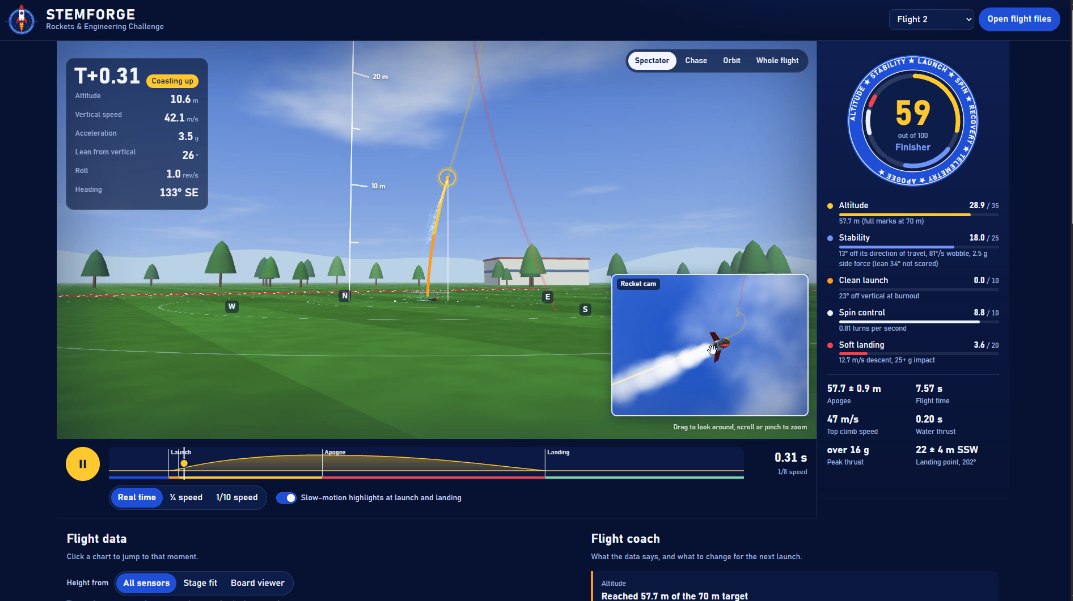
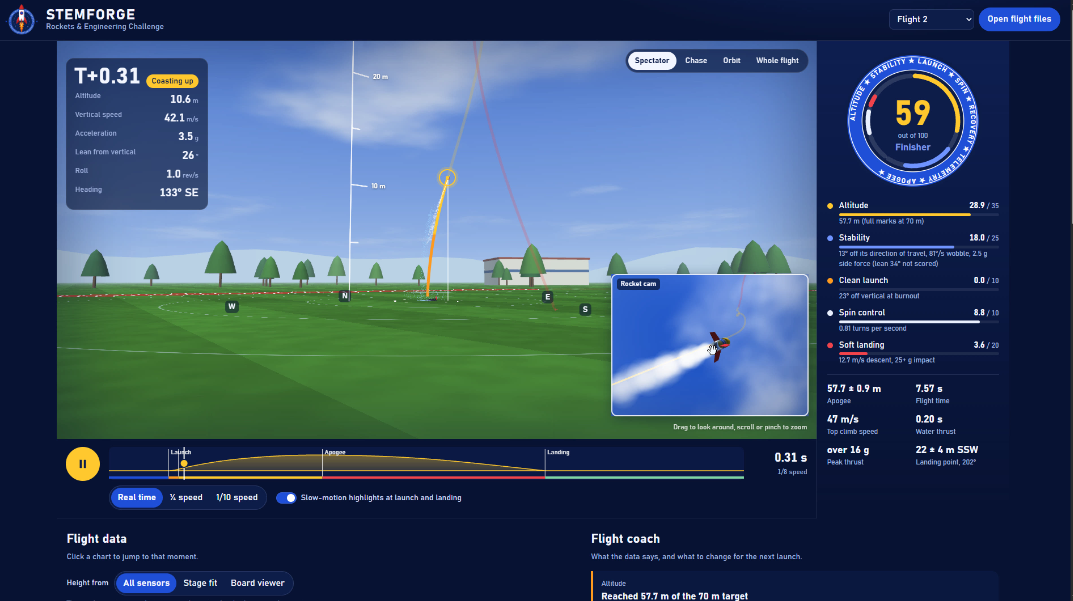
    Here’s the part we’re most proud of. Every position in the 3D recreation (4:20) comes from the rocket’s own sensors working together. No GPS, no ground tracking, just correlated data and physics (5:16).

    Step 1: Find the horizon. Before you can say where a rocket went, you have to know which way is level. On its own, each sensor gets this wrong in its own way. The gyroscope reacts instantly to every twist and roll, but its small errors build up over time and the horizon slowly tilts away. The magnetometer gives an absolute reference to magnetic north that never drifts, but it’s too noisy to trust moment to moment. Fused together (5:33), each corrects the other. The gyro supplies the fast, smooth motion, and the magnetometer keeps pulling it back to a fixed heading. The result is a stable, level horizon reference that holds through stages of boost, coast and tumble.

    Step 2: Point the acceleration in the right direction. The accelerometer measures thrust along the rocket’s own body, and the rocket is pitching, rolling and weathercocking into the wind the whole time. Using the fused attitude from Step 1, every acceleration sample is rotated out of the rocket’s frame and into the oval’s frame: up, downrange and crosswind. Gravity is removed, and what’s left is the rocket’s true motion over the ground.

    Step 3: Integrate to velocity, then to displacement. Integrate that world-frame acceleration once and you get velocity. Integrate again and you get displacement, mapped onto real XY coordinates across the oval (5:24). This is dead reckoning, the same principle that guided aircraft and submarines long before satellites.

    Step 4: Cross-check against the barometer. Double integration is unforgiving, since any small error grows fast. So the vertical axis is checked against the barometric altimeter. Each sensor keeps the others honest: the barometer anchors height, and the inertial data exposes the altimeter’s pressure spikes at high speed (8:44).

    Gyro (fast) + Magnetometer (stable) ➔ Level horizon & attitude            ↓
    Accelerometer (body frame) ➔ rotated to oval frame ➔ minus gravity            ↓
    ∫ ➔ Velocity   ∫∫ ➔ Displacement (X, Y, Z)            ↓
    Barometer cross-check ➔ 3D flight path


    The payoff: a 3D flight recreation that follows the crosswind drift across the oval, with apogee within ±0.9 m and the landing point within ±4 m (9:49). That’s from a 4 gram board riding a fast soda bottle.

    For students, this is the magic moment. Calculus stops being abstract when the integral of your rocket’s acceleration draws your rocket’s path across the screen, then shows the stages one by one and even recreates the tumble to the ground. Want a softer landing? - sounds like a plan.

  • PROTECT - The Battery in the Drawer is Everyone's Problem

    stemforge.phil • 10/10/2026 at 00:02 • 0 comments

    The Battery in the Drawer

    Battery safety is a habit, but some habits could be better
    Nothing dramatic happens to your pouch or 18650 lithium cell on the day it's ruined. There's no bang and no warning light. You put a gadget on a shelf or in a drawer with a little charge left, forget it for a few months, and when you come back the battery either won't charge, or charges and swells. That second outcome is the one worth worrying about. The damage was done weeks earlier, quietly, while everyone assumed the product was looking after itself.
    If you've built a battery-powered project, there's a good chance it's protected the way almost every tutorial and dev board shows: one device doing one job. That's a reasonable thing to do, but is it safe? This log is about why one device isn't enough, why that isn't anyone's fault, and what it takes to do better.
    Start with the safeguard most of us reach for first.


    Why deep sleep isn't off
    When the firmware sees a low voltage, say 3 V, it puts the microcontroller into its deepest sleep. It feels like switching the project off.
    But the power rail is still live, and a hidden quiescent floor keeps drawing life from the cell:

    • Linear regulators with permanently enabled paths. A common AMS1117 draws up to about 5 mA typical (check your part's datasheet).
    • A real-time clock, still ticking.
    • Fixed voltage dividers that act as a permanent leak to ground.

    Sleeping reduces the load. It doesn't disconnect it.
    The numbers are worth working out once. At 5 mA, a full 1000 mAh cell lasts about eight days. A nearly flat cell is a very different story: the stretch between "almost empty" and "damaged" holds only a small fraction of its capacity, and 5 mA can cover that quickly. And if the firmware hangs, nothing is watching at all.
    So software can't be the answer. Surely the hardware around it is.


    Why the charger doesn't help
    This is an easy mistake, and a very understandable one. A charging IC like the ubiquitous TP4054 sounds like battery protection for an 18650 or pouch, as it looks after the cell while charging. But it only manages charging. It isn't in the discharge path, so it never sees what the load does to the cell afterwards.
    Then there's the protection under the tape.


    Why the strip under the tape isn't the answer either
    Many pouch cells come wrapped in yellow Kapton tape, and under it there's often a small protection board (PCM). That's a good thing to have, and it's better than nothing. But from the outside you can't tell whether the tape hides a real protection IC, a dummy board or bare solder joints. And even a working one, like a standard DW01A setup, is a last-resort breaker designed to act at the cell's absolute limit. It was never meant to be a product's shutdown strategy.
    Each of these devices does its own job well. None of them was meant to be a lockout. Nobody has told us otherwise, because nearly every dev board and tutorial stops at one.
    And that leaves a flat battery. If only a flat battery were the worst of it.


    A dead cell isn't the worst outcome
    Cell datasheets set the discharge floor at about 2.5 V. Push a lithium cell well below that, toward 0 V, and leave it there for days, and its chemistry starts to change. Copper from inside the cell can dissolve into the electrolyte. Then someone does the natural thing and plugs it into a charger. During that recharge, the dissolved copper can plate back out as tiny metallic spikes that may grow through the separator and short the cell internally. In the worst case that means heat, gas and swelling, and sometimes fire.
    Most damaged cells never get that far. They just lose capacity and quietly become less trustworthy, which is the point: you can't see which cell is which. And many simple chargers don't check whether a cell has been pushed past the point of damage, since they were designed to charge cells, not to judge them.
    If you ever find a cell that's been left flat for a long time, or one that's started to swell, the safest advice is to retire it and...

    Read more »

  • Revisions for Latest Prototype and Rocket Launching tomorrow

    stemforge.phil • 10/09/2026 at 09:35 • 0 comments

    Prototype in manufacture includes a number of quality and functional revisions, including upgraded trace width to handle up to 3A in places where it's needed. Will be load testing and thermal testing this prototype within the next 2 weeks.

    The eFuse is a new addition as are a number of mosfets, the comparator and a supervisor chip.

    Reverse polarity even on the MODULE external B+ pin

    Got a new water rocket launcher yesterday and will get result up on youtube ASAP.

View all 4 project logs

  • 1
    Contents

    1. The Problem Statement

    2. Under the Hood: Electronics and Hardware Flexibility

    3. Mechanisms & 3D Printing

    4. Simulating & Testing

    5. Conclusion & Crowd Funding

    6. References

  • 2
    1. The Problem Statement

    In the STEMFORGE Rockets & Engineering Challenge, students work in teams of three or four to prototype a complete aerospace solution. Following the engineering process, each team must conceptualize, manufacture, launch, and land a high-performance water rocket. Think Mars lander, built from a soda bottle.

    Projects are evaluated on three pillars:

    • Performance: maximum acceleration and peak altitude.
    • Aesthetics: a sleek, functional, aerodynamic design.
    • Recovery: a multi-stage sequence that separates the payload module, deploys a parachute, and lands the core module upright.
    ⚠️ NOTE: To ensure structural integrity, the pressure of the launch bottle must strictly not exceed 65 psi.
  • 3
    2. Under the Hood: Electronics & Hardware Flexibility

    A water rocket shakes, spins, gets wet and lands hard, and the electronics inside still have to tell the truth. Most hobby ESP32 and LiPo boards charge a battery and hope for the best. The HYPER S3 ROCKET was designed around what happens when things go wrong.

    A flight, as the hardware sees it

    • On the pad: the battery is topped up over USB-C or solar, the real-time clock is running, and the board can sleep in deep-sleep mode on its 14 RTC-domain pins until something wakes it.
    • Boost: the IMU captures acceleration and spin, and the 4-bit MicroSD interface keeps up with the data rate.
    • Apogee: the barometric altimeter and IMU give your firmware what it needs to decide when to activate the release servo, and the 2 A rail means a servo surge doesn't reset your processor.
    • Landing: logging continues through touchdown, every sample timestamped by the RTC, and the whole flight is waiting on the card and the flash for double logging assurance when you plug in USB-C or connect over WiFi, even on your cell phone. 


    The "Double Safety Vault" is the unasuming star of the show: premium power & battery protection unlike any standard hobby board I've seen, the HYPER S3 ROCKET was built with protection layers that other LiPo development boards seem to ignore:

    • Two independent layers of battery protection: the BQ25188 charger manages every charge & discharge cycle, and a separate hardware eFuse, voltage supervisor and comparator also watches over the charge & discharge for comprehensive protection. Hard-wired under-voltage, over-voltage and over-current cutoffs work independently of the ESP32-S3, so a code crash can't leave the battery unprotected.
      • Under-Voltage Lock-Out (UVLO) with shelf safety: draining a cell too low causes permanent damage, or worse, hazardous thermal failure. The board cuts the load before the cell is over-discharged, and in that locked-out state the protection circuit sips only about 5.62 µA, so a flat battery isn't drained further in a drawer over the holidays. Plug in USB or a solar panel and it recovers by itself.
      • Two thermal zones: separate NTC thermistor inputs watch the battery during charging and during discharge, and cut the rail on over-temperature.
    • Reverse-polarity protection: accidents happen in busy classrooms. Hardware protection on the USB and solar inputs has been implemented standard. But this wasn't enough. I took great care to work out true reverse polarity on the battery input too, because without the standard (Red is Right), a keyed battery connector still won't protect the board (or the battery) if the battery wires are physically made the wrong way around.
    • Dual-power isolation: an onboard dual-input stage isolates concurrent power paths so a solar panel can't back-feed your computer's USB port. The VIN input is 5 V nominal for highest efficiency but regulates up to 18.5 V as a safety buffer for solar charging.
    • 1S LiPo power-path management: the BQ25188 prioritizes the system load while it isolates, protects and charges a single-cell battery right on the launch pad. USB-C input supports up to 1.1 A, and when the input can't keep up, the battery supplements it.
    • The charger is I²C-configurable for Li-Ion, Li-Poly and LiFePO4, and accepts a nominal 5 V solar panel with built-in input power tracking.
    • Battery analytics built in: a switched analog line lets the firmware read battery voltage and current on one pin, ready for 'per flight fuel-sensing' (discharge measurements only). Importantly, I wanted the ability for the board to self-diagnose and report the current draw graph to show spikes and dips during flight or while using the onboard WiFi and Bluetooth radios. There's also the I²C status and faults from the charger chip, so we've got a capable battery monitoring solution during flights and between charge top-ups.
    • Advanced EMI care via 6-layer construction: a 6-layer stack-up with two unbroken ground planes, built around a pre-certified ESP32-S3 module, shields sensitive sensors from buck-boost switching noise and gives a quicker path to EMI certification. Having my sights on a modular SoC, this is important for future projects with crowd funding or even for bulk manufacturing.

    Core specifications

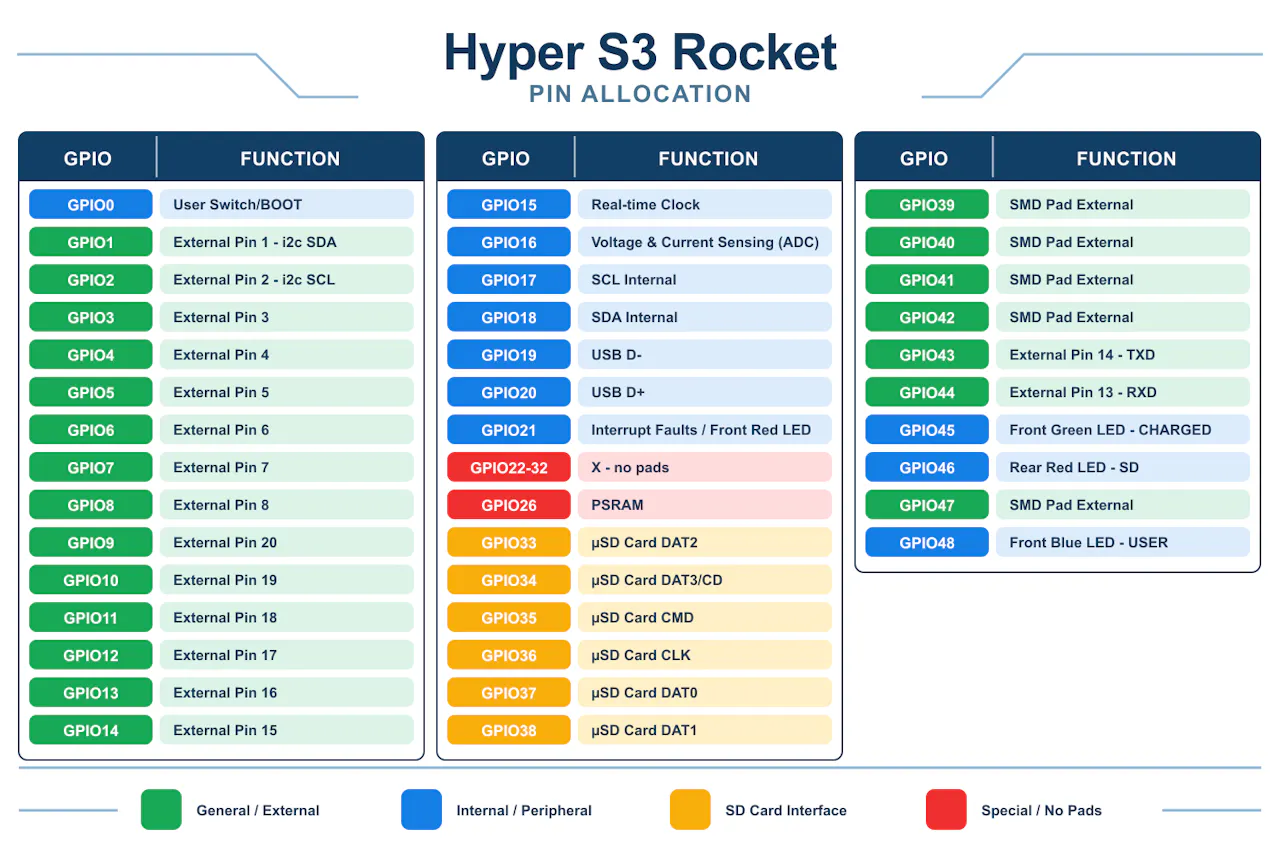
    • ESP32-S3 power: dual-core, 240 MHz, with 4 MB flash and 2 MB PSRAM. 16 castellated / through-hole GPIOs, plus 5 more on SMD pads, all with PWM. Up to 12 touch and 12 ADC channels, UART, native USB, and two independent I²C buses: one internal for the sensors, and one external for your own devices (GPIO 1 and 2), which the ultra-low-power coprocessor can read while the main cores sleep.
    • Precise hardware timing: a SiTime nano-power MEMS oscillator drives the real-time clock for accurate timestamps even with no Wi-Fi at the launch site. It matters for rocketry telemetry, data loggers, wearables and IoT alike.
    • High-current buck-boost power: a TPS631000 regulator handles solar and battery sources efficiently. It delivers up to 2 A continuous at 3.3 V (1.5 A deep into boost mode, down at 2.7 V input), with ripple under 20 mV and 8 µA quiescent current. That is serious current for a board this size.
    • Advanced motion & environmental tracking (LOGGER version): an optional 10-DoF array with an accelerometer and gyroscope, a magnetometer and a barometric altimeter with temperature. It tracks high-g events up to 32g (scalable up to 320g), spin, magnetic heading and altitude. The IMU's sensor hub gathers barometer readings in the background, so your processor stays free. The altimeter has a water-resistant gel-filled option, handy when your rocket lands in the splash zone. It is ideal for physics on roller coasters, drones, underwater ROVs and robots.
    • High-speed MicroSD (DATA & LOGGER versions): an onboard socket on a 4-bit SDMMC bus for rapid read/write speeds, whether you're capturing high-rate physics data, playing audio or storing media.
    • Four user LEDs: three on the front and one on the back for charging, faults, SD activity or anything you like.
    • Ultra-compact: the standard HYPER S3 ROCKET weighs about 4 grams and measures 20 mm × 33.5 mm. The edge-castellated MODULE variant narrows to 17.8 mm × 33.5 mm.

    The HYPER S3 ROCKET ecosystem: four modular versions Pick the tier that fits your project. Every version shares the same protected power core:

    • MODULE (Core): the ultra-compact foundation. It breaks out the ESP32-S3 on castellated pins on a 17.78 mm wide frame for true surface-mount integration, so you can solder it flat onto your own baseboard like any other SoC module.
    • CHARGE (Core + JST): adds a keyed JST battery connector alongside the protected BQ25188 power-path charging circuit.
    • DATA (Core + JST + SD): adds the high-speed 4-bit MicroSD socket for heavy data logging or media storage.
    • LOGGER (Core + JST + SD + Telemetry): the flagship aerospace tier, adding the 10-DoF IMU, altimeter and temperature array for full telemetry capture.

    Note: CHARGE, DATA and LOGGER all accept standard 2.54 mm pin headers for breadboard prototyping.

    Form factor flexibility

    • Surface-mount module: solder the board completely flat using the integrated castellated pins.
    • Breadboard prototyping: add the pin-header option for instant breadboard compatibility.
    • Every pin earns its place.

View all 7 instructions

Enjoy this project?

Share

Discussions

stemforge.phil wrote 10/09/2026 at 09:42 • point

First project on Hackaday for me. Any tips would be appreciated. Or let me know if I can help in any way.

  Are you sure? yes | no

Similar Projects

Does this project spark your interest?

Become a member to follow this project and never miss any updates