2. Under the Hood: Electronics and Hardware Flexibility
3. Mechanisms & 3D Printing
4. Simulating & Testing
5. Conclusion & Crowd Funding
6. References
2
1. The Problem Statement
In the STEMFORGE Rockets & Engineering Challenge, students work in teams of three or four to prototype a complete aerospace solution. Following the engineering process, each team must conceptualize, manufacture, launch, and land a high-performance water rocket. Think Mars lander, built from a soda bottle.
Projects are evaluated on three pillars:
Performance: maximum acceleration and peak altitude.
Aesthetics: a sleek, functional, aerodynamic design.
Recovery: a multi-stage sequence that separates the payload module, deploys a parachute, and lands the core module upright.
⚠️ NOTE: To ensure structural integrity, the pressure of the launch bottle must strictly not exceed 65 psi.
3
2. Under the Hood: Electronics & Hardware Flexibility
A water rocket shakes, spins, gets wet and lands hard, and the electronics inside still have to tell the truth. Most hobby ESP32 and LiPo boards charge a battery and hope for the best. The HYPER S3 ROCKET was designed around what happens when things go wrong.
A flight, as the hardware sees it
On the pad: the battery is topped up over USB-C or solar, the real-time clock is running, and the board can sleep in deep-sleep mode on its 14 RTC-domain pins until something wakes it.
Boost: the IMU captures acceleration and spin, and the 4-bit MicroSD interface keeps up with the data rate.
Apogee: the barometric altimeter and IMU give your firmware what it needs to decide when to activate the release servo, and the 2 A rail means a servo surge doesn't reset your processor.
Landing: logging continues through touchdown, every sample timestamped by the RTC, and the whole flight is waiting on the card and the flash for double logging assurance when you plug in USB-C or connect over WiFi, even on your cell phone.
The "Double Safety Vault" is the unasuming star of the show: premium power & battery protection unlike any standard hobby board I've seen, the HYPER S3 ROCKET was built with protection layers that other LiPo development boards seem to ignore:
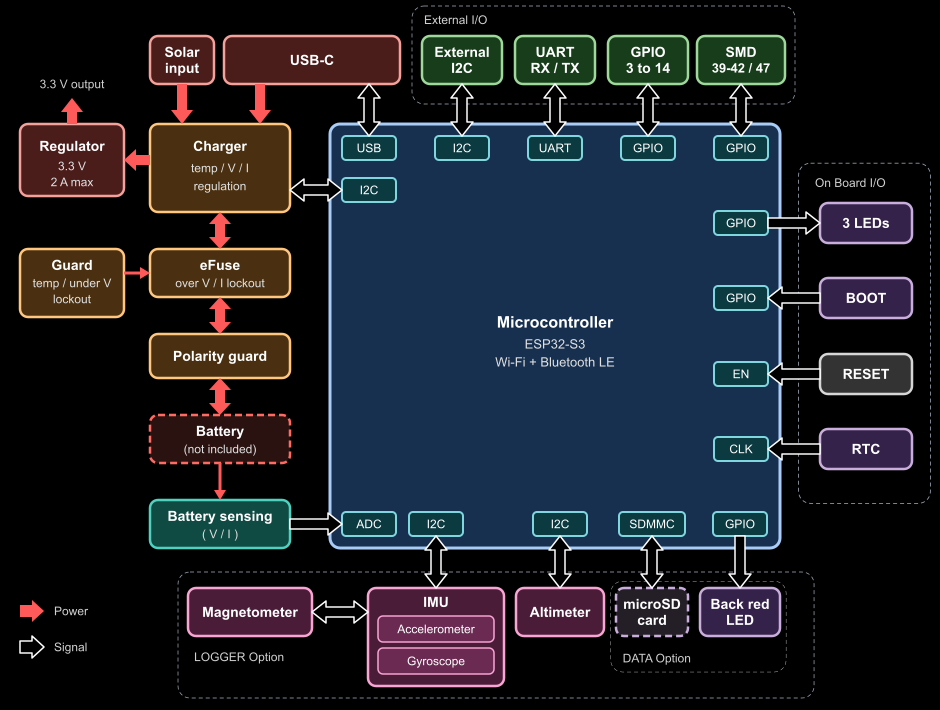
Two independent layers of battery protection: the BQ25188 charger manages every charge & discharge cycle, and a separate hardware eFuse, voltage supervisor and comparator also watches over the charge & discharge for comprehensive protection. Hard-wired under-voltage, over-voltage and over-current cutoffs work independently of the ESP32-S3, so a code crash can't leave the battery unprotected.
Under-Voltage Lock-Out (UVLO) with shelf safety: draining a cell too low causes permanent damage, or worse, hazardous thermal failure. The board cuts the load before the cell is over-discharged, and in that locked-out state the protection circuit sips only about 5.62 µA, so a flat battery isn't drained further in a drawer over the holidays. Plug in USB or a solar panel and it recovers by itself.
Two thermal zones: separate NTC thermistor inputs watch the battery during charging and during discharge, and cut the rail on over-temperature.
Reverse-polarity protection: accidents happen in busy classrooms. Hardware protection on the USB and solar inputs has been implemented standard. But this wasn't enough. I took great care to work out true reverse polarity on the battery input too, because without the standard (Red is Right), a keyed battery connector still won't protect the board (or the battery) if the battery wires are physically made the wrong way around.
Dual-power isolation: an onboard dual-input stage isolates concurrent power paths so a solar panel can't back-feed your computer's USB port. The VIN input is 5 V nominal for highest efficiency but regulates up to 18.5 V as a safety buffer for solar charging.
1S LiPo power-path management: the BQ25188 prioritizes the system load while it isolates, protects and charges a single-cell battery right on the launch pad. USB-C input supports up to 1.1 A, and when the input can't keep up, the battery supplements it.
The charger is I²C-configurable for Li-Ion, Li-Poly and LiFePO4, and accepts a nominal 5 V solar panel with built-in input power tracking.
Battery analytics built in: a switched analog line lets the firmware read battery voltage and current on one pin, ready for 'per flight fuel-sensing' (discharge measurements only). Importantly, I wanted the ability for the board to self-diagnose and report the current draw graph to show spikes and dips during flight or while using the onboard WiFi and Bluetooth radios. There's also the I²C status and faults from the charger chip, so we've got a capable battery monitoring solution during flights and between charge top-ups.
Advanced EMI care via 6-layer construction: a 6-layer stack-up with two unbroken ground planes, built around a pre-certified ESP32-S3 module, shields sensitive sensors from buck-boost switching noise and gives a quicker path to EMI certification. Having my sights on a modular SoC, this is important for future projects with crowd funding or even for bulk manufacturing.
Core specifications
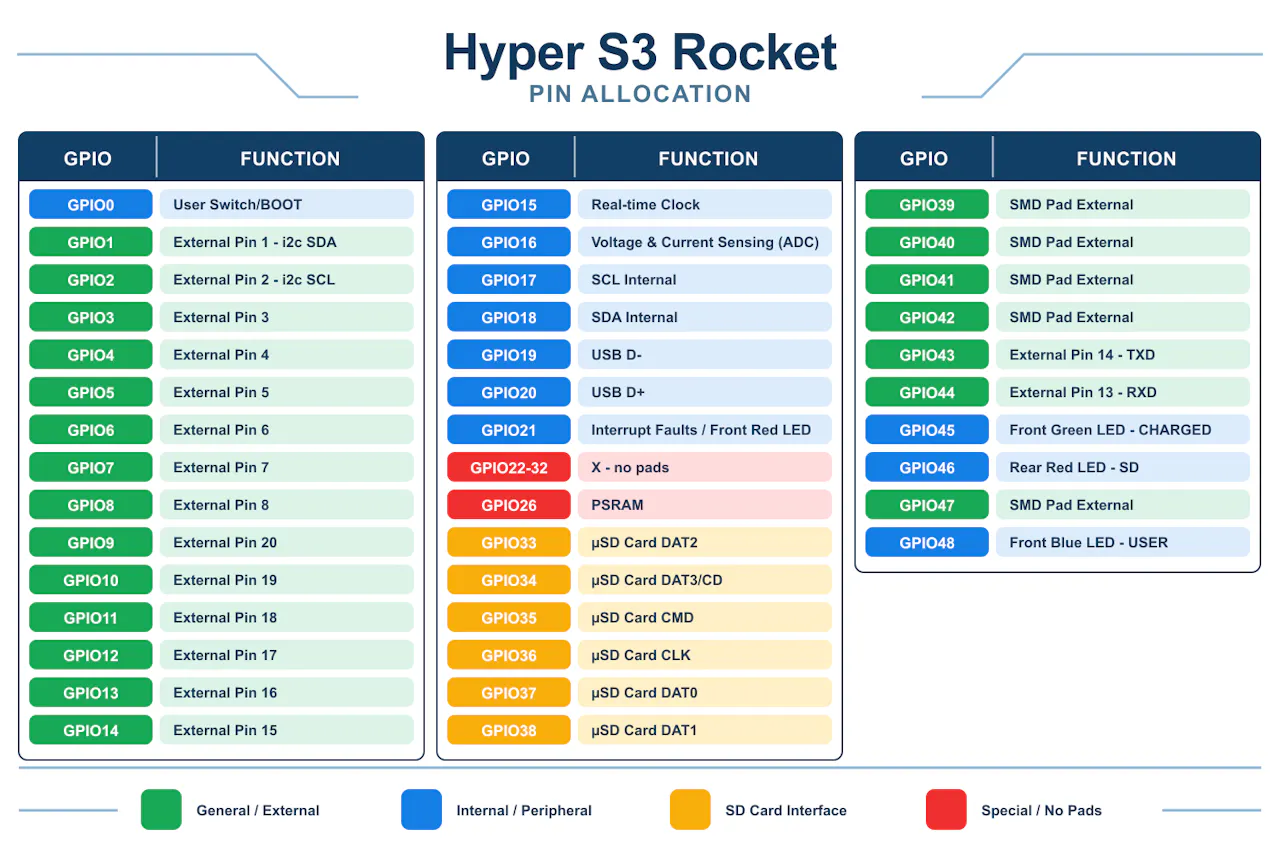
ESP32-S3 power: dual-core, 240 MHz, with 4 MB flash and 2 MB PSRAM. 16 castellated / through-hole GPIOs, plus 5 more on SMD pads, all with PWM. Up to 12 touch and 12 ADC channels, UART, native USB, and two independent I²C buses: one internal for the sensors, and one external for your own devices (GPIO 1 and 2), which the ultra-low-power coprocessor can read while the main cores sleep.
Precise hardware timing: a SiTime nano-power MEMS oscillator drives the real-time clock for accurate timestamps even with no Wi-Fi at the launch site. It matters for rocketry telemetry, data loggers, wearables and IoT alike.
High-current buck-boost power: a TPS631000 regulator handles solar and battery sources efficiently. It delivers up to 2 A continuous at 3.3 V (1.5 A deep into boost mode, down at 2.7 V input), with ripple under 20 mV and 8 µA quiescent current. That is serious current for a board this size.
Advanced motion & environmental tracking (LOGGER version): an optional 10-DoF array with an accelerometer and gyroscope, a magnetometer and a barometric altimeter with temperature. It tracks high-g events up to 32g (scalable up to 320g), spin, magnetic heading and altitude. The IMU's sensor hub gathers barometer readings in the background, so your processor stays free. The altimeter has a water-resistant gel-filled option, handy when your rocket lands in the splash zone. It is ideal for physics on roller coasters, drones, underwater ROVs and robots.
High-speed MicroSD (DATA & LOGGER versions): an onboard socket on a 4-bit SDMMC bus for rapid read/write speeds, whether you're capturing high-rate physics data, playing audio or storing media.
Four user LEDs: three on the front and one on the back for charging, faults, SD activity or anything you like.
Ultra-compact: the standard HYPER S3 ROCKET weighs about 4 grams and measures 20 mm × 33.5 mm. The edge-castellated MODULE variant narrows to 17.8 mm × 33.5 mm.
The HYPER S3 ROCKET ecosystem: four modular versions Pick the tier that fits your project. Every version shares the same protected power core:
MODULE (Core): the ultra-compact foundation. It breaks out the ESP32-S3 on castellated pins on a 17.78 mm wide frame for true surface-mount integration, so you can solder it flat onto your own baseboard like any other SoC module.
CHARGE (Core + JST): adds a keyed JST battery connector alongside the protected BQ25188 power-path charging circuit.
DATA (Core + JST + SD): adds the high-speed 4-bit MicroSD socket for heavy data logging or media storage.
LOGGER (Core + JST + SD + Telemetry): the flagship aerospace tier, adding the 10-DoF IMU, altimeter and temperature array for full telemetry capture.
Note: CHARGE, DATA and LOGGER all accept standard 2.54 mm pin headers for breadboard prototyping.
Form factor flexibility
Surface-mount module: solder the board completely flat using the integrated castellated pins.
Breadboard prototyping: add the pin-header option for instant breadboard compatibility.
Every pin earns its place.
4
3. Mechanisms & 3D Printing
Rocket components
Researching the components of a rocket is vital to understanding the problem and finding a solution. A rocket has many parts, and each one changes the result dramatically. Guessing is not an option.
Here's an example rocket diagram to inspire research into the form and function of every component.
If you want to try this at your own school, I've attached the 3D parts for the nose cone and the fin location jig for 3 or 4 fins. I'll also be updating the page with a rack and pinion mechanism that turns a 2g servo into a linear motor.
The cone shape is standardized because it forms the landing module's outer design, but the inner workings are for the students to engineer. The fin jig holds the fins steady while the glue cures. Fin alignment needs to be very accurate to keep the rocket on course and reduce radial (turning) motion. Commercial rockets use active stabilization through engine steering, but that's outside the scope of this project. Super Glue works very well on PET soft-drink bottles: rough them up first with 120 to 220 grit sandpaper for even better adhesion. Scale the fin jig to whichever bottle size you're using.
Pin release mechanism: landing modules and parachutes
There are many ways to separate the landing module and deploy a parachute, and no one-size-fits-all answer. Devising a 3D-printed mechanism with an SG90 servo to release a pin and separate the cone-shaped landing module from the rocket is part of the student challenge. Two parachutes, one for each module, would be even better.
The following image of a mechanical servo to linear pin release system looks to have potential. Could it be optimised and how?
Reference: RC Servo Release / Drop mechanism, free 3D print model, MakerWorld.
Making the parachute
There are many free parachute designs online. I like an octagonal parachute, but that's the fun of engineering: there are different reasons for different shapes. Don't just guess, use a source with data to back it up. Learn how to roll a parachute so it avoids tangles, and use research and AI to help find a solution.
The following video has some interesting engineering mechanics that can get students thinking.
Reference: Engineering Design for Parachutes with Mitch Jorgensen [Video]. YouTube.
5
4. Simulating & Testing
Using a Rocket Simulator
I use a rocket simulator with my class which helps students understand the engineering that governs the success of a rocket. It's easy to guess, but unless the students know rocket technology such as the difference behind centre of pressure and centre of gravity, they have a real problem. I ask questions such as, "Why does a ballast matter?" and "When should the parachute deploy?" or "What does the term apogee mean?". I could try to show you everything here, but rocket science is a challenge to be grasped, not fed at a trough. Engineering requires informed, valid, and mechanically proven choices - then test, analyse, revise and repeat. https://openrocket.info/ is a good start.
The Launch Pad
There don't seem to be many good launch pads available to purchase in Australia at the moment, but I bought one a few years ago from Pitsco but these are no longer available in Australia so I've teamed up with Little Bear in Germany. Still, this project is not about the launch-pad and there are good plans available online such as the one below from NASA.
Making NASA’s Water Rocket Launcher!
Data & Graphing
Getting graphs out of the HYPER S3 ROCKET is simple. I've developed code that logs data to the SD card; plug in over USB-C and read it into the Arduino IDE or Thonny (Python) using serial comms and live plotting. Playing with the websocket layer, I think hosting a web page from the ESP32 will make it even easier to display results over Wi-Fi. I'd also like to stream real-time flight data from the rocket to a base station. Once I start using ESP-NOW for peer-to-peer communications, I'll post the code here and on GitHub.
For fast calculations, Arduino is far superior at run time, yet MicroPython is an interpreter that is super easy to use. Kids don't need to spend extra time compiling the code, so it just works.
Make slight adjustments and Compare runs
It's important students make small adjustments to discover optimisations. They can use a DATA SHEET template to compare runs and work out whether changes are positive or negative.
Fairing: Yes_____ or No _____ Fairing radius (cm): _____
Nose Cone Shape: ___________ Material: ___________
Propulsion:
Water (liters): _____ Pressure (KPa): _____
Fin Design:
Fin Height: _____ Fin Shape: _____ Number of Fins: _____
Fin Dimensions: _______________
Launch Stats:
Max Altitude (m): _____ Max Acceleration (m/s2): _____ Time Acceleration (s) ___
Eject & Deploy Parachute Height (m) _____
6
5. Conclusion & Crowd Funding
What started as a classroom solution to a gap in STEM electronics has grown into a production-ready development platform. We are launching soon on CrowdSupply.com!
Whether you're a student tackling the STEMFORGE Rocket challenge, a hobbyist building a solar-powered weather station, or a maker who needs a compact, fail-safe ESP32-S3 development and deployment board, the HYPER S3 ROCKET is built for you.
The pinout, specifications and example code are on GitHub. Keep your eyes peeled on this Hackaday project page for upcoming deep dives and our official campaign launch.
 stemforge.phil
_lB3kNeO9U1.png?auto=compress,format&w=740&h=555&fit=max)


Discussions
Become a Hackaday.io Member
Create an account to leave a comment. Already have an account? Log In.