Jorj Bauer
-
Log 10: The Proof is in the Puddin'
a day ago • 0 commentsIt's exciting weekend time here at Bauer Labs!
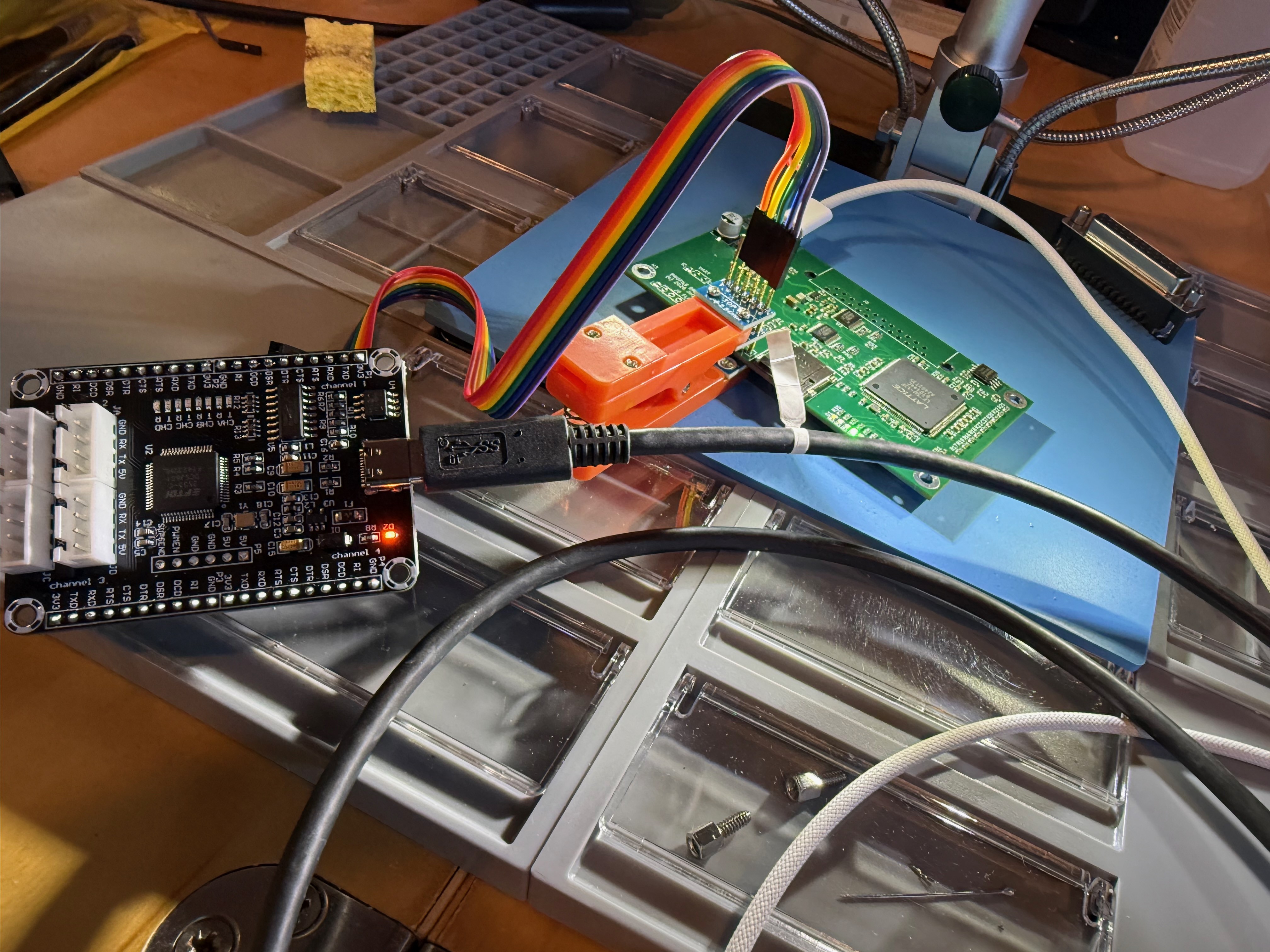
A pile of PCBs has plopped itself upon my bench thusly...
![]()
which, after my toaster-oven-reflow treatment, had a few solder bridges that needed removing...
![]()
And then a bit of programming...
![]()
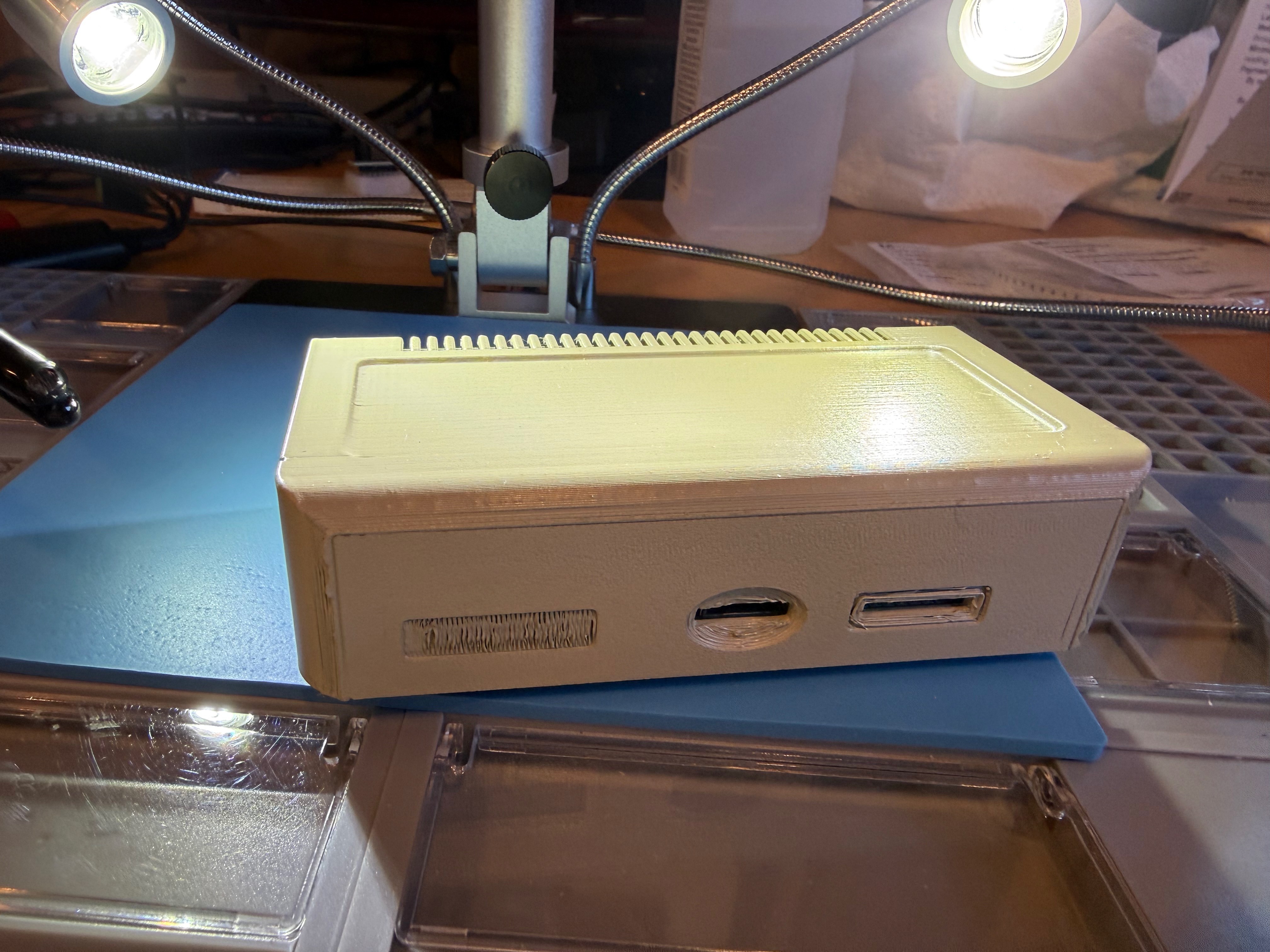
A tiny bit of case painting (yes, I could have sanded it down a little, but I'm impatient!)...
![]() and voilá, Bob's your uncle.
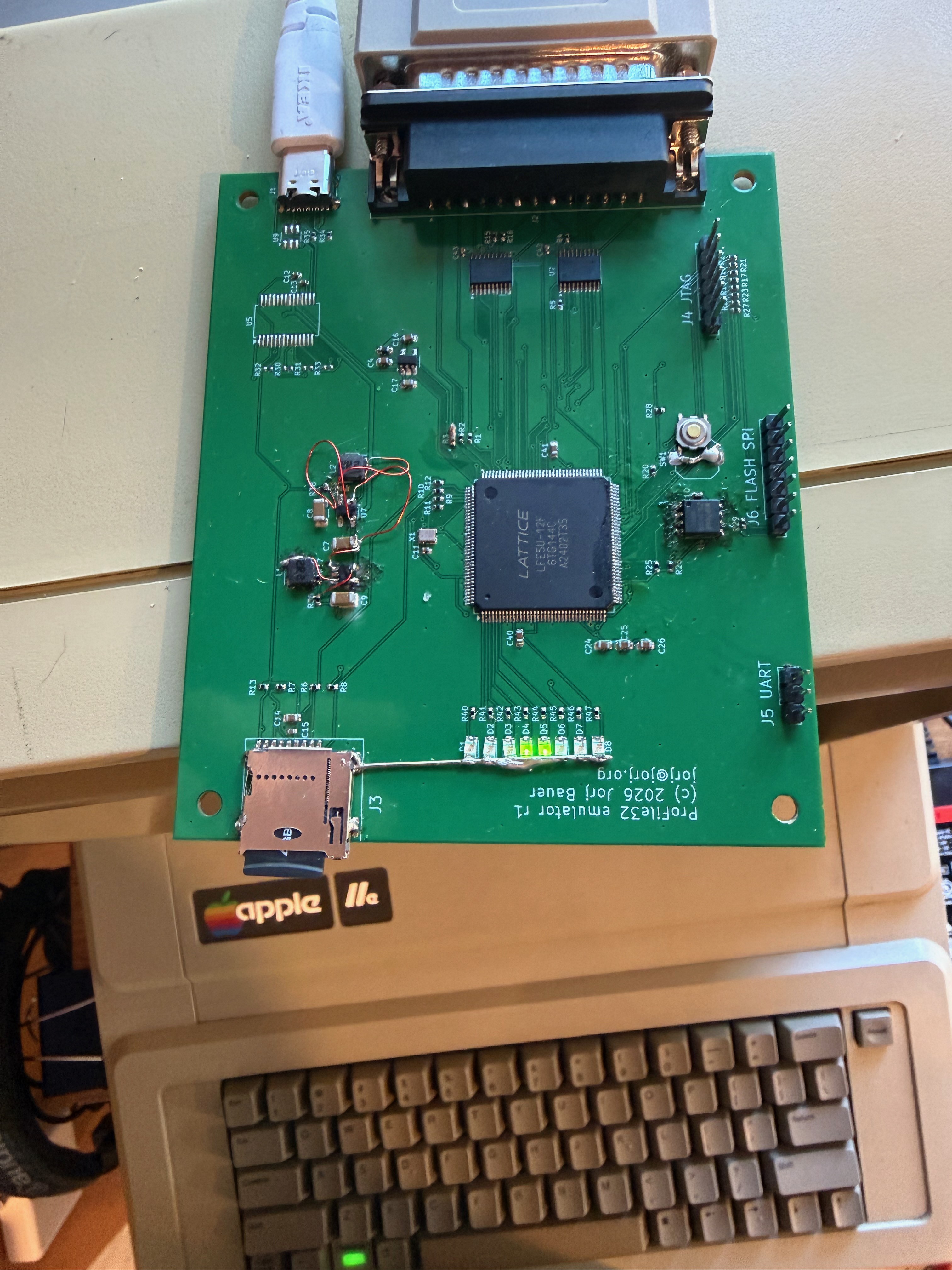
and voilá, Bob's your uncle.Fully buttoned up:
![]()
I'm in a little bit of disbelief here. This has been a six-year journey of learning about FPGAs to get to the point where I could design and build this thing. I had no idea that I'd be able to support multiple boot images using the stock ProFile interface card; or that I'd be able to mount multiple volumes at the same time from ProDOS. Nor that I'd be able to support full 32MB volumes. Heck, I didn't even know that I'd be able to wrap my head around FPGAs.
But here we are.
The last piece for me to do is publish all the code, which I'll be doing shortly; I just need to clean up the repo (there are hundreds of useless artifacts I'm not going to pollute the world with). Look for a link in the project description to my github when it's done. The schematic, code, and case STL should all be there in the near future...
-
Act 9: Hindsight is 20/20
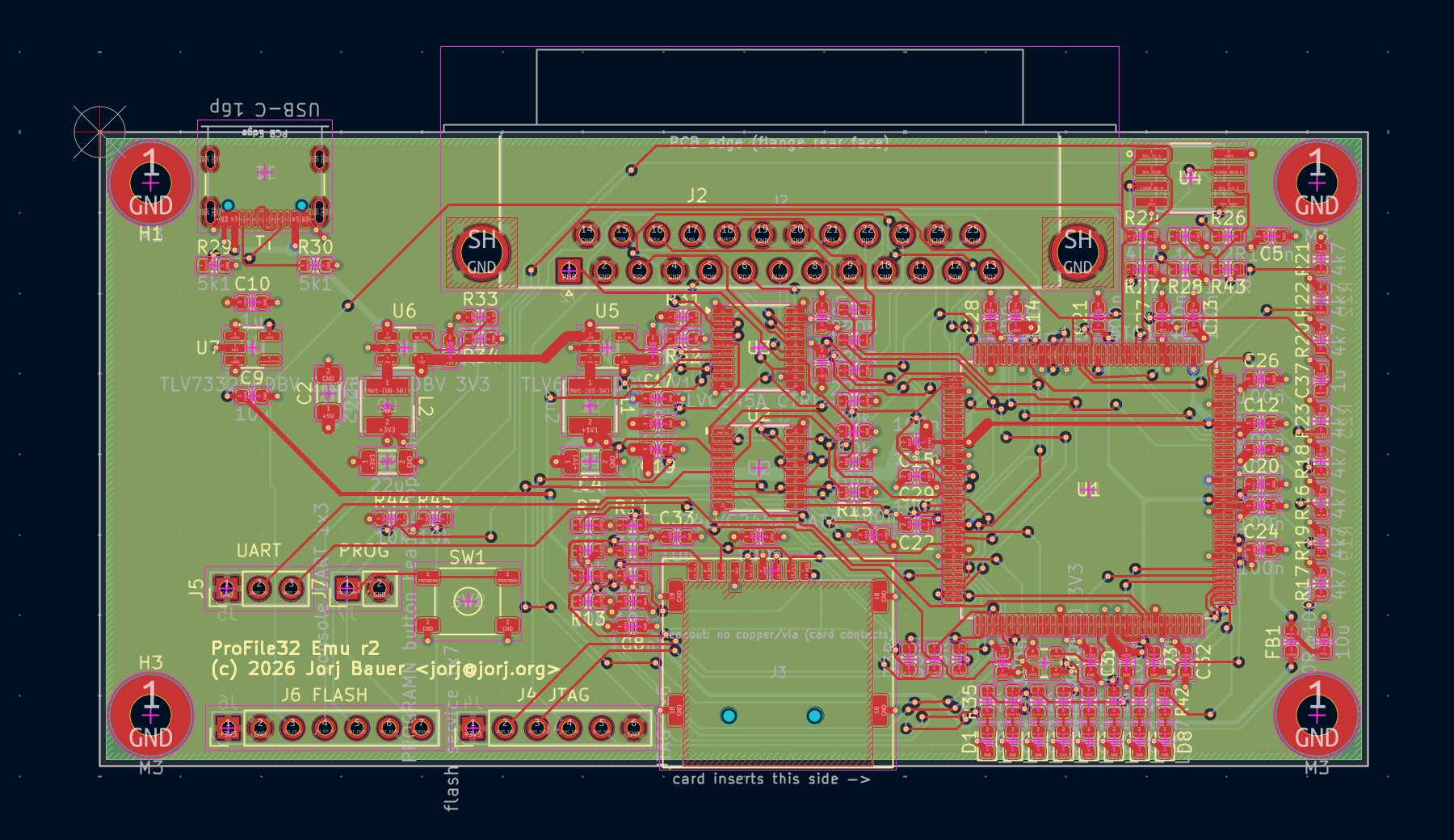
10/09/2026 at 10:50 • 0 commentsObviously, I'm prepping the r2 board. Here's where I am so far; still a few bits to clean up...
![]()
The r1 board was large and spaced out intentionally; more room to repair errors. Now it's time to crunch it down.
And while I'm smallifying the board... I'm biggifying the parts. I'd never worked with 0402 size parts before and, while I did manage to get it all working, it was not exactly fun. So we're back to 0603 here; unless I have need to shrink down more, I see no reason to use the little beasties I can barely see, and easily fling around the room accidentally. (The R3 lesson from my r1 board is really what made my mind up here: I dropped a 220 ohm resistor, picked up another resistor that was right there that I thought was the one I dropped, but it was a 10k.)
I've also dropped the parts I never used - the USB-C JTAG driver and all its support electronics are gone. I left in the LEDs because LEDs are cool, but they can be left out in a final build. As can the flash and jtag headers. I'll just need some way to initially program the flash (maybe an SOIC adapter, program them before they're even on the board).
The buck regulator pinouts are corrected; I've changed the footprint for SW1 to match what I've got sitting around; added a few passives to correct missing pull-ups that should make the flash more reliable, and stub terminators where the leads continue to an unpopulated header.
One thing I have to give up here, though: I really like having all the part labels right next to the parts. I've packed a lot of parts in places where I can't necessarily do that... so they're all on the back.
I also want to address a minor noise issue here. I've always been able to hear high frequency noise - like flyback transformers in CRTs. I've lost some of my hearing but that's never faded. Consequently, I was not surprised to hear the buck circuits doing their thing. For those that don't know how they work: high efficiency voltage converters work by rapidly turning on and off the supply, storing energy in magnetic fields and converting it back to electrical supply in a carefully timed dance. The frequency at which it switches on and off is usually very high, so that we can't hear what it's doing - something in the MHz range, well above what any animal can hear. But some parts (and, notably, the parts I picked for r1) do their best to be ultra-efficient; if the demand for current is not high, then it falls back to a much slower speed to save power. In this case, the TLV62568DBVR normally runs at 1.5 MHz and absolutely drops to something I'd estimate at 16kHz. Which is undocumented (the frequency, that is; the behavior is well documented as a power saving measure). There's no way to tell it to not do that, and it is very annoying. So we'll switch to the TPS62A01APDDCR - this is a forced-PWM-mode device that does waste a few extra mA of power, but should stay at its 2.4MHz switching speed so that we don't hear it. (Okay, so that *I* don't hear it.) The cost? Well, I've got a few of the old parts that will now do nothing. Some new inductors and resistors. And overall? It's actually cheaper, by about $1.34/board.
In a couple weeks, we'll see how the r2 PCB fares. And in the mean time, at least I've replaced the pile of boards and adapters with a single bodged-together PCB!
-
Act 8: If At First You Don't Succeed...
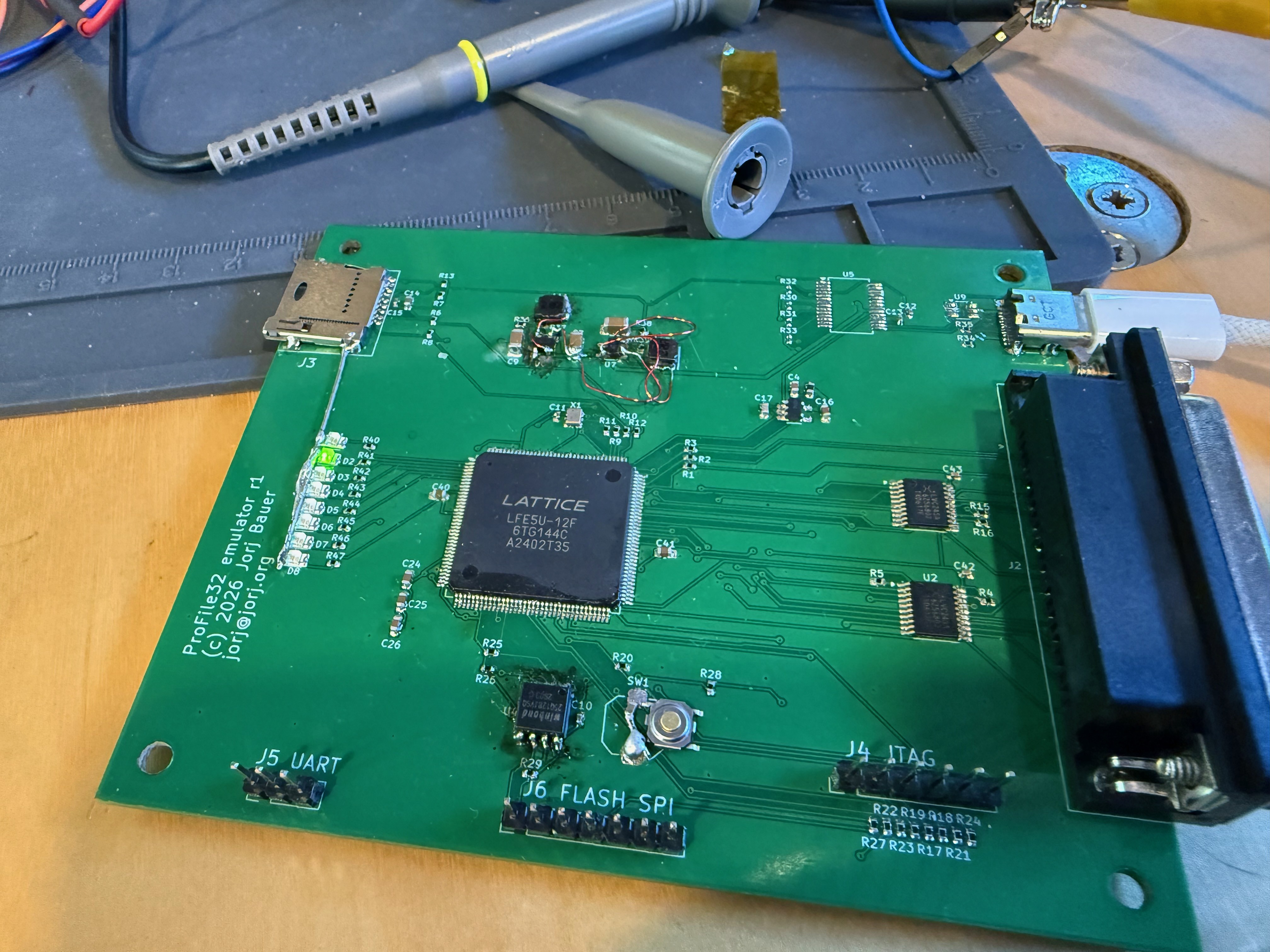
10/08/2026 at 20:08 • 0 commentsWell here it is, the r1 prototype 2-layer PCB.
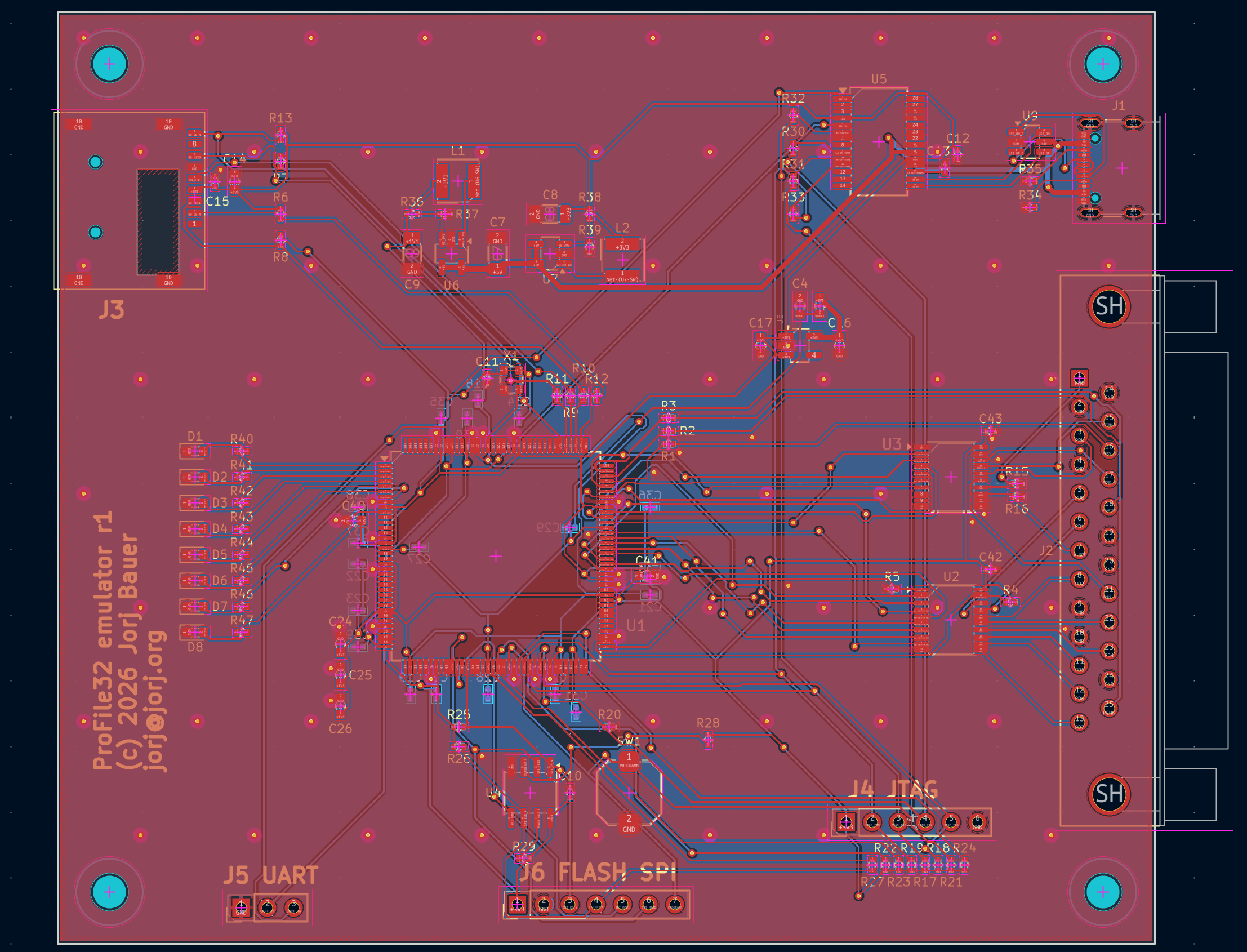
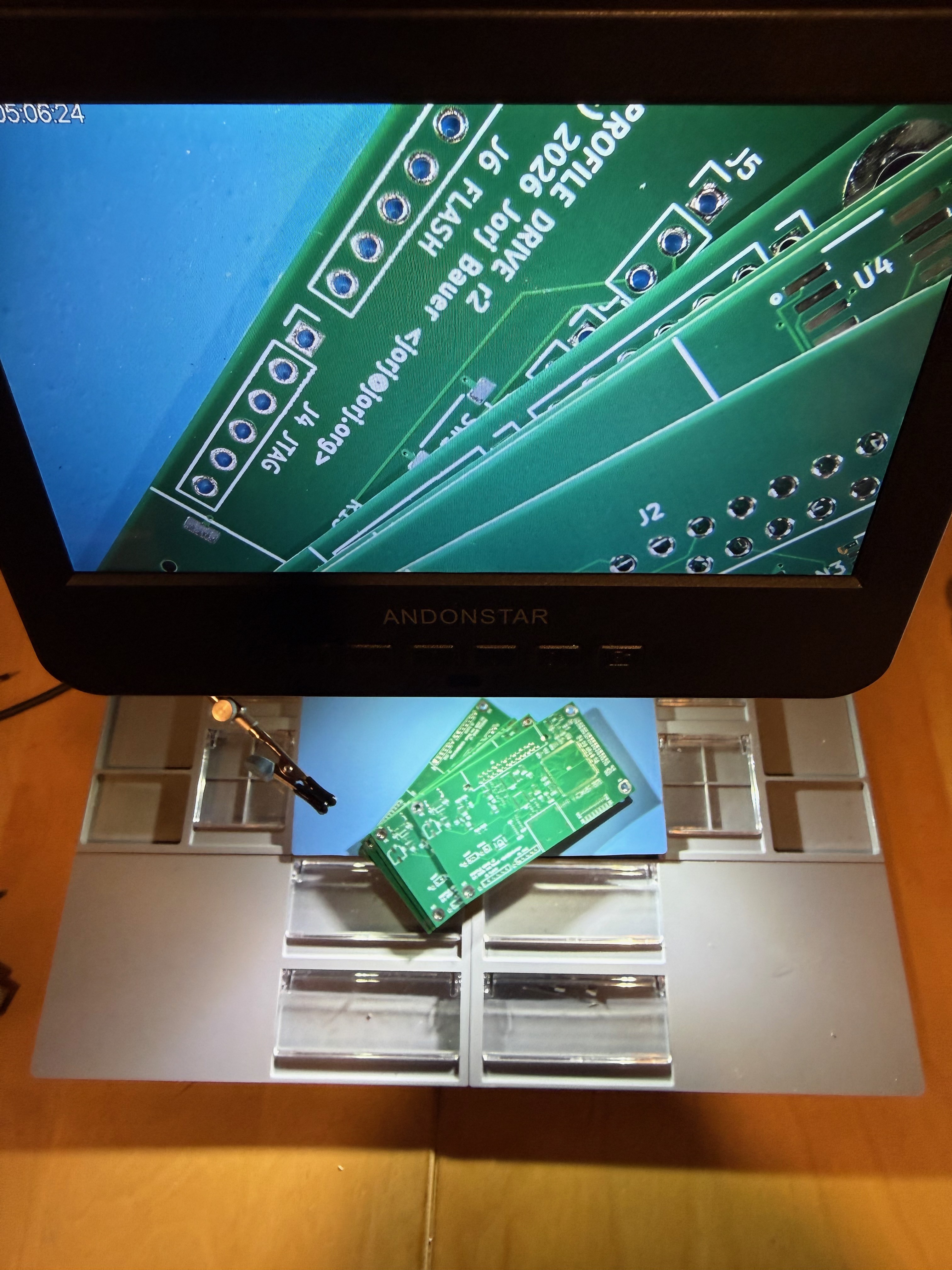
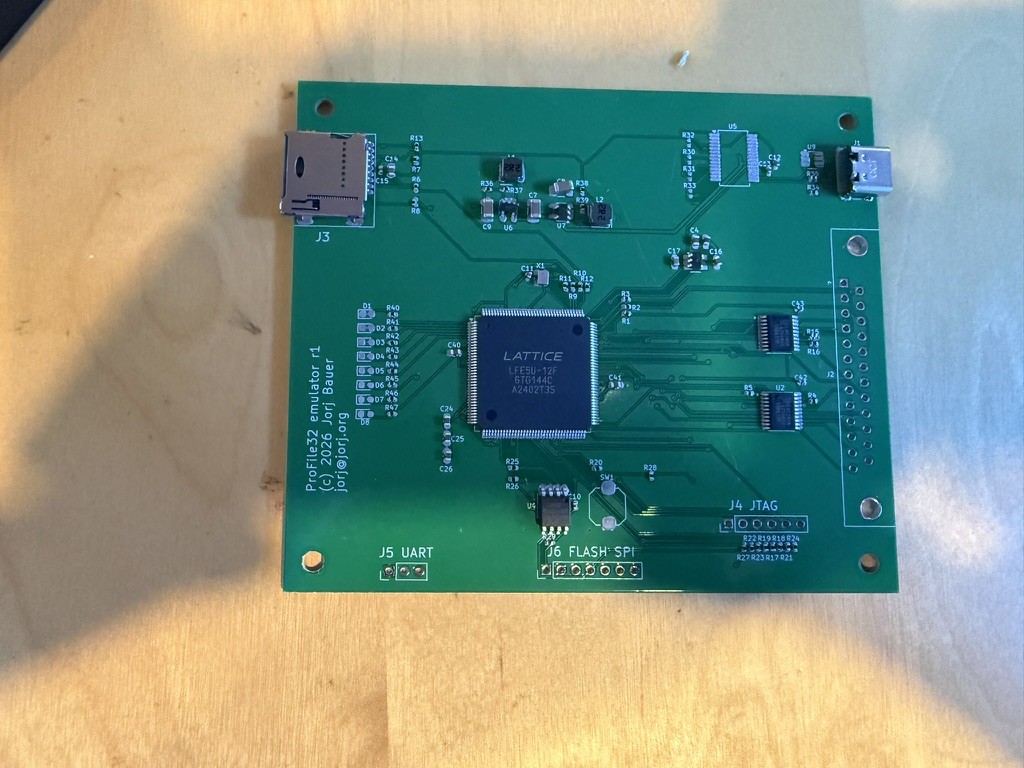
![]() I opted to take some risks: 0402 parts (look under "J4 JTAG" - those little black dots are 0402 resistors) and to err on the side of caution in other places (the TQFP-144 FPGA is a compromise: fewer pins, but I avoid BGA).
I opted to take some risks: 0402 parts (look under "J4 JTAG" - those little black dots are 0402 resistors) and to err on the side of caution in other places (the TQFP-144 FPGA is a compromise: fewer pins, but I avoid BGA).
What you're looking at here is just after the solder mask was squeegeed and most of the important parts have been placed. Notably absent: U5 in the upper-right, although I did fit most of the support parts in case I put it in later; SW1 down bottom-center; and a bunch of LEDs on the left, D1-D8. I picked out some spare LEDs and a random surface mount switch before reflowing the board - but that U5 part was very much "just in case".
Just in case of what? Just in case I couldn't figure out how to program it. There are three paths on this board to programming the flash chip - most obviously J6, the "FLASH SPI" port; then the J4 JTAG port, to have the FPGA itself program the flash; and lastly, a direct serial JTAG connection through USB-C, which is also supplying power to the board.
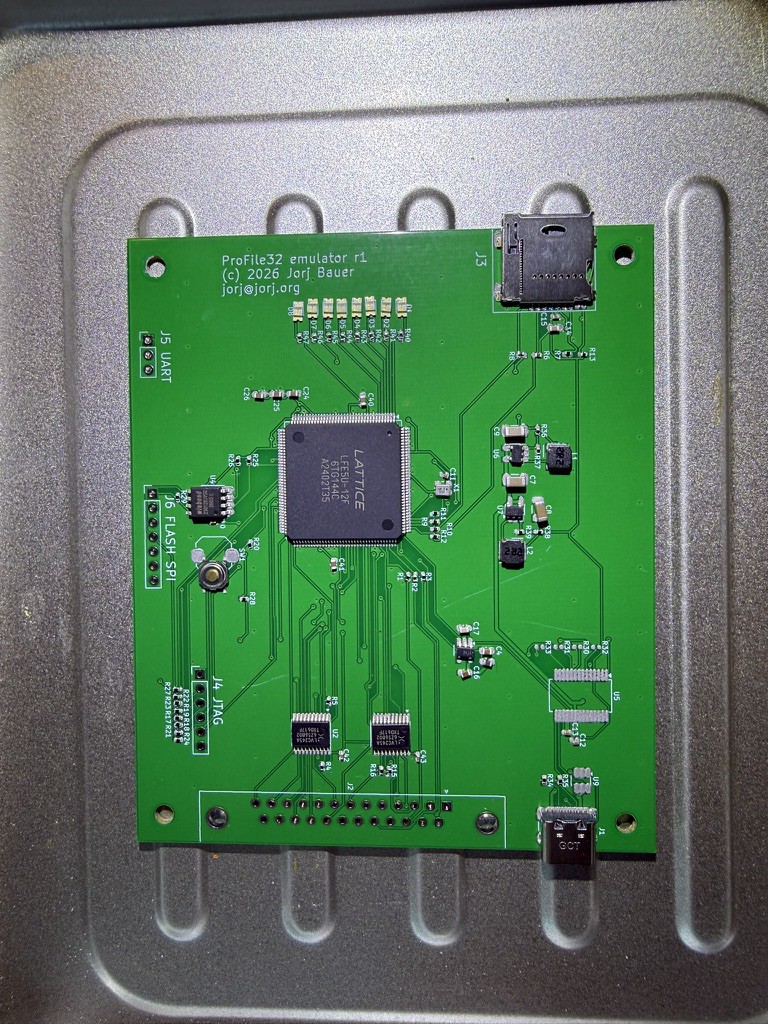
I was certain that the USB-C serial path would be one I tear out for r2 of the board, once I understood how it all worked. And that turns out to be true - I didn't need it, and it's not moving to the next revision. But it was touch and go for a while.![]() Now, I"m a toaster-oven-reflow kinda guy. I've never made anything big enough where that's a problem; I don't even have temperature sensors in the oven. I use low-temp solder and, by hand, preheat (soak) the PCB below the melt temperature before cranking it up to melt-temperature and then cooling it back off. I've made hundreds of PCBs this way - all small, about 6" x 3" or smaller. But this relative behemoth, with its large TQFP-144 FPGA, I had no idea how it would go. And the answer would be "poorly."
Now, I"m a toaster-oven-reflow kinda guy. I've never made anything big enough where that's a problem; I don't even have temperature sensors in the oven. I use low-temp solder and, by hand, preheat (soak) the PCB below the melt temperature before cranking it up to melt-temperature and then cooling it back off. I've made hundreds of PCBs this way - all small, about 6" x 3" or smaller. But this relative behemoth, with its large TQFP-144 FPGA, I had no idea how it would go. And the answer would be "poorly."
The board is large enough that it heated unevenly. Even with a long soak period, I had inconsistent melting of the solder; I wound up reflowing it a second time, rotated 180 degrees. And even then some of the solder joints on the FPGA looked a little rough. But no matter; it passed basic inspection for shorts and conductivity, which just left the question of "did I accidentally fry anything."
Not as such. Which doesn't mean it worked. But it also didn't explode, which I'm taking as a win.
Let's start counting the errors, though. Some are simple - the registration holes under the MicroSD card were in the wrong place, so it doesn't sit flush and doesn't have all the mechanical strength it should really have for a part that has something pushed into it. Easy enough to fix in the next revision, and doesn't really stop me from using it in r1. And I missed connecting the DB25 shell to ground, which is inconsequential here but weird.
Then we have the actual "it can't work that way" errors. The easier ones: the footprint for the SPI flash is for a narrow JEDEC SOIC-8, where I've got a wider part (EIAJ 208 mil). Half the pins made the pads, and the other half did not. The LEDs I picked had the same problem; wrong size footprint. Not a huge problem but ones I would have preferred to deal with before the first reflow. A little wire down the edge solves that one.
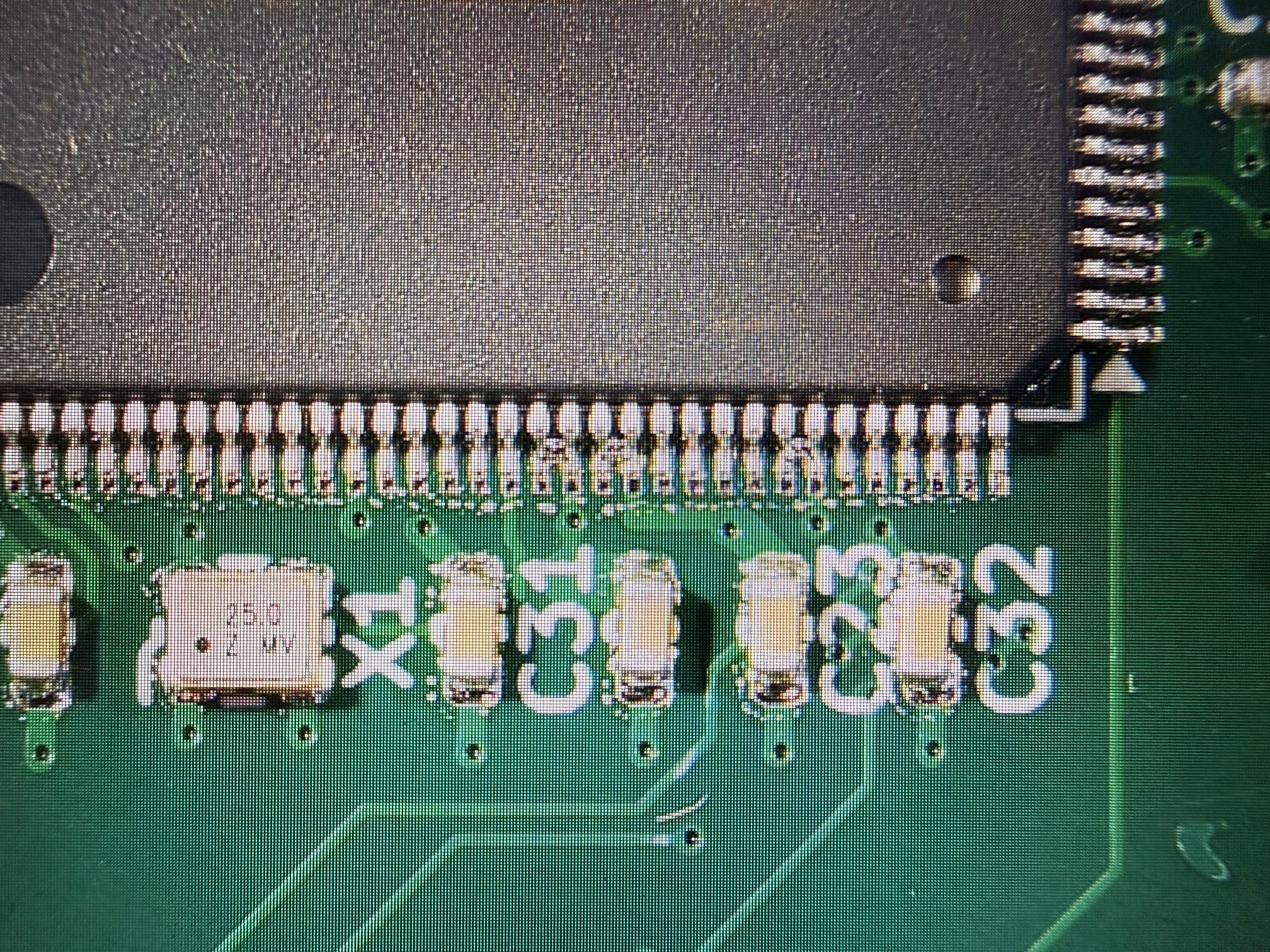
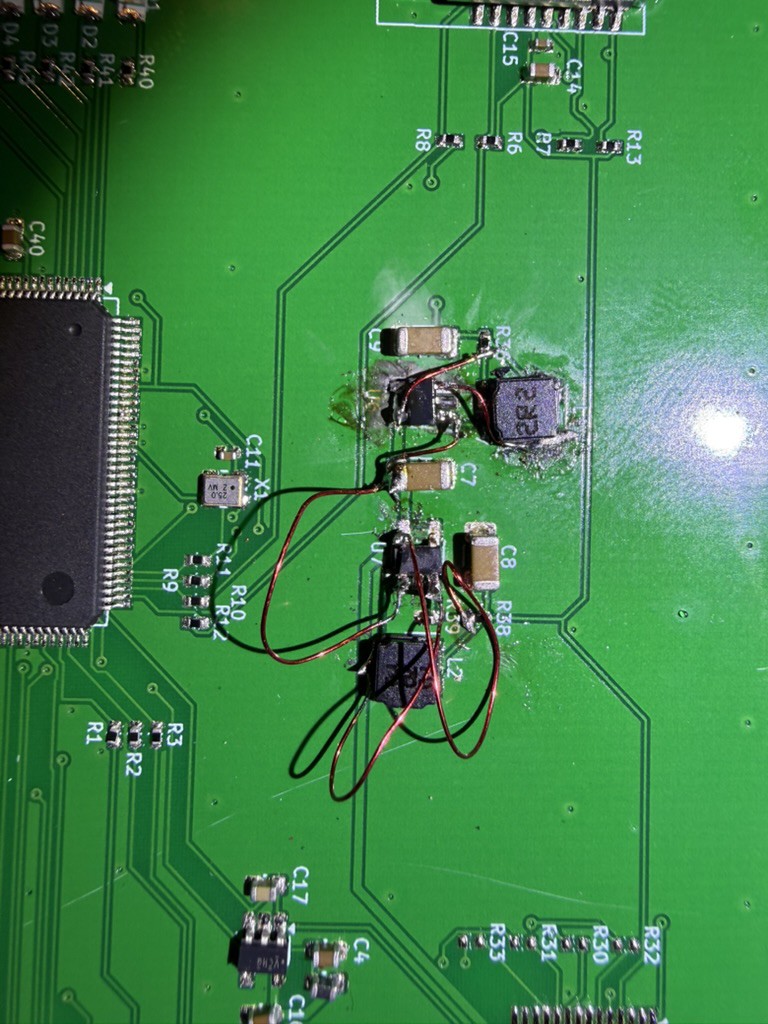
Worse: somehow, I completely bungled which pins were on which pads on two parts. This FPGA is a low-voltage part, and as such needs three voltage rails: 1.1v, 2.5v, and 3.3v. The buck regulators I used for 1.1v and 3.3v? Yeah, that's gonna leave a mark:![]() Not pretty, but it works.
Not pretty, but it works.
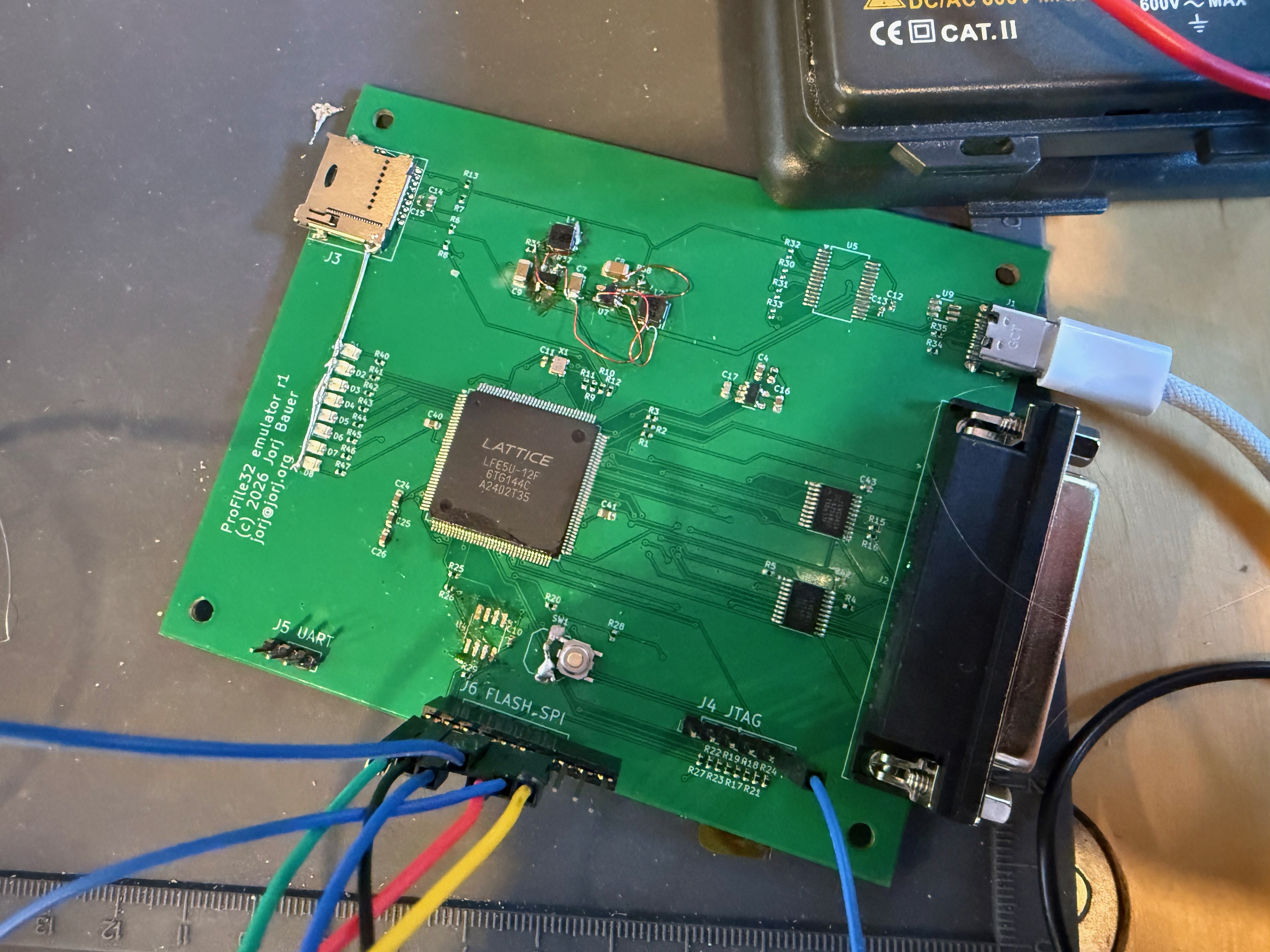
And lastly we have the "that's... not great" errors. When the FPGA boots, it needs the flash to be ready at precisely the right time. And if you press the reset button it needs to make sure the button doesn't cause multiple different presses through the cycle. Both of those are solved with an extra 1uF capacitor across the switch. And all of that leads to this fun version of the PCB:![]() Now, you being the astute, detail-oriented reader that you are, may have noticed that the flash chip is now missing from the bottom of the board, where I've left a mess of flux in its place. That would be because it died. Natural causes, I'm afraid: someone piped 5v in a 3.3v input pin. Not sure who. Definitely not me, nosir.
Now, you being the astute, detail-oriented reader that you are, may have noticed that the flash chip is now missing from the bottom of the board, where I've left a mess of flux in its place. That would be because it died. Natural causes, I'm afraid: someone piped 5v in a 3.3v input pin. Not sure who. Definitely not me, nosir.
Okay, maybe a little me. In a hurry to try to get it flashed, I built a quick flasher out of an Arduino Uno... completely forgetting that it's 5v logic levels. Then I tried connecting over JTAG with an old adapter I have from 15 years ago, which also failed.
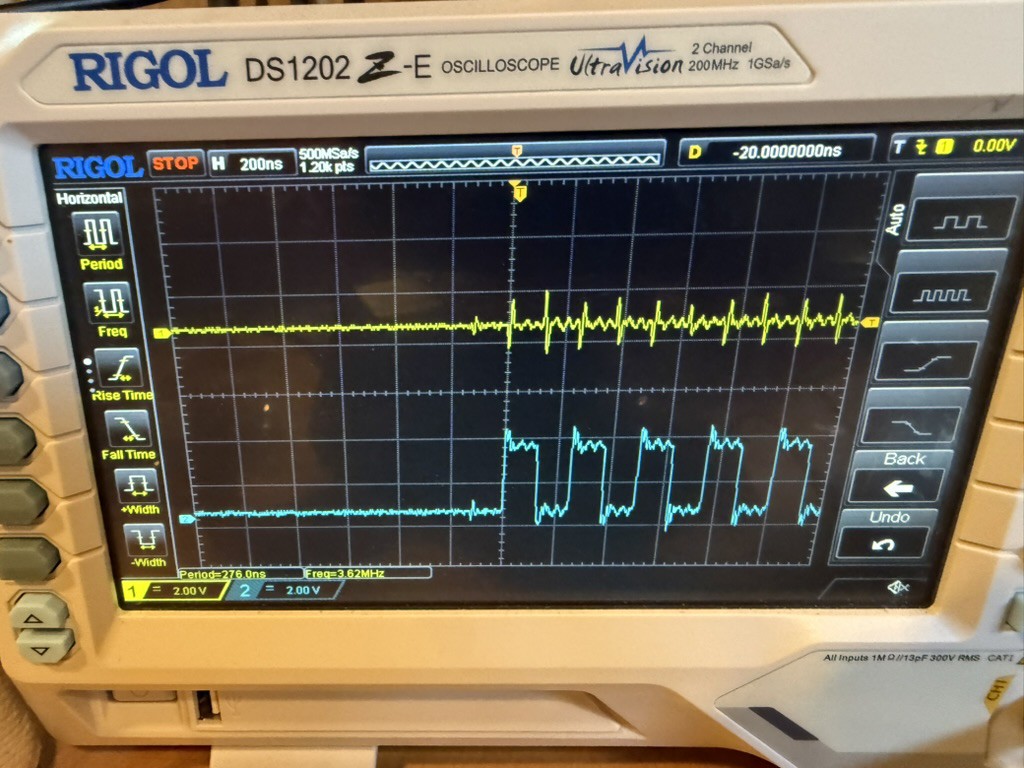
All of which lead to dozens of hours of testing, re-testing, probing, wiring up crazy harnesses of external circuits that contained a replacement flash chip in a clip, and so on - because I had no idea if I'd fried the flash, the FPGA, or both. And getting to the point where I could tell involved a lot of this:![]()
Blue: clock pulses on the flash chip. Yellow: not the logic transitions it should be showing on those clock pulses. Just meek chirps, crying out to be put out of its misery.
Which, eventually, I did. I built a harness for a replacement, wired it in to J6, and tried to boot from it... which failed.
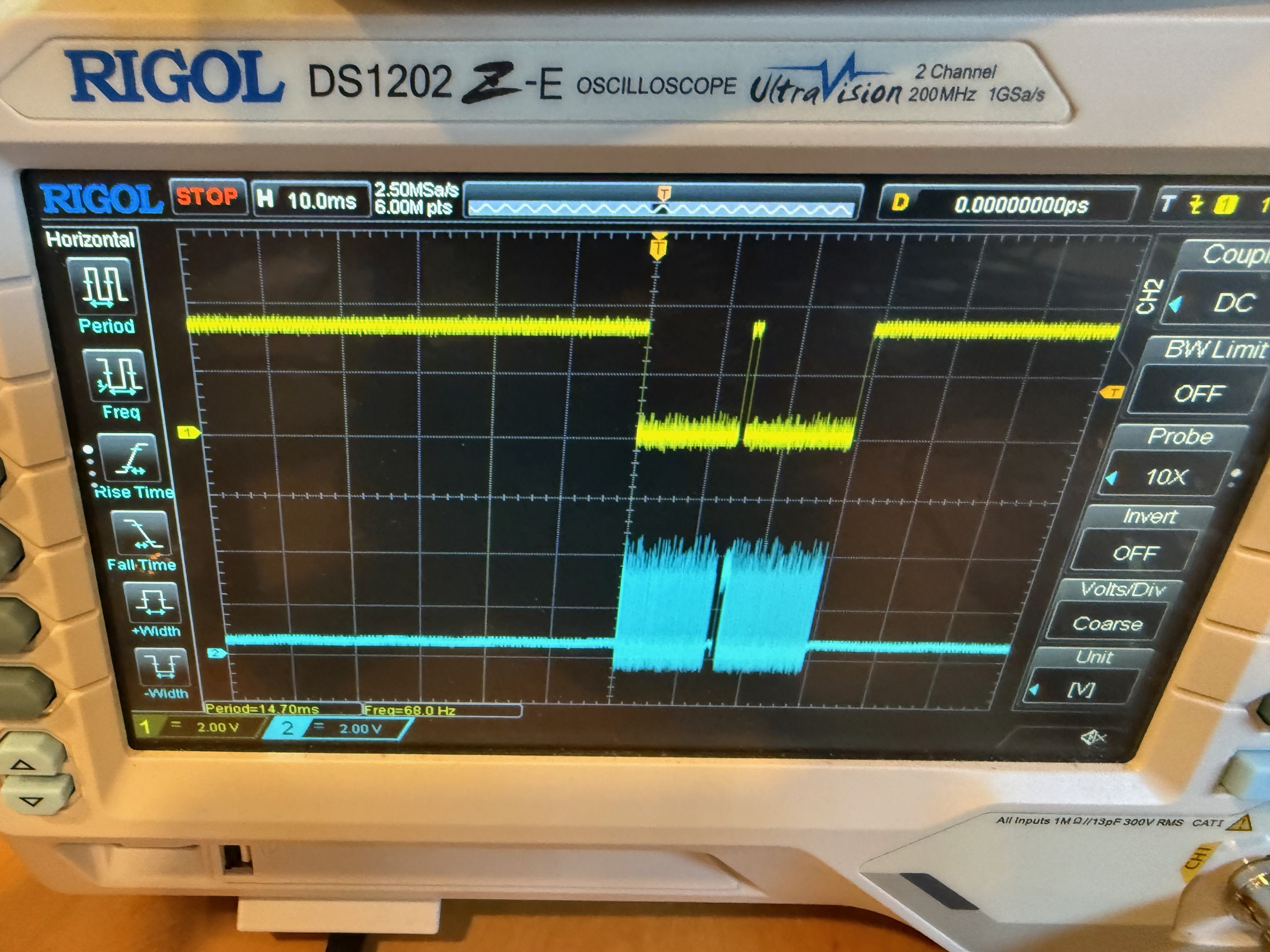
![]()
Interestingly enough, it failed at exactly the same time whether I was loading the bitstream quickly or slowly through the FPGA. I expected it would have failed after a certain number of clocks; but no, it was failing based on time. And once I realized that could only be true if the FPGA was not reading good data on the other end, and that my long-wired harness for the flash chip was probably an issue, I finally soldered back in the bugger and got my first signs of life: blinking lights!
![]()
Now, this was close: at this point I knew the bitstream would load and run. But it wasn't recognized as a drive by the Apple, because... I mixed up R3. There are three teeeeeny 0402 resistors to the upper-right of the FPGA: R1, R2, R3. They're all 220 ohm resistors. But while I was placing them on the board, one of the three flew out of my tweezers. But I found it! Right there on the table, picked it up and put it in. And the thing I put in was actually a 10k resistor. On R3, that's current protection for the line that the profile card in the Apple uses to sense whether or not the drive is connected.
Sigh. Pulled it out and just shorted R3. We don't need no steenkin' protection.
So in the final tally for r1: 9 wrong part size layouts (or 2, if you give me some grace for the repeated LEDs); 2 parts with completely wrong pinouts, one missing part, one badly installed part, one registration hole error. 8 completely unused parts, with 6 of them installed just in case. But somehow, it all worked in the end!
![]()
-
Act 7: Packaging
09/28/2026 at 09:14 • 0 commentsI've been telling a little fib for a while here. Or, more accurately, I've been letting you continue to believe something that isn't true.
This emulator isn't running on a Teensy 4.0.
Yes, it started that way; the hacked-together prototype used for debugging, which was useful through the proof of concept that I was, indeed, emulating a ProFile. But it had some timing issues and rather than pushing the brute-force "my CPU can out-CPU your CPU" race, I decided to take the more robust path.
It's on an FPGA, carried on a commercially made PCB, built so that anyone can build their own.
My first pass was on an Alchitry Cu dev board - which I quickly outgrew, and moved up to the Alchitry Au. Overkill, but functional.
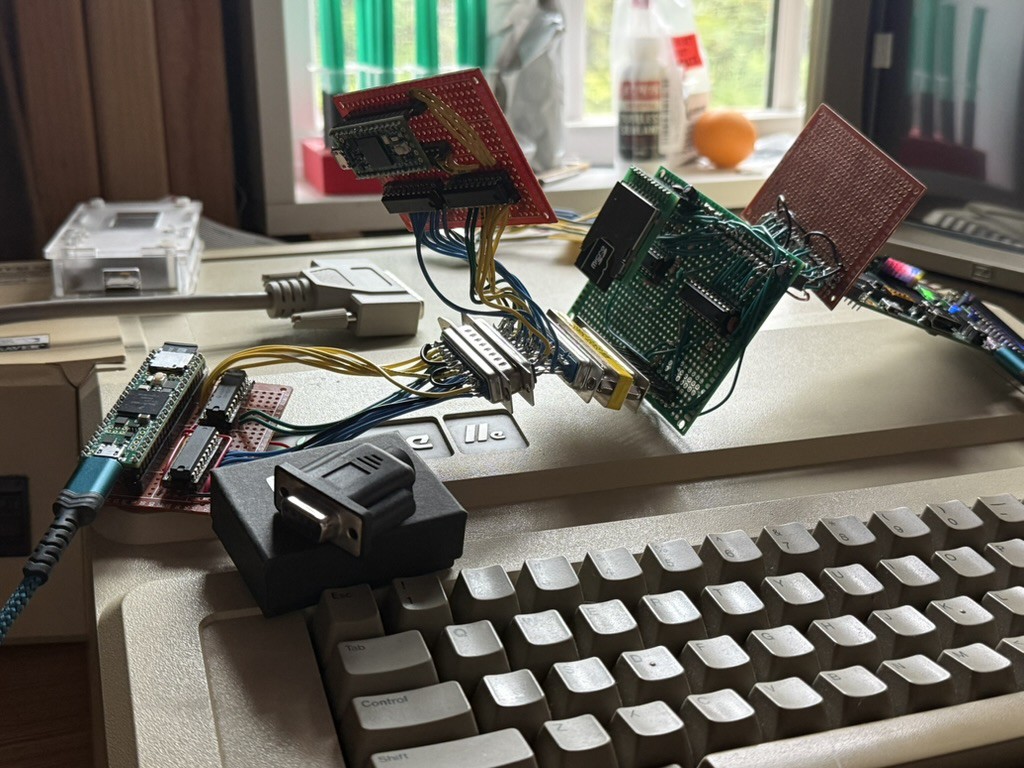
Then I rebuilt it on the ULX3S-12F, which meant building another adapter in the middle to keep the wiring I'd built for the Au. Not pretty, but functional just the same (shown here with my bus sniffer in the middle of the wiring, and the original Teensy ProFile reader on the left).
![]()
The '12F is a better choice. The Au is based on the Artix-7, which is somewhere shy of $100 per part; the LFE5U-12F is a much more sane $20. To make my life easier I also built it around the only non-BGA version of the 12F.
![]()
This was challenging to route - the TQFP-144 is really dense. But I'd rather have the difficult routing than have to deal with ensuring a ball grid array device gets properly soldered to pads I can't even see.
The verdict? Still pending! The boards have arrived, they're waiting for me to build one and test it out.
-
Act 6: Can We Build It?
09/28/2026 at 08:44 • 0 commentsThis feels like we're mostly done. The card fixed, the architecture understood, and we've pushed past limits of the original intended system pretty far already. But can we go further?
Yes. Yes, we can.
Let's start with the logical swap. In theory, if I had two ProFile hard drives I could boot off of one, swap the cable to the other, and read it just fine. There's no hard drive cache for us to defeat; we'd just have to chance that the electrical swap didn't accidentally fry anything. (Yes, that's a real possibility; I would definitely not perform this swap if I were you. But theoretically it's possible.)
Yes, I built it - specifically for ProDOS, it's possible to hot-swap volumes. And something more that I'll save for the end.
When thinking about whether or not this is possible, the first question is - what is the interface that allows us to do this? The BMOW FloppyEmu does the same, when you press buttons on its screen; but the current emulator has no buttons nor screen, nor do I want it to have that complexity. My first thought was that maybe we could build a new command to pass through to the emulator. It has a simple command byte structure - 00 for read, and so on; perhaps I could add some magical $ED (mnumonic for "eject disk") command that the emulator would honor, and be able to do something with. But the ProFile ROM defeats this. For us to send that command, I'd either have to write a complex program that directly drove the card, or I'd have to write a replacement ROM. Neither of those sounded very appealing (but both very possible).
Instead, I opted for a bit of modern trickery: knocking.
A ProDOS volume is, at most, $FFFF blocks (16-bit); where the ROM turns anything $FF00 or over into $FFFFxx on its assumption that you're asking for some sort of control block data. So I built a pattern: if you read the four blocks $FF41 $FF32 $FF45 $FF44 in that sequence, over a short time, the emulator notices that it happens and triggers ... some behavior. This is safe for a physical ProFile drive - it should calmly return I/O out-of-range errors. And it's unlikely that someone will ask for those four specific blocks from an arbitrary hard drive image (although it is possible, and if it were to happen, I could extend the knock sequence). A little bit of assembly...
kloop:  (re-point BUFL/BUFH to INFOBUF)
        lda ktab,x              ; $41 $32 $45 $44
        sta BLKL
        jsr drvcall             ; errors ignored: a real drive refuses these
        ... x4

        (re-point) lda #$C0 / sta BLKL
        jsr drvcall             ; info block
        bcs nodev
        lda INFOBUF+4
        cmp #$A5                ; the emulator's signature byte
        bne nodev

        lda #$C1 / sta BLKL     ; fetch the boot blob...
        lda #$00 / sta BUFL
        lda #$08 / sta BUFH     ; ...to $0800, where the ROM would have put block 0
        jsr drvcall
        bcs nodev
        ldx unitsv              ; X = slot*16, the boot-block entry convention
        jmp $0801               ; and enter it exactly as a boot would
... performs the knock, checks that the returned data looks like it should, and then runs the same picker menu that the bootloader uses. Boom - in-OS, runtime, re-selection of what drive is connected.
That's great if we're doing it by hand, but the actual use case I have is: moving files between two images. And to do that, it needs to be automated in some way. ProDOS really isn't command-line-ish, but how close can we get?
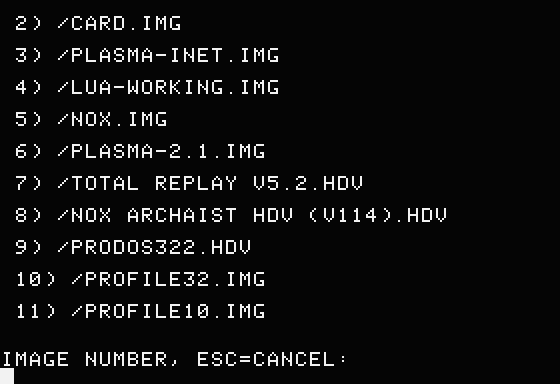
This is an excerpt of PICK, a binary that performs the knock, transfers file names from the emulator as data blocks, prints them onscreen, takes input to choose one of them, and then performs the swap.
![]()
After the knock, the info block ($FFC0) gives a count; and each catalog page ($FF80 + (idx>>3)) is an ordinary 512-byte block payload with 64-byte records. Those records were cached by the emulator at its startup, so there's no extra overhead; it's just data transfer couched in special terms, overloading block numbers near the end of the device within a short time frame. Wait too long and you get the normal disk block instead.
Great; I can now load something from one volume, use a command to swap to another volume, and save it manually again. Works, but it's not exactly automatic. I'd much prefer that.
This one is really the icing on the cake.
ProDOS has extensible drivers, right? And it allows SmartPort drives to do seemingly impossible things by assuming the identity for a volume based on a slot number that has no drive on it. And the theory I had is sound: it *is* possible to create a driver that registers two different volumes with ProDOS - with overriden names "/D1" and "/D2" for clarity - attach different images to each, and then, behind the scenes, swap which we're talking to dynamically.
The drive name override is done by hijacking reads of the master volume information block and rewriting it on the fly; safe, only because the driver is ProDOS-specific as is the behavior. The selector, as far as ProDOS is concerned, is a drive choice. With the card in slot 5, /D1 is S5,D1 and /D2 is S5,D2.
This works as an Applesoft BASIC-proven interface. Using it in other contexts is possible, but keeping the driver protected and resident is sort of a challenge; I'm sure it's a nut that can be cracked application-by-application, and whether or not there's a better way to register the driver in memory space that won't be eaten by a program is a problem to be solved later.
The important thing is that I can copy my files between two volumes now as I like.
-
Act 5: Is That My Bug?
09/28/2026 at 06:37 • 0 commentsAs mentioned in Act 4: I've got a bootable 32MB-capable system - except when I don't. I've found two published hard drive images that just won't boot at all: the Total Replay image, and Nox Archaist. Both absolutely worth the time to figure out why not.
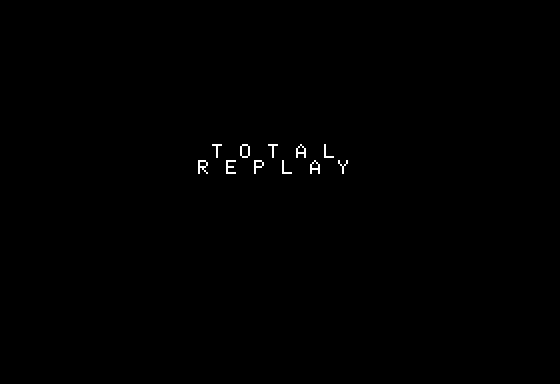
The symptom is clear. Both images completely hang when you try to boot them, very unsatisfyingly like this -
![]()
Without a distinct crash, this is harder than just disassembling what's happening. This means we need to take a look at the boot block for Total Replay and walk the whole boot cycle through the ROM. Given that these images are 32MB, it's possible that they're trying to load something from the end of the disk and failing - given my geometry hack and the $FF00 magic block rewrite override. Maybe THAT'S my bug!We can start with the debug output of the Teensy ProFile emulator, which dumps this more than a dozen times a second:
rd blk=$000000   block 0
rd blk=$00D848   "next directory block" = bytes +2/+3 of block 0 = 48 D8 (the loader's own TXA/PHA)
rd blk=$000002   block $D848's bytes +2/+3 are 02 00, so back to block 2
rd blk=$000003
rd blk=$000004
rd blk=$000005   null next pointer -> read block 0 "as a directory" -> repeat
So that hypothesis is dead; that's not my bug. It's looping, not getting anywhere near the end of the disk, in a very sane boot pattern that just never completes. We're going to have to go deeper - down in the Total Replay boot block disassembly:
$0867  LDA #$1E
$0869  STA $45          ; driver buffer hi = $1E00
$086B  STA $3F          ; scan pointer hi = $1E
$086D  JSR READBLOCK    ; $08C3: ReadBlock via the card's ProDOS driver
$0870  LDA #$04
$0872  STA $3E          ; scan pointer = $1E04 (first dirent)
$0874  LDY #$00
$0876  LDA ($3E),Y      ; entry's storage/length byte      <-- walks the pointer
$0878  AND #$0F         ; name length
$087A  TAX
$087B  INX
$087C  CMP $09A4,Y      ; compare against "LAUNCHER.SYSTEM"
$087F  BEQ $0898
$0881  CLC
$0882  LDA $3E          ; next entry: pointer += $27 (39 bytes)
$0884  ADC #$27
$0886  STA $3E
$0888  BCC $088C
$088A  INC $3F
$088C  CMP #$FF         ; end of this block's entries?
$088E  BNE $0874
$0890  LDX $1E02        ; next directory block, ABSOLUTE from the buffer
$0893  LDY $1E03        ;   (this is why the hops work but the walk doesn't)
$0896  BCS $0867        ; read it, resetting only the high byte
$0898  INY
$0899  LDA ($3E),Y      ; match the name, character by character
$089B  DEX
$089C  BNE $087C
$089E  STX $FF
$08A0  LDY #$11
$08A2  LDA ($3E),Y      ; key pointer (index block) lo
$08A4  TAX
$08A5  INY
$08A6  LDA ($3E),Y      ; key pointer hi
$08A8  TAY
$08A9  JSR READBLOCK    ; read the file's index block

READBLOCK:
$08C3  STX $46          ; block number lo   (caller passes the block in X/Y)
$08C5  STY $47          ; block number hi
$08C7  LDA #$01
$08C9  STA $42          ; command 1 = READ
$08CB  LDA $45          ; save the buffer high byte...
$08CD  PHA
$08CE  JSR $D1D1        ; PLACEHOLDER: rewritten at boot to JSR $CnEA
$08D1  PLA
$08D2  STA $45          ; ...and restore it: the card's read loop advances $45 by 2
$08D4  RTS
What I see there is a ton of zero-page magic variable addresses, self-modifying code, and cleverness.
The 6502 has distinct opcodes that make it faster, easier, and the code smaller when using the first $100 bytes of memory for variables ("zero-page addresses"). This memory space is, then, incredibly valuable: if you have a program running, which is using an operating system, which talks with drivers, all of them will need some set of it and - as with most hardware of this era - there's no real way to stake your claim that your special zero-page address is or is not already claimed. Handy charts like this existed in the 80s to help programmers figure out where to stash their variables, and what to avoid.
                        Lo Nibble of Address
Hi
Nib  0   1   2   3   4   5   6   7   8   9   A   B   C   D   E   F
     --- --- --- --- --- --- --- --- --- --- --- --- --- --- --- ---
 0 | A~  A~  A   A   A   A   -   -   -   -   A   A   A   AI  A   A
 1 | A   A   A   A   A   A   A   A   A   A   A   A   A   A   -   M*
 2 | M   M   M   M   M3  M   MA3 MA3 M3  M3  M3  M3  MA3 MA3 M3  MA3
 3 | MA  M   MA  MA3 M   M3  M3B M3B M3B M3B M~  M~  MA3~MA3~MA3~MA3~
 4 | M3~ M3~ M3~ M3~ M3~ M3~ M3~ M3~ M3~ M3~ I3~ I3~ I3~ I3~ M~  M
 5 | MA  MA  MA  MA  MA  MAI AI  AI  AI  AI  AI  AI  AI  AI  AI  AI
 6 | AI  AI  AI  AI  AI  AI  AI  AI3 AI3 AI3 AI3 AI  AI  AI  AI  AI3
 7 | AI3 AI  AI  AI3 AI3 AI  AI3 AI  AI  AI  AI  AI  AI  AI  AI  AI
 8 | AI  AI  AI  AI  AI  AI  AI  AI  AI  AI  AI  AI  AI  AI  AI  AI
 9 | AI  AI  AI  AI  AI  AI  AI  AI  AI  AI  AI  AI  AI  AI  AI  AI
 A | AI  AI  AI  AI  AI  AI  AI  AI  AI  AI  AI  AI  AI  AI  AI  AI3
 B | AI3 AI  AI  AI  AI  AI  AI  AI  AI  AI  AI  AI  AI  AI  AI  AI
 C | AI  AI  AI  AI  AI  AI  AI  AI  AI  AI  AI3 AI3 AI3 AI3 I   I
 D | AI  AI  AI  AI  AI  AI  AI3 I   AI3 AI3 AI  AI  AI  AI  AI3 AI
 E | A   A   A   A   A   A   A   A   A   A   A   -   -   -   -   -
 F | A   A   A   A   A   A   A   A   A   A   -   -   -   -  I   AI


M = Used by Monitor; * used in early Apple IIe ROMs-- now free
A = Used by Applesoft BASIC
I = Used by Integer BASIC
3 = Used by DOS 3.3
~ = Used by ProDOS ($40-$4E is saved before and restored after use)
B = Used by ProDOS BASIC.SYSTEM (also uses all Applesoft locations)
- = Free; not used

--Bryan Dunphy, Michael J. Mahon, Rubywand
Yep, you read that correctly - taking in to account all of DOS, BASIC, ProDOS, and the Monitor there are only 14 bytes of zero-page RAM available that are conflict-free. Who knows what is or isn't used by individual device drivers, ROMs, or shim utilities. If your program has any substantial footprint, you're almost certainly going to have to accept that you conflict in some way - hopefully in a way that you don't care about. Like "I'm using ProDOS with AppleSoft BASIC, so the DOS 3.3 and Integer BASIC locations aren't important." Or, just as likely, "I'll save these variables when we start, and then restore them when we exit, so the operating system still works correctly."
All of those boot block zero-page accesses are important here - it could be that any one of them is in conflict with the ProFile ROM. Is THAT my bug? There's no reason why the author of the Total Replay or Nox Archaist boot blocks would ever know about this - these titles are eating 32MB of space, while the ProFile ROM only ever drove 10MB of disk. Without our geometry decoupling and block access hack there's no way this card would ever have been able to run such an image, just due to space requirements.
The author here was aware that this was the case: you can see it in READBLOCK, where $45 is being saved and restored across calls to the hardware. I suspect that's for a SmartPort device - probably something that cropped up during testing of the initial boot block.
And in Nox Archaist, we see the same general pattern, just looking for a different filename:
$082C  LDA #$1E
$082E  STA $45
$0830  STA $3F
$0832  JSR $0888        ; ReadBlock
$0835  LDA #$04
$0837  STA $3E
$0839  LDY #$00
$083B  LDA ($3E),Y
  ...  (identical walk: ADC #$27, INC $3F, CMP #$FF, LDX $1E02 / LDY $1E03)
$085E  LDA ($3E),Y
$0867  LDA ($3E),Y
$086B  LDA ($3E),Y
$086E  JSR $0888
Let's see what we have going on in Apple's 1984 ROM for the ProFile card:
; the driver bracket and dispatcher
$C81C  PHP
$C81D  SEI
$C81E  JSR $C829
$C821  BCC $C826
$C823  PLP
$C824  SEC
$C825  RTS
$C826  PLP
$C827  CLC
$C828  RTS
$C829  STA $3F          ; <-- $3F = $C5
$C82B  LDA #$00
$C82D  STA $3E          ; <-- $3E = $00   ($3E/$3F now point at $C500)
$C82F  LDA $C082,X
  ...
Welp, that looks like a smoking gun to me. The ProFile is storing its slot information in 3E and 3F; the boot block is using the same addresses as a scanner pointer. Neither is saving/restoring those memory locations, and both of them are listed as used by various parts of the ecosystem, but at boot time, it's not clear that any of those are important. The boot block sets up its pointer, calls out to read a block, and the readblock driver in the ProFile ROM happily overwrites the pointer. Whose bug is that, exactly? Nobody's. Everyone's. But today it's mine to untangle.
Either (a) we ask for these to be patched upstream, so that Total Replay and Nox Archaist both change their code; or (b) we patch the ROM so that it saves/restores what it's doing in zero page itself, protecting whatever calls it.
(a) involves waiting, so let's look at (b) first. In theory all it would take is a couple instructions to save $3F/$3E at the head of the driver, and restore at the end. Unfortunately the ROM is, as most are, completely full and we'd need a couple dozen bytes to do what I'm proposing. But if we rewind back to the full ROM disassembly, it begins like this:
$C800                  STR      '(C) APPLE COMPUTER INC. 1984'
$C81C DRIVER           PHP
$C81D                  SEI
$C81E                  JSR      DRV_DISPATCH
...
We don't need that string. The only thing it could be doing is helping to identify what peripheral is plugged in to this slot and, since the ROM does its own work alongside boot blocks in this area, it's really not important. Let's see how much I can cram in there:
$C800  LDA $3E          ; ZPSAVE: save the caller's pointer
$C802  PHA
$C803  LDA $3F
$C805  PHA
$C806  JSR $C81C        ; the ORIGINAL bracket, byte-identical
$C809  STA $31          ; park A ($31 is stock-ROM scratch already)
$C80B  PLA
$C80C  STA $3F          ; restore
$C80E  PLA
$C80F  STA $3E
$C811  LDA $31          ; restore A; PLA/STA/LDA never touch carry
$C813  RTS
$C814  STR '3E3FSAVE'   ; marker, in the space the copyright used to occupy
$C81C  PHP              ; ...the stock ROM continues here, unchanged
Then we just need to patch where the driver is called:
                 stock                      zpsave
$CFF6  STA $07F8                  $CFF6  STA $07F8
$CFF9  JMP $C81C                  $CFF9  JMP $C800      <-- the only other change
$CFFC  HEX 00 00 47 EA            $CFFC  HEX 00 00 47 EA
Now when ProDOS tries to dispatch to our READ, it actually calls the ZPSAVE wrapper which then calls the stock read dispatcher. Nice, clean, and ... mostly worthless. I haven't even tested it; one of the failures of my card was in the rom slot itself, and I have no interest in making that worse. For the same reason I really wouldn't suggest that anyone else do so. Which means we have an academic, theoretical fix that's not terribly useful and we don't even know if it definitively fixes our boot error. Not terribly satisfying (although, I have to say that cramming those bytes over a string really felt good.)
No, what we need to do is patch one of the images and see if it boots while *not* using $3E / $3F. First, a scan of the boot block tells me that $EB / $EC seem free. These are in the range of "nothing known claims them," so they're probably safe for the bootloader itself. What if we find and replace all of the former instances with the latter?
Total Replay
Memory Locationold new instruction $086C3FECSTA $3F$08733EEBSTA $3E$08773EEBLDA ($3E),Y$08833EEBLDA $3E$08873EEBSTA $3E$088B3FECINC $3F$089A3EEBLDA ($3E),Y$08A33EEBLDA ($3E),Y$08A73EEBLDA ($3E),Y(And, for completeness, the same 9 operands for Nox Archaist at $0831, $0838, $083C, $0848, $084C, $0850, $085F, $0868, $086C.)
What does that get us (he asked, expecting another crash further down the boot process)?
Gold. YES, THAT'S OUR BUG. Reported upstream, already patched in both; the next Total Replay past v5.2 should include it; and if you're a Nox owner that needs an updated image, you should join the 6502 Workshop Discord server, introduce yourself in #the-scuttlebutt-pub channel, and then ask for the update in the #nox-tech-help channel.
-
Act 4: Teaching the Old Dog New Tricks
09/28/2026 at 01:47 • 0 commentsThis is where things start really becoming fun.
With the difficult repair behind me, now I can ask a new question: "What can I do with this card?" With the actual ProFile still enjoying its second retirement, and this Teensy stand-in sitting in its place, I have the opportunity to consider what this project has promised from its title - a modern emulator that performs some novel tricks.
But let's start at the beginning.
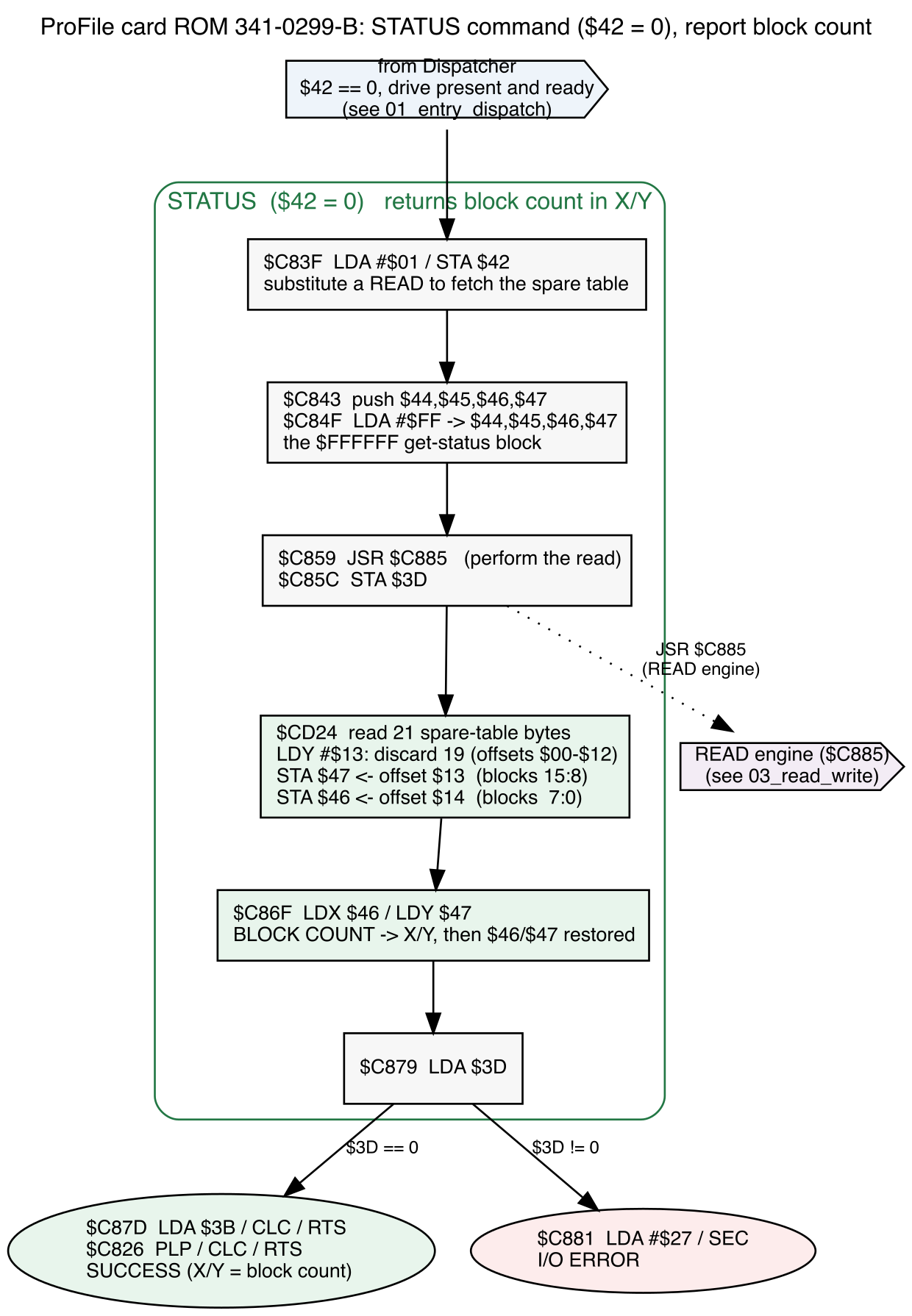
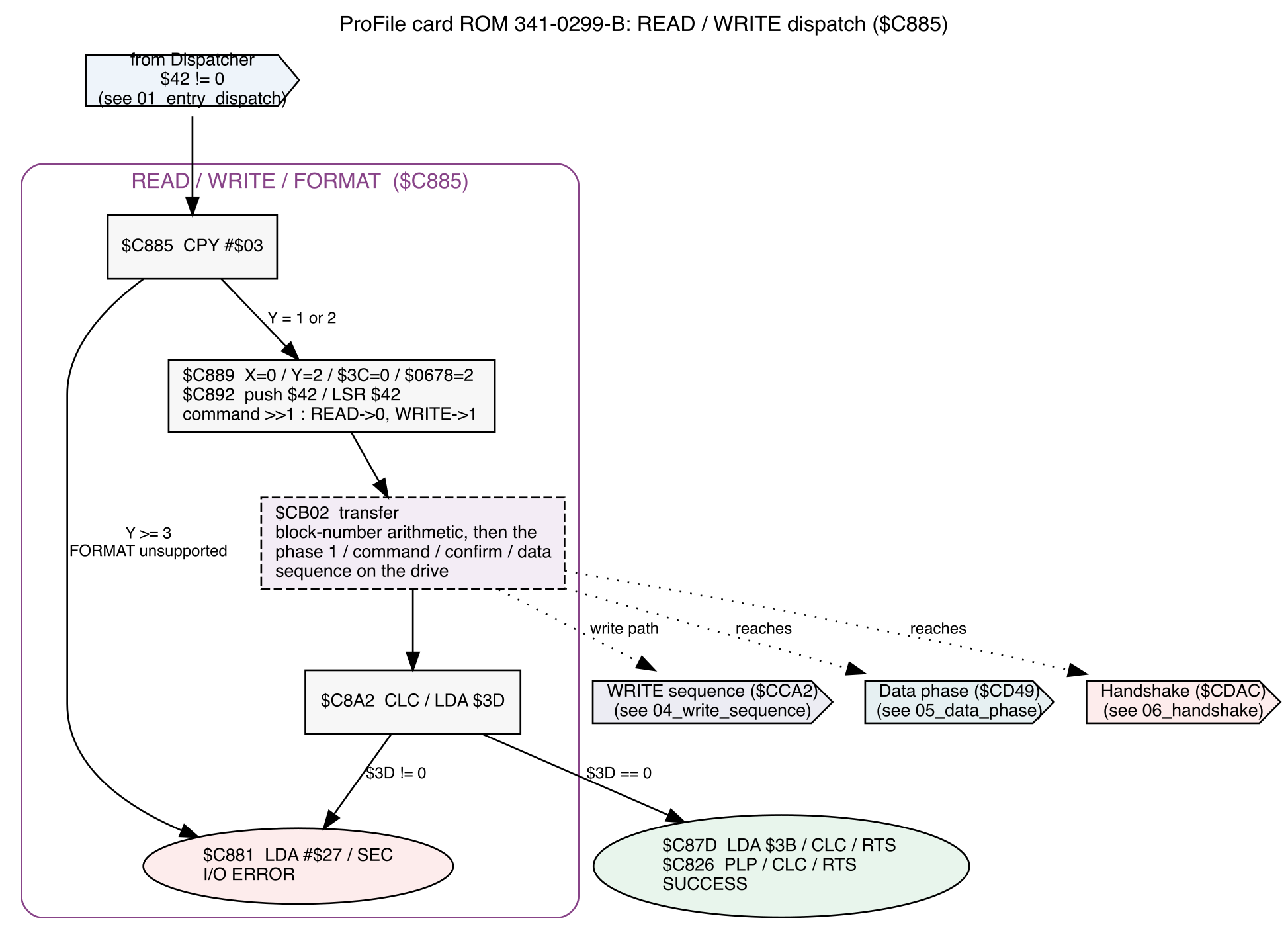
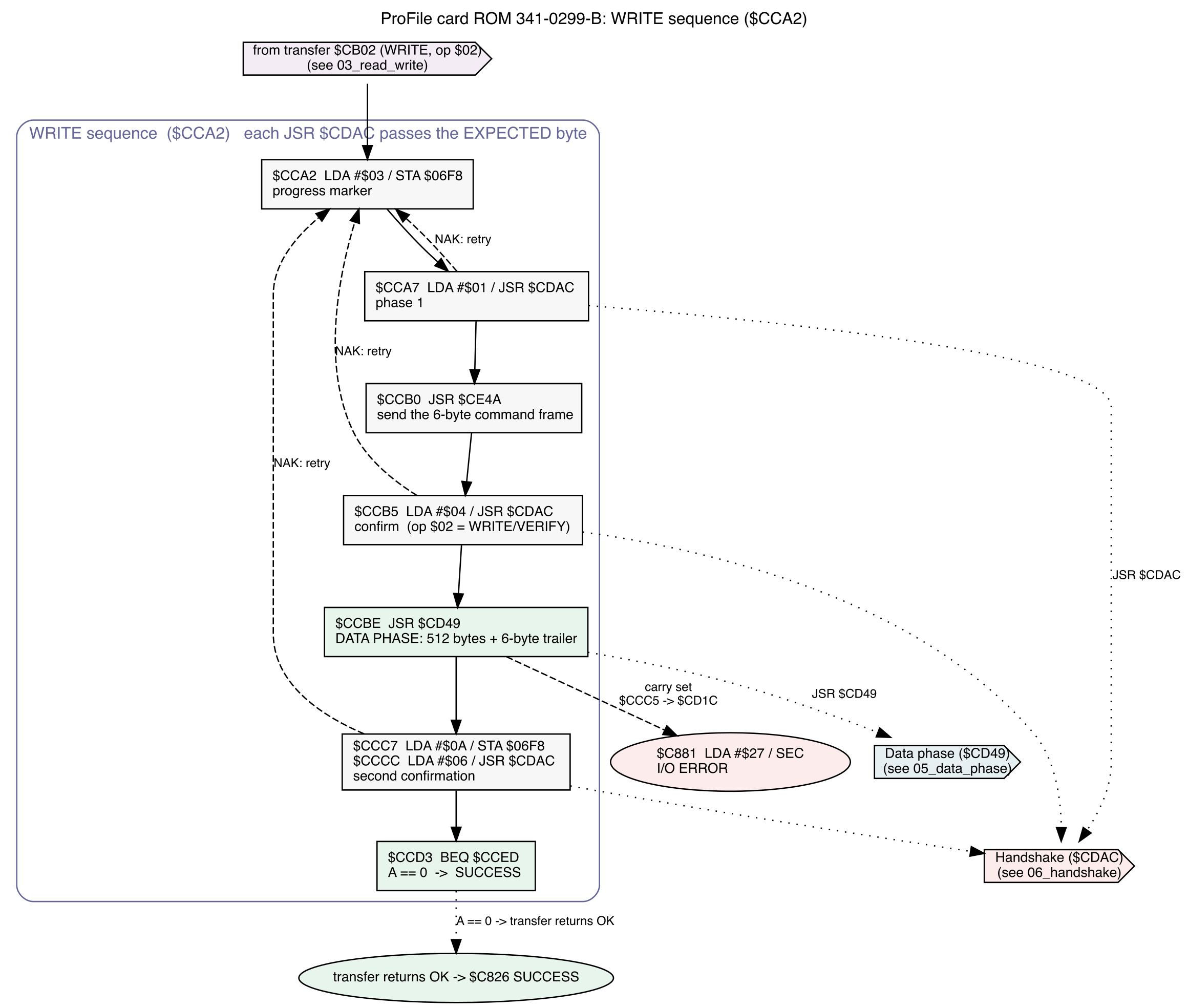
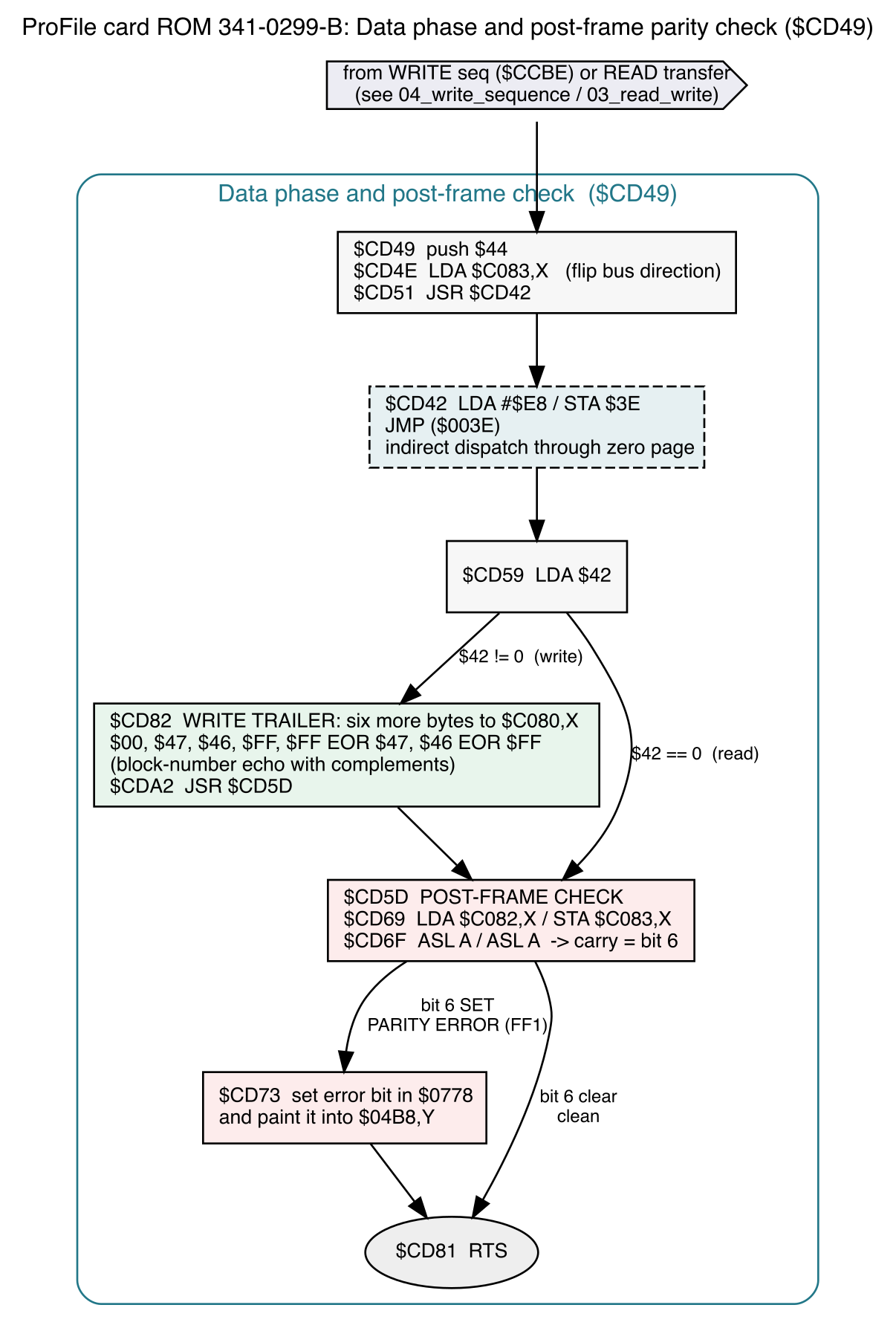
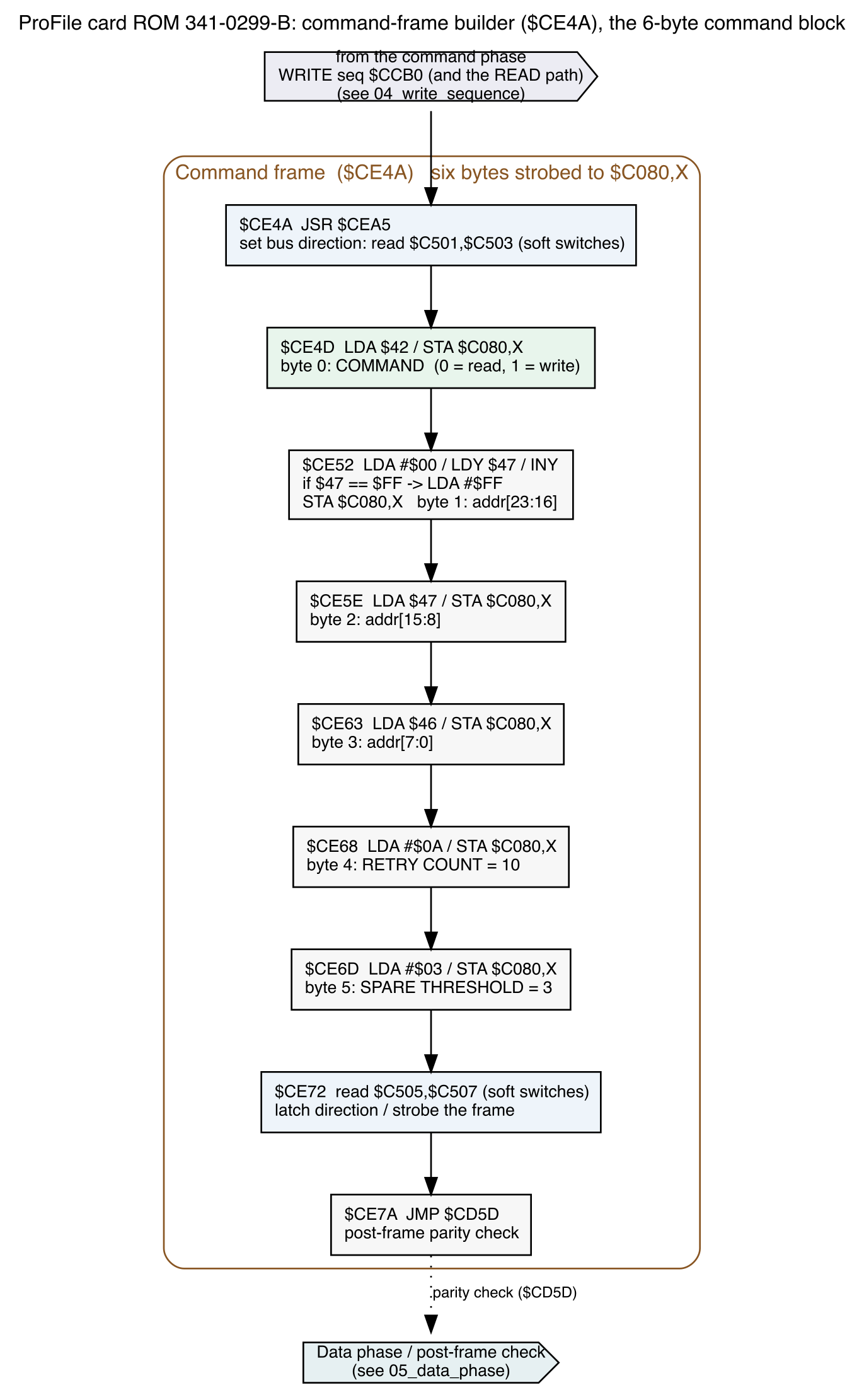
We've gotten to the point where the emulator is capable of booting the machine. I sort of hand waved over the end of the debugging cycle because it was already very long. In reality the end of the debugging cycle didn't go nearly as smoothly; once I got good bus conversations flowing through the card, I still had some minor trouble. I had to properly rewire part of it, and remove/rework quite a lot of debugging code so that it worked fast enough to meet the ROM's timing expectations. That process is really what netted me the flow diagrams in the previous entry; they were each painstakingly built out while debugging the emulator itself.
But we got there! A booting hard drive is literally the minimum requirement I had. And I started thinking about how cards like the CFFA card work. There are multiple volumes on some reasonably modern media, with a ROM hook at startup to detect a keypress and invoke a selection menu. Cards like this are built around older IDE drive expectations, so they tend do use the partition table and thus can only support 4 volumes. And when I'm talking about a relatively tiny CF card, maybe the wasted space is okay; but when we're talking about a 16GB piece of actual modern media, it seems absolutely crazy to be stuck with only one 10MB volume.
Here's my wish list, then. I want to be able to create an arbitrary number of volumes on my media, limited only by the size of the media itself, easily selected at boot time; with full 32MB volume support (as this is the maximum ProDOS volume size).
Which brings us to the first real obstacle. While I can obviously create whatever files I want on a microSD card, the boot-time selector is, typically, a function of the boot ROM. When you're designing a card from scratch you have that luxury. While I could write a replacement ROM, that feels like "a step too far" - for anyone that has a ProFile interface card in their Apple ][, where the card actually works, and they're looking to build/install some sort of hard drive replacement, it's reasonable to consider a peripheral that plugs in to the other end fo the cable; but it's not really consumer-grade product if they have to pop out a ROM chip along the way. Especially if that's likely to cause leaf socket fatigue failures.
No, I need another path. And I'm unreasonably excited by the one I came up with.
At boot time the ProFile card looks to the hard drive to retrieve state information from the drive itself, reading block $FFFFFF. This magic block number (and block $FFFFFE which is scratch RAM) was never in contention for actual drive space, because the drives in question were 5 MB or 10 MB - and with 512 byte blocks, that means we only need to address $4BFF blocks, at most.
After reading $FFFFFF, block 0 is read - the boot block of the device, which then loads whatever it needs to continue the boot process.
So what if we got sneaky here? The ProFile card, out of ROM necessity, always checks block $FFFFFF before it starts booting. What if, after seeing a $FFFFFF read, our emulator slipped in its own boot block that invoked its keydown press check?
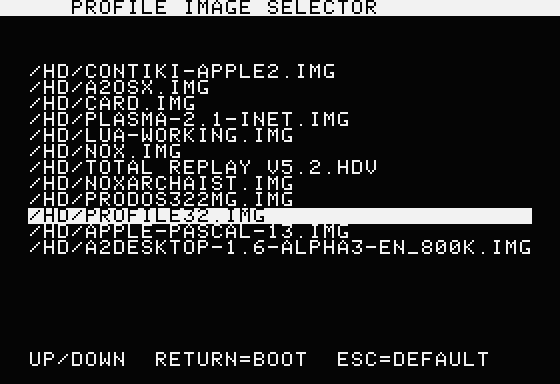
Well, if we did that, we'd wind up with something like this...
![]()
... nice. Once our fake boot block has loaded, it treats follow-up reads of block 0 as normal, allowing the device to boot once something is selected. With clever code in the emulator to send filenames to the Apple ][, we can run whatever we want - it's fairly trivial as long as we can keep it within block 0 (512 bytes). If it gets bigger we can apply the same trick as much as we like: reading block 1 might also be hijacked until some magic sequence unlocks it in the boot menu. So we can consider this one a solved problem, it just needs programming attention.
Our second wishlist item, then: 32MB volume support. This is a little more nuanced and took a little time to understand.
The ProFile card's ROM does no bounds checking at all, so on the face of it, we're free to make any size volume we want. You want a 12MB volume? Have at it. But there is one wire-level and one ROM-level issue slithering through the grass to bite your ankles.
The reason the card reads $FFFFFF at startup is to determine the drive size, which is reported in that block. That makes our first step of making a larger volume: report it as bigger in the info block. Easy enough.
Which leads to our first problem: arbitrary sized volumes aren't supported. In the boot path, is this bit of code:
$CBFD  LDA  $3C            ; boot-mode test: $3C and $0678 are the
$CBFF  ORA  $0678          ;   boot-path counters/flags. Both zero =
$CC02  BEQ  $CC4A          ;   ordinary driver call -> skip all of this.

$CC04  LDA  $46            ; low byte of the block count the drive REPORTED
$CC06  AND  #$03           ;   keep the low two bits
$CC08  BNE  $CC0D          ;   not a multiple of 4 -> skip the handoff
$CC0A  JSR  $CC75          ;   multiple of 4 -> HAND OFF to the loaded code

$CC0D  SEC                 ; (skip target, and the fall-through)
$CC0E  LDA  $0578          ;   restore/adjust the buffer high byte:
$CC11  SBC  #$02           ;   saved $45 minus the 2 the read loop advanced
$CC13  STA  $45
$CC15  DEC  $46            ;   decrement the 16-bit value in $46/$47
$CC17  LDY  $46
$CC19  INY
$CC1A  BNE  $CC1E
$CC1C  DEC  $47
$CC1E  JMP  $CB6A          ;   back into the read sequence
$3C contains the volume size as reported, and here it's being checked as a multiple of 4. Not a multiple of 4? Sorry, can't boot. But interestingly enough this is not checked again anywhere else - which makes sense, since every byte in this ROM is sacred. Safety checks would have been done once, at most, and performing that check at boot time means it's not important through the rest of the use cycle. So, okay, we must report at boot time that the drive size is a multiple of 4.
Second: any block over $FEFF is automatically aliased into the drive's $FFFFxx magic window. You can't actually address block $FF00; the card's ROM turns that into $FFFF00 automatically ("if the high byte is FF, then send the request to the drive as FFFFxx; otherwise send it as 00yyyy"). And while it might be tempting to say "just ignore the leading $FF", that would break the boot process, since the host reads $FFFFFF in order to determine the geometry to begin with.
Okay, so if the emulator ignores the top byte *except* for FFFFFF and FFFFFE, then we can support drives up to... what is that? 31.998MB? Or if we avoid the whole magically-remapped block issue, something like 31.75MB. Either seems reasonable enough, as long as we never need that extra 2k or whatever.
Aaaand of course we do. The Total Replay image - one of the more popular hard drive images out there - is, in fact, 32MB. And stuffed to the gills. If we want folks to be able to use this as a general-purpose hard drive akin to the CFFA, but using hardware they already own - we're going to have to be a little more tricky.
Like I said above: there's no real bounds checking for anything in this ROM. So let's lie a little. It's just a bitty lie, which probably won't hurt us.
If we tell the card, at boot time from the $FFFFFF block, that our drive is 31.75MB; then the drive size at runtime is actually divined from filesystem metadata, because operating systems of the era have no way to re-query the ProFile itself to ask "how big are you?" The best they can do is pull the volume size out of the formatted drive information itself. In ProDOS, that's stored in block $2; and it can be a real, full, 32MB value. As long as the boot time check is happy, we can decouple the claimed geometry from the number of blocks it's willing to serve. Which just leaves the question of how to use those extra blocks on the emulator side when they're requested post-boot.
And again, we'll do it by tracking what blocks the drive has read recently. Just like at boot: if we read $FFFFFF, then we know we want to substitute for $0 the next time it's read. And if we *haven't* read $FFFFFF, then we can assume the data being requested is an actual block that has artificially had $FF prepended to its address. Which works for every block except $FFFFFF itself. From behavior analysis, then: if we run a short-lived timer for any read access, we can tell that the drive must have been fallow before reading $FFFFFF in order to get the drive information block. It doesn't happen in the middle of other read patterns. And we don't need to do the same for any write at all - nothing writes to $FFFFFF, that's read-only. And I've found no utilities that try to use the ProFile's $FFFFFE ram page, which is to be expected; OSes didn't know about the quirks of arbitrary hardware, for the most part. You'd need to find a ProFile-specific program for it to be poking up that way.
And that's my wishlist in a nutshell - we've architecturally come up with plausible workarounds for them. So why, then, does Total Replay hang and never boot? Ah, that sounds like a topic for next time...
-
Act 3: Carnac the Magnificent
09/27/2026 at 18:30 • 0 commentsBuckle up, this one gets deep into the weeds.
I've got the schematic in hand, close as I can tell. And I need to figure out how I'm going to identify what is wrong with this card. It won't boot my hacked-together ProFile emulator card: why? Is it a problem in my hardware implementation? I know the interface card wouldn't boot a genuine ProFile 10, so there's something wrong there - how do I find it, or know when it has been found and fixed?
---------- more ----------With the ProFile itself this would be easier: use the known-good ProFile and debug away. But without one I'm fighting two simultaneous problems. If I want to solve this system, I'm going to have to know that when the Apple does , the ProFile should do , which means that the card did - and then find cases that violate those conditions, reverse engineer what failure on the card would cause that situation, and finally attempt some repairs.
My schematic tells me how everything is connected, but not what the card is thinking.
So I thought: I should start with the ROM. A disassembly of it will at least expose how the machine is supposed to use the drive; and from that, maybe I can build a reproducible test for any single part of the functionality. So here we go: 2048 bytes of code -
$C800                  STR      '(C) APPLE COMPUTER INC. 1984'
$C81C LC81C            PHP
$C81D                  SEI
$C81E                  JSR      LC829
$C821                  BCC      LC826
$C823                  PLP
$C824                  SEC
$C825                  RTS
$C826 LC826            PLP
$C827                  CLC
$C828                  RTS
$C829 LC829            STA      $3F
$C82B LC82B            LDA      #$00
$C82D                  STA      $3E
$C82F                  LDA      $C082,X
$C832                  LSR      A
$C833                  BCC      LC838
$C835                  LDA      #$28
$C837                  RTS
$C838 LC838            LDY      $42
...
... and so on, for a good while. It's data, to be sure, but we need it to be information.
Some of those entry points are known - ProDOS uses this as a standard block drive device, so we can annotate those entry points and generate a call flow graph to try to understand what it's actually doing and why:
$C800                  STR      '(C) APPLE COMPUTER INC. 1984'
$C81C DRIVER           PHP
$C81D                  SEI
$C81E                  JSR      DRV_DISPATCH
$C821                  BCC      RET_OK
$C823                  PLP
$C824                  SEC
$C825                  RTS
$C826 RET_OK           PLP
$C827                  CLC
$C828                  RTS
$C829 DRV_DISPATCH     STA      $3F
$C82B LC82B            LDA      #$00
$C82D                  STA      $3E
$C82F                  LDA      CARD_STAT,X
$C832                  LSR      A
$C833                  BCC      LC838
$C835                  LDA      #$28
$C837                  RTS
$C838 LC838            LDY      CMD
...
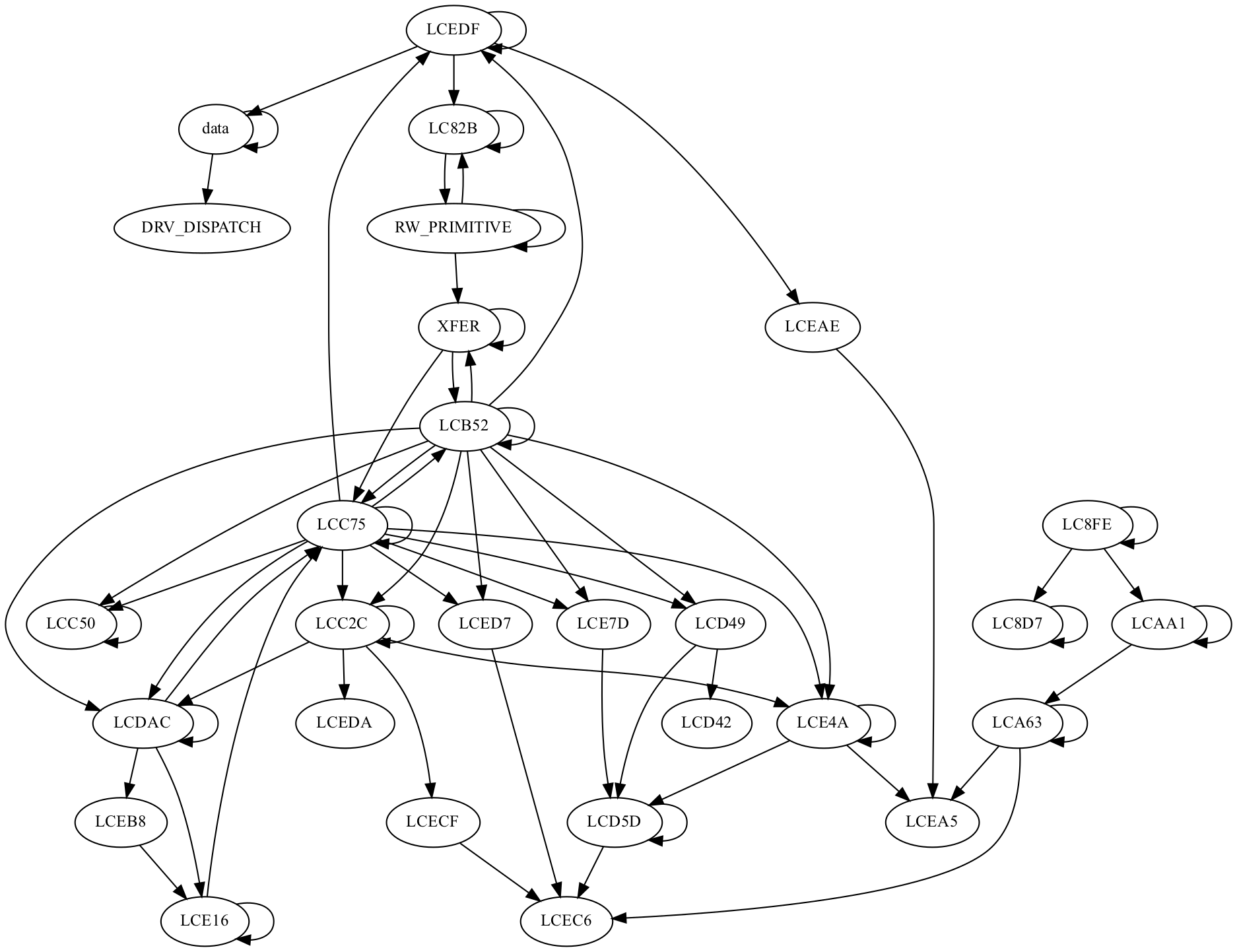
Nicer to read, but still difficult to interpret. Maybe the call flow will help:
![]()
Okay, maybe that's something, but it's clearly not enough.
The ROM dump gives us useful information about command behavior and timing. It corroborates things we already know (block $FFFFFF is informational, block $FFFFFE is the hard drive's scratch RAM). So it's possible to gin up a test like this -
   Apple //e                         DB-25            ProFile Teensy emulator
 +-----------------+    slot 5     +--------+   (stands in for the drive)
 | 6502 + card ROM |==============>|  card  |========> logs every byte, every
 | 341-0299-B      |  $C0D0-$C0D3  | 820-   |          handshake, and can be
 | probe ML at     |<==============| 5006-B |<======== told to assert or wait
 | $0300 / MLI     |               +--------+          for a specific state
 +-----------------+
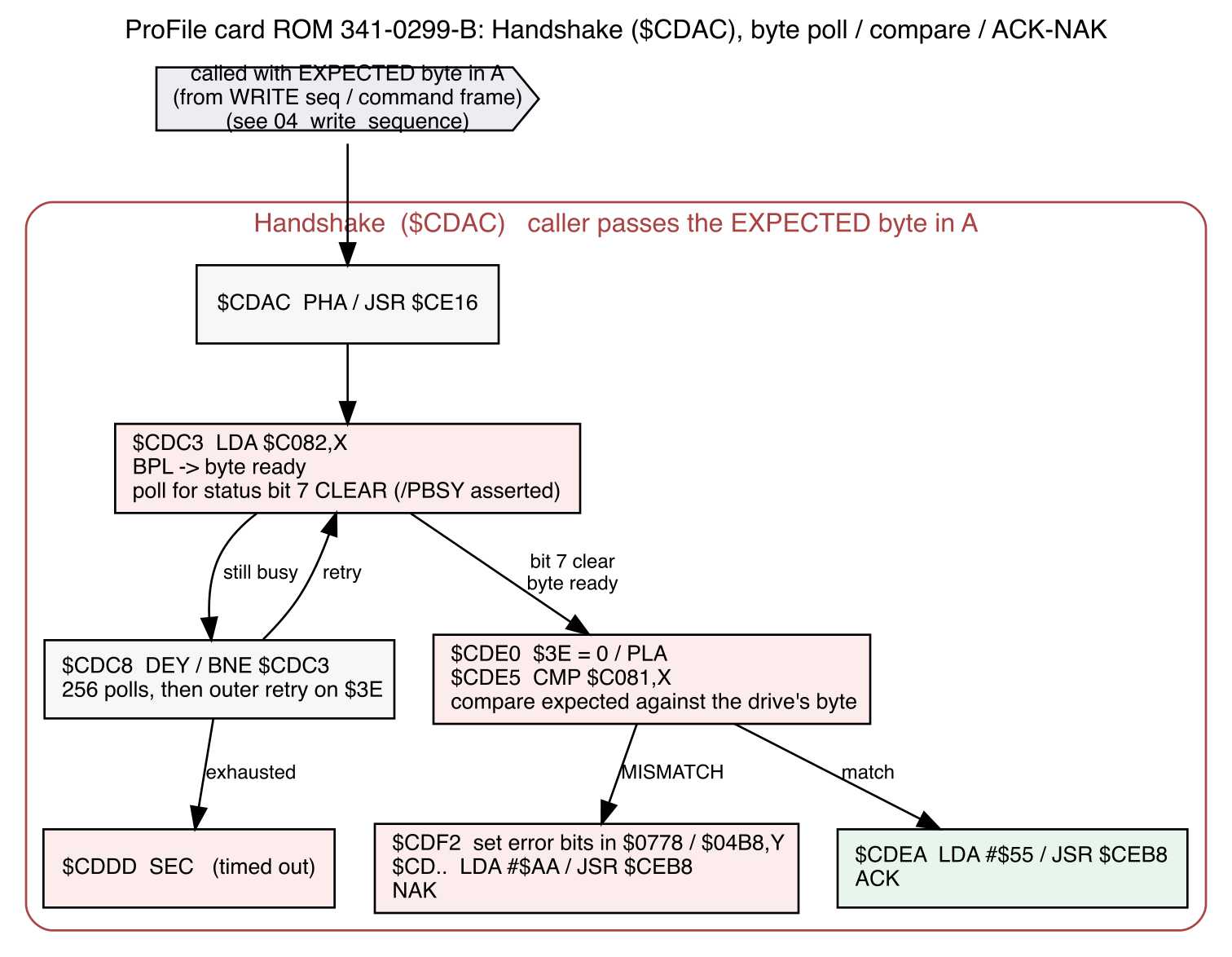
Testing was slow - boot the computer, watch the Teensy emulator, and do a PR#5 - the Apple should try to read blocks, and it does - `00 FF FF FF 0A 03` is "READ $FFFFFF" (10 retries, spare threshold 3). Then what I see after is `02 AA` - the drive enters command mode with 02, and then the card NAKs it with AA. What I should see is `02 55`. Hmm... what does that routine look like?
  $CB80  LDA #$03 / STA $06F8         ; progress marker = phase 1  (loop top)
  $CB85  LDA #$01 / JSR $CDAC         ; (1) COMMAND handshake, expect $01
  $CB88  BCC $CB9F                    ;     carry clear = completed
  $CB9F  BNE $CB80                    ;     A != 0 (NAK) -> retry; A==0 (ACK) ->
  on
  $CBA1  JSR $CE4A                    ; (2) send the 6-byte frame 00 FF FF FF 0A
  03
  $CBA4  BCS $CC21                    ;     (frame error)
  $CBA6  LDA #$0A / STA $06F8         ; progress marker = second confirm
  $CBAB  LDA #$02 / JSR $CDAC         ; (3) CONFIRM handshake, expect $02   <--
  here
  $CBB0  BCS $CB8C                    ;     carry set  = timeout -> error path
  $CBB2  BNE $CB80                    ;     A != 0     = NAK    -> RETRY from
  top
  $CBB4  JSR $CE7D                    ;     ACK'd: read 4 status/header bytes...
Well, that looks correct. We can see the confirm attempt at step (3), with a carry check after JSR $CDAC:
  $CDAC  PHA                          ; save expected ($02)
  $CDAD  JSR $CE16                    ; wait for /PBSY ready (timeout -> carry
  set)
  $CDB2  LDA ($3E),Y  x3              ; read $C505,$C507,$C504 soft switches:
                                      ;   set READ direction, release the '374,
  assert /PCMD
  $CDC3  LDA $C082,X / BPL $CDE0      ; poll status bit7 until the byte is ready
  $CDE0  LDA #$00 / STA $3E / PLA     ; restore expected ($02)
  $CDE5  CMP $C081,X                  ; <== compare $02 against the byte on the
  read node
  $CDE8  BNE $CDF2                    ;     mismatch -> NAK path
         ; --- match path (not taken on the fault) ---
  $CDEA  LDA #$55 / JSR $CEB8         ;     ACK: send $55, return A=0 (success)
         ; --- NAK path (taken) ---
  $CDF2  LDA #$02 / ORA $0778 / STA $0778   ; set error bit 1 ($CDAC mismatch)
  in the screen hole
  $CDFA  ORA $04B8,Y / STA $04B8,Y          ; paint it into the status hole too
  $CE02  LDA #$AA / JSR $CEB8         ; <== EMIT $AA on the wire  (JSR $CEB8 =
  STA $C080,X)
  $CE07  ...                          ; return with A != 0 / carry set  (= NAK
  to the caller)
So the card should only NAK if the byte on the wire (02) isn't $02 (at $CBAB).
If the drive believes it was successful, and we see success on the wire, and the code is checking for the exact success condition we are seeing, why are we seeing a failure? Something must be wrong on the wire. Maybe it's timing of what we're reading (this isn't a real ProFile drive, after all); or maybe we're close to finding something wrong in the card's logic chips somewhere.
We'll cut it in half again: if we drive a constant value onto the bus from the emulator (say, $02), and then read it back from the computer side, then we have no timing issue to contest with. Can we read a value as put on the wire?
Well, $C0D1 (as long as the card is in slot 5) is the data-in read register. We just need a little magic ritual to read it. Johnny Carson did it with a sealed envelope he'd hold to his head as Carnac the Magnificent: "$20.20." Rips it open and reads: "What will a gallon of gas cost by next year." He's got the answer and has to understand the question, which is pretty much where we are, with a slightly more technical ritual. First we have to understand how this card should work so we can build the ritual to find the question.
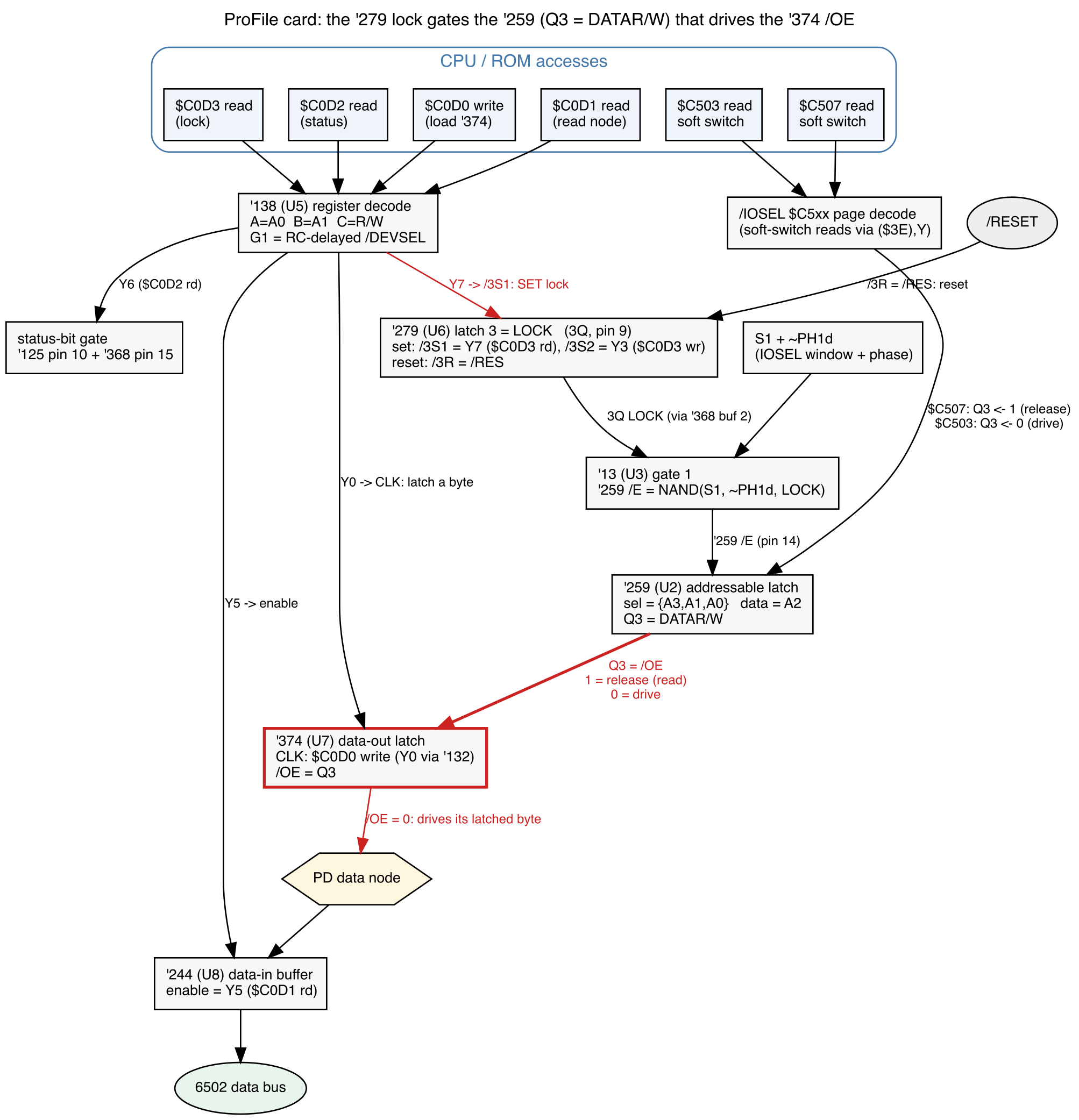
The ProFile card doesn't just magically put the bus in $C0D1 when you read it. It has no idea when you're reading that memory location. We're talking about a dance between four chips on the card: a '374, '244, '259, and '279.
The 374 is the data latch that holds our value outbound, what we write to the bus. It's paired with a '244 that reads data back from the bus. The '374 drives the bus only while it is enabled, and the '259 holds the one bit that decides that - flip it one way and the '374 is writing such that the '244 can only see the '374's value; and the other way the '244 can see what the drive is actually saying.
To get to that point we also need to describe a couple other chips that decode the address lines. This is the whole data flow:
![]()
which means that our ritual to read has to be:
- unlock the '279 direction latch (Y3 -> pin 10)
- Drive the '259 Q3=0 to enable the '374
- Clock $FF into the 374 as a baseline test
- Read what's on the '244 right now (should be $FF)
- Release the '259 Q3=1 to decouple the '374 from the bus
- Read the '244 to see that the bus is now released, should read our target data from the bus
- Re-assert the '259 Q3=0 for confirmation
- Read the '244 to see that we are now seeing our $FF driven value again
This is what we want to see:
] CALL -151
* C0D3: 00
* C503
C503- xx
* C0D0: FF
* C0D1
C0D1- FF
* C507
C507- xx
* C0D1
C0D1- A5
* C503
C503- xx
* C0D1
C0D1- FF
The xx are inconsequential reads of soft switches which are passed through as the switching signals to the card. It's really the reads to C0D1 that we expect: in this sequence, we're driving $A5 on the bus from the emulator, so we should read FF / A5 / FF (as written). Which is indeed what we saw. Drive a $02 from the emulator, we read FF / 02 / FF.
And that, my friends, is the sanitized version. It didn't go nearly that smoothly. The first time, I read back 03 instead of FF. PD2 through PD7 were being dragged low, repeatably, though it wandered with how the card was seated. That's not logic or code; it's a copper failure somewhere.
The 74LS38 was stuck low. This is an open-collector NAND gate in the data-read decode path, sitting on the data-in lines. The IC was fried; I replaced it, and started reading the FF that I expected. And yet the card still NAKed; this was not the only failure.
At this point the ritual passes as written; FF / A5 / FF as expected. The 374 lets go when told to, the 244 can read properly, and I can switch back and forth between the two.
Which is the worst possible answer, because it means the new failure isn't in the copper. It's dynamic. The same switch that flips perfectly when I single-step it from the monitor is not landing when the ROM fires it in the middle of a live transaction, with real bus timing, a real /IOSEL window and a real PH1 edge. The suspects become the stateful parts: the '279 lock, the 74LS109 flip-flops, and the RC networks that shape the strobe. At this point I have little choice: what I really need is to know what's on some of the pins, live, while the machine's running.
But that's my last resort. The last thing I want to do is blow out the card or //e logic board due to a stray popped-off clip during debugging. So I started with a looong continuity campaign: beeping every net against my as-documented circuit map. And I found something interesting: with the ROM out of its socket, pin 18 (the 2716's /CE) had no continuity to the '279 that drives it. The ROM had been running on luck, or fumes, or capacitive coupling, who knows. I'd read the ROM fully and correctly, twice, and missed it.
Now there's a choice to make. The ROM is in a socket, which is great for rescuing the part; but the socket is soldered on to the PCB and would require some surgery to replace. But maybe we don't have to: the reason it's failed is almost certainly fatigue on one of the socket holes - a flat-pinned leaf-contact socket operates by spring force and, with a fatigued leaf, won't hold true against the IC's leg. But a wider piece of metal might work fine. A modern, machine pin socket has exactly this sort of profile and, for the cost of rising the ROM up one IC higher, gives us back the continuity that was lost. At least for now. Also sobering: every dynamic observation before that moment had been made on a card whose ROM was only mostly enabled, so all of it was suspect.
And yet... it still NAKs. Two problems found and fixed, and we're still seeing exactly the same failure we started with.
In retrospect, the ritual lost me some time here. I was mostly testing with $A5 driven, which has bit 0 set, which left me blind to the next domino in our chain.
So I built a bigger hammer. Serial console into the //e, the emulator driven from a script, and a new emulator knob that answers the confirm with any byte I choose. Then sweep it, in the real boot path. The result was strange and, briefly,
thrilling: the card ACKed the confirm only when the emulator answered $01, three times out of three, and NAKed $00, $02, $03, $41 and $81. The identicalLDA #$02 / JSR $CDACsequence, copied into RAM and executed from there, ACKed $02 exactly like the source says it should. Same compare, same drive, same card; the only variable was where the instructions were fetched from. Conclusion, written
down with great confidence: the 2716 is delivering a wrong byte under live timing. Maybe the ROM is sick and needs to be replaced. Replacements can be found, that's not a problem, but I have none in stock. So, after ordering a few replacements for a permanent solution, I dug deeper.Spoiler: the ROM was fine.
The next morning an in-situ dump of the ROM at live bus timing came back byte-perfect. What the sweep had actually found was a trap in the ROM itself: when a confirm mismatches, $CDAC's error path re-handshakes expecting $01, the phase-one byte. So a sweep that answers $01 gets "accepted" because it matched the error path's retry, not the confirm. I had measured the failure mode and called it success.
Two things narrowed the gap.
The first was the 74LS109. This was new stock from 2021 that had seemingly died: on close measurement I found about 70 ohms to ground on multiple input pins in both polarities, where a healthy input reads one-way. Its FF1 is the card's parity-error latch, and a leaky FF1 behaves exactly the way this card had: statically clean, then set by anything, drifting between good and bad with handling and heat, probably degrading progressively. But somehow the original 1981 chip's inputs measured healthy, so it went back in. With a 100 pF cap from its preset pin to ground soldered at the socket as glitch insurance.
The second wasn't on the card at all. All the manhandling of my emulator board eventually snapped the BSY wire between the Teensy and the DB-25. The card's status bit 7 stopped tracking BSY, so the ROM's response-wait loop timed out. The Teensy could prove it was driving the pin, by reading back its own pad, while the card never saw it.
And finally, grudgingly, the //e read some blocks from the emulator and promptly crashed. Because the image I was using - the original 2021 artifact - is indeed not even bootable. It has its own corruption issues, and I suspect it was taken out of service specifically because the contents were somewhat corrupt. The filesystem looks intact enough but a few hours of side work showed a corrupted boot sector and some parts of the catalog hierarchy that were internally inconsistent.
Just look at the shape of all that. The card had two faults of its own: the '38 and the open /CE leg, where the NAK survived both repairs. Another part I replaced that didn't need it, I'd also broken it of my own testing; and the value sweep test that felt conclusive had confidently implicated an innocent chip. Many theories along the way were 100% reasonable. And wrong. Including the assumption that this hard drive image should boot cleanly when everything is working.
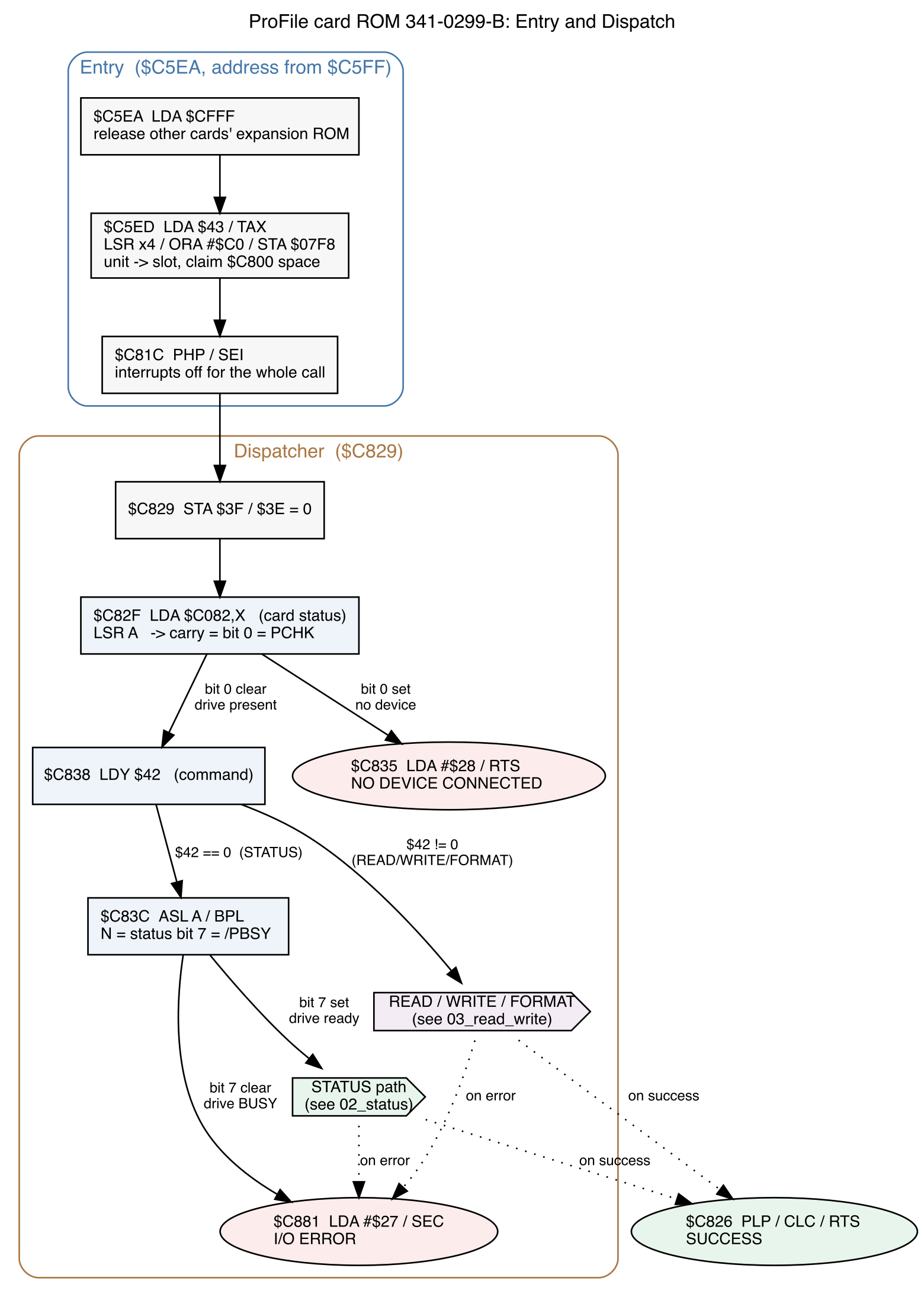
Which brings us to these very valuable reads - after getting to this point, I'd amassed a lot of behavioral analysis of the ROM and could build full flow diagrams of how the ROM behaves. Which becomes really important in the next entry...
![]()
![]()
![]()
![]()
![]()
![]()
![]()
-
Act 2: Tracing the Untraced
09/27/2026 at 14:13 • 0 commentsThe Apple ProFile service manual is generous in technical detail. You want to know what you'll see on your scope when a drive read is happening? There's a picture in there. But alas, the schematic in it is for the Apple /// interface card and I need the Apple ]['s. If I want to trace it out, I'm going to have to do it myself.
And that is what I did. I pulled the card and traced it, pin by pin, net by net. This is slow, meditative work: ohm out a connection, find both ends, decide what the part actually is, and draw it. Rather than lean on generic library symbols, I
drew custom ones so that every pin carries its real function instead of a factory label. When a pin's job is "D0 read strobe," the symbol says so.This was also my first foray in to KiCad. I've used Eagle for many many years - but their licensing changes a few years ago made it unrealistic for me to keep shelling out dough for a product I use a couple times a year. I decided to bite the bullet and figure out how to move on.
Which gave me another opportunity - scripting the state of the card. As I identified parts and interconnections, it was easy enough to build netlists in a script and have that script regenerate the whole schematic.
It took about a week in total. A lot of beeping, dragging, sweeping, head-scratching, double-checking and documenting. Pull out the netlists and build actual wiring, because that's easier for me to see while tracing something (instead of a netlist's invisible connection to three other places, I can follow the lines).
Now I wouldn't want to build a replacement from this. I wouldn't say that it's verified 100% accurate - there were definitely late nights where I was mis-documenting something that I had to come back and fix later! - but it worked for its purpose here.
This part was genuinely hard, mentally. I know that I've made absolutely zero progress on solving my problem. I decided that the tangential problem of not having the schematic was important, and it's now tackled well enough for me to move on; but my original issue is none the better for it.
-
Act 1: Understanding the Problem
09/27/2026 at 13:50 • 0 commentsFrom my ProFile 10MB reader project you can see where I started: a 10MB hard drive and Apple //e which did not want to talk with each other. That reader was the "divide the problem in half" project: is the failure the drive, or the interface card in the Apple //e?
It was the card.
And having passed that hurdle, the next question was: can I repair the card?
In 2021 I did a brute force IC replacement of all of the components I could easily source, just as a "if this fixes it, fine, I'm done" - but it didn't. So I swapped the components back out, put the whole lot in anti-static bags, and shelved it as a future project.
But here in 2026 it *is* the future! How lucky.
Now, I had no idea how I was going to find the problem; and once I did find the problem, I wasn't sure what I was going to do with the card. A ProFile card is a rare thing to have these days and it's compatible with precisely one line of hardware that has precisely two choices of what to connect to it. And while I've got the bigger of them - my whopping 10MB hard drive - I also know from my 2021 work that the drive is magnetically failing. The blocks are being spared out every time I spin up the drive.
Right. First things first: "what will I do with it once it's fixed" is a yet further future problem (for which you probably know the answer, given the title of this project). The one to focus on right now is: how do I find what's wrong?
Let's list the issues.
- It fails to boot the ProFile, but the drive works well enough to suck its contents out via custom hardware.
- I don't have a schematic. The best that exists is the Apple ProFile service manual which helpfully includes the schematic for the Apple /// interface card (p. 247), but not for the Apple ][.
- I don't know how it works. Even if I had the schematic, I'd need some way to tell that behaviors are or are not in line with expectations. I know the protocol now, sure - my dumper proves that - but exactly how the interface card performs its magic and how that interfaces to the operating system is, as I start, unknown to me.
And the assets.
- I have the card, inserted in a working //e.
- I have the ProFile - but it has developed a hard short on its logic board, so I'd have to repair it in order to use it directly.
- I have my ProFile reader and the other variants I built during that test cycle: a bus sniffer that sat between the ProFile reader and the drive, very useful while I was trying to understand the protocol; and a ProFile emulator, which I never quite got fully working but did use for some testing in order to limit how many times I needed to turn on the ProFile 10.
A lot to unpack, but this feels very tractable.
ProFile Emulator
FPGA-based ProFile drive emulator for the Apple ][, ///, and Lisa
 and voilá, Bob's your uncle.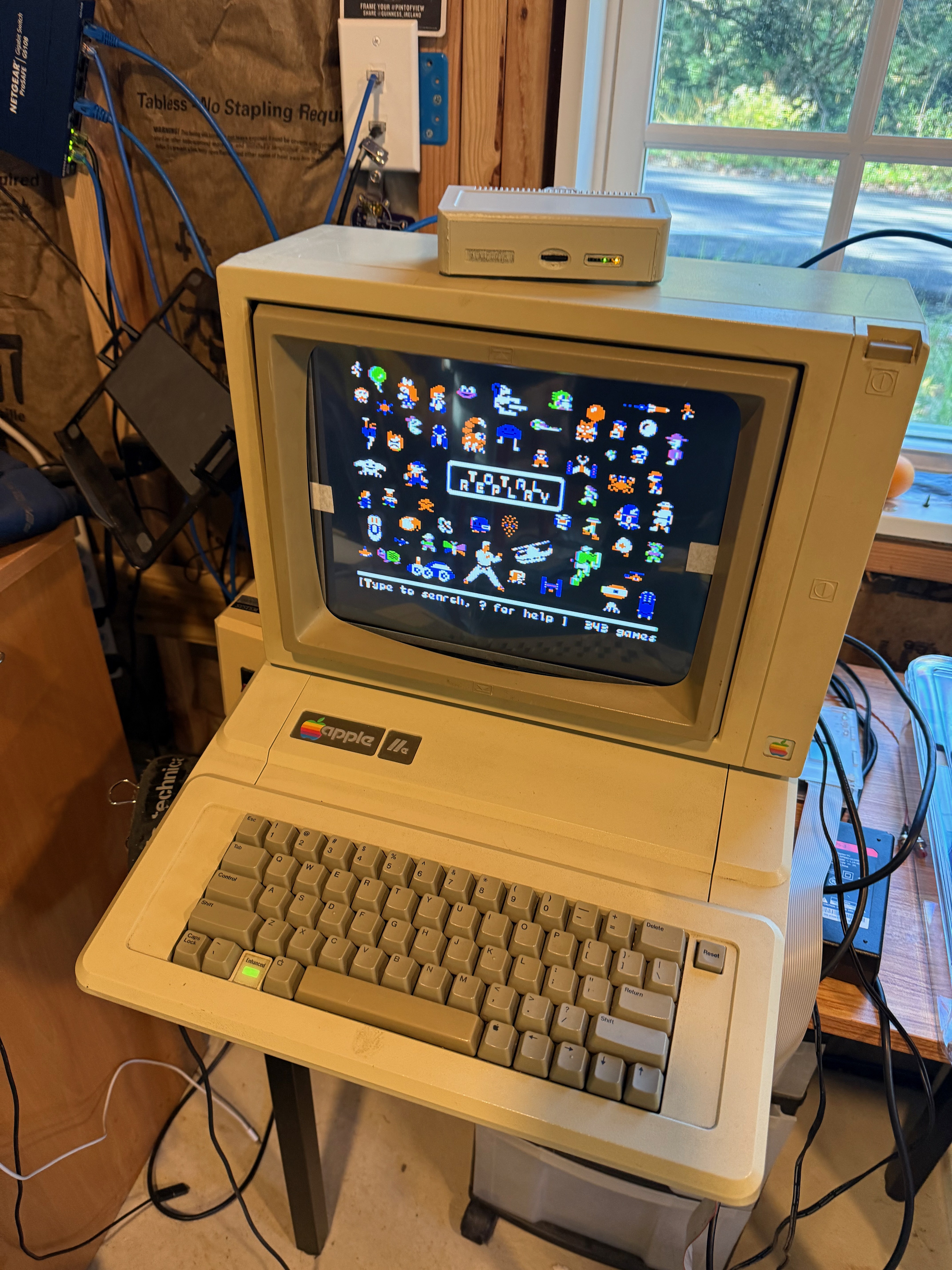
 I opted to take some risks: 0402 parts (look under "J4 JTAG" - those little black dots are 0402 resistors) and to err on the side of caution in other places (the TQFP-144 FPGA is a compromise: fewer pins, but I avoid BGA).
 Now, I"m a toaster-oven-reflow kinda guy. I've never made anything big enough where that's a problem; I don't even have temperature sensors in the oven. I use low-temp solder and, by hand, preheat (soak) the PCB below the melt temperature before cranking it up to melt-temperature and then cooling it back off. I've made hundreds of PCBs this way - all small, about 6" x 3" or smaller. But this relative behemoth, with its large TQFP-144 FPGA, I had no idea how it would go. And the answer would be "poorly."
 Not pretty, but it works.
 Now, you being the astute, detail-oriented reader that you are, may have noticed that the flash chip is now missing from the bottom of the board, where I've left a mess of flux in its place. That would be because it died. Natural causes, I'm afraid: someone piped 5v in a 3.3v input pin. Not sure who. Definitely not me, nosir.