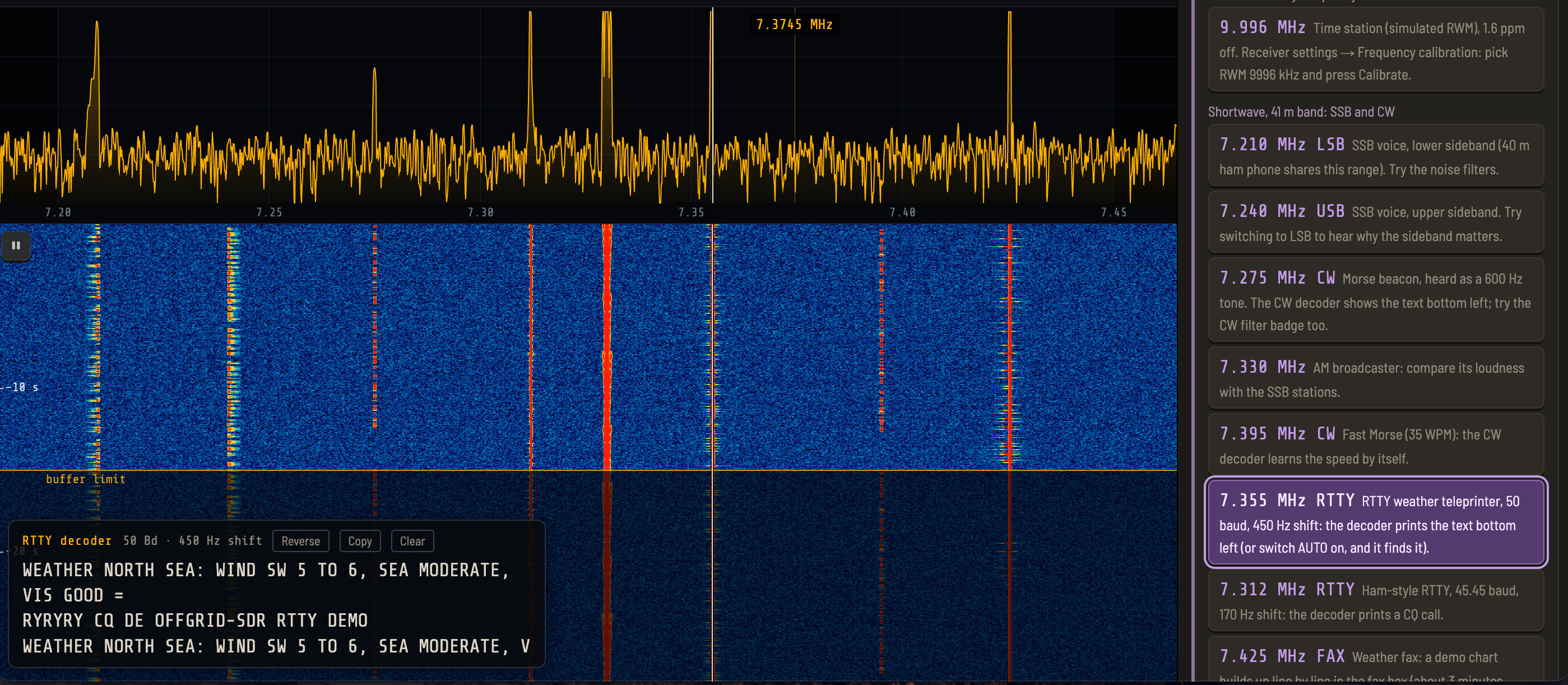
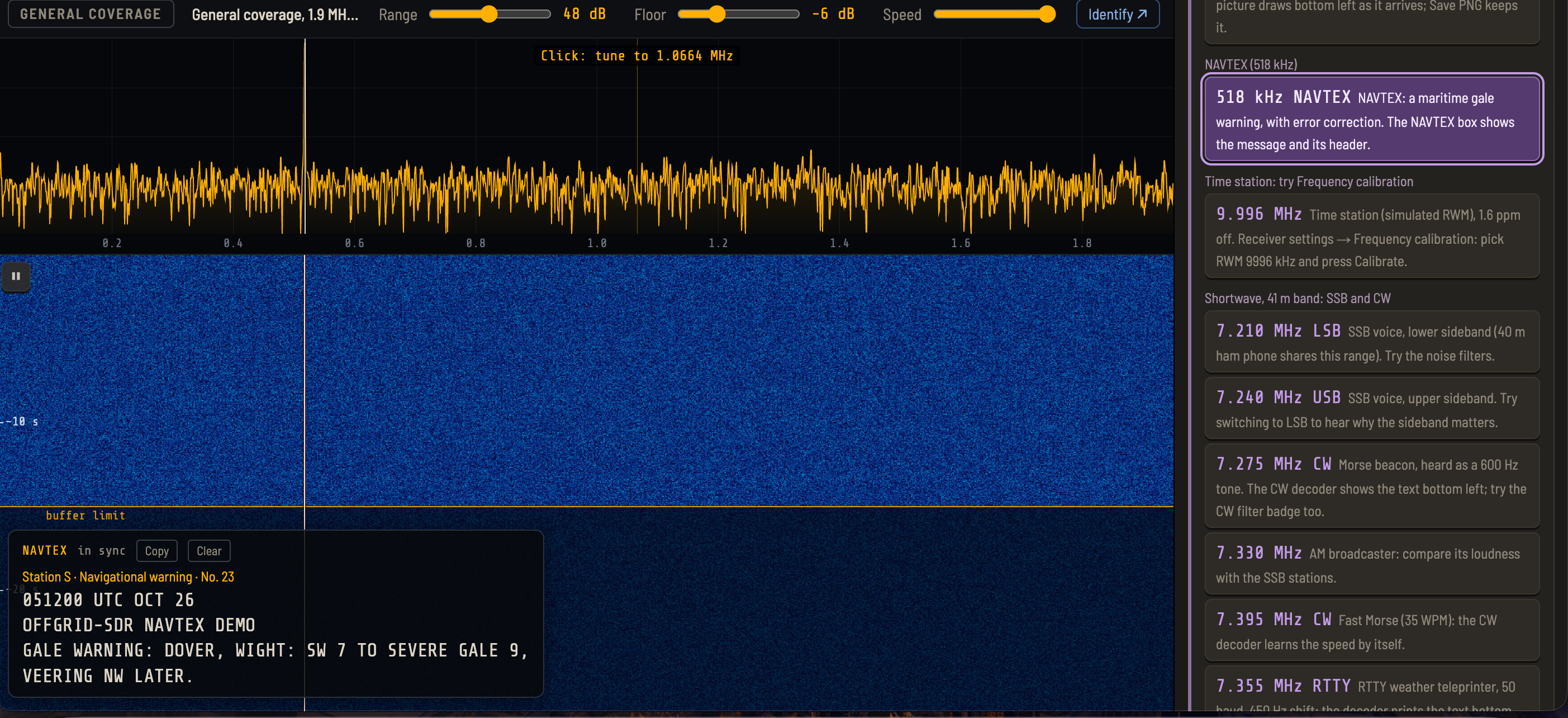
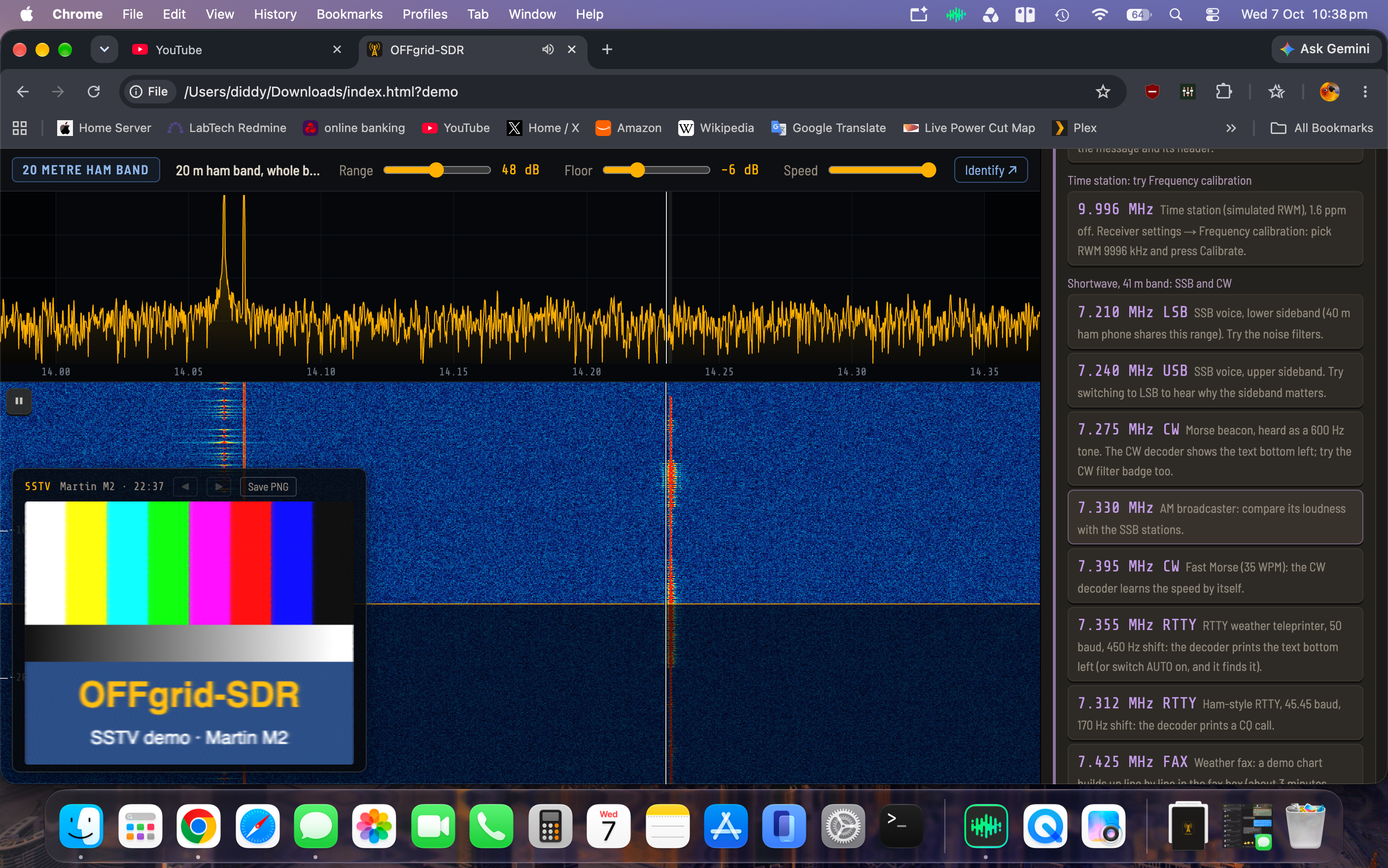
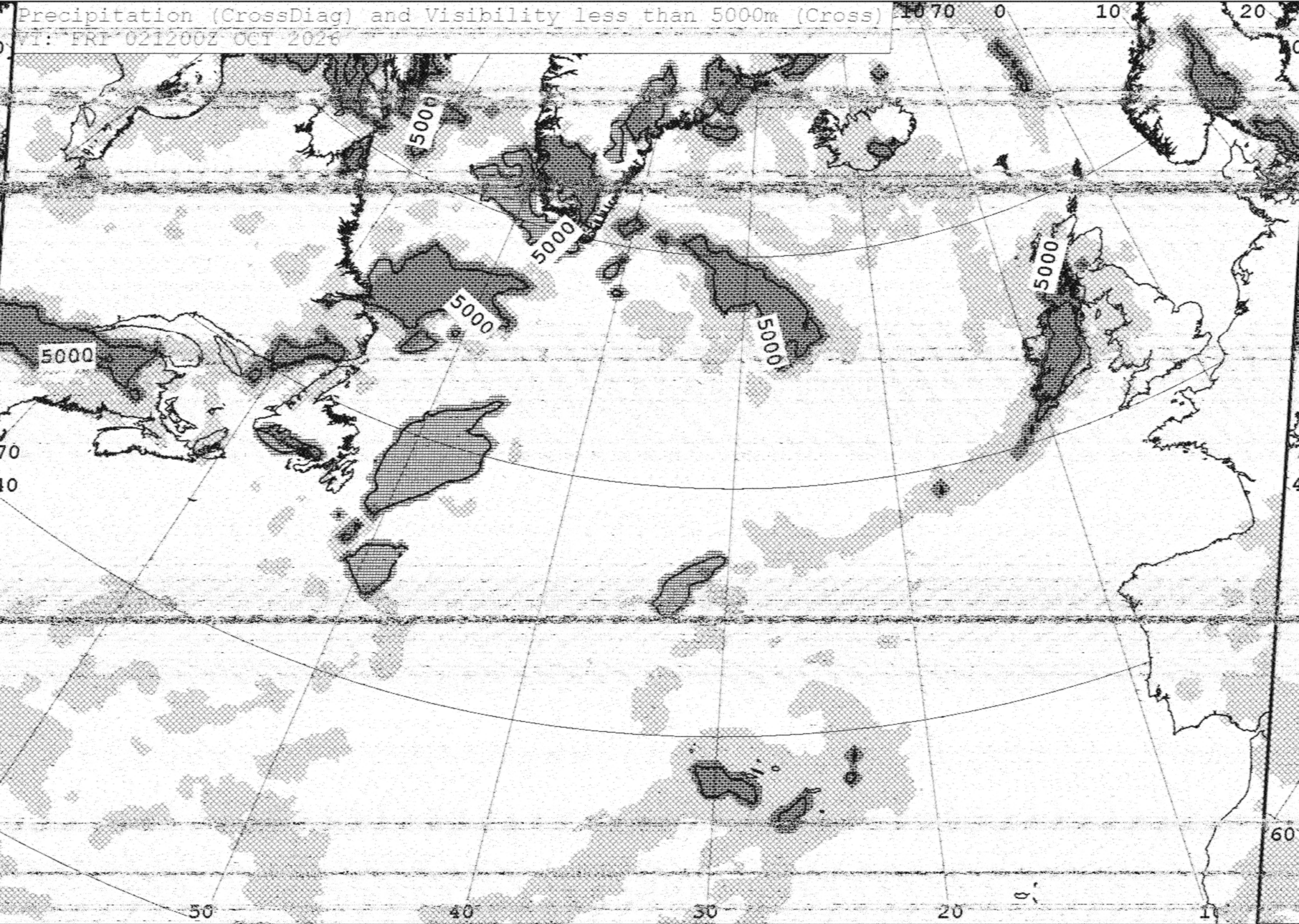
It’s still the same idea: a complete RTL-SDR receiver in a single HTML file that runs in the browser, with no installation, no drivers on most systems, and no internet. This release is mostly about making the receiver work things out for you, and making it more dependable on real hardware.
AUTO got much smarter
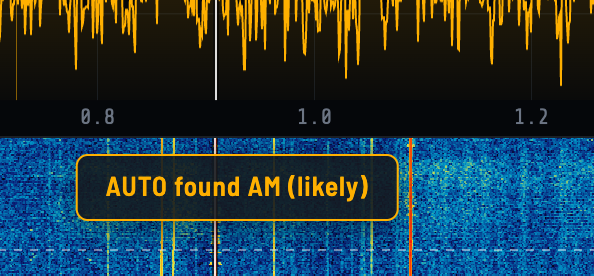
AUTO listens to a signal for a couple of seconds, works out what it is, and switches to the right mode. In 1.7 it handles SSB properly. It finds the whole voice wherever the dial sits on it, picks LSB or USB from where the speech energy sits, and then tunes to the suppressed carrier to within a few hertz. It does that by lining up the harmonics of the speaker’s voice: voiced speech is a comb of harmonics at whole multiples of the pitch, and the comb only lines up at the true carrier. Clicking an SSB signal on the waterfall does the same fine-tuning by itself.
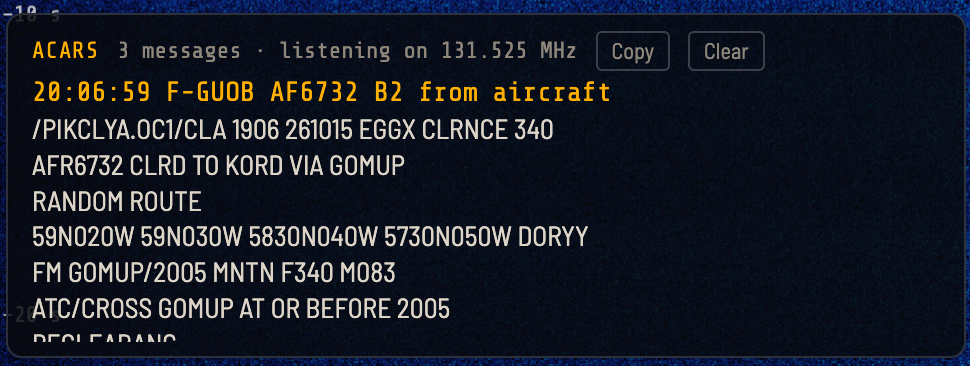
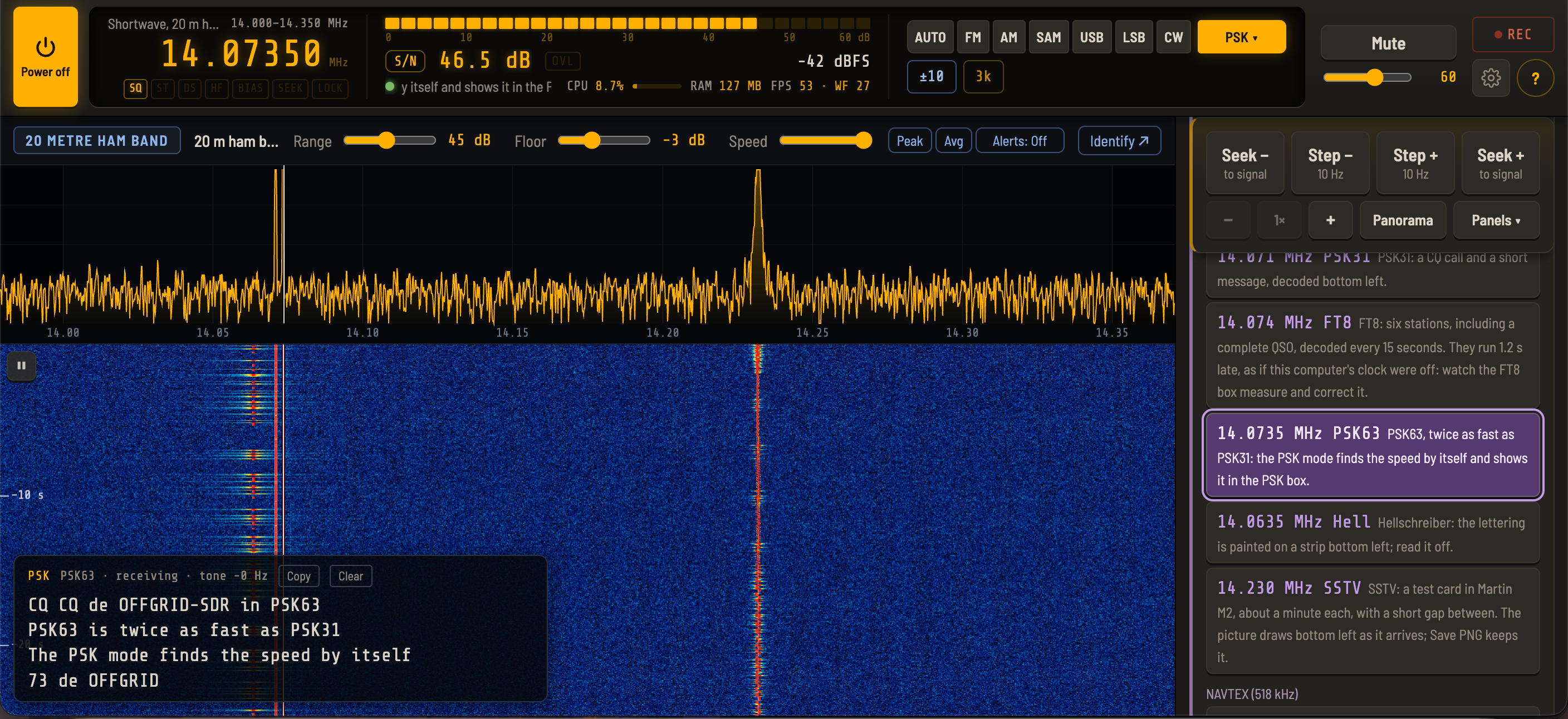
It also now recognises FT8, FT4, ACARS, PSK63 and PSK125. It no longer mistakes fading AM for Morse, an off-tune voice for PSK, or fast Morse for Hellschreiber. Each of those fixes came from a diagnostics log of a real signal it got wrong.
FT8 and FT4, still completely offline
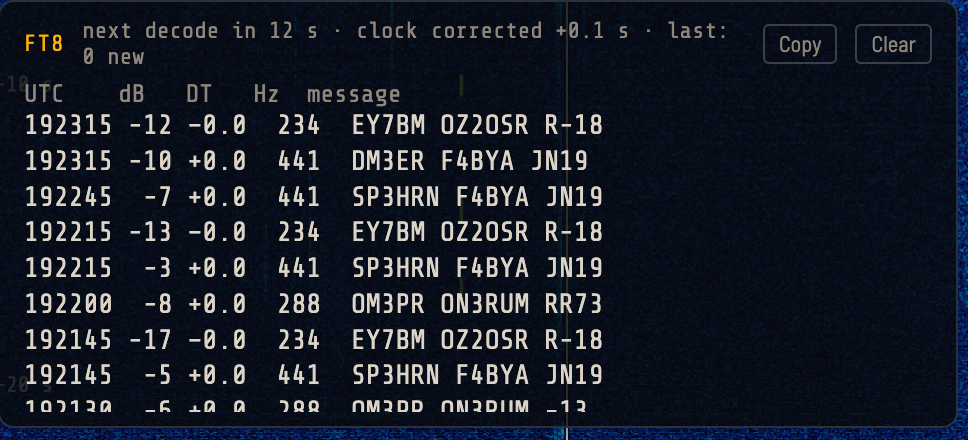
There’s a new FT4 decoder alongside FT8, and the decode list now shows each station’s country and its distance and bearing from you. None of that needs the internet:
Countries come from a table of callsign prefixes built into the file, covering 269 countries and areas.
Your location comes from 620 built-in cities, a locator you type in, or the computer’s GPS if it has one.
The clock, which FT8 needs within about a second, is corrected from the timing of the stations it hears.
The list can be sorted by distance with one click, which is a nice way to see how far your antenna is reaching.
Other additions
Keyboard shortcuts, including typing a frequency on the number pad from anywhere
Memory markers on the spectrum, and a UTC clock
PSK decoding that starts part-way through a transmission
RTTY that works out which way round mark and space are by itself
A power-on “lamp test” that lights every light in the top bar for two seconds, like a car dashboard
The bug hunt
The most interesting part of this release was a bug that only showed on a MacBook. After powering off and on, the receiver would come back with only noise until you changed band. The diagnostics log showed the stick on exactly the right frequency, locked, delivering data at full rate, but with everything 36 dB weaker. The tuner’s gain had been left at its lowest.
The cause looks like timing. On power-off the tuner goes into standby with its amplifiers turned down. On power-on, the first register writes after it wakes are exactly those amplifier registers, and on a fast USB path some of them seem to get lost. Re-sending the gain a moment after start-up cures it. It later turned up on a Windows laptop too, once the start-up sequence got faster.
Along the way I sent six fixes to Jacobo Tarrío, the author of the webrtlsdr library OFFgrid-SDR is built on, and he has taken most of them upstream. That includes a better fix for another restart bug, where the tuner’s frequency rounding made the receiver drift a few hertz at every restart until it stopped following the tuning altogether.
self-test
As part of future releases I have added in an internal self test tool as a way to bug hunt before release.
Future releases should be as near to bug free as possible.
OFFgrid-SDR 1.6 is out. It's still one file (`index.html`), can still run from a pen drive, and still needs no internet. This release tidies up the whole screen, adds three new decoders, and makes the radio much harder to knock over.
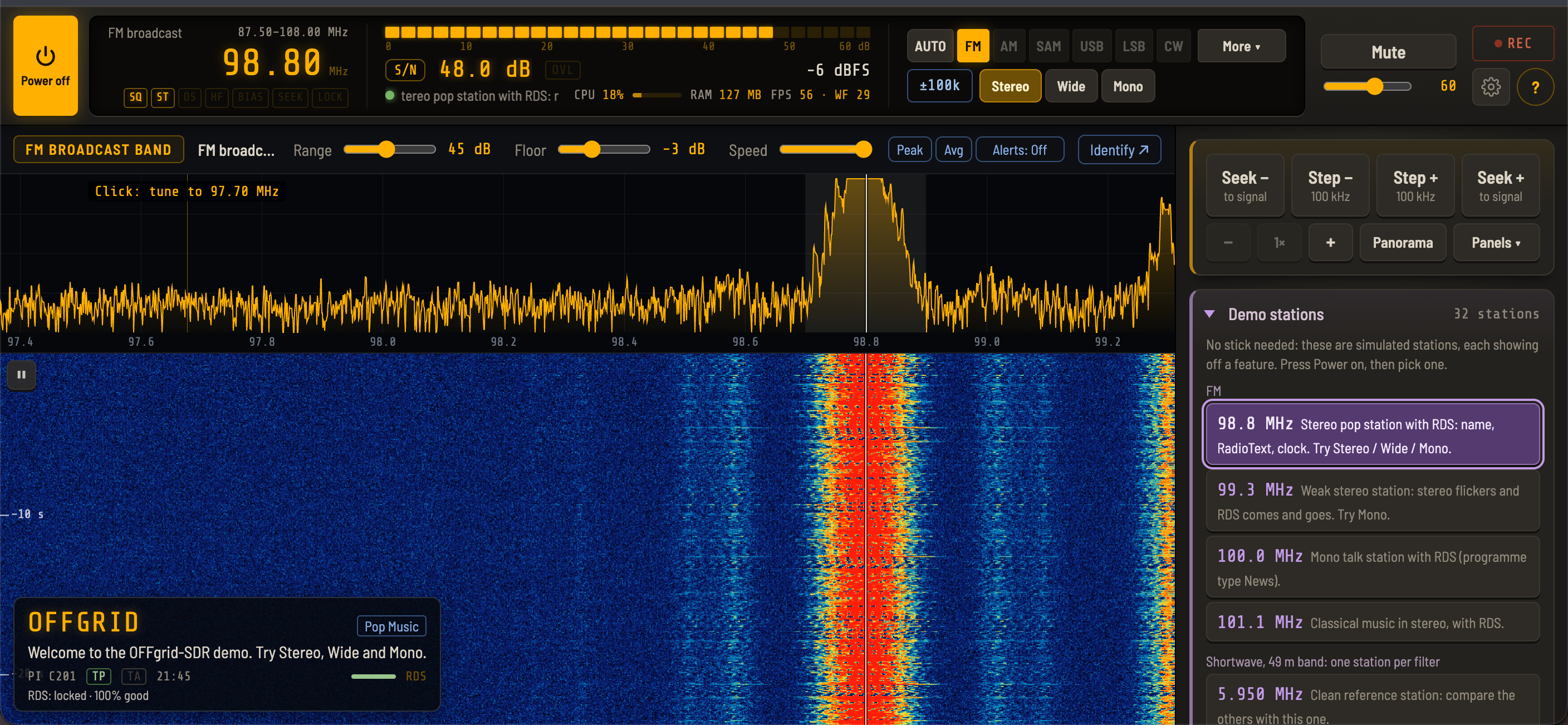
No stick needed to try it: open `index.html?demo`, and every new feature has a simulated station to play with.
A cleaner screen
After 1.5 the controls had grown, so 1.6 is mostly about making them easier to find.
**Top bar:** frequency, S-meter, mode, volume, mute, record, settings and help are always visible, on desktop and on phones **One-click modes:** AUTO · FM · AM · SAM · USB · LSB · CW · More ▾. SAM-U, SAM-L, the decoders and Wide/Narrow FM are under More **Settings dialog:** open it from the gear icon, with tabs for Device, Display & tuning, Audio & recording, Decoders, Calibration and Backup **No duplicate controls:** mode, filter width and step each have exactly one control now **Status lights** under the frequency digits, and a larger S-meter reading that balances the frequency **Seek / Step box pinned:** it stays at the top of the side panel while the panels below scroll, and a new **Panels** menu jumps straight to Band, Memories, Audio & gain and the rest **Zoom buttons** are now −, + and the zoom level (click it for the full view)
Layout stability got a lot of attention too. The Alerts button no longer shifts the spectrum toolbar, and the top bar no longer jumps in height on shortwave or when a frequency label appears. A status message that's too long for its space now scrolls instead of being cut off (with "reduce motion" on, it's shortened and the whole message is on hover).
Tall (portrait) view
On a Chromebook or tablet held upright, the page no longer scrolls, so the browser's tab and address bar stay put. The top bar, a slice of waterfall and the Seek / Step box stay in view, and only the panels below them scroll.
Overload indicator and RF gain per band
**OVL indicator** next to the meter: amber when the band keeps touching full scale, red when the receiver is overloaded - Click it while it's lit and it lowers the RF gain step by step until the overload clears, then shows what it changed, with **Undo** - Each band now remembers its **own RF gain**, so a busy band can run lower without changing the others. (Automatic gain stays one setting for all bands.)
Three new decoders
**FT8:** decodes everyone in the passband every 15 seconds. It also corrects the computer's clock from the stations it hears, so it works offline. The demo has FT8 stations on 14.074 MHz
**ACARS:** aircraft text messages on the airband, decoded and listed. The demo has an ACARS station on 131.550 MHz
**PSK** (was PSK31): now decodes PSK31, PSK63 and PSK125, and finds the speed by itself. The demo has a PSK63 station on 14.0735 MHz
Weather fax also works from any band now: choosing FAX away from shortwave tunes to the first fax station in the list.
Fast band switching, fixed
This was a nasty one. Change band quickly and the spectrum and waterfall could freeze while the audio carried on. A band change made while the sample rate was still changing (entering or leaving the airband and 2 m sections, slower on a slow computer) could also be lost.
That's fixed, and there's a safety net behind it: a watchdog restarts the display if it stops, and resends the frequency if the stick and the display disagree. You no longer need to go to another band and back.
USB stick recovery
Unplugging the stick, or the stick resetting, no longer leaves the radio stuck. It goes back to Off cleanly, and if it was on, it starts again by itself when the stick is plugged back in. There are also clear messages now for a lost stick, data stopping, samples going missing and the common USB errors (including the WinUSB driver on Windows).
Diagnostics log
If something does go wrong: **Settings → Backup → Save diagnostics log** saves the last three minutes of band changes, retunes and stick errors. It holds no audio, memories or personal data, so it's safe to send me if you hit a problem.
Thanks to everyone who has tried it, reported bugs and posted reviews. Keep the feedback coming!
OFFgrid-SDR 1.5 is out. It's still one file (index.html), still runs from a pen drive, and still needs no internet, but this release adds a neural network, a self-filling logbook, and a stack of tools for digging weak signals out of the noise.
No stick needed to try it: open index.html?demo, and every new feature has a simulated station to play with.
==== AI VOICE CLEANER ====
The headline feature. OFFgrid-SDR now includes RNNoise, a small neural network trained to separate speech from noise. It clears hiss, roar and noise-type jamming from voices in AM, SAM, SSB and FM voice, and in testing it took pure noise down by over 30 dB while leaving speech untouched.
• Four strengths: Light, Med, Strong and Full, in Audio & gain next to the other noise filters
• Built for speech: the stronger settings quieten music, and Full silences it. Light and Med blend in some of the original audio, so music stays audible
• It runs entirely inside the page, offline: the compiled network (about 112 KB) is embedded in index.html as WebAssembly, and only loads when you switch it on
On weak, hissy SSB it's genuinely impressive. Credit to Jean-Marc Valin and the Xiph.Org Foundation for RNNoise, and to Jitsi for the WebAssembly build.
==== SMART NOTCH ====
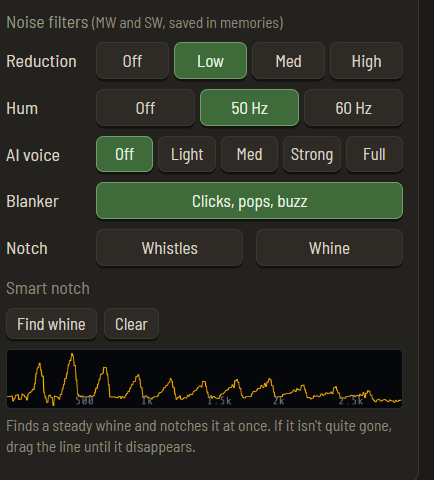
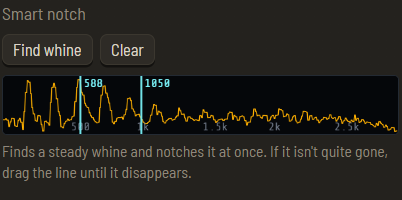
That steady whine from a heterodyne on a broadcast station? Press Whine. OFFgrid-SDR listens to the last 3 seconds of audio, finds a tone that stays at exactly the same pitch the whole time (speech and music move about; a whine doesn't), and notches it at once.
• On the demo whistle it cut the whine by over 50 dB
• It skips mains hum and points you to the Hum button instead
• A strip shows the audio you're hearing: click to drop a notch where you like (with a hover preview), drag a notch until the whine disappears, scroll to nudge it, right-click to remove it
• Up to three notches, cleared when you change station
==== THE LOGBOOK ====
OFFgrid-SDR now keeps a log for you: date and time (UTC), frequency, mode, signal (average and peak S/N), station and notes.
• Stations you stay on for 30 seconds are logged by themselves, and so are decoder results: NAVTEX messages, DSC calls, SSTV pictures and fax charts
• The station is filled in offline wherever OFFgrid-SDR can work it out: your own labels, RDS, the built-in station lists, the decoders, and callsigns picked out of CW, RTTY and PSK31 ("DE G4ABC")
• Edit any entry in place, export it as CSV for a spreadsheet, or have OFFgrid-SDR keep a CSV file up to date automatically
==== FREQUENCY LABELS ====
Right-click the spectrum or waterfall and name a frequency ("Local repeater", "BBC WS"). The label shows as a tag on the spectrum and under the frequency readout, fills in the logbook's station column, and travels in settings backups, so a kit can be sent out already labelled.
==== THE SPECTRUM: ALERTS, PEAK HOLD AND SIGNAL INFO ====
• New-signal alerts: a ring flashes on the spectrum where a signal appears on a frequency that has been empty for two minutes. Great on a quiet ham band or the airband
• Peak hold and averaging: a faint line of the strongest recent levels, and a smoother trace so weak steady signals stand out
• Signal info popup (optional): hover over a signal for its frequency, level, dB over the noise, width, band plan, known frequencies (FT8, WSPR, beacons, time stations and more) and your own label or memory
The alerts took some getting right. The first version treated "louder than usual" as new, and on a broadcast band every station fading back in set it off. Now each spot on the band remembers when it last had a signal, and an alert needs the spot to have been empty for two minutes. Three deeply fading broadcast stations: no alerts. A weak intermittent CW signal on 30 m: caught.
==== REPLAY: SCROLL BACK THROUGH IT ALL ====
The waterfall buffer from 1.4 could hold 60 seconds, but you could only see what fitted on screen. Now:
• While paused, the mouse wheel scrolls back through the whole buffer, with the time marks moving along
• ⇕ Whole buffer squeezes all of it onto the screen
• An FM replay decodes its own RDS
• The waterfall keeps running while OFFgrid-SDR sits in a background tab. Browsers pause drawing in background tabs, so the waterfall now builds its rows from the incoming radio data instead: come back, and everything you missed is there to scroll back to and replay
==== FOR OLDER AND SLOWER COMPUTERS ====
• Low-power mode halves the samples and the drawing. In testing on a computer slowed to a quarter of normal speed, the default settings broke up badly, while Low-power mode played with no audio gaps at all
• OFFgrid-SDR suggests Low-power mode when it notices the computer struggling: audio gaps, a very slow display or high CPU, for half a minute. It never switches it on by itself
• On phones and low-memory computers, the longer replay buffers are greyed out, so the browser can't run out of memory
It also runs well on a budget Lenovo 300e Chromebook, in laptop and tablet mode, landscape and portrait.
==== SMALLER CHANGES AND FIXES ====
• AGC speed (Slow, Medium, Fast) for SSB and CW
• SSTV in LSB on 40 m and 80 m, chosen automatically
• Airband names: type a 25 kHz-style name such as 120.625 and those channels keep the names you'd see on a chart, while 8.33 names like 123.805 keep the 8.33 style
• Ham bands always open in their own mode (LSB, USB or FM), and a mode AUTO picks is for that one signal only
• AUTO is instant on the airband, PMR446 and marine VHF
• A much sharper filter in AUTO's analysis: strong neighbouring stations, and the stick's DC spike, can no longer fold in as phantom signals (76 to 108 dB of rejection, up from 11 to 20 dB). Thanks to the reader who pointed this out after the 1.4 log
• PSK31 now locks on reliably, and the Hellschreiber strip no longer freezes
• New demo stations: an off-channel AM station for AUTO, a whistle-and-hum station for the smart notch, and an SSTV picture in LSB
Thanks as ever to Jacobo Tarrío, whose webrtlsdr and signals libraries make it all possible, and to everyone who has tried OFFgrid-SDR and sent feedback.
If OFFgrid-SDR is useful to you, there's a "Buy me a coffee" button in the ? help panel.
OFFgrid-SDR 1.4 is out, and it's the biggest update yet. It's still one file (index.html), still runs from a pen drive, and still needs no internet. But it now does a lot more than listen.
Grab it from GitHub: github.com/diddy-boy/OFFgrid-SDR
And no stick needed to try it: open index.html?demo, and every new feature has a simulated station to play with.
==== WATERFALL REPLAY: REWIND THE RADIO ====
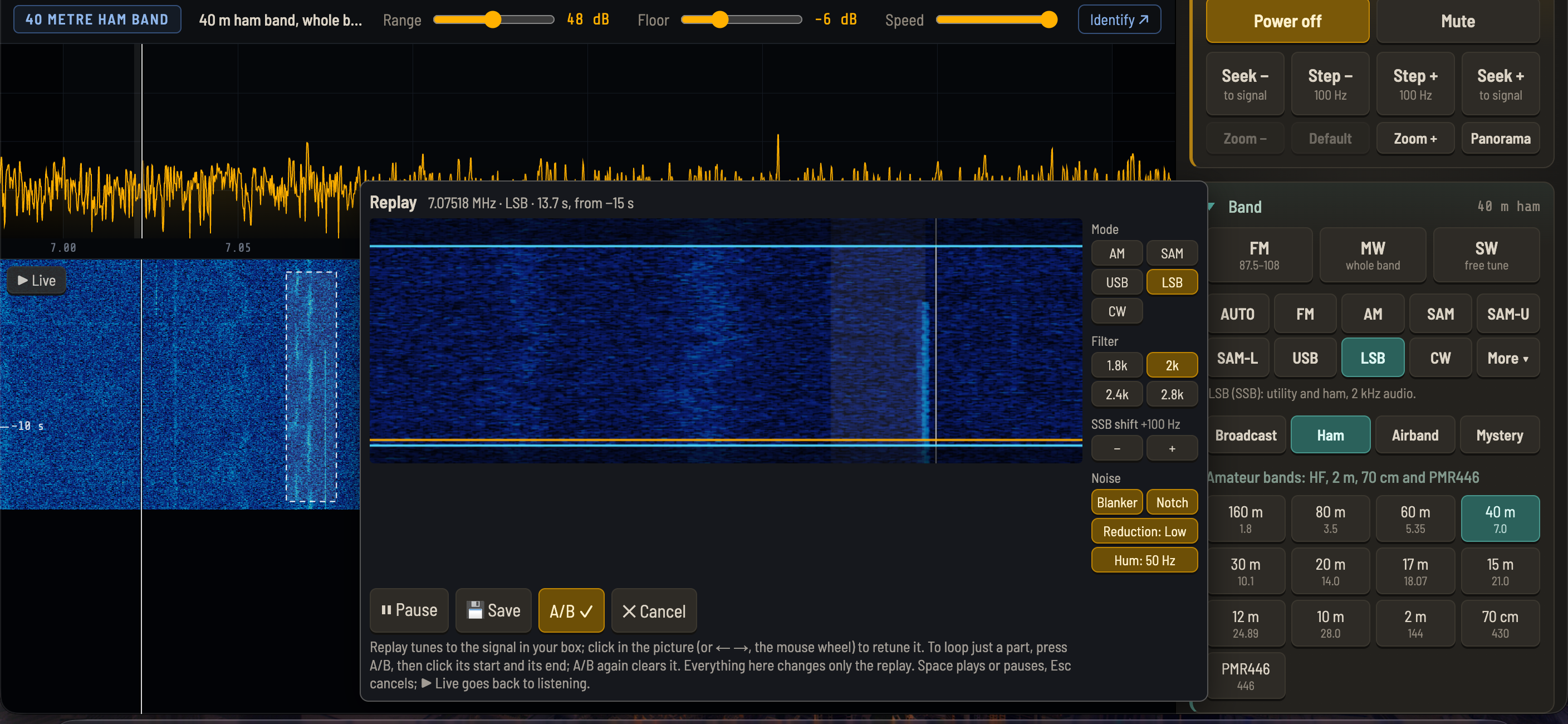
Ever spotted something interesting on the waterfall a moment too late? Switch on the waterfall buffer (15, 30 or 60 seconds) and OFFgrid-SDR keeps the raw radio signal in memory. Press pause, draw a box around any signal from the last few seconds, and a replay window opens with a zoomed view of that moment, playing it on a loop.
• The replay has its own mode, filter, SSB shift and noise filters, so you can try AM, SSB or CW on the same captured moment without touching your main settings
• Click inside the picture (or use the arrow keys or mouse wheel) to retune within the box
• In CW, the Morse in just that section is decoded
• A/B loops just the part you're interested in
• Save writes two files: an MP3 of what you hear, and a raw IQ file named so SDR#, SDR++ and others open it at the right frequency
How it works: the samples are stored as 8-bit I/Q (2 bytes each), so 30 seconds at 2.048 MS/s is about 123 MB. Each waterfall row records which stored samples it came from, so a box drawn on the picture maps exactly onto the signal. Replay runs those samples through a separate demodulator about 24 times faster than real time, so changing the mode on a replay is close to instant.
==== AUTO: "WHAT IS THAT SIGNAL?" ====
AUTO is a switch. Turn it on, and every time you tune somewhere new, OFFgrid-SDR listens for a couple of seconds, works out what the signal is, switches mode and tunes precisely onto it. A banner says what it found and how sure it is.
• Shortwave: CW, RTTY, PSK31, NAVTEX, DSC, weather fax, SSTV, Hellschreiber, AM and SSB
• VHF/UHF: narrowband FM and airband AM
• The FM broadcast band: wideband FM
• It even recognises DRM digital broadcasts (which a browser can't decode) and tells you what that block of hiss is
• If nothing is clear, it picks the band's usual mode: the right sideband on the ham bands, AM on broadcast bands, narrowband FM on VHF
The fun part was finding a signature for each mode:
• RTTY's two tones alternate (one on, the other off), while a Morse carrier and its keying sidebands rise and fall together. Measuring how the two tones move over time tells them apart.
• PSK31 flips its phase. Comparing the signal's phase 15 ms apart (spanning the dip at each flip) shows reversals that no other mode has.
• SSTV is frequency-modulated, so its strength is almost perfectly steady, unlike a voice.
• For SSB, speech is strongest at its low end, right next to the suppressed carrier, so where the energy bunches up tells you USB from LSB.
My favourite bug: AUTO kept "finding" a steady carrier on empty frequencies. It was the stick's own DC spike, which wasn't even in AUTO's view. The decimation filter that narrows the view lets strong signals fold back in, so a spike 22.5 kHz away appeared exactly 1.5 kHz from the dial. AUTO now ignores the spike where it folds to, as well as where it really is.
==== SIX NEW DECODERS ====
• RTTY: weather, news and ham teleprinter text. It finds the shift (170, 425, 450 or 850 Hz) and the speed (45.45, 50 or 75 baud) by itself.
• NAVTEX: maritime safety and weather messages on 518, 490 and 4209.5 kHz, with error correction (every character is sent twice).
• DSC: ships' distress, urgency, safety and routine calls, listed with who called whom (MMSI numbers), distress calls in red. A quirk of DSC: its check bits count the zeros, so an upside-down symbol checks out too. The decoder has to work out which way up the signal is from the phasing symbols at the start of each call.
• SSTV: slow-scan TV pictures in the Martin, Scottie and PD formats, drawn line by line as they arrive, and saved as PNG. On shortwave (14.230 MHz) and VHF, ready for the ISS on 145.800 MHz.
• PSK31: keyboard-to-keyboard ham text. Click a signal and it snaps onto it.
• Hellschreiber: the tone paints the letters, and you read them by eye, just like the 1930s machines. The strip is drawn twice, stacked, so there's always a complete row of letters, however the timing falls.
==== FREQUENCY CALIBRATION ====
Pick a time station (RWM, WWV/WWVH/BPM or CHU) and press Calibrate. OFFgrid-SDR mixes the carrier down, averages a few seconds, and measures it to a fraction of a hertz with a long FFT. It then sets the stick's ppm correction, and confirms it with a second measurement. The correction is saved in settings backups, so a kit can be sent out already calibrated.
==== A NEW MODE LAYOUT ====
The same ten buttons on every band:
AUTO · FM · AM · SAM · SAM-U · SAM-L · USB · LSB · CW · More
FM picks wide or narrow by itself (wide on the FM broadcast band, narrow on VHF/UHF). The decoders live under More. Modes that don't fit where you're tuned are greyed out, with the reason in the tooltip, so the row never changes shape.
A shout-out for SAM-U and SAM-L: synchronous AM using just one sideband, to dodge a neighbour splattering into the other side. It's usually only found on specialist receivers, and it has rescued a lot of difficult stations for me. It comes from Jacobo Tarrío's excellent demodulator library, which OFFgrid-SDR is built on.
==== SMALLER ADDITIONS AND FIXES ====
• CW tuning help: click near a Morse signal to snap exactly onto it, or press Z to zero-beat
• An RDS status line (searching / no data / locked · 98% good), so you can tell "no RDS" from "signal too weak for RDS"
• RDS now heals itself: it could stall after a pause, or on a busy computer, and it now restarts by itself if it loses lock
• AUTO, zero-beat and calibration no longer freeze the display: they process samples as they arrive instead of all at once at the end (found by a tester running a VM alongside!)
• An FPS readout beside CPU and RAM
• On direct-sampling sticks like the Nooelec on HF, the RF gain slider is greyed out with an explanation (the signal bypasses the tuner there)
• Lots of new demo stations: RTTY, NAVTEX, DSC, SSTV, PSK31, Hellschreiber, DRM, and a time station for calibration
Thanks to everyone who has tried OFFgrid-SDR since the rtl-sdr.com write-up, and as ever to Jacobo Tarrío, whose webrtlsdr and signals libraries make it all possible.
If OFFgrid-SDR is useful to you, there's a "Buy me a coffee" button in the ? help panel.
OFFgrid-SDR 1.3: Panorama, Scan, an auto notch and a lot more
OFFgrid-SDR has moved on quite a bit since version 1.1, so here's a round-up of everything new in versions 1.2 and 1.3, plus a few of the more interesting problems along the way.
As always, it's still one file (index.html), still runs from a pen drive, and still needs no internet. Grab the latest from GitHub: github.com/diddy-boy/OFFgrid-SDR
==== PANORAMA: UP TO 10 MHZ AT ONCE ====
An RTL-SDR stick can only see about 2 MHz at a time. Panorama gets round that by sweeping: it hops the stick across a wider range, takes a spectrum at each stop, and stitches the slices into one picture, up to 10 MHz wide.
• Around me: centred on where you're tuned, 2, 4, 6, 8 or 10 MHz wide
• Three HF slices: 0.5–10, 10–20 and 20–28.8 MHz
• Click any signal in the panorama and the receiver tunes straight to it, ready to listen
• Click Panorama again and you're back exactly where you were
A 10 MHz sweep takes around half a second on a real stick.
How it works, for the curious:
• While sweeping, the stick switches to 10 ms sample blocks (normally 50 ms), so little time is wasted after each retune
• After each hop, the blocks that were already on their way from the old frequency are thrown away, then one fresh block is captured
• Only the clean middle 80% of each slice is used, avoiding the roll-off at the edges and the DC spike in the centre
• The slices are level-matched, so the joins don't show as steps in the noise floor
• The top HF slice stops at 28.8 MHz on purpose: that's where both the RTL-SDR Blog V4 (its upconverter) and the Nooelec (direct sampling) switch their HF input, and those switch-overs are slow. Staying below it keeps every hop fast on both sticks.
==== SCAN YOUR MEMORIES ====
Press Scan, tap the memories you want scanned (they glow green), and set the squelch. Scan hops through them and stops on any with a signal, showing "SCAN: HOLDING ON A SIGNAL", then carries on 3 seconds after the signal ends. Anything you do by hand ends the scan.
It's ideal for airband, PMR446 or a handful of favourite stations.
==== IDENTIFY: WHAT'S ON THIS FREQUENCY? ====
The Identify button (above the waterfall, when online) now offers three lookups for the frequency you're tuned to:
• What's on this frequency? A web search
• Ask AI: asks Google's AI Mode what's usually there, given the frequency, mode and UTC time
• Shortwave radio schedule: below 30 MHz, opens shortwave.live's schedule database for that exact frequency, showing who's scheduled and when
Only the frequency (and for the AI, the mode and time) is sent, and only when you click. Offline, it's simply greyed out.
==== AUTO NOTCH: GOODBYE WHISTLES ====
The new Notch button finds steady whistles (heterodynes from a nearby carrier, the classic shortwave annoyance) and removes each with a very narrow 20 Hz notch, within about a second.
The first design was the textbook one, an adaptive "line enhancer" that predicts the audio and subtracts what's predictable. It removed the whistles, but it also ate the speech: over a few milliseconds a human voice is quite predictable too.
So it was rebuilt as "detect, then notch". Every tenth of a second it takes a fine spectrum of the audio and looks for narrow peaks that stay on exactly the same frequency for about a second. A whistle does; the harmonics of a voice keep moving as the pitch changes, so they're left alone.
The result: a whistle drops by around 40 dB, while the speech is essentially untouched. It handles up to three whistles at once and follows slowly drifting ones.
==== SSB FILTER WIDTHS AND PASSBAND SHIFT ====
• The filter badge now cycles SSB through 1.8, 2, 2.4 and 2.8 kHz with one click
• A passband shift slides the filter up or down without changing the pitch, to dodge a station just above or below
• Both are remembered per band and saved in memories
==== FASTER BAND AND SAMPLE-RATE CHANGES ====
Changing the sample rate (including going into and out of 2 m and airband, which use 2.4 MS/s) used to fully restart the stick: close the USB connection, reopen it, re-initialise the tuner. It now just pauses the sample stream, sets the new rate on the RTL chip and carries on. The pause dropped from about 0.8 s to about 0.1 s.
Testing it turned up a nice race condition. Starting a new sample stream is asynchronous, and if the next change asked it to stop before it had really started, the stop did nothing and the stream started anyway: an orphan stream that nothing would ever stop. Waiting for the start to complete fixed it. It's the kind of bug that only appears when you change things quickly, which is exactly what Panorama and Scan do.
==== A CLEARER TUNING LINE ====
The tuning line used to be amber, and it vanished over strong signals, which show as yellow and orange on the waterfall. It's now white with a thin dark edge, so it shows up over any colour.
==== SMALLER IMPROVEMENTS AND FIXES ====
• Each band button now sets its own mode and tuning step, and remembers your choices. Before, CW's 10 Hz steps could follow you into a broadcast band, so waterfall clicks missed the 5 kHz channels.
• Coming back from 2 m to a shortwave broadcast band no longer leaves you in NFM
• Clicking the display in general coverage (free tuning, e.g. at 252 kHz) no longer complains about band edges
• The squelch is now a clean on/off gate, like a real radio, with a little hysteresis so it doesn't chatter
• The Blanker and Notch are green toggle buttons, matching the other noise filters
• Shorter mode captions, with the full explanations in tooltips
• New demo station on 5.985 MHz, a talk station with a whistle, to try the Notch
• Demo mode no longer serves a moment of the old frequency's signal after a retune
==== THANKS ====
Thanks to everyone who has tried OFFgrid-SDR, and as ever to Jacobo Tarrío, whose webrtlsdr and signals libraries make it possible.
If OFFgrid-SDR is useful to you, there's a "Buy me a coffee" button in the ? help panel.
 diddy
diddy