Close
0%
0%

Mackerel-68k Linux SBCs

Homebrew Motorola 68k single-board computers running mainline Linux

Similar projects worth following
Mackerel is a series of homebrew single-board computers based on the Motorola 68k CPU family. The 68008, 68010, and 68030 boards all boot the same mainline Linux kernel, with a 68040 in the works.

The Mackerel family is a series of Motorola 680x0 single-board computers designed and built from scratch. As of mid-2026 all three boards boot the same mainline Linux 7.1.x kernel, from the 8-bit-bus 68008 up to the MMU-and-FPU-equipped 68030.

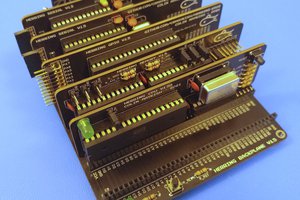
Mackerel-08

Mackerel-08 pairs the 52-pin PLCC MC68008 (a stripped-down version of the original 68000) with 512 KB of flash ROM, 3.5 MB of SRAM, and an XR68C681 DUART providing two serial ports and three bit-banged SPI connections (one wired to an SD card). Despite the 8-bit bus and no MMU, it boots a modern 7.1.x kernel into a BusyBox shell, with its root filesystem baked straight into the kernel image. It's quite possibly the slowest CPU mainline still supports.

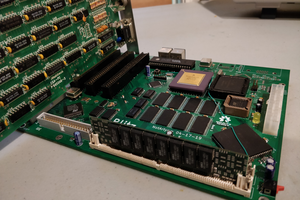
Mackerel-10

The second phase of the project. Mackerel-10 widens the design to a 16-bit data bus with a 68010 (or 68000) CPU and adds real memory: a DRAM controller implemented in a CPLD drives up to 16 MB DRAM in the form of 30-pin SIMMs. An onboard IDE header turns a real hard drive or a CF-to-IDE adapter into a proper block device. Like the 08 it runs NOMMU - and now the same mainline kernel.

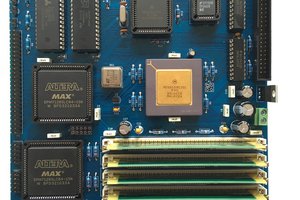
Mackerel-30

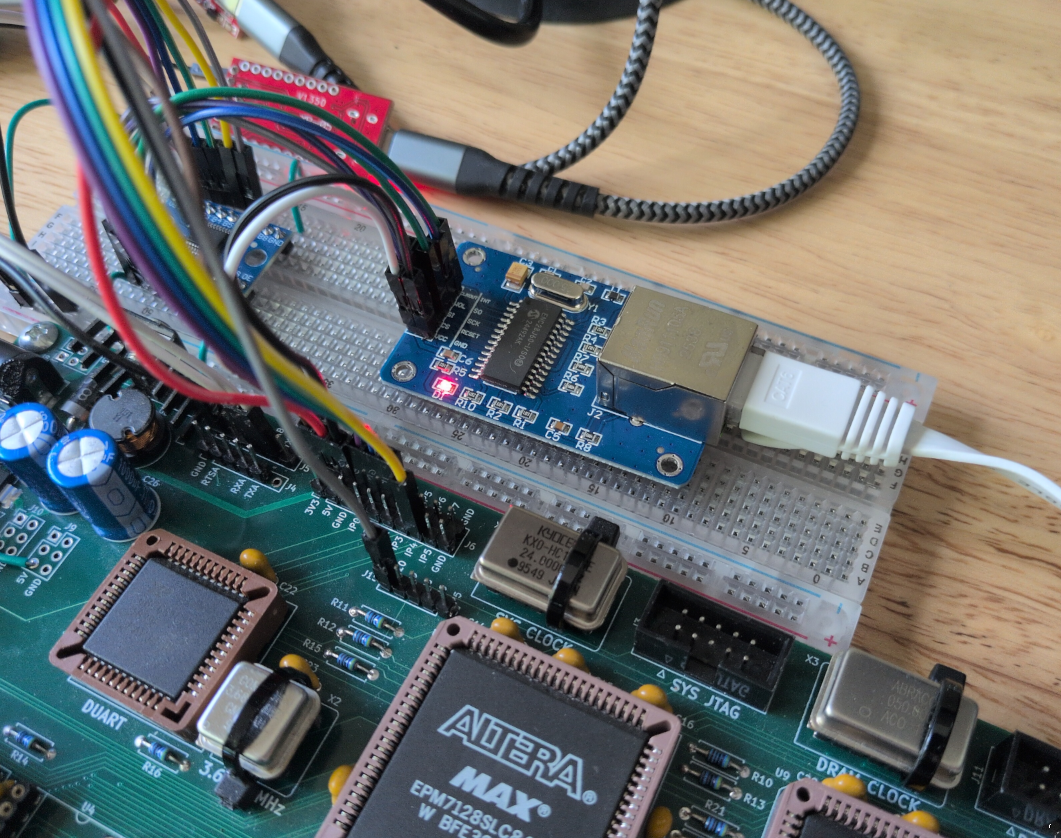
The first iteration with a 32-bit external bus. Mackerel-30 is built around a 68030 running at 20 MHz, with the Mackerel-10 DRAM controller upgraded to a 72-pin SIMM for up to 128 MB. It adds an MC68882 FPU and, crucially, a working MMU - so it runs Linux the way a "real" machine does: virtual memory, hardware floating point, IDE storage, and networking through an ENC28J60 over SPI. The same kernel as the 68008, just with a lot more functionality.
mackerel-10-v1.2-RELEASE.zip

Mackerel-10 v1.2 - Schematic, Gerbers, Firmware, PLD files

Zip Archive - 1.40 MB - 12/12/2024 at 16:33

Download

mackerel-08-v1.1-RELEASE.zip

Mackerel-08 v1.1 - Schematic, Gerbers, Firmware, PLD files

Zip Archive - 2.32 MB - 12/12/2024 at 16:33

Download

  • Mainline Linux 7.1 on a Motorola 68008 - The Slowest Still-Supported CPU?

    Colin Maykish06/07/2026 at 22:35 1 comment

    Mackerel-08 now boots the mainline Linux kernel! That's v7.1-rc6 at the time of writing. An 8 MHz-rated Motorola 68008 (here running at 14 MHz) and 3.5 MB of RAM are enough to boot the latest kernel into userspace and provide a minimal BusyBox shell. That's about all it can do. My attempts to add more kernel features quickly blow up the memory budget and the board runs out of RAM before it finishes booting, but it does technically run!

    In my estimation, this has to be one of the slowest real computers with full modern kernel support. If you know of one even more limited, I would legitimately love to hear about it. It's still amazing to me how versatile Linux is. This 40+ year-old cost-reduced CPU was not a powerhouse even in its day (the 68010 came out the same year), yet it boots the same kernel as my new Ryzen desktop.

    Mackerel-08 and Mackerel-10 have shared a functional uClinux port for some time now, but it was based on a decade-old release tarball I found online and used kernel v4.4. This actually worked out alright. There's honestly not a huge difference between v4.x and v7.x specific to the m68k architecture, but it was tied to an old prebuilt toolchain that I couldn't reproduce locally and it made adding new modern code to the project much harder - gcc 5.4 doesn't always want to compile the latest application code.

    Recently, I was able to boot v6.17 on Mackerel-30, but that system has a real MMU and comparatively a ton of RAM at 128 MB. I actually started with the goal of getting the 68010 with its NOMMU config running the same version as the 68030 and eventually settled on the latest release candidate, v7.1-rc6. I didn't really consider that the 68008 would be feasible with a decade of kernel bloat and its anemic memory budget. When the 68010 port went relatively smoothly, I set up a similar config for the 68008 and off I went: Step 1, remove everything from the kernel config you think you can live without. Step 2, keep removing stuff... Eventually, with a tiny ROMfs baked into the kernel image and all code executing in place (not copying into RAM first), Mackerel-08 managed to boot into BusyBox with a few hundred KB of RAM to spare.

    I now have the same kernel, with only per-board defconfigs and a few #ifdefs, booting and running on all three Mackerel boards.

  • Drivers, Drivers, Drivers!

    Colin Maykish05/31/2026 at 21:58 0 comments

    Mackerel-30 is actually shaping up to be a real Linux machine! I've spent a bunch of time recently building out drivers for all the hardware on the board. It now has persistent storage, a fully implemented serial port, and even networking. I'm pleased that none of the minor design problems with the first prototype PCB have prevented any of this work. Despite the shortcomings, Mackerel-30 (as well as my understanding of Linux kernel development) is progressing really well.

    IDE

    Mackerel-10 has a functional IDE driver in uClinux, but it's pretty bare bones and built on the older Linux kernel driver API. With Mackerel-30, I was able to implement the IDE interface on top of the more modern libata framework. The idea is still the same - tell the kernel about the memory-mapped registers and setup the proper interrupt lines. The lovely thing about Linux is that once you have the foundational layer working, you get all of the things above it for free. One IDE driver gets you block devices, filesystems, fdisk and other tools without any additional code.

    Speaking of IDE, I made a few tweaks to the bootloader IDE/FAT code that reduced the load time of the kernel image from 20 seconds to about 17. That's fine, but hardly noticeable in practice. The massive gains came from enabling the 68030's instruction cache before starting the IDE load command. This change alone dropped the time under 5 seconds for a 5MB kernel file. That's over 1 MB/s! Doing the math, there's still some performance on the table, but I don't think it's really worth the time to rewrite the IDE code in assembly.

    PPP

    I took a short detour to set up what turned out to be a terrible first network connection for Mackerel-30. PPP is a point-to-point protocol for handling network traffic over a simple serial port. I patched up the XR68C681 driver to handle the second port on the DUART and implement proper baud selection logic. With that in place, there's a config in the kernel to enable the protocol and then a simple cross-compile of the pppd binary itself.

    The second serial port (/dev/ttyXR1) is connected to my Linux PC, pppd is started on both ends. Tada! Network connection...

    ~ # pppd /dev/ttyXR1 9600 noauth local nodetach 10.0.0.2:10.0.0.1 &
    Using interface ppp0
    Connect: ppp0 <--> /dev/ttyXR1
    local  IP address 10.0.0.2
    remote IP address 10.0.0.1
    ~ # ping 10.0.0.1
    PING 10.0.0.1 (10.0.0.1): 56 data bytes
    64 bytes from 10.0.0.1: seq=0 ttl=64 time=210.000 ms
    64 bytes from 10.0.0.1: seq=1 ttl=64 time=210.000 ms

    This is extremely limited out of the box. The host PC and the Mackerel board can both ping eachother, but that's about it, not to mention the baud rate limit. I was only able to get the connection stable at 9600 bps.

    It's also possible to set up routing, iptables, and DNS and I did actually get Mackerel pinging the external internet, but this whole exercise was more of a proof-of-concept of the Linux networking stack on Mackerel than a practical result. Still fun to see though!

    SPI + ENC28J60 Networking

    DUART GPIO <-> level shifter <-> ENC28J60 ethernet

    And now for the fun one... There are so many peripherals that communicate over SPI. Having that interface available on the board opens up a world of options for connectivity, storage, sensors, etc.

    The only problem is that nothing on Mackerel-30 actually speaks SPI right now. Fortunately, Linux has a really solid bitbang SPI controller that can be easily implemented on top of just about any GPIO. I wired up the SPI code to the DUART I/O registers and, as with the IDE driver, every layer above it just falls into place.

    The cheap ENC28J60-based ethernet breakout board I have requires only a SPI connection plus a single interrupt line. There's a driver already available in the Linux kernel and it's one config option away.

    ~ # uname -a
    Linux mackerel 6.17.1-multi-00028-g5b42c9f55f18-dirty #1 Mon May 25 11:28:54 EDT 2026 m68k GNU/Linux
    ~ # ping -c 4 google.com
    PING google.com (142.250.65.78): 56 data...
    Read more »

  • Discord Server Is Up

    Colin Maykish05/23/2026 at 19:26 0 comments

    For whatever reason, I've seen a recent increase in interest for the Mackerel-68k project. This is great! I'm very happy that folks are enjoying the project, building boards, and running code.

    Since questions and comments are coming in from all over the place, I think it makes sense to centralize them.

    With this in mind, I've set up a dedicated Discord server:

    https://discord.gg/DtvXxYCt2Q

    If you need help with hardware bring-up, want to show off your build, or just want to talk about the project, please come by.

    Please keep in mind, this is a hobby project. I work on it in my spare time. I am happy to help out, but set your expectations accordingly.

  • Linux 6.17 On Mackerel-30

    Colin Maykish10/17/2025 at 05:16 2 comments

    After a long battle with toolchains, head.S, and a serial driver, Mackerel-30 now boots Linux kernel 6.17 (the latest release at the time of writing) and hands control over to an interactive Toybox shell. A minimal system for sure, but a fully functional, standalone, and modern Linux installation on an almost 40 year-old CPU. I'm feeling pretty good about this accomplishment. Here's a rough outline of how I got here.

    The first hurdle is setting up a toolchain. Unlike with Mackerel-08 and Mackerel-10, I didn't have the advantage of a complete build system with precompiled toolchain like the one provided by uClinux. Every piece had to be put together manually. I settled on using crosstools-ng to assist in the toolchain setup. Like the Linux kernel itself, crosstools-ng still supports the m68k architecture. It took a lot of trial and error (and many objdumps), but I settled on a toolchain consisting of gcc 15, binutils 2.45, and musl as the C library. The most painful part of this step was figuring out the right combination of crosstools config settings and CFLAGs to get a binary that contained only 68030-supported instructions and no FPU instructions (my FPU is still disabled).

    With a functioning toolchain, I could compile the kernel. I started working my way through early kernel boot code, methodically placing putc calls all over the head.S assembly file. I spent what felt like too much time trying to coerce Linux to work with my memory map until I gave up and adjusted the address decoding on the CPLD to align with the Linux m68k expectations, removing the SRAM chip entirely and remapping the 128 MB of DRAM to 0x00000000-0x7FFFFFFF. The MMU was set up to pass these physical addresses to the same virtual addresses. Mackerel-30 had finally reached start_kernel().

    Optimistically, the hard part was now over - the kernel was booting and I had output coming through the early console. I had to write a proper serial driver for the XR68C681 DUART, move the timer interrupt duty to the CPLD, and debug a few minor issues, but before too long, Mackerel-30 was making the jump to userspace. This event was anticlimactic as there wasn't one.

    There are a million options when it comes to building a userspace and it's where a lot of the fun of building a Linux system happens. With a modern kernel, MMU support, and working console I/O, the possibilities are endless, but it's best to start simple. I chose a barebones root filesystem populated almost exclusively by a single Toybox binary and a few symlinks. Toybox can act as the init system as well as the interactive shell with a handful of useful commands. I used cpio to pack this barebones filesystem into an initramfs and bundled it with the kernel image. Mackerel-30 is now a complete Linux system:

    $ hostname
    mackerel
    $ uname -a
    Linux mackerel 6.17.1-multi-00013-g4a905c110481-dirty #5 Thu Oct 16 18:39:30 EDT 2025 m68k Toybox
    $ cat /proc/cpuinfo
    CPU: 68030
    MMU: 68030
    FPU: none(soft float)
    Clocking: 8.1MHz
    BogoMips: 2.04
    Calibration: 10240 loops
    $ free -h
         total used free shared buffers
    Mem: 123M 4.1M 119M 736K 0
    -/+ buffers/cache: 4.1M 119M
    Swap: 0 0 0
    $ mount
    rootfs on / type rootfs (rw,size=62652k,nr_inodes=15663)
    devtmpfs on /dev type devtmpfs (rw,relatime,size=62652k,nr_inodes=15663,mode=755)
    proc on /proc type proc (rw,relatime)
    sysfs on /sys type sysfs (rw,relatime)

    Next up is a lot of cleanup. There were definite corners cut in the bring-up process and now is a good time to revisit some of the dirtier hacks before I forget everything and move on.

    On the top of the todo list is an IDE driver. I implemented a crude PIO-based driver on Mackerel-10 and that's working well enough, but it relies on an older driver interface. I think there are more modern examples to explore on Mackerel-30. Either way, permanent storage unlocks a lot of functionality and gives me the option to boot from a real drive instead of a temporary RAM-based filesystem.

    I'd also like to finish bringing up the...

    Read more »

  • 128MB Ought To Be Enough For Anybody

    Colin Maykish01/04/2025 at 17:59 4 comments

    I was a bit premature in declaring the DRAM controller for Mackerel-30 complete. It was minimally functional as an 8-bit wide memory, but failed for any multi-byte or offset bus cycles. Implementing these wider memory cycles correctly requires some additional logic in the controller to correctly select the CAS lines for all possible bus cycle types.

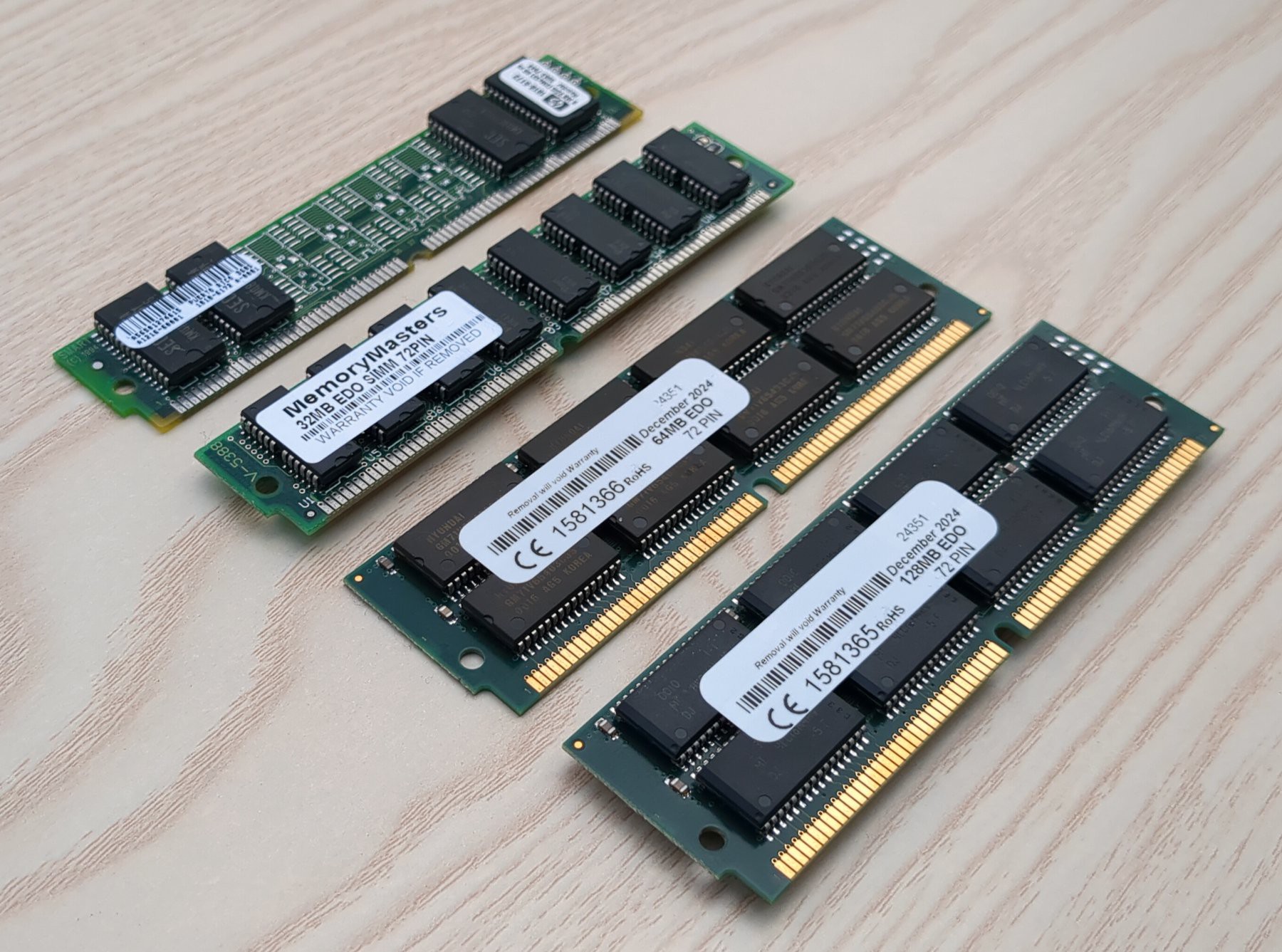
    On 72-pin SIMMs, there are four RAS lines and four CAS lines. Asserting a pair of RAS lines (0,2 or 1,3) selects between the two "sides" of the SIMM in the case of double-sided SIMMs (Note: these sides refer to how the DRAM chips are wired electrically, not necessarily how they are physically soldered to the PCB). Each of the CAS lines acts like a byte-select pin for the four bytes in the 32-bit wide SIMM. The trick to getting the correct bytes from DRAM onto the data bus requires decoding the SIZ0, SIZ1, A0, and A1 pins from the CPU into the right combination of CAS signals for the SIMM.

    Top to bottom: 8 MB, 32 MB, 64 MB, and 128 MB SIMMs. The 64 MB SIMM is electrically single-sided (i.e. one-rank), the others are all electrically double-sided (i.e. two-rank).

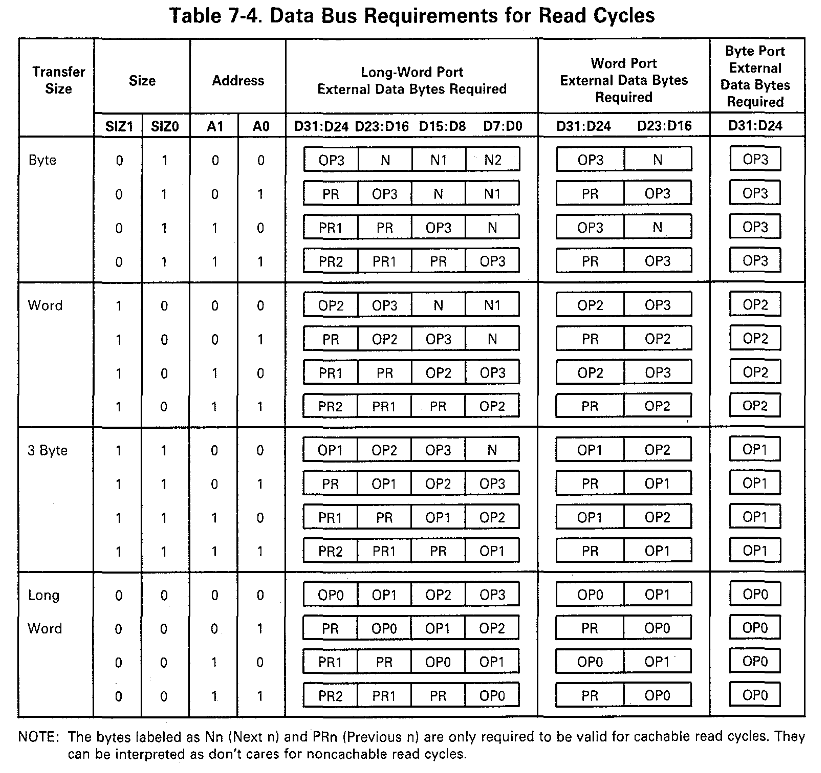
    Fortunately, the MC68030 datasheet covers all of this in detail.

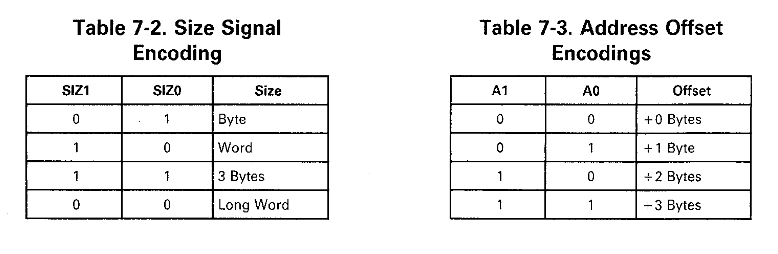
    These two tables show how the SIZ0 and SIZ1 pins can be used to determine the requested bus width and how the A0 and A1 pins are used to set an offset if the request is not long word-aligned.

    This huge table displays all possible combinations of bus width and offset and shows where the data is expected to be in each case. Since the DRAM always acts as a 32-bit wide memory, each of the entries in the Long-Word Port column map to a combination of CAS lines. For example, if the CPU requests a 16-bit word with an offset of 1 (row 6), the second and third bytes of the DRAM need to be read, so the CAS pattern is 0110 (active high).

    The easiest way to translate this information into Verilog for the DRAM controller is with a case statement:

    wire [3:0] CYCLE_TYPE = {SIZ1, SIZ0, ADDR[1], ADDR[0]};
    reg [3:0] CAS;    // active high
    
    always @(*) begin
        case (CYCLE_TYPE)
            // CYCLE TYPE <= CAS[3:0]
    
            // byte
            4'b0100: CAS <= 4'b1000;
            4'b0101: CAS <= 4'b0100;
            4'b0110: CAS <= 4'b0010;
            4'b0111: CAS <= 4'b0001;
    
            // word
            4'b1000: CAS <= 4'b1100;
            4'b1001: CAS <= 4'b0110;
            4'b1010: CAS <= 4'b0011;
            4'b1011: CAS <= 4'b0001;
    
            // 3-byte
            4'b1100: CAS <= 4'b1110;
            4'b1101: CAS <= 4'b0111;
            4'b1110: CAS <= 4'b0011;
            4'b1111: CAS <= 4'b0001;
    
            // long word
            4'b0000: CAS <= 4'b1111;
            4'b0001: CAS <= 4'b0111;
            4'b0010: CAS <= 4'b0011;
            4'b0011: CAS <= 4'b0001;
    
            default: CAS <= 4'b1111;
        endcase
    end
    

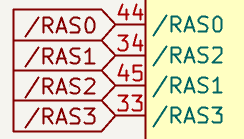
    One issue I ran into while putting this solution together was strange RAS behavior. Each pair of RAS lines is supposed to act as a bank selector, but when I implemented this, I lost access to half the bytes in the memory. It turns out I mislabeled the RAS pins on the SIMM slot in my schematic and had RAS1 and RAS2 swapped. Fortunately, this is all semantics and swapping RAS1 and RAS2 in the CPLD pin mapping solved this problem entirely.


    Can you spot the problem?

    With the DRAM now handling different cycle types correctly, I set up address decoding to handle 64 or 128 MB SIMMs. The SIMM bank is selected based on the A26 line. If A26 is 0, RAS0 and RAS2 will be asserted, if A26 is 1, RAS1 and RAS3 will be asserted instead. This allows support for either a 64 or 128 MB SIMM, only the addressable size of the DRAM will change: 0x4000000 or 0x8000000 respectively. Smaller single-sided SIMMs (4 and 16 MB) should also work without modification, but other sizes of double-sided SIMMs would require modification to this address decoding scheme to be fully mapped, but who doesn't want as much RAM as possible anyway!?

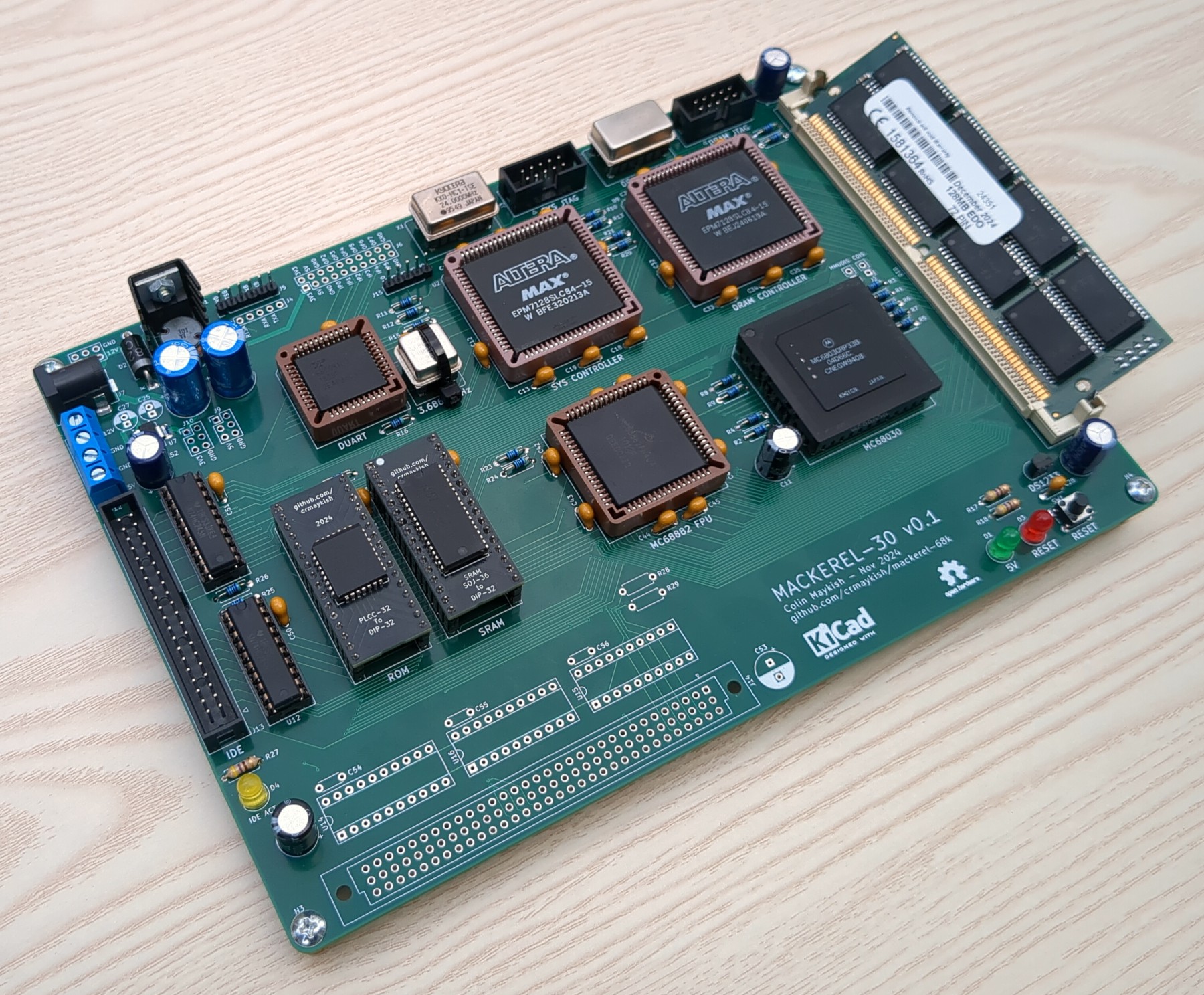
    Mackerel-30 with 128 MB SIMM installed

    To wrap up this DRAM improvement, I revamped the memory test code in the bootloader. There are now two ways to test memory: a simple 8-bit read and write test and a new 32-bit test that can cover the entire 128 MB memory space. The 32-bit...

    Read more »

  • More Mackerel-30 Bringup Progress

    Colin Maykish12/15/2024 at 00:27 0 comments

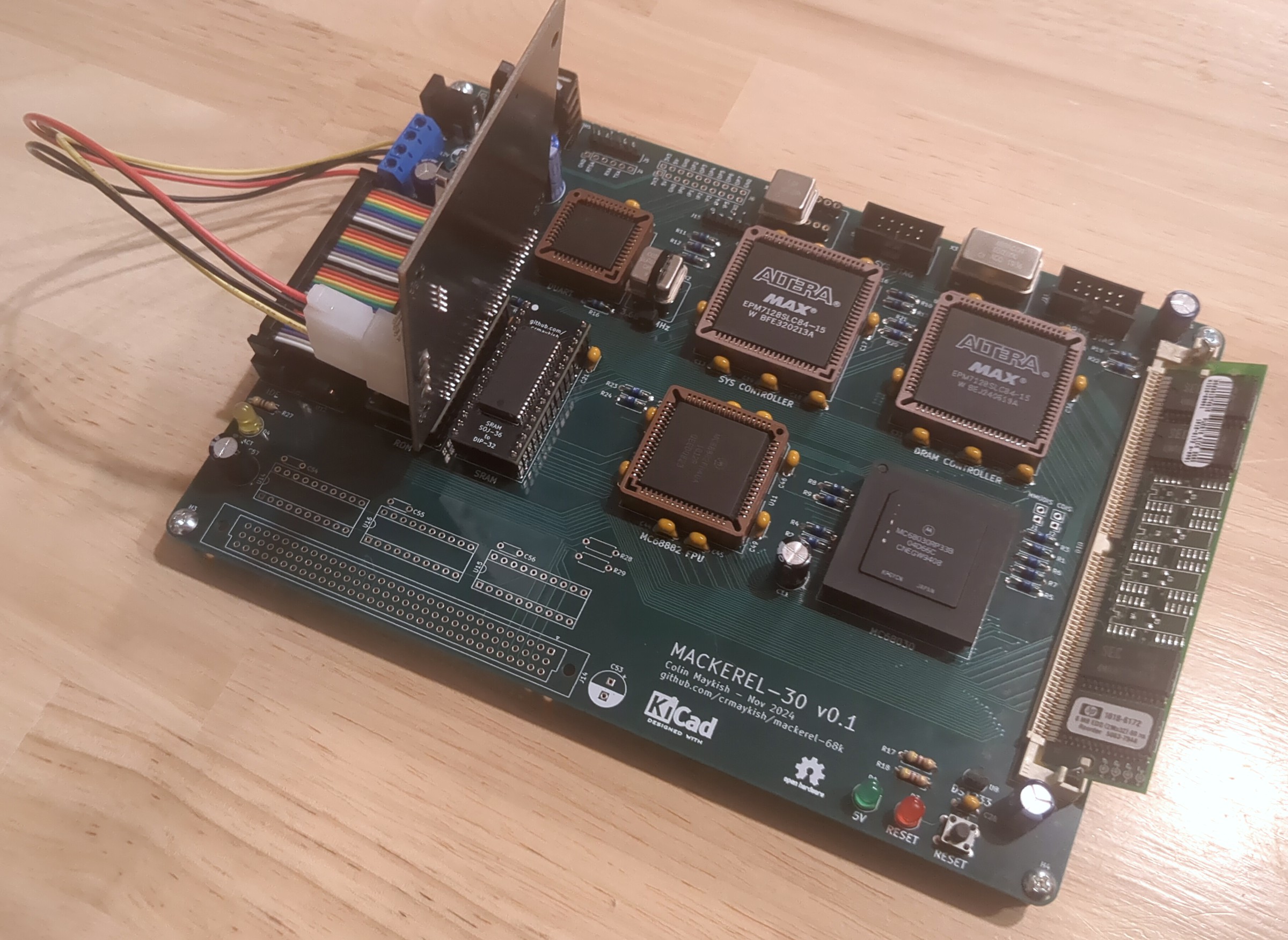
    Current state of the Mackerel-30 prototype board

    Mackerel-30 board bringup is going well for the most part. I've got the IDE interface and DRAM controller hooked up and functional. I did make a mistake in IDE wiring though. One of the buffer chips between the IDE interface and the CPU data bus has the bits wired in reverse order, i.e. bits 0-7 are mapped to 7-0. Fortunately, the rest of the control circuitry is wired correctly and the bits can be reversed in software for now. This adds a bit of overhead, but Mackerel-30 is not winning any speed contests right now anyway. I'll add it to the list of fixes for the next PCB revision.

    I also ported over my DRAM controller from Mackerel-10. Going from four 30-pin SIMMs to a single 72-pin SIMM required a bit of adjustment to the CAS and RAS logic, but the state machine and refresh timing is almost unchanged. Unfortunately when I bought DRAM sticks for this project, I didn't notice that the 64 MB modules I ordered were 3.3v only. I've ordered some more 32 MB and 64 MB modules that will work at 5v, but for now I'm using a backup 8 MB stick.

    There seems to be some inconsistencies with how 72-pin SIMMs have their RAS and CAS lines wired up to the individual DRAM ICs. The 8 MB sticks I have seem to map one RAS line to each of the 4 8-bit DRAM ICs on the stick, but based on other datasheets and information I've seen online, this may not be 100% standardized. My interpretation is that normally the four RAS pins operate in two pairs of two, effectively acting as a bank switch for double-sided modules. I'll have to experiment when I receive the new batch of SIMMs, but in the worst case, I can make some minor adjustments to the DRAM controller logic to compensate. I'm feeling pretty confident in the core functionality of the controller at this point.

    My intention was to finish out this update with a proof-of-concept FPU test, but I realized the libc library I'm using doesn't support floating point at all. I could still add the new decoding logic to the CPLD and do some tests in assembly, but I think I will wait on the FPU for now. I've got the hardware far enough along to start porting Linux to Mackerel-30 and I'm much more excited to get started on that than to worry about the FPU at the moment.

  • Mackerel-10 Nearing Completion

    Colin Maykish12/12/2024 at 16:12 0 comments

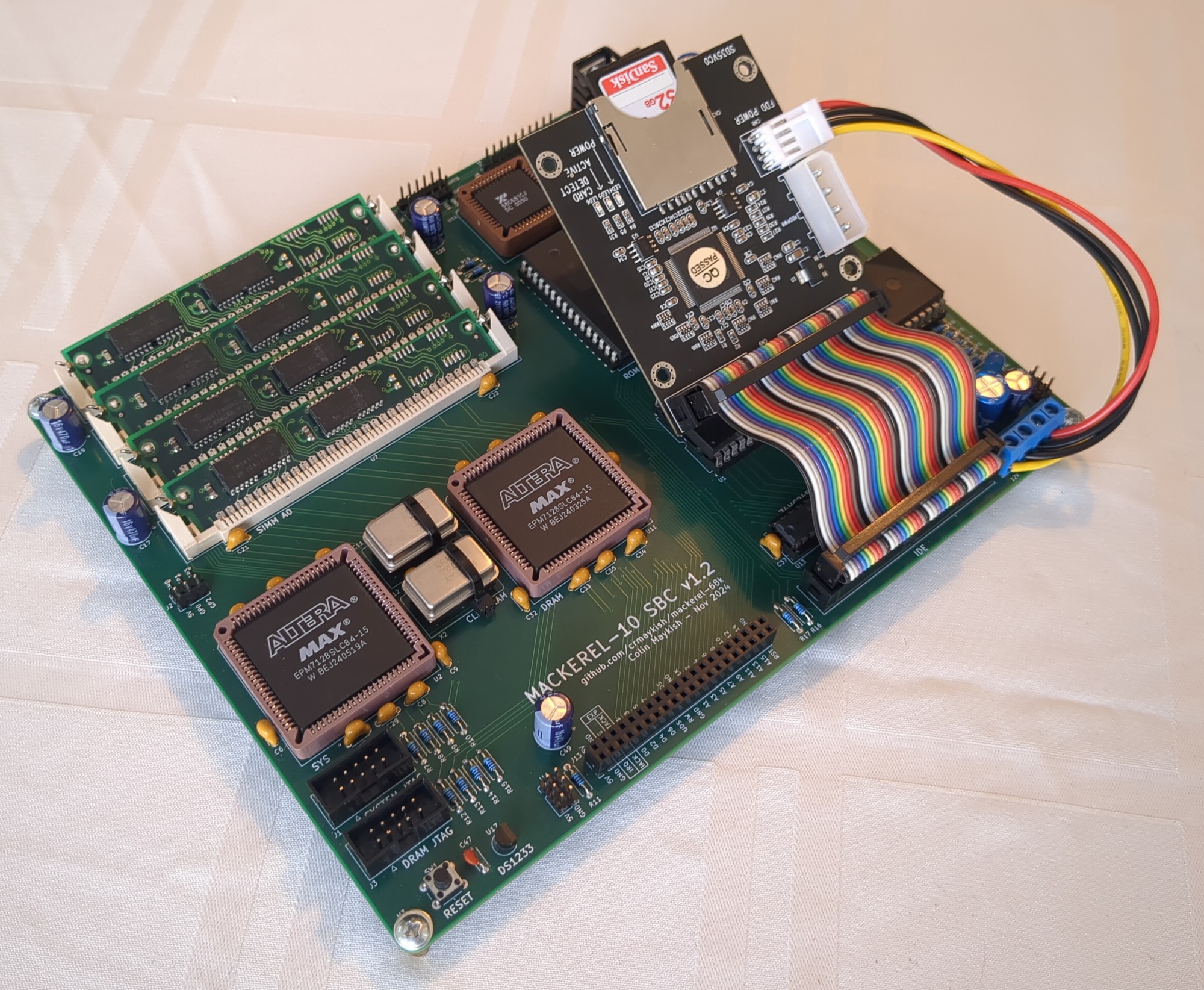
    I've put together a new revision of the Mackerel-10 PCB to fix the issues in v1.0. The main problems with v1.0 were in the IDE interface. I had the direction of the buffers reversed which required a cut trace and a bodge to fix. I also failed to connect the second IDE chip-select pin to the CPLD, so that had to be bodged in as well to enable control of the IDE interrupts. With the circuit corrected, the IDE interface is working as expected without any bodges.

    There are actually two very similar versions of the revised PCB. Originally I created v1.1 which fixes the issues listed above. After experimenting with the DS1233 reset circuit on Mackerel-30, I decided to add it to Mackerel-10 as well, replacing the 555 circuit that was doing the job previously. This version is v1.2 and is identical to v1.1 other than the reset circuit. If you would like to build one of these boards, I'd recommend v1.2, but v1.1 is still an option if you'd prefer to use the 555 reset.

    As discussed in a previous post, the DRAM controller is running at 50 MHz with good stability. It is also decoupled from the CPU clock. My 68010s start to have issues with even a slight overclock, but the system runs well with the CPU clock at the rated maximum of 10 MHz. Using the 68SEC000, I'm able to run at 20 MHz. The SEC chip is capable of much more, but the DUART and IDE interfaces start to behave erratically beyond that point. It's possible that some additional wait-state logic would remove this bottleneck.

    Finally, I've made some progress on the software side as well. The bootloader now supports the FAT16 filesystem and can load the Linux image from a file on the IDE drive instead of reading raw sectors into memory. I've set up the SD card with a small FAT16 partition containing the kernel image file and a larger ext2 partition. The ext2 partition can be mounted from uClinux and gives Mackerel-10 an option for writable persistent storage.

    Mackerel-10 v1.2 with IDE drive

    At this point, I don't have any immediate plans for more hardware changes to Mackerel-10. The current PCB satisfies all of the requirements I had for this system when I started. My focus has shifted to Mackerel-30, but there are still some interesting software options to explore on Mackerel-10.

    Mackerel-10 Release Files: https://github.com/crmaykish/mackerel-68k/tree/master/releases/mackerel-10

  • 68030 Is Executing Code!

    Colin Maykish11/25/2024 at 18:17 0 comments

    The first prototype of Mackerel-30 is alive! After many hours of soldering, updating Verilog, and modifying memory maps and Makefiles, the 68030 is up and running. Better yet, it's running the same bootloader code as Mackerel-08 and -10 and loading programs over serial. Since the 68030 is more or less a superset of the earlier CPUs, very little C code needs to change from previous iterations of Mackerel.

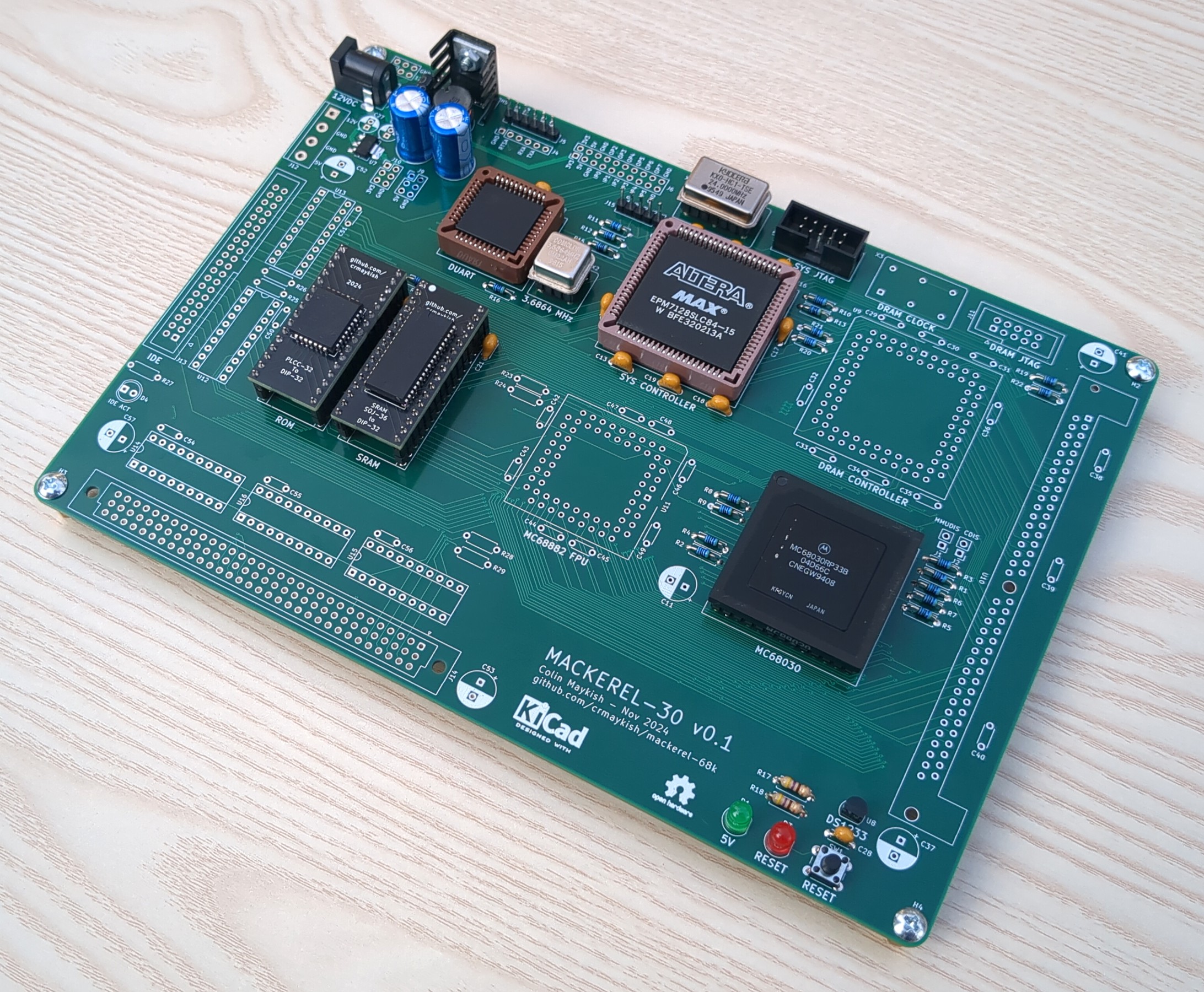
    Mackerel-30 v0.1 minimal configuration for board bring-up

    So far I have verified the basics of the system. Only the ROM, SRAM, and DUART have been tested, but there's enough glue logic implemented to run the bootloader and handle vectored interrupts from the DUART.

    Seeing a new design come to life really never gets old. That said, this is a prototype and there are already some problems. For one, the serial header is backwards from previous Mackerel hardware. This caused a slight panic when the code appeared to be running, but no serial output was displayed. Fortunately, flipping the USB-serial adapter solved that issue.

    I also managed to export the Gerbers without noticing that the VIN pin of the 3.3v regulator was not connected to anything. I need to figure out why KiCAD didn't complain about this, but the 3.3v power is not actually needed for the board to run, it's just there for external hardware, so no harm done. It's also easy enough to bodge the VIN pin to a nearby 5v rail if necessary.

    I haven't hooked up the FPU yet, but I am missing A13-A15 pins on the glue CPLD. I think these are required as part of address decoding for the FPU, so they may need to be bodged in.

    Finally, there are a few footprint issues. The mounting holes for the 72-pin SIMM are not all sized correctly, requiring some "plastic surgery" to solder in the socket.

    The DIN 41612 connector footprint also has issues. The holes are all way too small to fit the pins of the connectors I have. This is not a custom footprint, it was pulled from the KiCAD library, so it's possible I just have non-standard connectors, but either way, it makes the expansion header pretty unusable.

    With the basics working, my plan is to finish assembly and test the DRAM, IDE, and FPU. If at least the DRAM and IDE are functional, I should be able to start on the Linux port. If I find any showstopping issues, I guess Linux will have wait for the next revision.

  • What's New For Mackerel-30?

    Colin Maykish11/10/2024 at 02:02 0 comments

    Rather than design a bare minimum prototype for Mackerel-30, I decided to take a bit more risk and incorporate most of features I want from the start. Moving from the 68008 to the 68010 was a reasonable step up in complexity. Jumping to the 68030 presents another significant leap with 32-bit buses and more complicated control logic. In some ways, it's actually easier to deal with though. The dynamic bus sizing removes the requirement for 16-bit ROM and RAM chips. A single 8-bit ROM and SRAM should be enough to bootstrap the system.

    Besides the new CPU, I've included a few other hardware upgrades. I'm looking forward to getting the MC68882 FPU up and running. It should be supported by Linux and might give a boost in performance for things like scripting languages or graphics support if and when I get to those.

    I've also upgraded to 72-pin SIMMs for the DRAM. Each SIMM is 32-bits wide which makes the wiring straightforward and requires only a single module. The available capacities are also quite a bit higher than 30-pin modules, going up to at least 128MB. The DRAM controller will be adapted from the one I designed for Mackerel-10.

    The only piece I have not included in this first prototype is networking hardware. I'm still exploring some options in this area and I'm not ready to commit to one design. Once the base system is brought up, I plan to build a network card to connect to the expansion header.

  • Another Word On DRAM

    Colin Maykish10/25/2024 at 04:15 0 comments

    Getting a DRAM controller working at all feels like a great accomplishment, and while it has been stable and functional, there were some situations I couldn't explain. For example, it was not possible to run the DRAM controller at anything other than twice the CPU speed, even running them at the same frequency failed completely. I was not satisfied with my understanding of my own design. I also wanted the option to run the DRAM on its own independent clock to completely free up the choice of oscillator for the CPU.

    With the goal of better understanding and more flexibility, I took the lessons learned from my first iteration and went back to the drawing board, starting with the datasheet. The simplest place to start is the CAS-before-RAS refresh.

    CAS-before-RAS Refresh

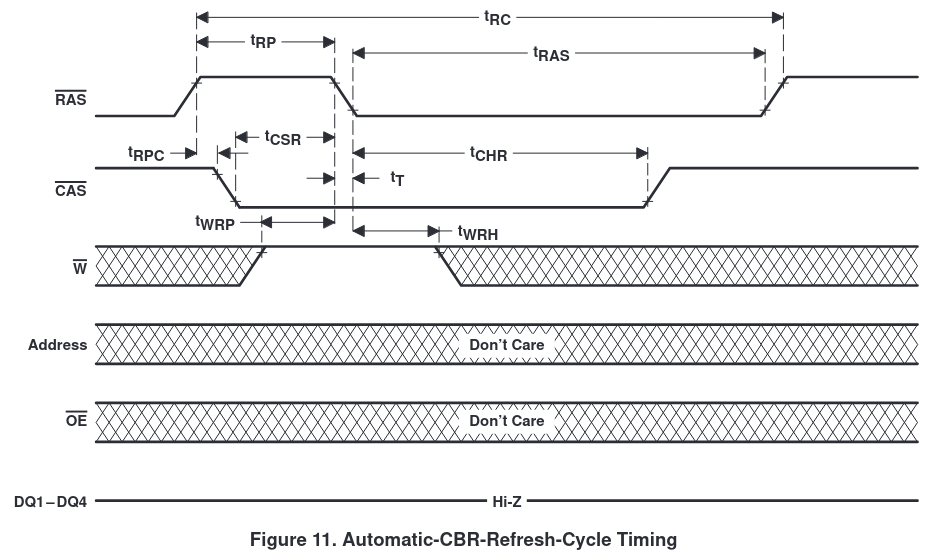
    CAS-before-RAS refresh timing diagram from the TMS417400 datasheet

    The refresh process is not complicated: pull CAS low, then pull RAS low, raise CAS, and then raise RAS again. One thing worth noting here is that the WE pin has to be HIGH by the time RAS is lowered. Since the state of the WE pin is "don't care" for the rest of the refresh cycle, I chose to pull it HIGH in the first state of the refresh state machine. Note: Mackerel-10 has four 30-pin SIMMs in two 16-bit pairs, A and B. RAS is shared between SIMMs in a pair, but the CAS lines are all independent, thus two RAS pins and four CAS pins in my controller.

    REFRESH1: begin
        // Acknowledge the refresh request
        refresh_ack <= 1'b1;
    
        // Lower CAS
        CASA0 <= 1'b0;
        CASA1 <= 1'b0;
        CASB0 <= 1'b0;
        CASB1 <= 1'b0;
        WRA <= 1'b1;
        WRB <= 1'b1;
        state <= REFRESH2;
    end
    
    REFRESH2: begin
        // Lower RAS
        RASA <= 1'b0;
        RASB <= 1'b0;
        state <= REFRESH3;
    end
    
    REFRESH3: begin
        // Raise CAS
        CASA0 <= 1'b1;
        CASA1 <= 1'b1;
        CASB0 <= 1'b1;
        CASB1 <= 1'b1;
        state <= REFRESH4;
    end
    
    REFRESH4: begin
        // Raise RAS
        RASA <= 1'b1;
        RASB <= 1'b1;
        state <= PRECHARGE;
    end

    The final piece of the DRAM refresh cycle is determining how often it needs to happen. According to the datasheet, all 2048 rows need to be refreshed every 32 ms. If we refresh each cell incrementally with CBR, that means we need to refresh a cell every 32 ms / 2048 = 0.015625 ms. That equates to 64 kHz. Finally, the DRAM controller is running from a 50 MHz oscillator, so 50 MHz / 64 kHz = 781 cycles between refreshes.

    The Verilog for counting cycles is basic, but I'll include it here for reference. The two refresh_ registers are used to pass the refresh state back and forth between this generator code and the main state machine. REFRESH_CYCLE_CNT is set to 781.

    // ==== Periodic refresh generator
    reg refresh_request = 1'b0;
    reg refresh_ack = 1'b0;
    reg [11:0] cycle_count = 12'b0;
    
    always @(posedge CLK_ALT) begin
        if (~RST) cycle_count <= 12'b0;
        else begin
            cycle_count <= cycle_count + 12'b1;
    
            if (cycle_count == REFRESH_CYCLE_CNT) begin
                refresh_request <= 1'b1;
                cycle_count <= 12'b0;
            end
            
            if (refresh_ack) refresh_request <= 1'b0;
        end
    end
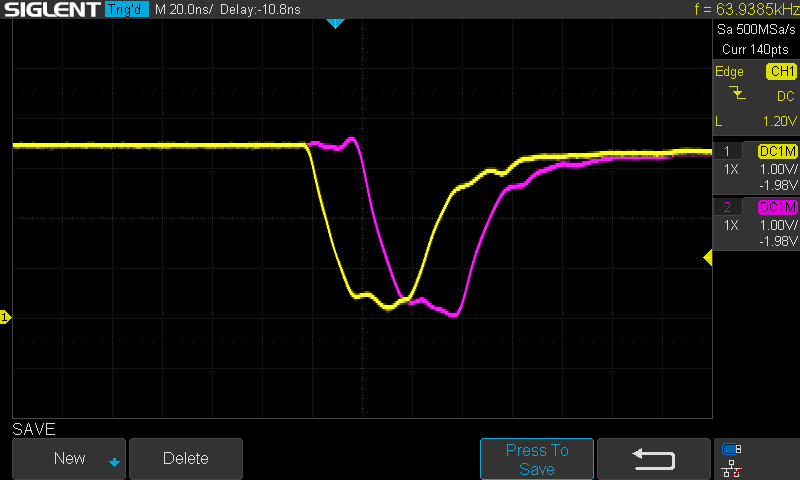
    CAS-before-RAS refresh cycle running at 64 kHz as calculated

    Read/Write Cycles

    With the CBR refresh behavior confirmed, I started to revamp the rest of the state machine, i.e. the process of actually reading and writing memory. As mentioned, my first implementation worked, but just barely. One of the issues I had was a dozen or more compiler warnings in Quartus that looked something like this: Warning (163076): Macrocell buffer inserted after node. I could not track down an exact cause, but the little information I found online and my own testing seemed to indicate that this error basically means "you're trying to do much work at once". By breaking up my state machine into more smaller states and removing highly parallel pieces of code, I was able to get rid of all all these warnings. It seems like the key is not to change too many register values per clock cycle, but to instead pipeline the design.

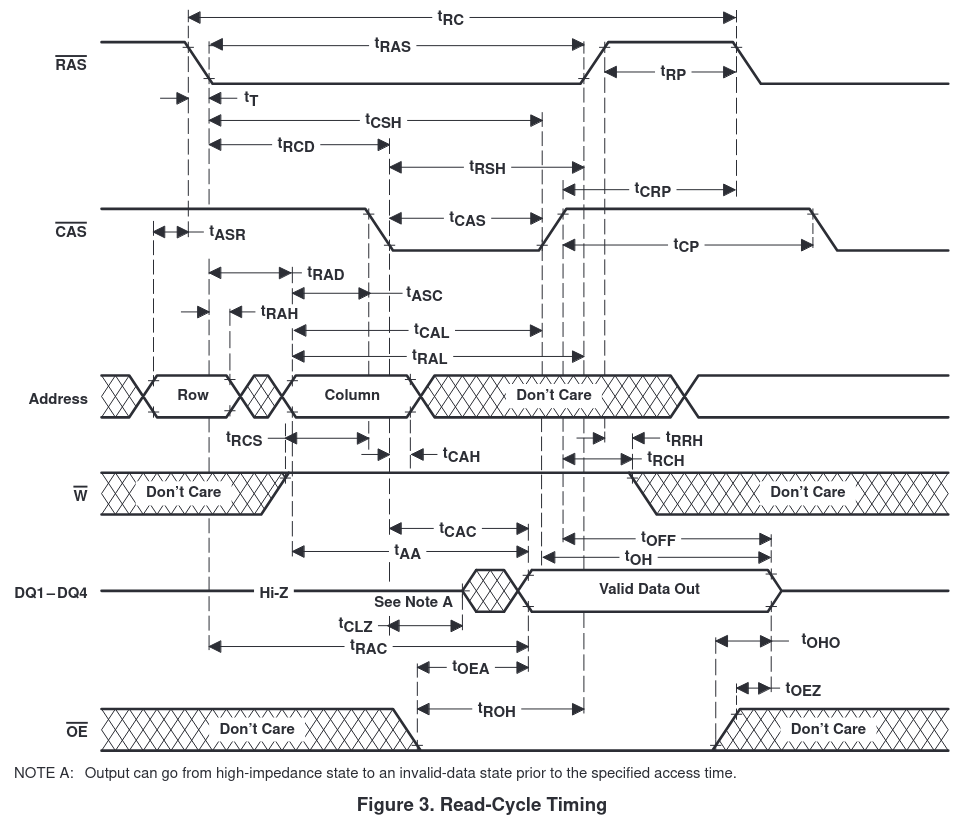
    DRAM read cycle timing diagram from the TMS417400 datasheet

    The actual logic of the DRAM read and write...

    Read more »

View all 36 project logs

Enjoy this project?

Share

Discussions

tdurland wrote 05/24/2026 at 18:50 point

just built the mackerel-08 1.1 zip release and burned to sd card and it boots

Jumping to 0x400
Linux version 4.4.0-uc0 (none@fedora) (gcc version 4.5.1 (GCC) ) #1 Sun May 24 11:06:30 PDT 2026
Mackerel-08 support by Colin Maykish <crmaykish@protonmail.com>
bootconsole [mackconsole0] enabled

uClinux/MC68000
Flat model support (C) 1998,1999 Kenneth Albanowski, D. Jeff Dionne
Built 1 zonelists in Zone order, mobility grouping off.  Total pages: 889
Kernel command line:
PID hash table entries: 1024 (order: 0, 4096 bytes)
Dentry cache hash table entries: 1024 (order: 0, 4096 bytes)
Inode-cache hash table entries: 1024 (order: 0, 4096 bytes)
Memory: 2180K/3584K available (761K kernel code, 32K rwdata, 96K rodata, 40K init, 42K bss, 1404K reserved, 0K cma-reserved)
Virtual kernel memory layout:
    vector  : 0x00000000 - 0x00000400   (   1 KiB)
    kmap    : 0x00000000 - 0xffffffff   (4095 MiB)
    vmalloc : 0x00000000 - 0xffffffff   (4095 MiB)
    lowmem  : 0x00000000 - 0x00380000   (   3 MiB)
      .init : 0x000df000 - 0x000e9000   (  40 KiB)
      .text : 0x00000400 - 0x000beb30   ( 762 KiB)
      .data : 0x000beb30 - 0x000dede0   ( 129 KiB)
      .bss  : 0x000e9000 - 0x000f3aac   (  43 KiB)
NR_IRQS:32
Setting up Mackerel timer hardware
Calibrating delay loop... 1.16 BogoMIPS (lpj=5824)
pid_max: default: 4096 minimum: 301
Mount-cache hash table entries: 1024 (order: 0, 4096 bytes)
Mountpoint-cache hash table entries: 1024 (order: 0, 4096 bytes)
clocksource: jiffies: mask: 0xffffffff max_cycles: 0xffffffff, max_idle_ns: 19112604462750000 ns
romfs: ROMFS MTD (C) 2007 Red Hat, Inc.
io scheduler noop registered (default)
XR68C681 serial driver (c) 2024 Colin Maykish
ttyS0 at I/O 0x0 (irq = 1, base_baud = 115200) is a XR68C681 DUART module
console [ttyS0] enabled
bootconsole [mackconsole0] disabled
brd: module loaded
uclinux[mtd]: probe address=0xf3aac size=0x54000
Creating 1 MTD partitions on "ram":
0x000000000000-0x000000054000 : "ROMfs"
HACK! hardcoding rootfs mount as romfs filesystem
VFS: Mounted root (romfs filesystem) readonly on device 31:0.
Freeing unused kernel memory: 40K (000df000 - 000e9000)
init started: BusyBox v1.21.0-uc0 (2026-05-24 11:07:22 PDT)
starting pid 31, tty '': '/bin/hostname mackerel-08'
starting pid 32, tty '': '/bin/expand /etc/ramfs.img /dev/ram0'
starting pid 33, tty '': '/bin/mount -t proc proc /proc'
starting pid 34, tty '': '/bin/mount -t ext2 /dev/ram0 /var'
starting pid 35, tty '': '/bin/mkdir /var/tmp'
starting pid 36, tty '': '/bin/mkdir /var/log'
starting pid 37, tty '': '/bin/mkdir /var/run'
starting pid 38, tty '': '/bin/mkdir /var/lock'
starting pid 39, tty '': '/bin/mkdir /var/empty'
starting pid 40, tty '': '/bin/cat /etc/motd'

Welcome to uClinux on
  __  __         _               _          __  ___
 |  \/  |__ _ __| |_____ _ _ ___| |  ___   /  \( _ )
 | |\/| / _` / _| / / -_) '_/ -_) | |___| | () / _ \
 |_|  |_\__,_\__|_\_\___|_| \___|_|        \__/\___/
 github.com/crmaykish/mackerel-68k

starting pid 41, tty '': '/bin/cttyhack /bin/nwsh'
# random: nonblocking pool is initialized, so all is good now Thank you for all the work and help

  Are you sure? yes | no

Colin Maykish wrote 05/24/2026 at 19:39 point

Great! Glad it's up and running.

  Are you sure? yes | no

tdurland wrote 05/22/2026 at 20:53 point

I tried loading the linux serial bin file and it just stays on 

### Mackerel-08 Bootloader v0.1.2 ###
###       crmaykish - 2024        ###
> load
Loading from serial into 0x400...

any ideas?

  Are you sure? yes | no

Colin Maykish wrote 05/24/2026 at 13:52 point

Closing the loop here for future reference. Using the latest bootloader code (0.5.5) and a known good Linux image (the one in the release zip), the board booted into Linux.

  Are you sure? yes | no

tdurland wrote 05/02/2026 at 03:57 point

>
### Mackerel-08 Bootloader v0.1.2 ###
###       crmaykish - 2024        ###
> boot
Loading Linux from SD card...
Sending SD init command...
Failed to initialize SD card
Sending SD init command...
Failed to initialize SD card
Sending SD init command...
SD card ready!
Image size: 0
Loading kernel into 0x400...
Done
Jumping to 0x400

PANIC: Unimplemented instruction

Any ideas?

  Are you sure? yes | no

Colin Maykish wrote 05/21/2026 at 00:49 point

I sent you some more details in a DM, but I think there's something wrong with the format/structure of your SD card. The image size of 0 means the bootloader couldn't read the file size of the Linux kernel image and so it didn't actually load anything into RAM.

  Are you sure? yes | no

tdurland wrote 04/29/2026 at 23:35 point

Hello 

### Mackerel-08 Bootloader v0.1 ###
###   crmaykish - 2024    ###
> boot
Loading Linux from SD card...
Sending SD init command...
SD card ready!
Image size: 0
Loading kernel into 0x400...
Done
Jumping to 0x400

PANIC: Address error

Am I using the correct Bootloader ?

  Are you sure? yes | no

Malcolm Harrow wrote 03/01/2025 at 23:29 point

I'm having some fun building a mackerel-10! I have the main computer and DRAM working, now waiting on an IDE cable to arrive.  My SIMMs are 1Mb .. so there maybe some repeated memory/memory unaccessible .. I need to test!  For the CPLDs I used ATF1508s and the pof2jed utility to create a jed file for programming - that that seemed to run without a hitch.  One small feedback - on the schematic both crystals are labelled as 50MHz .. the one that generates CLK_SRC should be 20 MHz (I think).  A great board, lots of fun!

  Are you sure? yes | no

Colin Maykish wrote 03/02/2025 at 01:12 point

Cool! Glad you've got a board up and running

The 1MB SIMMs should work fine, but the DRAM address space won't be contiguous without some changes to the address mapping in the DRAM controller Verilog. Send me a DM if you need help modifying it.

Nice to know the ATF chips work as a drop-in replacement. I bought a bulk lot of the Altera CPLDs and haven't explored anything else, but having alternatives for these old chips is always nice.

The CPU runs at half the CLK_SRC oscillator frequency, but that's technically configurable to 1x or 1/4. For normal 10 MHz CPUs, a 20 MHz oscillator is the right choice and it's what the timers expect as well. I've had the SEC CPUs running at 40 and 50 MHz without dividing down the frequency, but that's probably not a common use case. I'll add a note to the schematic about oscillator choice.Thanks!

  Are you sure? yes | no

Malcolm Harrow wrote 11/27/2024 at 01:32 point

The 030 board is looking very nice !  Why do you use SOJ memory chips on a header rather than native DIP32 5v memory chips - is it speed ?  Same question for the flash ..

  Are you sure? yes | no

Colin Maykish wrote 11/27/2024 at 02:01 point

Originally it was for speed, yea. I wanted to see if the slower DIP packages were actually a bottleneck. For the most part, they aren't, but I ended up really liking the increased durability of the adapter PCBs with machined pin headers compared to the fragile DIP legs. The SOJ SRAM chips are also about half the price of the DIP versions, though the cost of the adapters cancels that out somewhat.

  Are you sure? yes | no

tdurland wrote 10/28/2024 at 03:47 point

What speed are the 22v10c parts, on your BOM you left off the speed

  Are you sure? yes | no

Colin Maykish wrote 11/07/2024 at 15:19 point

I'm using 15ns parts from Atmel.

  Are you sure? yes | no

tdurland wrote 11/13/2024 at 03:01 point

Could you post the jed files for the 3 gal chips and the hex file for the eprom

for the 68008 version 1.1

Thanks

  Are you sure? yes | no

Colin Maykish wrote 11/13/2024 at 23:05 point

I've added the three JEDs and the bootloader binary here:
https://github.com/crmaykish/mackerel-68k/tree/master/releases/mackerel-08/v1.1

If you're putting together a board, send me a DM. I'd be interested to hear how it's going.

  Are you sure? yes | no

Daniel Palmer wrote 10/25/2024 at 13:44 point

I just stumbled across this project. Its possible to run a modern (as in Linus' master branch) kernel on 68000 as long as you have ~8MB of memory.

If you're interested I can point you to my repos with the changes needed and you could have a good getting it working on your board?

  Are you sure? yes | no

Colin Maykish wrote 11/07/2024 at 15:16 point

Sure, I'd be happy to take a look. Building the latest kernel for m68knommu isn't too bad. I've gotten that far, but getting libc and a userspace all working was where I gave up.

  Are you sure? yes | no

Daniel Palmer wrote 11/08/2024 at 10:21 point

I have you covered on userland too. I have a recentish buildroot fork with enough patches to build a modern (ish, gcc 12 right now) toolchain and userland.

It's a bit broken for 68000 I think right now as I'm halfway through making 030, 040 and 060 work as well but I have buildroot, u-boot, linux and QEMU as a package here:

https://github.com/fifteenhex/m68kjunk

  Are you sure? yes | no

kanomi wrote 09/24/2024 at 22:20 point

In the schematic of  Mackerel-08-v1, I could not find any values of resistors (R1 to R20?).

In addition, those values were not printed on the PCB either. Can you tell me those resistor values?

  Are you sure? yes | no

Colin Maykish wrote 09/24/2024 at 23:18 point

Sure, you've reminded me I need to clean up the schematic and post the BOM list. Until then, the resistor values are:
1k: R15, R20, R23
10k: R21, R22
4.7k: everything else

Also I realized that the PDF schematic I had on this project page was for v1. I've uploaded the v1.1 schematic. I'd recommend referencing that one. The resistor values and labels are the same on both, but v1.1 fixes some other issues.

Edit:
Here's the updated schematic with resistor values:
https://cdn.hackaday.io/files/1838617866309024/mackerel-08-v1.1-updated.pdf

  Are you sure? yes | no

Malcolm Harrow wrote 09/24/2024 at 13:25 point

Any early indications how much faster the IDE interface is compared to the SPI SD Card ?

  Are you sure? yes | no

Colin Maykish wrote 09/24/2024 at 15:18 point

It's so much faster... On Mack-08, it takes 3m 46s to load the 1.2MB Linux image from the SD card. That works out to about 5.5 kB/s. On Mack-10, I was able to load 1024000 bytes in about 5.5 seconds - about 181 kB/s. That's a 32x speed increase.

Neither version of the code is well-optimized. I'm sure there are ways to improve the bitbang SD performance, but a 32x difference makes sense in a way. Mack-08 takes two memory cycles to read a single bit at a time (toggling the SPI clock up and down), whereas Mack-10 can read 16 bits in one memory cycle.

  Are you sure? yes | no

Malcolm Harrow wrote 09/22/2024 at 14:32 point

You may want to take a look here .. https://github.com/rosco-m68k/rosco_m68k/tree/develop/code/software/updateflash


there is some code to update the flash in situ if you write enable the chip (achieved on the board via a jumper).  Then you may not need the zif socket :)

  Are you sure? yes | no

Colin Maykish wrote 09/22/2024 at 15:34 point

I considered implementing something like this early on in the project, but I never got to it. My issue was that once I could run code from ROM, I no longer needed to flash ROM very often - I'd just load new code over the serial port - so this just fell off the priorities list. Still a good reference though, thanks.

  Are you sure? yes | no

Malcolm Harrow wrote 09/22/2024 at 14:27 point

Very nice project.  I agree with you on Quartus, spend as little time as possible there!!   I have been trying to recompile the uClinux 4 source for the rosco_m68k board, but it’s complaining that it can’t find elf.h.  I’m working on a Mac and using the rosco cross compiler.   Could you let me know your setup to get a clean compile ?

  Are you sure? yes | no

Colin Maykish wrote 09/22/2024 at 15:28 point

I'm not familiar with the compiler used by rosco, but Linux (and especially uClinux) is very picky about which compilers will actually build the kernel. You'll need a toolchain created specifically for it. Doing this natively on Mac is probably not going to work. You'll also need a x64 Linux machine or VM.

My setup looks like this:
1. Debian 12 (Ubuntu 22 or 24 should also work)

2. `apt install build-essential`

3. Download the uClinux 2016 toolchain: https://sourceforge.net/projects/uclinux/files/Tools/m68k-uclinux-20160822/m68k-uclinux-tools-20160822.tar.bz2/download
4. Extract that toolchain and make sure the `usr/local/bin/` folder is on your `$PATH`

5. From the root of the uClinux project, you should now be able to run `make menuconfig` and then `make`.

That's a pretty high level view. If you get this far though, you should be ready start porting uClinux to your rosco board.

If you get stuck, feel free to send me a PM. Happy to help.

  Are you sure? yes | no

Malcolm Harrow wrote 09/23/2024 at 00:10 point

Many thanks for the quick response .. I now have a compiling system !

I also had to apt install libncurses-dev to get the menu to work

There is also a newer version of the tools using gcc 12.3 .. its on the same account and called m68k-uclinux-tools-20231026.tar.xz

I will let you know I get on ..

Malcolm

  Are you sure? yes | no

Bharbour wrote 08/07/2024 at 02:44 point

Thats a good looking board!

  Are you sure? yes | no

Colin Maykish wrote 08/07/2024 at 03:07 point

Thank you! There's always some minor things, but I'm really happy with how it came out.

  Are you sure? yes | no

teraz wrote 03/08/2022 at 19:53 point

Is possible make a mobile version? for example 24h working time?

  Are you sure? yes | no

Colin Maykish wrote 03/09/2022 at 01:03 point

Sorry, not sure what you mean. Like a portable version of the computer?

  Are you sure? yes | no

teraz wrote 03/09/2022 at 10:44 point

yes, similar https://github.com/penk/penkesu , meybe solar panel too. motorola is power eficient

p.s. look this too https://hackaday.io/project/643-minibsd-laptop-computer 

  Are you sure? yes | no

Keith wrote 02/23/2022 at 22:34 point

I have designs for the 68008, 68000 and 68020. They all use SRAM so they would need hacking to exceed the 24 megabyte needed for an OS like Linux. My boards ran OS9/68K on a SCSI disk.
https://hackaday.io/project/28957-stebus-68008
https://hackaday.io/project/28960-stebus-68000 (board only, no cct or manual)
https://hackaday.io/project/28959-stebus-68020

  Are you sure? yes | no

Colin Maykish wrote 02/24/2022 at 00:32 point

Nice looking boards. I like the idea of STEbus, but I'm not sure I'd want to invest a lot into it knowing I'll be expanding the bus width when I move up the 68k family tree. I guess most of the CPUs (other than the 68000) could actually use an 8-bit bus directly though.

I think I'm going to have to tackle DRAM when I need more than the 4MB that the 68008 can address. Buying and soldering all that SRAM sounds expensive and time-consuming.

  Are you sure? yes | no

Keith wrote 02/24/2022 at 00:44 point

The STEbus is 8-bit data but that does not stop processors being any data width they wish inside the board. For example, the 68020 board makes 16-bit accesses  to the ROM and 32-bit accesses to the RAM. The 68020 has "dynamic bus sizing", and will make accesses in whatever width the board logic tells it to. The STEbus is really just for i/o, not main memory. In the olden days, memory chip capacity was so small that extra boards were the only way to carry them. These days memory is big and cheap, and can easily fit on the processor board.

  Are you sure? yes | no

Colin Maykish wrote 02/24/2022 at 00:55 point

Ah, that makes a lot more sense how you could get away with an 8-bit bus. I'm coming from a software background, so the system architecture, especially when it comes to things more complicated than SBCs, is definitely a learning opportunity for me.

  Are you sure? yes | no

Alexandra Bastet Stehr wrote 02/23/2022 at 07:07 point

Regarding memory size, 24 MBytes seems to be the bare minimum these days for a recent kernel. How we found out? OpenComputers2 came around for Minecraft 1.18 and that one implements a RiscV64 VM with a barebone Linux on top. We tried to fire up a machine with just 16 MB inserted and got a genuine kernel panic as the userland refused to come up with just 4 MB of RAM left, the kernel alone eats up around 12 MByte. Inserted the 2*4 MByte from our very first try and voila, the machine came up to a login and we could run anything.

  Are you sure? yes | no

Colin Maykish wrote 02/23/2022 at 15:03 point

This was on kernel v5?

I'll admit I've done very little research on what it will take to run Linux on this machine so far. Might have to stretch my definition of "modern Linux" a little to accommodate the 68008 limitations.

  Are you sure? yes | no

Alexandra Bastet Stehr wrote 03/24/2022 at 09:51 point

Yep, made with recent buildroot, here is the fork: https://github.com/fnuecke/buildroot

  Are you sure? yes | no

Boxerbomb wrote 02/05/2022 at 19:11 point

Nice man, I will be following the project. I love 68k computers and I think that you are making the right choice trying to work your way up to the 30. I have been thinking about starting up a project like this and maybe using some sort of interface to a large RAM chip to avoid having to reprogram EEPROMS.

  Are you sure? yes | no

Colin Maykish wrote 02/06/2022 at 04:46 point

Thanks, appreciate the interest. The build up from the 68008 is definitely less daunting than jumping straight into a 68030. My solution to constantly flashing ROM is a serial bootloader. I can load new programs into RAM over the serial port. The actual ROM code changes a lot less frequently that way. The only downside is you lose your program when you lose power.

I'm also working on a more direct boot-from-USB using the CH376S module. That will get its own write-up when I get it finished.

  Are you sure? yes | no

John Smith wrote 03/15/2023 at 18:16 point

Hi. Have you had a chance to complete the project and publish PCB gerbers for backplane and PLCC adapters?

  Are you sure? yes | no

Similar Projects

Does this project spark your interest?

Become a member to follow this project and never miss any updates