mrpendent
-
Nothing's gonna stop me short of an atomic bomb...
06/03/2023 at 19:10 • 0 commentsThe new circuit boards have arrived! I think I am ready to put together the second version. All the functional parts are here. So let's do it..
![]()
-
Groping for Glory
05/20/2023 at 18:03 • 0 commentsI have ordered the second version of the PCB. I think I have made some serious progress and may not need another PCB.
![]()
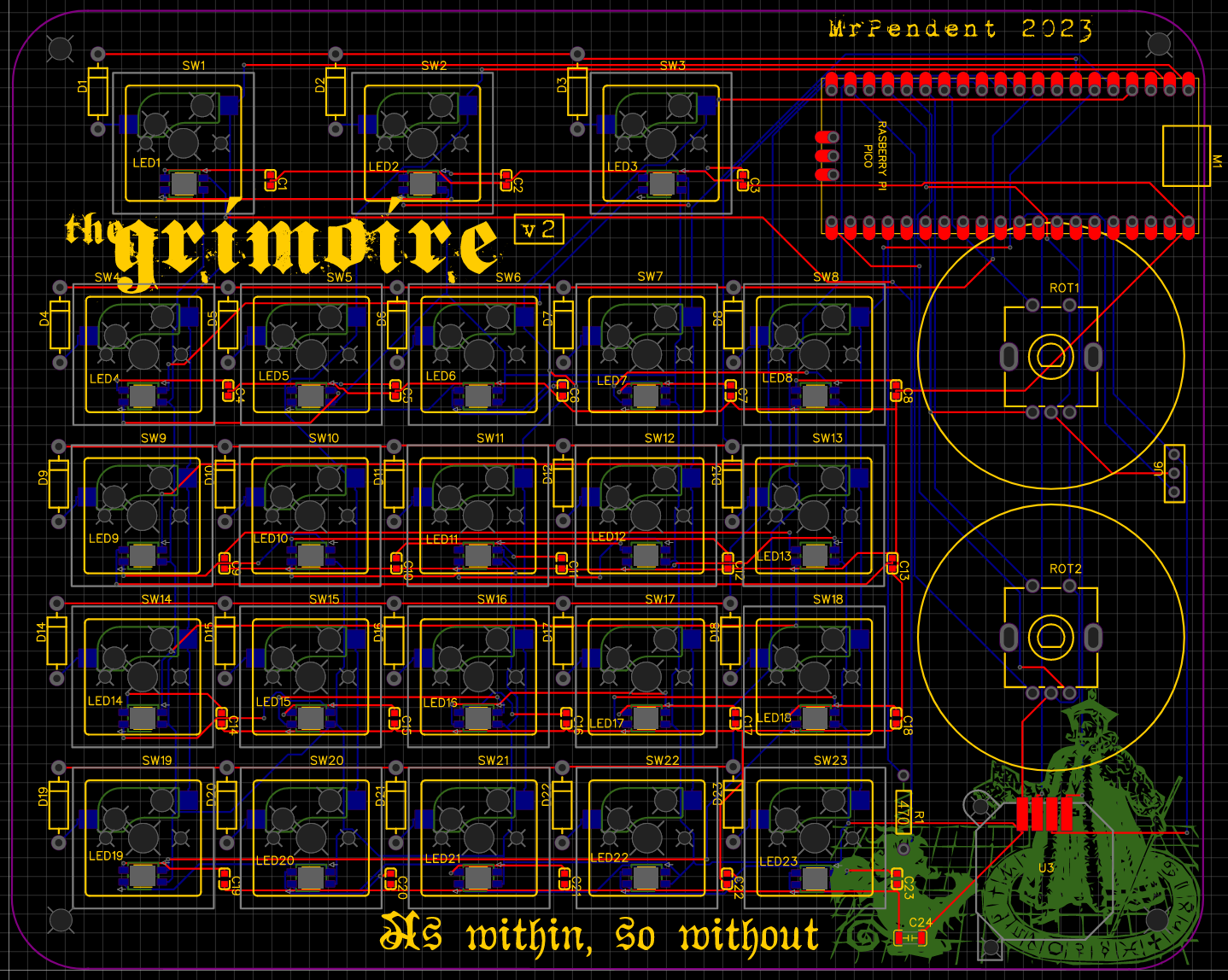
So what do we have here?
- There are the 23 MX-style keys, with Kailh hotswap sockets. We had these in the last one
- There are the two encoders which were already there as well.
- There's the spot for the Pi Pico--which is where we have the first change lurking (it's hiding, just peeking out. It's shy). But we'll get to that.
- Down in the lower right, hiding in the graphic of Solomon, there is a PSP 1000 joystick. I plan to use it to navigate around the canvas.
![]()
- Over on the right-hand side, you will find U6, which is to be magnetic power (and data) connector. The other magnetic end will be connected via a ribbon cable to the sigil window.
- The voltage stepper was removed, because (as noted in a previous log) I didn't need it after all.
- Way down at the bottom right, on the butt of Solomon's demon, is a tiny little capacitor (C24) for the LEDs. I believe it is there to buffer against surges. Not sure. But LadyAda said I needed it, so I need it.
- I have added the reverse mounted NeoPixel LEDs to light up the keys, because...well, just because.
- Less impressively--but no less important--I added some holes to allow the board to be anchored to the base.
- Finally, I toned down the graphics, and made them less specific to me, so that others can enjoy it as well.
- I also pushed the keys a lot closer together.
As I said before, the plan is to surface mount everything, and build the shell to accommodate this. I'm concerned about the height of the sigil window (over the Pi) and the encoders, combined with the low height of the joystick. But I'm sure it's nothing that can't be dealt with.
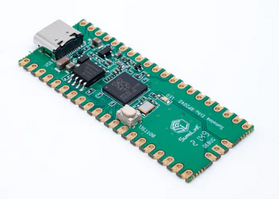
Now, back to the Pico. I was going to use a Raspberry Pi, but after receiving them, I realized that they used a micro-USB jack, not USB-C. This made me sad. so I found these:
![]()
They are basically Pi Picos, but have the USB-C. Hopefully they don't come with a bunch of viruses, but I have time to investigate that. Also worth noting is that the reset button is in a different spot. This isn't important at this stage, but if I'm going to put a button for it on the upper half of the shell, it's important (I haven't made that decision yet).
So with this order I have requested that the teeny tiny caps for each key are soldered on by JCLPCB's robots, because I'm old and have bad eyes and those things are tiny!
![]()
But since I already have the hotswaps, the diodes, and the LEDs there is no reason for them to solder them on. And I want to do it myself.
I still need to order the magnetic connectors, but I'm waiting to see if I need other parts because of that cost of shipping. Still, I feel like I've made a large step forward.
-
Two steps forward...
05/15/2023 at 23:22 • 0 commentsI have added the magnetic connector (sort of)--I have put three vias on the PCVB routed to 5v, a GPIO pin, and ground. This way I can use a ribbon cable to connect the sigil LED to the magnetic connector. That should be sufficiently secure inside the device, but allow the top of the shell to be removed without risk of damage. I also plan to have the case only held together by magnets--no screws on the outside. I was also able to make the knobs bigger.
I ordered several parts from Adafruit (although I forgot the @$#%& magnetic connector. Hopefully other things will be needed to share the shipping cost.
In the process of doing this, I realized that I don't need the stepper chip at all. I can get 5v from the Pico, so don't need to step up 3.3v to 5 for the LEDs. So I'll pull that thing out.
I'm also trying to figure out how to get JCLPCB to put one type of component on the board, but not the others. I think I have it figured out, but that's a challenge for another day.
-
I'm almost ready
05/14/2023 at 03:46 • 0 comments![]()
After quite some thinking, some sleeping, some gaming, and some more thinking, I have figured out a few things.
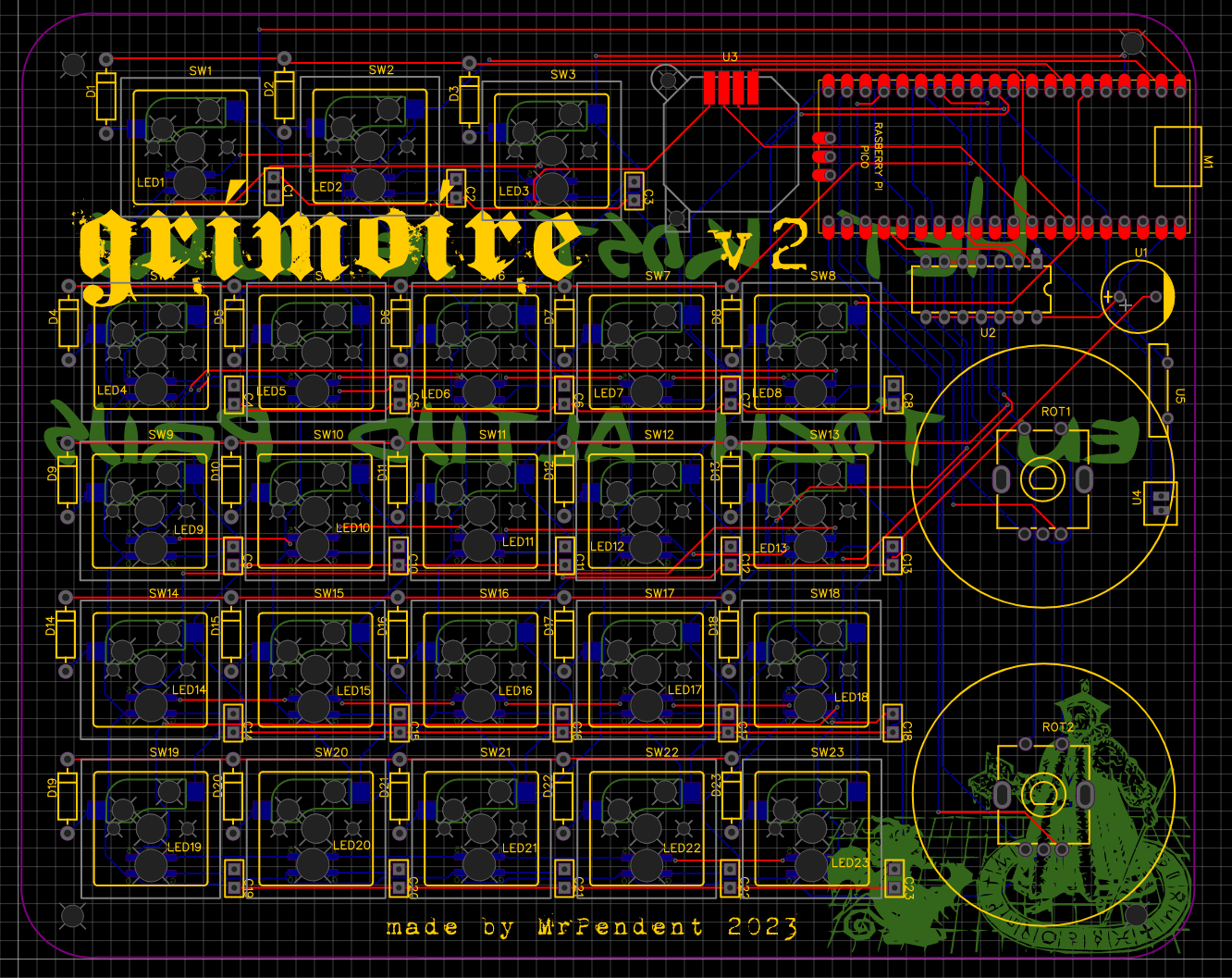
I think I have the final PCB. It looks like this:
![]()
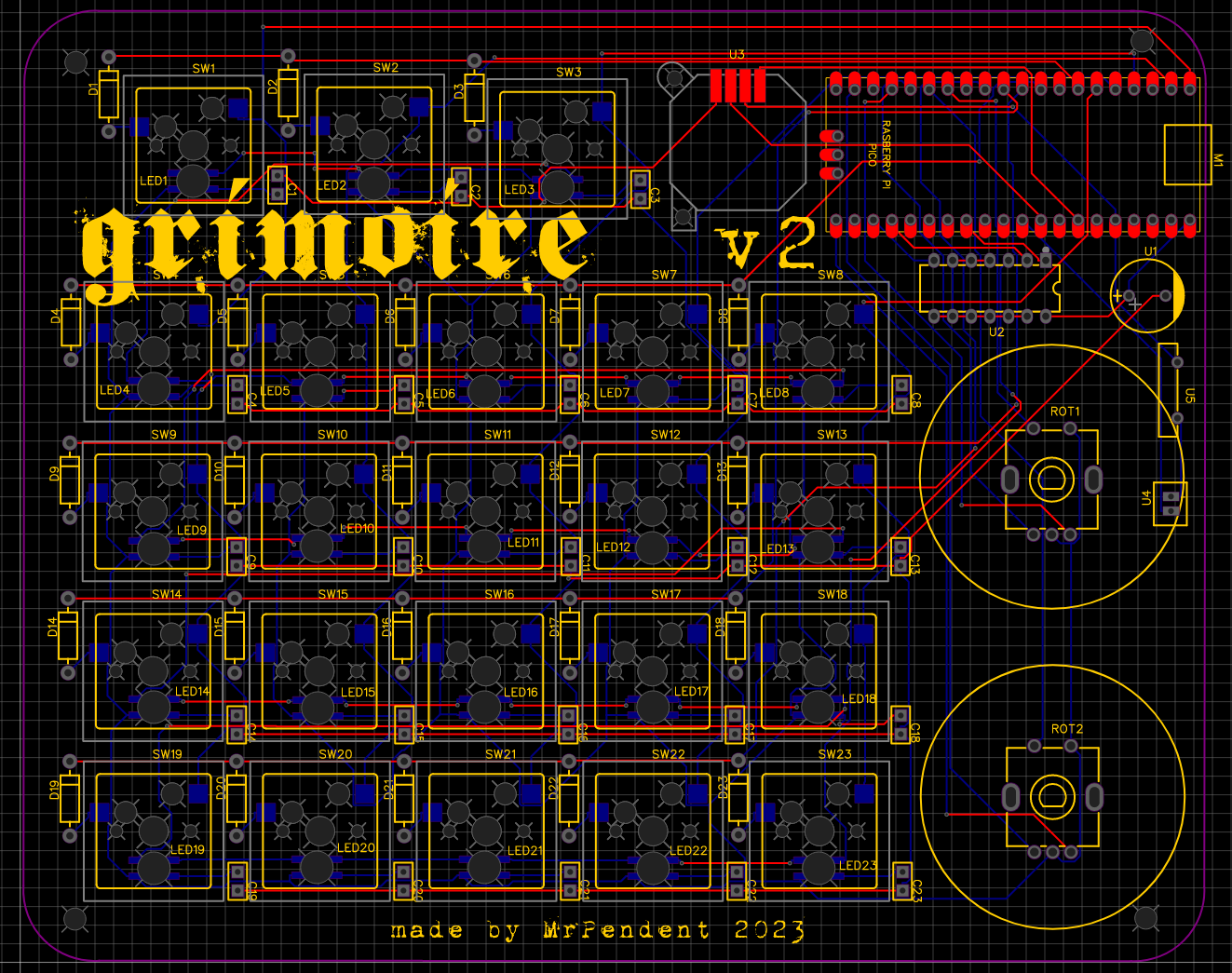
I know with the decorations it's a bit difficult to read. But remember that "customizing to within an inch of its life"? There you go. Here's one with some of the fanciness stripped back:
![]()
What has changed:
- The encoder wheels are a little different. I wanted big, weighted wheels that felt super good to spin. These are not that big, but they are pretty good at about 36mm (about 1.5").
- Over on the right, I have added a power header (marked U4). This is to allow a cable to connect to the nOOd that will go around the sigil (it will be wrapped around the sigil disk to light it up!)
- The 3 buttons at the top have been pushed to the left to make room for the joystick. I'm still concerned that the joystick is a mistake, but that's something that we can only discover through experience.
- Everything has been made surface mount on the PCB so that we can anchor the PCB to the base of the shell. The only bit on the top will be the nOOd, which can be connected by a cable. I am still considering a magnetic attachment, but that's something to consider.
- Sadly, I have to use a Pi Pico and so have to connect it through a micro-USB instead of USB-C. I'm not super happy about it, but that's life. the Banana Pi Pico has a USB-C, but it's not the same size, and it's not in EasyEDA (or at least I can't find it). I would do something about that but using micro-USB is hardly the worst thing in the world.
I'll probably look at having JLCPCB put the LED caps on, but not the other bits. I think I'm pretty close to the final version (until I test it) but I'm going to leave it to rest while I think about a few last things (like the magnetic power connector).
-
Get back to where you once belonged...
05/12/2023 at 00:55 • 0 commentsSo--the touch strips are not going to work for me. They are just too big (200-140mm). But I am going to keep the joystick. I just have to figure out where to put it. I think I'm going to have to change/shrink/remove the sigil.
![]()
This leads me to the next question, though--how exactly is this thing going to be connected. I have not really thought about it clearly. I had planned to connect a light (or some lights) to light up the sigil. I had also planned to mount the PCB to the base of the shell.
I had not really considered that each of these is in opposition to the other.
So I think I need to look at how to get everything mounted directly to the PCB. I think I can squeeze the joystick beside the top three buttons. There's a lot of wasted space there.
We're getting closer...
-
You've got the touch! You've got the power!
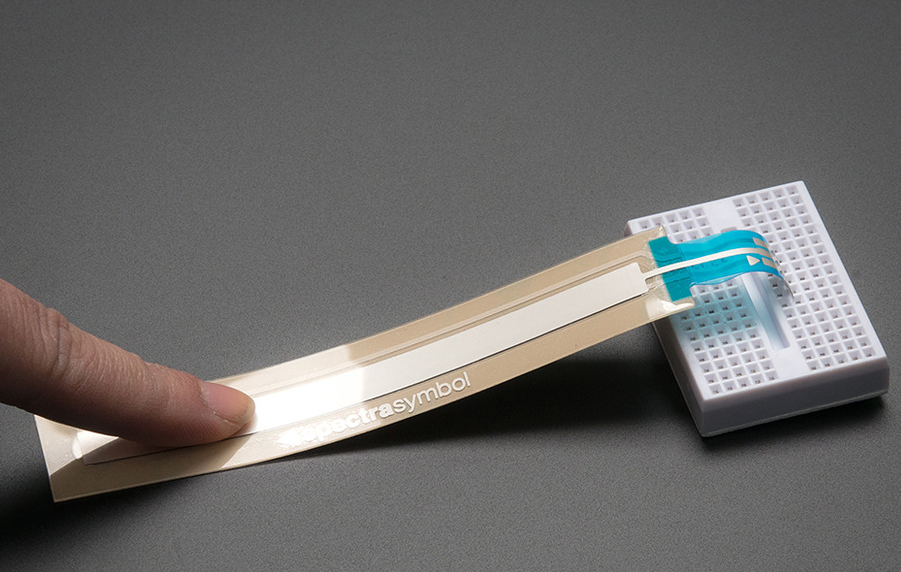
05/11/2023 at 00:06 • 0 commentsI have left the Grimoire marinating in its juices--smothered in gravy, Texas style!--for days now, and it has paid off. I think that instead of the dials for zoom and brush size, I will use some touch sliders. For the zoom, I want to use a strip touch sensor like this one:
![]()
I'm not sure about the brush size. I could use another strip, or a circular one. I think it might be good to use a strip. What I like the most about the strips is that I can touch at any point along it and jump to that point. Trying to map zoom levels and brush sizes to the 0-100 of the sensor is another issue, but not one that is insurmountable. This might also allow me to include a joystick for panning the image.
So that is going to require some modeling changes to the shell and, more importantly, to the PCB. I think I'll keep a backup of the current version just in case this turns out to be a bad idea.
-
Somebody holds the key
05/06/2023 at 21:24 • 0 commentsOk. I'm still getting confused here. Which means more research. I'm sure I can find the answer, but it's annoying that I have to keep looking.
![]()
I have been able to ascertain that the LEDs need the following:
- a single capacitor for the power. It is unlikely to cause a problem because this is drawing power from USB (5v), but a 1000 uF capacitor stops any chance of a surge eating my neopixels.
- A resistor on the data line before each pixel's DIN.
- A level-shifting chip, to translate the 3.3v from the Pico to the 5v logic expected by the neopixels
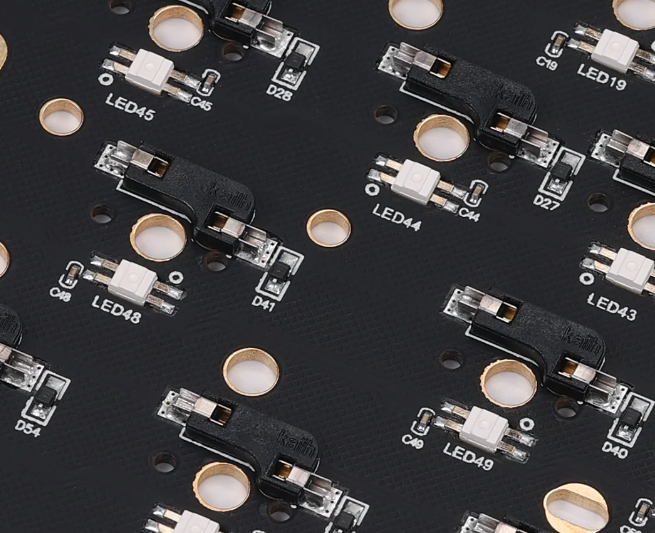
I tracked down a couple pre-made PCBs for keyboards by a company that definitely knows more about this than I do, and found these examples:
![]()
This is the back of the KBD Fans KBD75RGB. Clearly visible are the capacitors beside the LED, and the diodes next to the hotswap sockets. So this cements the need for a capacitor for each LED.
On the back of the KDB Fans DZ60RGB I can see the diodes for the keys, the LEDs, but the only capacitors seem to be at the bottom near that chip (which I assume is the level-shifting chip.
![]()
Also, down at the bottom we can see something labeled "Y1". A quick Google says that is a resonant filter, used to filter out stray signals (something called "debouncing"). So apparently I'll need that too, although I haven't seen that mentioned anywhere. No big deal, though I'm not sure where it needs to go--I assume on the DIN. That can just go on the list of stuff to figure out.
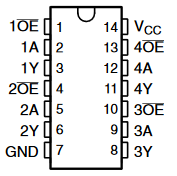
The bigger issue is how to wire in the logic shifting circuit (the 74AHCT125). The pins are as follows:
![]()
It is clear that we have 4 copies of the same thing, plus a ground and power line. Which means each "set" has the following: the OE (which Google tells me is Output Enabled), the A pin and the Y pin. It seems that the A is the input, which is combined with the OE, and then put out to the Y pin. Because I know this is supposed to stand between the Pico and the LEDs. I think that this would go to DIN, because that is where the high/low signals would be. I also think that I would only really need one "set" of pins. I suppose I could break the LEDs up into 4 rows, but I'm not sure there is a point.
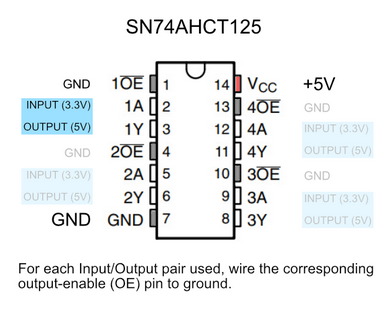
I found this image to describe the wiring and it makes sense:
![]()
I think the bit I was missing was that +5v line. I think I need to to bring a power line straight from the USB......Which would be the VBUS on the Pico!
![]()
UPDATE: PCB has been updated. Now to let it simmer a bit.
![]()
-
I get knocked down, but I get up again...
05/04/2023 at 03:12 • 0 commentsStupid LEDs.
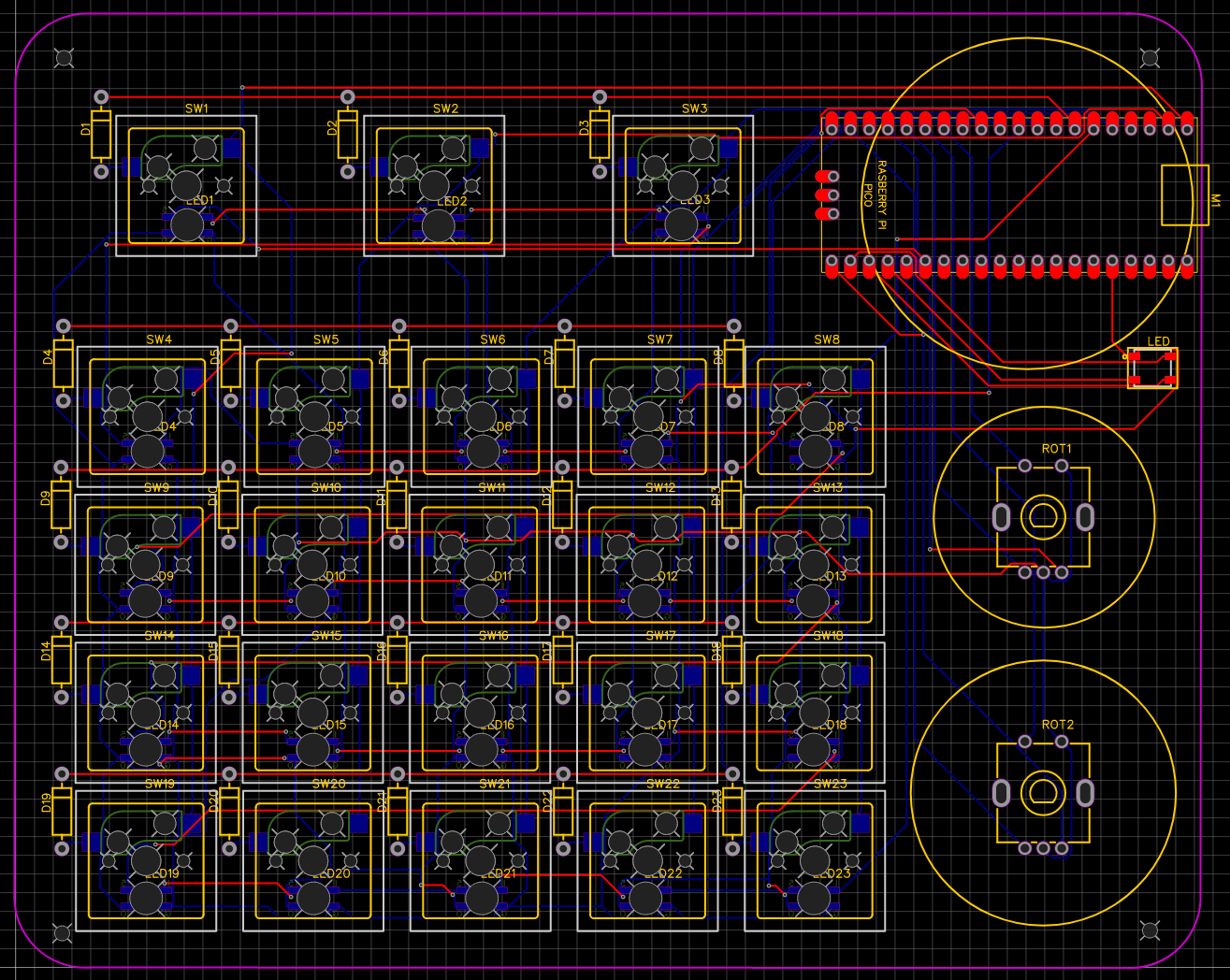
I have redone the schematic and added reverse surface mount LEDs. The PCB got a bit bigger (161x132). I think I have it all sorted. I'm going to wait a bit and do some reading before I send it off to manufacturing. Here it is as it stands:
![]()
If you didn't know better, you might think I had some idea what I was doing.
-
And the Legend Continues...
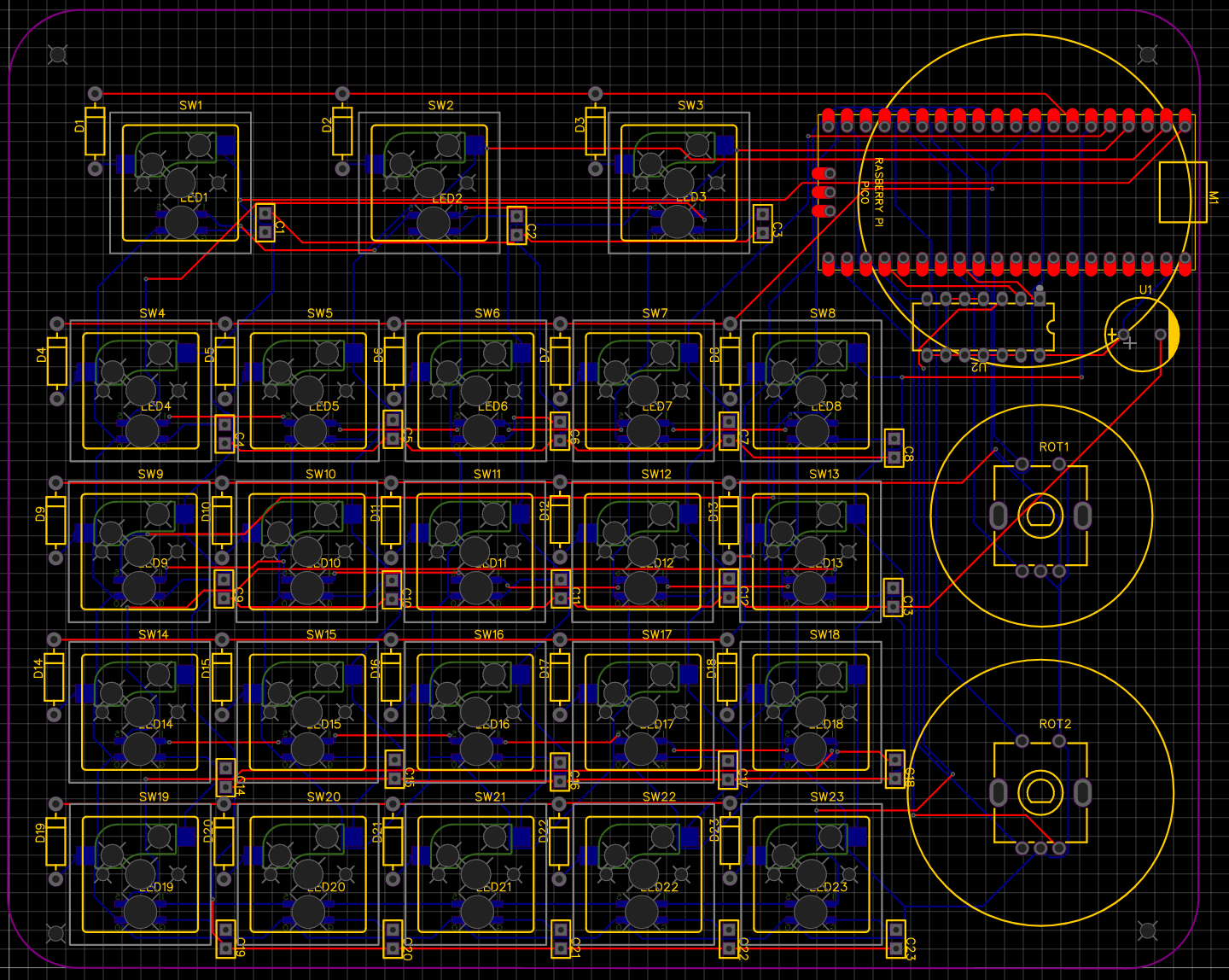
05/03/2023 at 20:17 • 0 commentsLet's have a look at the schematic I had:

Obviously my first-ever schematic At least two things should jump out at anyone who knows what they are doing. There may be more, but I don't know what I'm doing, so I can only see 2 (right now).
The first one is pretty simple: the LED
![]()
I have power coming to the LED and a ground for it. So it should turn on. However, there is no connection for the I/O, so there will be no control. In a pinch I could have manually wired those, so I wasn't that upset.
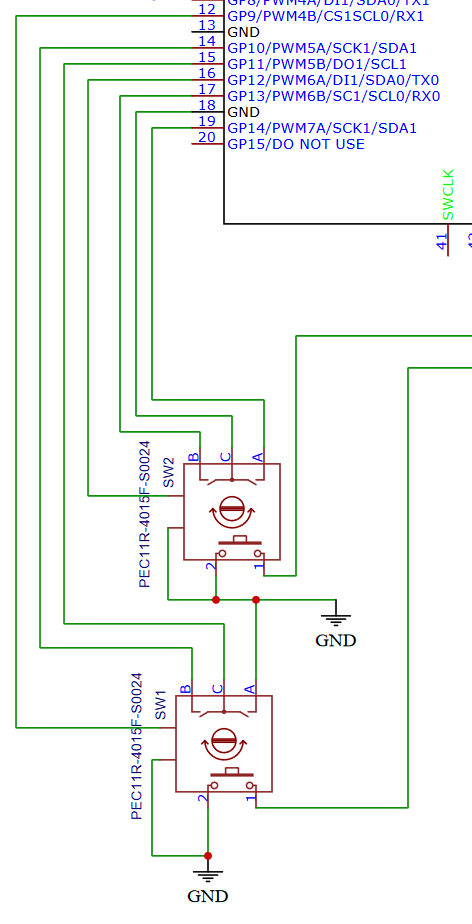
Then there's this mess:
![]()
First of all, I don't know what the two extra prongs are on the encoders. When I look at my encoders, it looks like those are just metal bits to clamp it to the board (or just for decoration--what do I know?).
Even leaving that aside, we can see that the nutjob who wired this connected B and A on SW2 to GPIOs correctly. And C connected to ground.
Over on the side of SW2, though, we have a the beginnings of the weirdness. I seem to have connected two pointless prongs--one to a GPIO and one to ground. Safety first, I guess?
On SW1, we can enjoy how the A prong is wired straight into ground. Just send that signal right into oblivion. But, to make up for it, the ground prong has been wired to a GPIO!
![]()
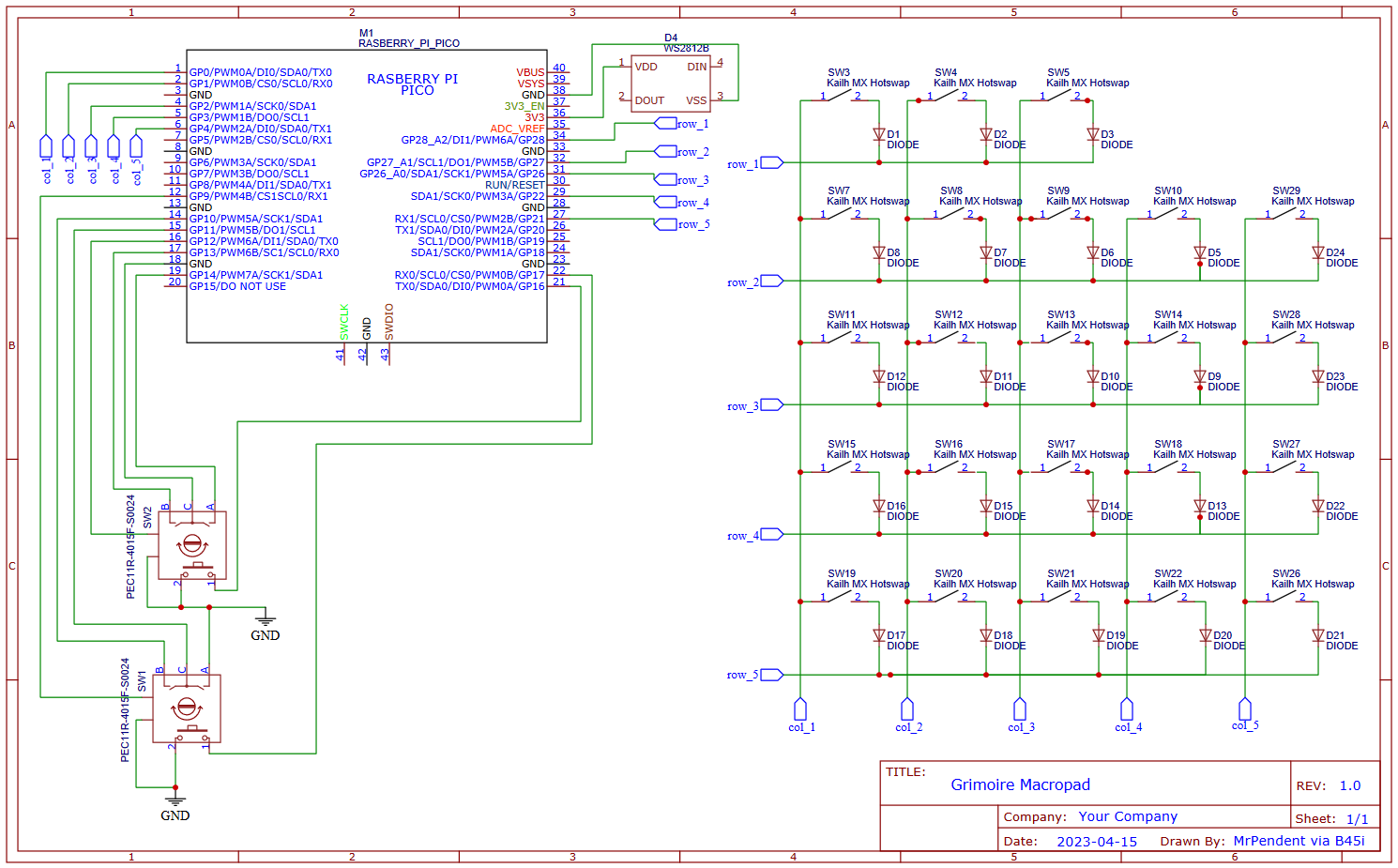
So with this in mind, I have made a new schematic (and gerber file, of course). May I present the Grimoire Macropad v2.0 Schematic!
![]()
I still don't know what those two extra prongs are on the encoders... This makes a little more sense. then are properly connected, the LED is fully addressable, and the columns and rows are put in a place to make it easier to program the keymatrix on the Pico. So with that done, here is where the PCB is now:
![]()
The other thing that is notable here is that I have added vias in the LED pads to make it easier to connect wires, just in case. I also renumbered the switches to that they make sense--starting at SW1 in the upper left and proceeding as expected to the bottom. I moved the diodes to be under the switches after seeing that on someone else's page.
But just as I was getting ready to write this, I started hearing a tiny little voice. Just a little tiny one way in the back. A soft but wise voice saying, "You know--you probably should put LEDs under those keys..."
Dammit.
-
A wild Complitastrophe appears!
05/02/2023 at 18:37 • 0 commentsI attempted to begin the coding portion of this show, and it was at this point that I discovered an issue: I have no idea what I'm doing!
In trying to get something to work, I looked at the GP I/O pins on the Pico--and realized that I did some strange things. One encoder shows some kind of output when I turn it, but nothing else seems to do anything. That could just be coding, but looking at the traces for the encoders, I seem to have connected them at random.
Well, shit.
This definitely means a new PCB, which isn't that bad. I already had some things I wanted to change anyway (I forgot a control trace for the WS2812B; also, some mounting holes might be nice), so it's not the end of the world. I'm more embarrassed by the wiring. I mean, even as a beginner this thing doesn't make sense.
I found some code that should serve as a starting point for the code. But to do that, I need to figure out how to lay out the keys with the wiring so I can test it all before it is soldered down. Not sure if I can do that with breadboard. I'd really rather not. That means buying breadboard, wires, and 23 breakout boards.
I think I can finagle some wiring to get them into a keymatrix without the diodes and work it out that way.
Man--9 breakout boards for $13 (plus pins!). That comes to probably $60. If there was a use for the breakouts afterward I wouldn't mind so much, but as far as I can see, once I finish this I won't have any need for the breakouts. So that will be $60 tossed out the window.
![]()
I don't know how I'm going to work this yet. I might be able to test the keys on the existing PCB (but not the encoders, of course) which would help. I'll try the code linked above tonight and see how it goes.
The Grimoire Macropad
A macropad build that is probably more trouble than it is worth.