Close
0%
0%

DIAVOX Cellphone

Turning an old diavox phone into a cellphone. No smart stuff, just a telephone. Pick up the handset and dial just like the old days.

Similar projects worth following
I remember the days when a phone was just a phone. Pick up the handset dial the number, just you the phone and the other person you are talking to. Place the handset back on and the call ends. No fancy smart features to distract you. This project is about turning an old telephone into a portable cellphone and learning new things on the way.

The Diavox Project "Old phone cellphone"

Where to start?

The scope of the project is rather large so it is divided into sub-projects and their individual tasks. Some have dependencies which have to be completed first.

Sub-projectStatus
Debug probeCompleted  
Rust programming toolchainCompleted  
Bell ringerUnderway
Keypad matrix scanningCompleted  
DTMF keytone generationCompleted  
Codec breakout PCBStarted
LTE ModemNot Started
Handset speaker and microphoneNot Started
Connecting everything togetherNot Started
Power supplyNot Started
Programmming
Started
Post-prototype refinementNot Started

  • Up to speed

    Anders Helgesson09/23/2025 at 22:08 0 comments

    I was a bit optimistic that I would get the lab up and running in 1 month... I'm still waiting for stuff to be cleared out of the room so I can use it. If the room was completely empty, it would be up and running by now. It's not in my hands right now, which kinda sucks. I've waited this long I can wait a bit longer.

    Let's see where did I left off. I was getting the H-bridge gate driver design ready to ring the bells. I wanted to try to make a UVLO and OVLO by using the last remaining resources in the greenpak.

    I've now decided that for the prototype to skip both of those. I'll have to resdesign everything in the end anyway. It's a prototype and if a magic smoke event happens it happens.

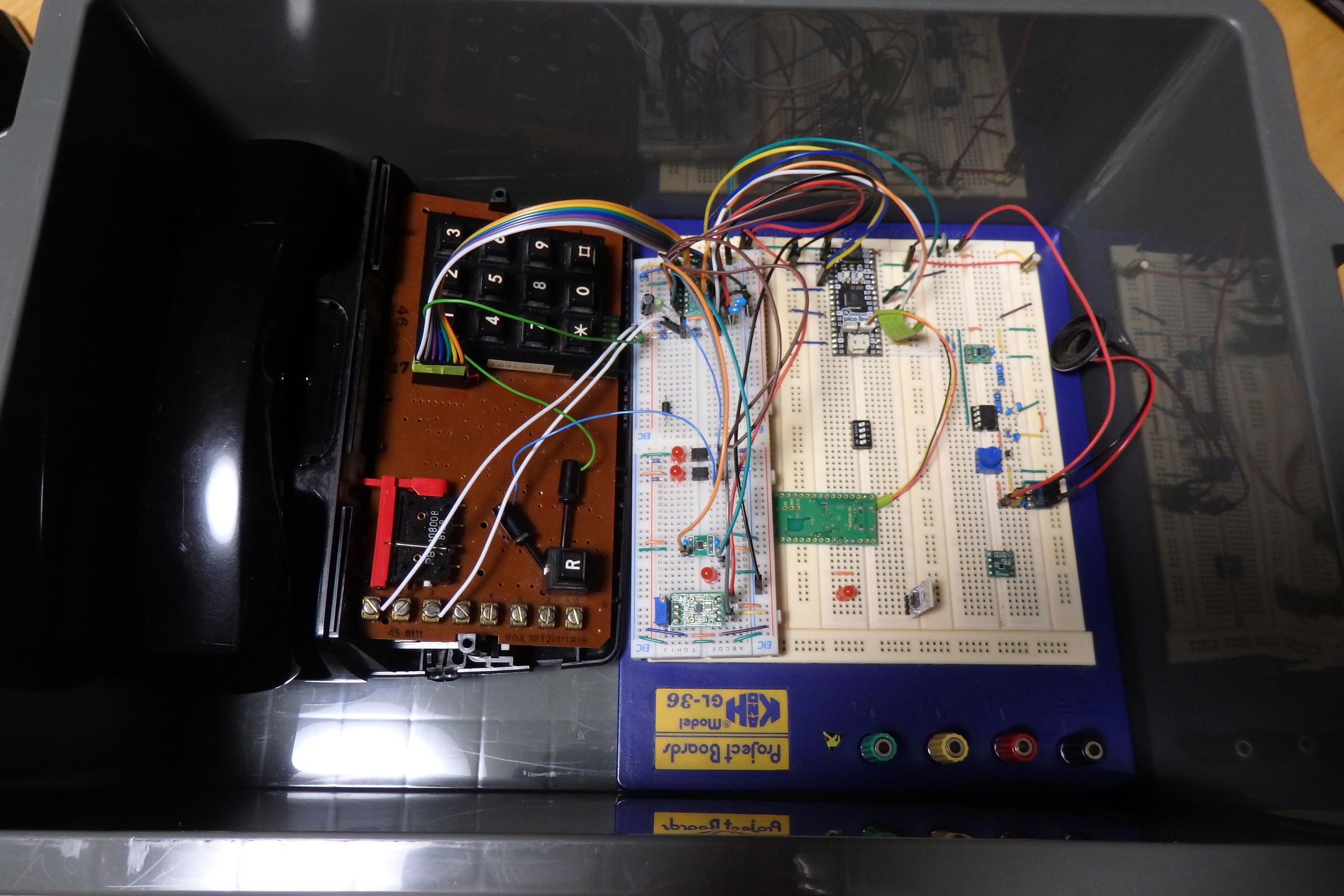
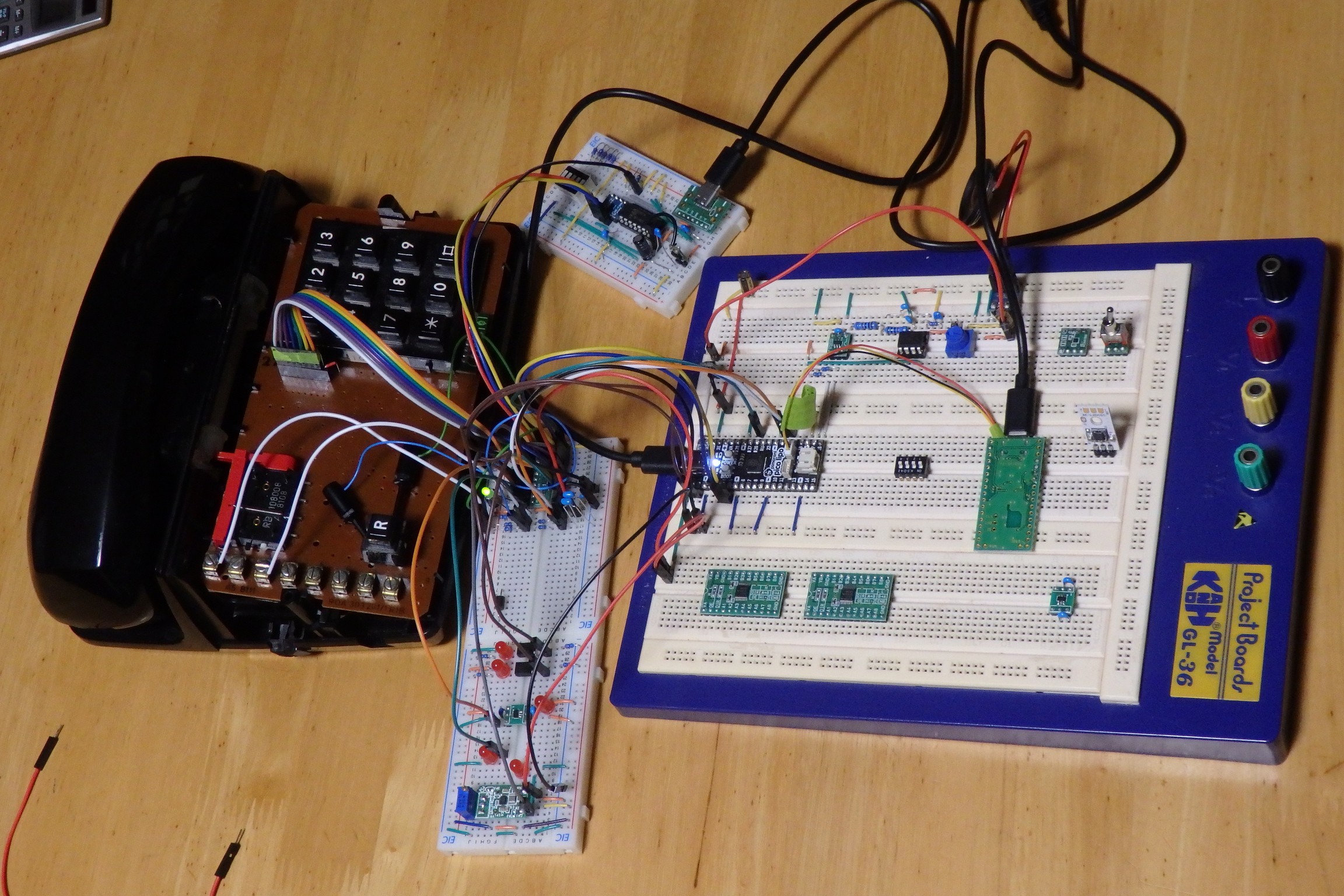
    I get to see my long lost friend again. No offense but what a mess you are.

    Since I'm just messing around with a purpose I have no schematic. Once I have the prototype working I will redesign it with a schematic. It should probably be done the other way around. :)

    After some testing of the current programming I noticed some bugs which have to be fixed.

    Bug 1:
    If you simulate a call and pick up the handset while the bells are ringing it doesn't cut the bells ringing until after the DMA transfer has completed. If you pickup the handset when it's not activly ringing the bells it goes directly to idle state like it's programmed. I have to take a look at the DMA transfer why it's not cancelled when handset is picked up.

    Bug 2:
    There is no power on reset in my greenpak design so when I plug it into power it sends a pulse to all the gpio in the greenpak which makes the loadswitch turn on a for breif moment and both gate drivers. This might cause a shoot-through in the h-bridge.

    Bug 3:
    When you put on the handset while the no connection tone rings it doesn't cut it right away. This probably has to do with the DMA transfer and it's the same type of bug as Bug 1. But this time when the no connection tone is playing. Have to look at the tone playback code.

    Bug 4:
    When you answer the simulated call the psu is not turned off which means the 40 volt psu would still be powered. I need to take a look at the code handling the 40 volt and 5 Volt psu.

    Other than I can not notice anything wrong. Keypad is very responsive and there is no fault when push the keys in any way possible. The handset switch is also very robust it doesn't crash when abused by toggling it as quickly as I can.

    The hacked together HS I2C interface using PIO is also holding up fine, no tone playback issues. I'll probably keep using this for the prototype. In the end the MCU I choose will probably have a built in 12-bit DAC.

    After thinking a bit ahead a 1.8 Volt MCU is the way to go, that is why I've decided to separate the gate-driver and keypad scanning. This way I can add the power on reset for the gate-driver and also add the handset switch which will cut the opto-coupler pwm outputs to the h-bridge effectively cutting the bell ringing. Of course it has to be fixed in code as well.

    The VDD2 of the SLG46826 can do 1.8 volts, using this to my advantage I could run the mcu at 1.8 volts. Use VDD2 pins for connecting to the MCU. Reducing the need of level-shifters to just one I2C level-shifter.

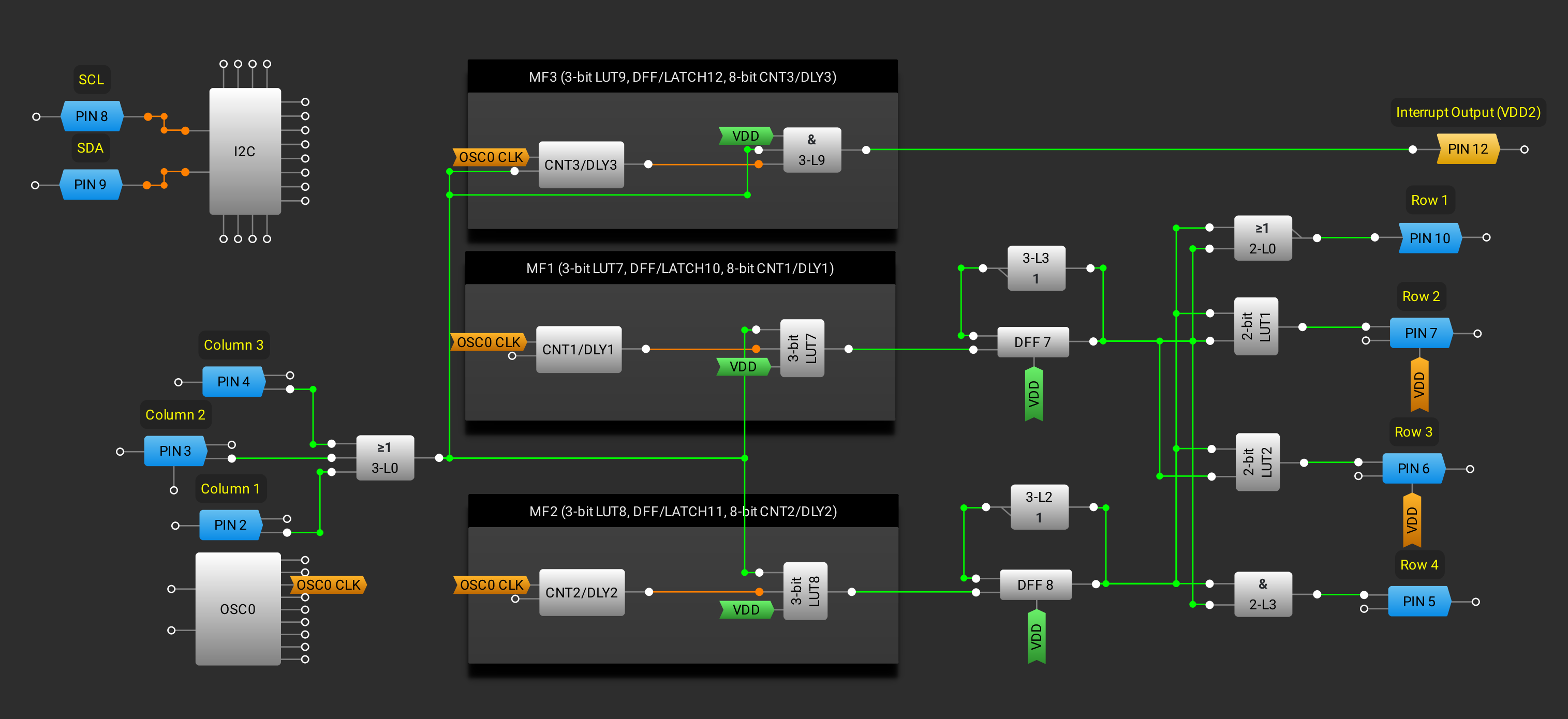
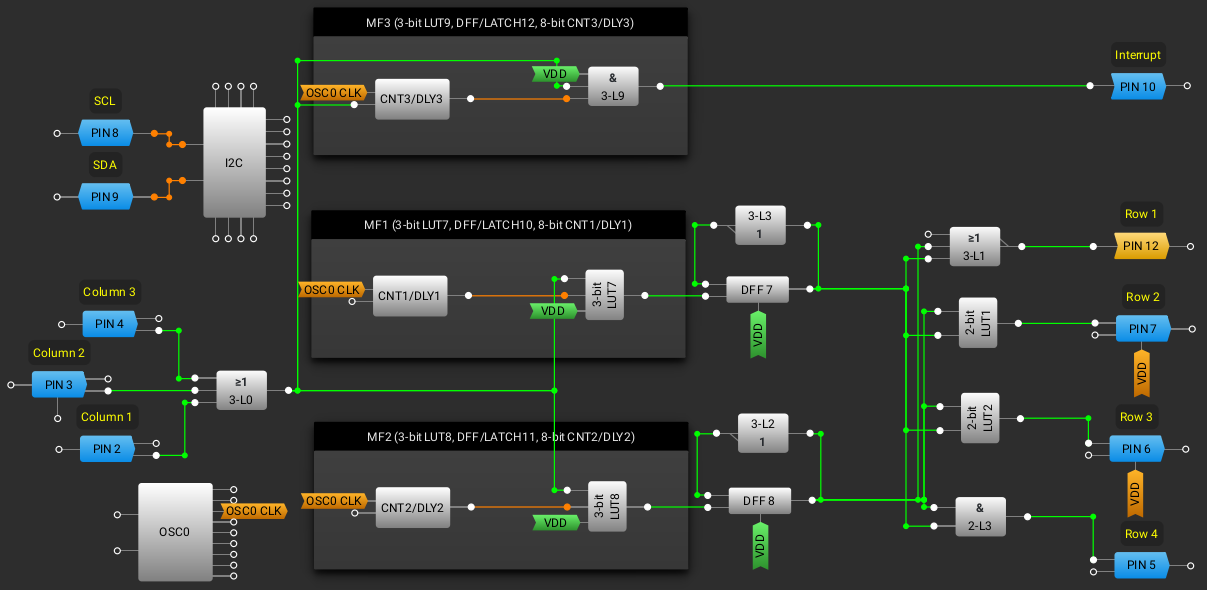
    Keypad scanning greenpak now looks like this. VDD2 pins are yellow.

    Interrupt pin from the keypad scanning could be set to 1.8 Volts, the row and columns could be 3.3 volts.

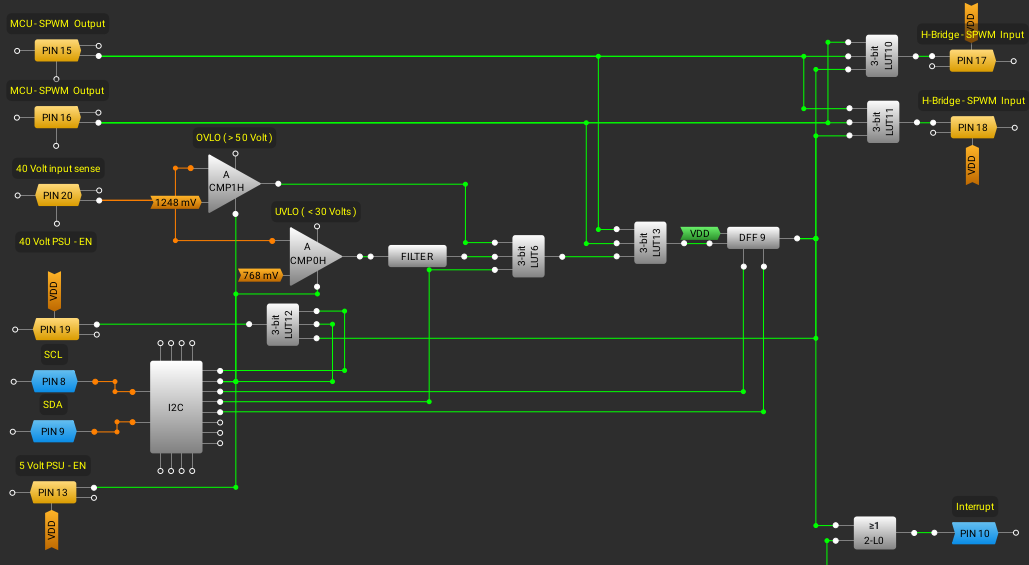
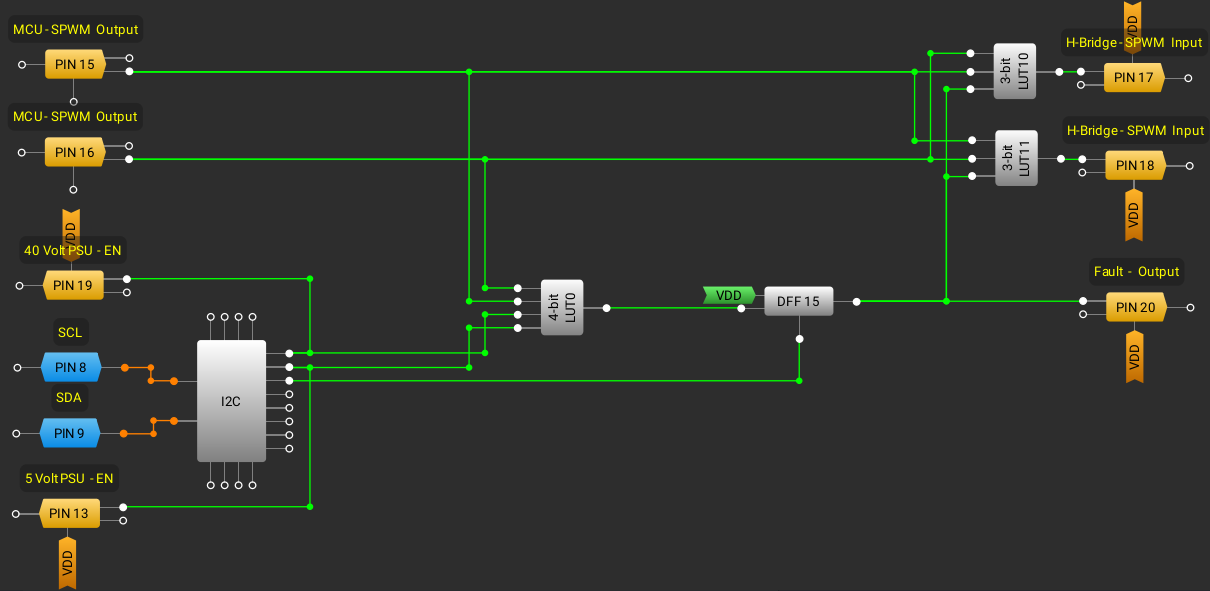
     The gate-driver greenpak looks like this for now.

    The gate-driver PWM inputs and fault output could be 1.8 volts. The h-bridge outputs, handset switch input and so on could be 3.3 volts.

    After the prototype is finsihed I can start looking at what MCU to switch to but there is alot of work left to be done. I'll have to rewire the greenpaks and fix the bugs in the code then I can connect the bell ringer stuff. Will it ring?

  • It's been awhile

    Anders Helgesson08/22/2025 at 03:36 0 comments

    It's been a busy couple of months I've not had much time to work on this project which is a bit sad. I'll recap what I've been able to do on the project.

    I had problems programming one of the SLG46826 greenpak's LUTs with my hacked together tool.

    I made a better driver for it, I took a look at other projects that make use of the MCP2221A and the offical linux driver source code. I got to know some of the blackbox secrets from them, so I was able to make a pretty solid driver.

    I used the eeprom again to test my driver it worked perfectly fine writing and reading even at the maximum amounts of bytes. HID which the mcp2221A is using is pretty slow when it comes to large datatransfers. 64 bytes per transaction.

    I made it as fast as I could with my driver. The MCP2221A buffer is just 1 byte short to read an entire eeprom block in one go. It's fast reading the eeprom but getting the data out of the buffer takes some time using the HID protocol.

    So then I started writing my greenpak cli tool and all of a sudden I was getting these NACKs when I should get ACKs. I guess I'll just use a logic analyzer to see what is going on. I used one of the rp2040 logic analyzer firmwares connected it up and tried capturing the traffic. I got a lot of garbage due to the fact I had no buffering or anything for the signals.

    That didn't work so, I vagely remebered that I had read about a logic analyzer software for the beagle bone black. So I looked into that and I couldn't find the software image the link was dead. I tried compiling from scratch didn't work as the source didn't specify which version of linux it was using and since alot of the offical beagle bone versions of linux had changed how to access the bbb peripherals. It was just a waste of time.

    This was the 3rd time I've tried using the beagle bone black for a project and just wasted time on getting it to work.

    So I went for my oscilloscope and it work fine capturing the signal but I'm not good at decoding I2C by looking at the traffic so I hooked it up to the pulseview program and captured the data again. Since the signals are analog I can not attach a decoder to them.

    I ordered one of those old saelae logic analyzer clones and when I used that I got the traffic just like that. I could even capture reading the entire block of the eeprom easily as it has tons of memory.

    I quickly found the problem with my driver, I was using 7-bit addressing with the eeprom tests and the greenpaks datasheet specifies the addressing using 8-bits with the read and write bit attached which I assumed was needed so the address was shifted twice. 

    So dropping the last bit from my control byte solved the issue. So it wasn't a problem with the driver, but rather me being confused that 8-bit addressing is a thing which is not since the last bit is part of the protocol framing. The more you know.

    Then alot of things happened and I've finally secured a room for my lab. :)

    Hopefully I can get something set up in there this month.

  • The 2-Bit LUT0 troubleshooting

    Anders Helgesson05/18/2025 at 20:59 0 comments

    There are many ways I could just keep going with my project, use an additional SLG46826V module or just skip the OVLO but I want to find out why I can not write the first byte.

    Like before I can not write the first byte of the SLG46826V greenPAK module.
    Now why doesn't it work?

    The LDO supplies stable power to the greenPAK and the decoupling caps are close to both VDD's. I noticed that there are small tiny decoupling caps on both VDD's on the module itself. Thus my extra caps are really not needed.

    Datasheet says "The VDD pin requires a voltage ranging from 2.5 V to 5.5 V for Programming and Erase operations." I read 3.28 Volts.
    It's only the first byte, I before tested to write all pages backwards same problem.

    I tried flashing the NVRAM as well and did an hard reset, didn't work. Since the LUT has not be set up I have no interrupt at all.

    I asked the GPT about it and it spitted out this markdown tech note for me.

    # ChatGPT Tech Note: SLG46826V Byte 0 Programming Gotcha
    
    ## Issue
    When programming the SLG46826V via I²C, all configuration bytes appear to update correctly except for byte 0 (address `0x00`) in page 0. Attempts to write to this byte in RAM or NVM appear to fail — readbacks show the old value.
    
    ## Root Cause
    
    **Byte 0 is special.**
    
    - It is the first register loaded from NVM into RAM at power-up.
    - It often controls critical startup logic — sometimes related to I²C behavior, internal routing, or clock enable signals.
    - To prevent accidental bus disconnection or logic instability, the chip blocks writes to this byte in RAM via I²C.
    - Only a reset (power or software) will update RAM with the value from NVM at byte 0.
    
    ## Solution
    
    To properly program byte 0:
    
    1. Erase Page 0 using the standard NVM erase command (write `0x8E` to register `0xE3`).
    2. Write your desired 16 bytes to Page 0, including byte 0 at address `0x00`.
    3. Wait for the NVM write to complete (`tWR` max 20 ms or use ACK polling).
    4. Trigger a reset:
       - Power cycle the chip
         **OR**
       - Send a software reset by writing `0x02` to register `0xC8` (RAM block 0)
    5. After reset, byte 0 in RAM will now match what was written to NVM.
    
    ## Verifying Your Programming
    
    | Address   | RAM write works instantly? | NVM write needs reset?                     |
    |-----------|----------------------------|--------------------------------------------|
    | `0x00`    | No (masked)                | Yes (requires reset to take effect)        |
    | `0x010x0F` | Yes                     | Yes (effect visible immediately in RAM after write) |
    
    ## Example Reset Command (Soft Reset)
    
    ## Notes
    
    - This behavior is not explicitly documented in a single section of the datasheet or ISP app note.
    - It is inferred from testing, forum replies, and hardware behavior.
    - Applies to the SLG46826V and similar GreenPAK devices.
    

    I tried it and it didn't work. GPT's are scary.

    It searched the web for quite a long time coming up with it, it's probably mixing data for greenPAKs.

    I looked at the programmer and noticed that I had a 0.01uF decoupling cap for the mcp2221A so I switched that to an 0.1uF. Just to make sure there is no issue there.

    I soldered a new slg46826V module and I have the same problem with that one, first byte can not be written to.

    I'm pretty sure that it is a problem with my programmming. But I wrote the pages backwards and I had the same problem. There is perhaps a problem when setting the page address for page 0x00.

    I'll refactor the greenPAK tool code and make a cli interface for it. Hopefully going through the code I might find the problem at least I will have a more easy to use programming software.

  • New design with UVLO and OVLO

    Anders Helgesson05/17/2025 at 23:04 0 comments

    It kept bugging me that I have no way of knowing if under-voltage occur for the 40 Volt PSU. I could just skip it but the whole reason I'm doing the project is for learning, so I started squeezing the last resources out of the greenPAK to see if I can make it happen.

    Here is the new greenPAK design. I were able to get the check for over-voltage in there as well.

    Like before it is not possible for both sPWM channels to be on at the same time. This would also latch the fault DFF. If a fault is latched the sPWM outputs can not drive the gates again until the fault is cleared.

    Under or over voltage also latches a fault using the ACMP's to measure the voltage. Both ACMP's are powered by the same signal that enables the 5 Volt rail. The outputs of both ACMP's can be ignored using a I2C register. This is neccessary to not get a fault when turning on or off 40 Volt PSU. During power up/down the outputs will be filtered out using the LUT when the register is set.

    The 5 volt EN signal is turned on, it also power the ACMP's, then turn on the 40 Volt PSU, check the UVLO ACMP that power has been established, then clear the acmp signal ignore and it should be ready for sPWM.

    To free up the pin needed for the voltage sense, I made the fault interrupt share the keypad matrix interrupt pin. This also have to be addressed in programming by using I2C to check if it's a Fault that triggered it or not.

    Using a macrocell with a DFF that has both nRESET and nSET for the fault latch. I can trigger a fault at anytime via the Virtual I2C register. It could be used for testing so I put it in there.

    To test the ACMP's I will use a SMPS TPS module set at 4 volts and use a voltage divider to get 1 Volt output. Connect that through a 1k series resistor and have an 0.01uF cap for filtering. I can get the programming right before moving onto the real 40Volt supply and H-Bridge.

    I need to order Schottsky diodes to protect the greenPAK input and some other components.

    So what is the problem with this design?

    Before I had a problem with the first byte of the SLG46826 register, I can not write to it. It controls the matrix outputs for the 2-Bit LUT0. Since I had enough resources I just simply switched to another LUT to get on with the project. Now I need to use that LUT again. 

    I have to troubleshoot this. I will first solder another SLG46826 module and test if its possible to write to the first byte, just to rule out a problem with the one I'm currently using. Then I have to go through the code for my greenPAK tool. I guess having the offical debug tool would make things easier but I'm learning a lot more this way.

  • GreenPAK H-Bridge gate driver test

    Anders Helgesson05/11/2025 at 20:51 0 comments

    I've decided to skip the reading of the voltage from the 40 Volt PSU and use that pin as a fault output for the H-Bridge control. Now all the pins of the GreenPAK(SLG46826V) are in use. I'm now using a virtual input register in the GreenPAK to control the 40 Volt PSU and the MCU pin originally intended for this purpose has become the fault interrupt input.

    I connected it all up and it looks like this. The added test circuit breadboard with the LED's and lots of wires.

    The TPS module is set at 5 volt to power the H-Bridge and 40V PSU.

    Opto-couplers with 1k pulls ups are powered from the TPS module. They are controlled by the greenPAK.

    The load switch will be a stand in for the 40V PSU with a LED.

    Before I mentioned I would use a load switch for the H-bridge but since there is nothing to power there except for the pull ups, I've decided to use the EN pin on the TPS module instead. It's EN is sinked to ground by the GreenPAK to turn it off.

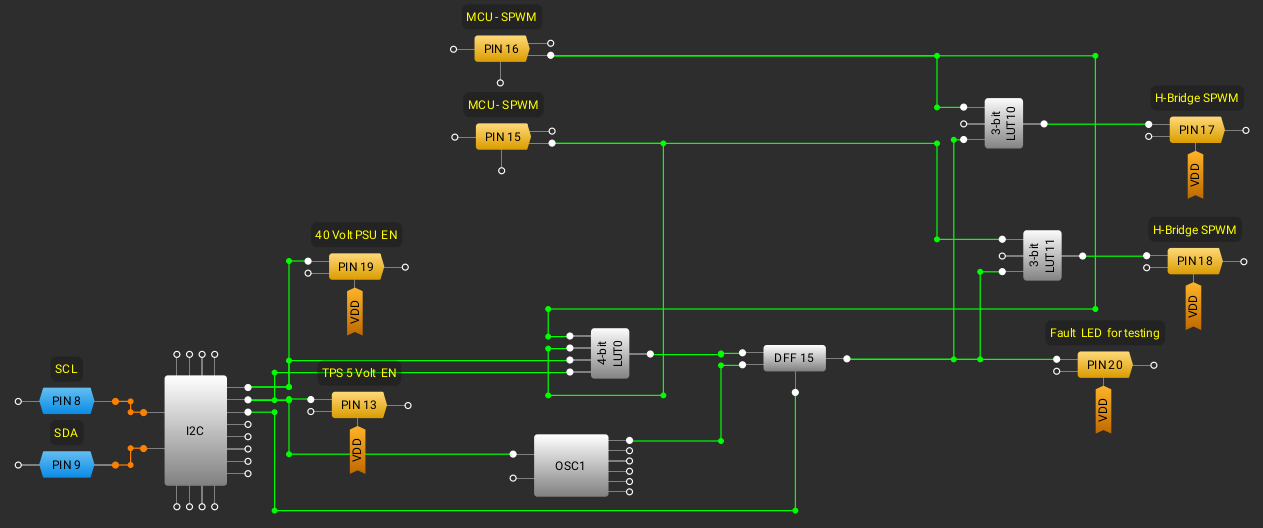
    Here is what the H-Bridge gate driver GreenPAK design now looks like.

    First the two 3-bit LUT's takes the MCU SPWM signals inverts the signals and outputs them to the H-Bridge gates. They also make sure that both signals can not be on at the same time. The fault signal is also sent taken into account as an extra safety, if a fault has been latched it can not drive the gates.

    The 4-bit LUT takes both MCU SPWM signals, TPS EN signal and the 40 Volt PSU signal. This makes it not possible to drive the gates without the 40 Volt PSU on. A DFF is connected to the output and if it's HIGH it will latch until cleared using the I2C controlled register.

    I noticed that the LED's I used have inbuilt resistors(for 5volts) on the positive side(anode), with the 1K pull up acts as a voltage divider. Using these kind of LED's for breadboarding should probably be avoided, when they make a voltage divider when you don't want one.

    Programming the new functionality. I've decided to make a general read_virtual_input_register and write_virtual_input_register. So it's easy to use these registers, there is 8 in total.

    I added the new simulate call state and some other code to make that work. I had to debug some code and fix some issues. Commands for resetting the fault condition and simulate a call have been added. I also added so I can access all the virtual input registers as well for testing.

    At first it didn't work like it should and it was because I had configured the 4-bit LUT the wrong way. Since I used this test circuit and not the live H-Bridge, no magic smoke event occured. After I reconfigured the 4-Bit LUT it started working as it should.
    I tested all the logic of the 4-Bit LUT and Injected 3.3 volts on each of the sPWM signals from the MCU to test the shoot-through protection. The H-Bridge gate driver works like it should and should protect the H-Bridge from blowing up.

  • H-Bridge gate control design

    Anders Helgesson05/05/2025 at 20:34 0 comments

    To implement my H-Bridge gate driver in the GreenPAK I have to have a test circuit. I've decided to wire it up on a small breadboard.

    A 5 Volt PSU will power the 40 Volt PSU and H-Bridge opto-coupler pull-ups. A load-switch will turn on a LED and is a stand in for the 40 Volt PSU. The will opto-couplers are connected to LED's as well. I will be using a pin as output for the fault and it will turn on a LED.

    Here is the design for the gate-control in the GreenPAK.

    Here is how this should work. The 4-bit LUT checks the output signals, 5 Volt supply EN and 40 Volt PSU EN.

    It outputs a 1 if both SPWM channels are on at the same time, it also checks that the 40Volt PSU has been turned on and that the 5 Volt supply is also on. The 40 Volt PSU can not be turned on before the 5 Volt PSU this will also register a fault.
    It's latched by the DFF until reset by the MCU via one of the I2C virtual output registers.
    The SPWM LUT's inverts the logic and if it has a fault signal locks both channels so they make sure that the H-Bridge is off.

    The PSU's are also controlled by the MCU via the I2C virtual output registers.
    Now to test this design I have to wire up the test board and do some programming.

    I'm going to make used of the command mode of the phone. Fault reset command, would reset the DFF if a fault has occured. Bell ringer test command, when this command is activated and the handset placed back on, a timer starts and executes a simulated call by ringing the bells until the handset is picked up.

    With a test circuit there is no risk of something blowing up, while implementing the new Bell Ringer control.

  • NVRAM erase command fix

    Anders Helgesson05/04/2025 at 19:30 0 comments

    I suspected that the document "In-System Programming Guide for SLG46824/6/7-A", that specifies some whole pages as reserved is wrong. Looking through the register definition in the datasheet there are some configuration that exist in the excluded pages 4 and 12. Perhaps that table was just for the SLG46824?

    Including page 4 and 12 in the erase command fixed the problem and I could flash it properly.

  • Keypad works but NVRAM erase command does not

    Anders Helgesson05/03/2025 at 20:15 0 comments

    The GreenPAK keypad scanning design with the new pinout looks like this.

    The columns share the same LUT and to keep it simple and just one I2C read to get the key pressed. I'm reading 3 bytes. Byte 0x74, Byte 0x75 and Byte 0x76. These contains the matrix inputs and LUT outputs used.
    These are used to determine which key was pressed. Since I don't change the pinout often. I'm just going to update the code with the new pinout, it's just simpler. I updated the bitmask with the new setup for the column pins, for the rows I were reading the LUTs already so nothing have changed here. It now works again. I've flashed the new design onto the GreenPAK.

    My erase command doesn't seem to properly erase the device. The new code and pinout works if I write directly to the registers.
    If I use my NVRAM erase, flash and then reset the device it doesn't work. I'm guess my erase command does not erase all of the NVRAM properly. I have to go through and get the NVRAM erase to work properly. I have to write some debug features to read and compare the NVRAM and registers.

    So it wasn't a problem with the schmitt triggers, so I put them back on the column inputs and tested it. It works perfectly and might even be more robust with the schmitt triggers on the column inputs.

  • NVRAM erasing, flashing and a problem

    Anders Helgesson05/02/2025 at 21:40 0 comments

    With the research I did before I implemented the nvram erase command for the GreenPAK(SLG46826). I erased the NVRAM and checked it. It worked perfectly.

    With the now blank GreenPAK I decided to flash my new design. I powered everything up and it didn't work. I check the debug messages and interrupt from the GreenPAK didn't latch.

    I remembered that I had added schmitt triggers on the column inputs, so I removed them again. Back to flashing, now I erased and accidentally flashed the old project file again. That was wasteful. I should have written to the registers instead to test.
    I wrote the new design to the registers and the interrupt was working again. However when I pressed the keys, it's not playing back the correct key tones. Why?

    Well, I forgot about the way it works, the GreenPAK sends an interrupt when a key is pressed. The MCU gets this and reads which key is being pressed through reading the registers of the GreenPAK over I2C. Instead of reading the LUT's I set it up to read the pins. Now this was a bad choice as the pinout has changed.

    I have to rewrite the code for this. I'm going to have it read the LUTS directly instead. Time to read the datasheet again.

    One step forward, two steps back but I'm on the right track.

  • Erasing the NVRAM pages in the GreenPAK(SLG46826)

    Anders Helgesson04/30/2025 at 19:11 0 comments

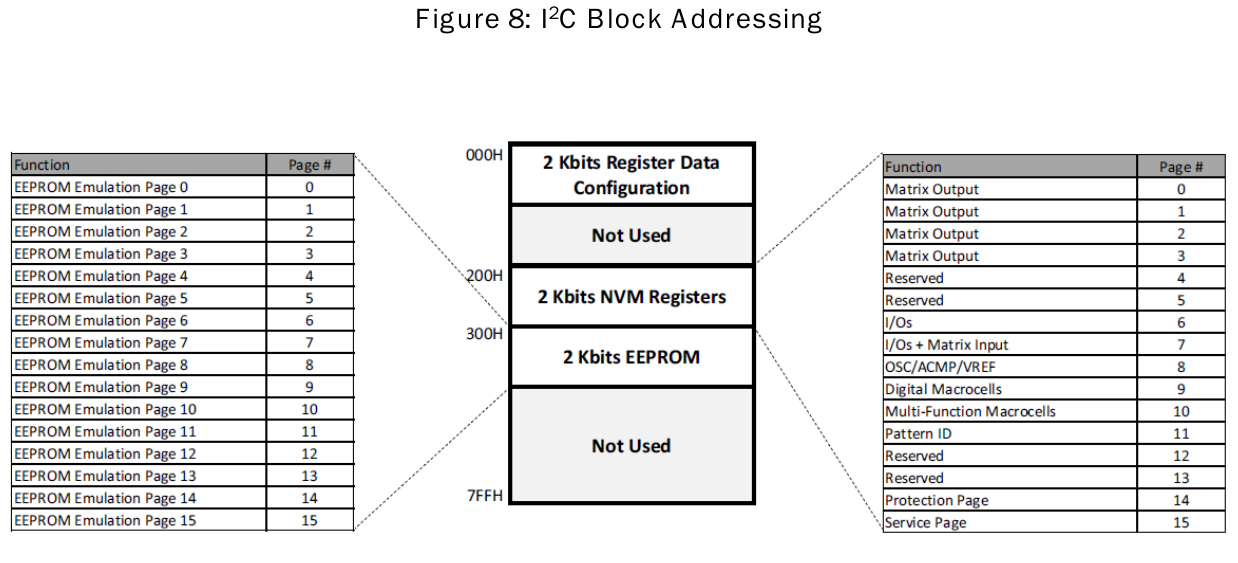
    I looked at how to erase the NVRAM in the GreenPAK(SLG46826) and I found this.

    This was not included in the datasheet but in another document (In-System Programming Guide for SLG46824/6/7-A).

    This is interesting as my software writes to all but the last service page. I found this table and it tells me that writing to the reserved pages could also be skipped. I'll put it in the comments for the write command for now.

    I need to erase pages 0-3 and 6-11. I can skip the reserved, protection and service pages.

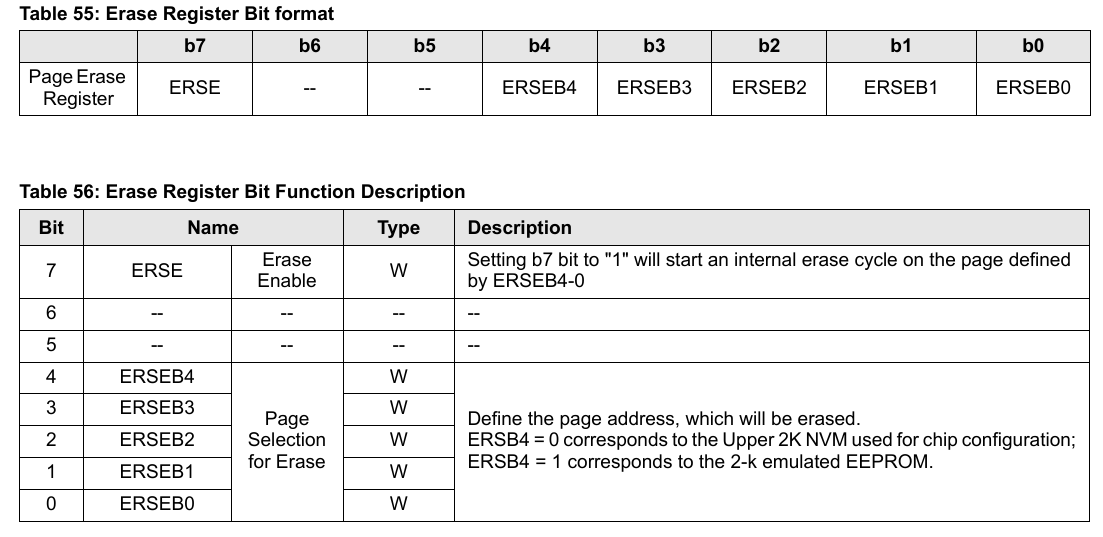
    Erasing the NVRAM is done through the ERSE register. It is also used to erase the emulated eeprom. The datasheet says "The ERSR register is located on I2C Block Address = 000b, I2C Word Address = E3H."

    The ERSE Register (E3H) Bit Function Description looks like this.

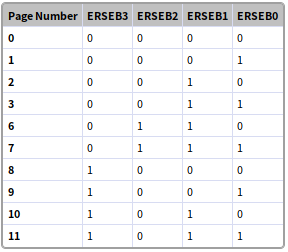
    If I understand it correctly the ERSEB3 - ERSEB0 are used like this to set which page that should be erased.

    The last 4 bits must be used to select a page number from 0-15. No mention of this but I assume it is how it works.

    So for example 10001011b would erase NVRAM page 11, 10011011b would erase emulated EEPROM page 11. I might have mentioned before that the emulated EEPROM can not be used by the GreenPAK it self but could be accessed through I2C to store calibration and other settings that do not change. It also has the limitation of 1000 writes like the NVRAM.

    Datasheet notes also says:

    "Upon receipt of the proper Device Address and Erase Register Address, the SLG46824/6/7-A will send an ACK. The device will then be ready to receive Erase Register data. The SLG46824/6/7-A will respond with a non-compliant I2C ACK after the Erase Register data word is received. Please reference the SLG46824/6/7-A errata document (revision XC) posted on Renesas’s website for more information.

    The addressing device, such as a Bus Master, must then terminate the write operation with a Stopcondition. At that time, the GPAK will enter an internally self-timed erase cycle, which will be completed within tER (max 20 ms). While the data is being written into the Memory Array, all inputs, outputs, internal logic, and I2C access to the Register data will be operational/valid. After the erase has taken place, the contents of ERSE bits will be set to "0" automatically. Erase will be triggered by Stop Bit in I2C command."

    I guess I have to take that into account when writing my nvram erase command.

    It also says:
    "An Acknowledge Polling routine can be implemented to optimize time sensitive applications that would prefer not to wait the fixed
    maximum write cycle time (tWR) or erase maximum cycle time (tER). This method allows the application to know immediately when the Serial EEPROM emulation write/erase cycle has completed, so a subsequent operation can be started. 

    Once the internally self-timed write/erase cycle has started, an Acknowledge Polling routine can be initiated. This involves repeatedly sending a Start condition followed by a valid Device Address byte (NVM block address) with the R/W bit set at Logic 0. The device will not respond with an ACK while the write cycle is ongoing. Once the internal write/erase cycle has completed, emulated EEPROM will respond with an ACK, allowing a new read, erase, or write operation to be immediately initiated.

    The length of the self-timed write cycle (tWR) and self-timed erase cycle (tER) is defined as the amount of time from the Stop condition that begins the internal write operation to the Start condition of the first Device Address byte that includes NVM address(A9 = 1; A8 = X) sent to the SLG46826 that it subsequently responds to with an ACK."

    I could use this to make the erase command quicker instead of waiting for 21ms per page erase. I guess since some values are already 0 a page erase would take less than the max of 20ms specified in most cases.

    Before I had problems with setting the first 2-bit LUT0, maybe the erase command will make it useable? I could read from it but not set it in both...

    Read more »

View all 62 project logs

Enjoy this project?

Share

Discussions

Ken Yap wrote 01/08/2025 at 00:41 point

Interesting idea. Is the DTMF tone generation to make it sound like the old days? AFAIK that's not how numbers are "dialed" with mobile phones. Although some automated response systems will want DTMF tones during a call for responses.

Also speed dial storage could be considered. Punching 10+ digit numbers for frequently called people will get old.

  Are you sure? yes | no

Anders Helgesson wrote 01/08/2025 at 09:21 point

The DTMF tones are just for aesthetics, and their whole purpose is for the user to hear the keypad tones. If I understand the codec datasheet correctly, I can route the tones (via AUX) so the recipient can hear them as well, but I will probably not do that. 

Dialing and pressed keys during a call, they will be sent to the modem over UART to be handled.

I will probably add speed dial features once the phone is working.

  Are you sure? yes | no

Giulio Pons wrote 01/06/2025 at 00:03 point

Very nice! Do you use a SIM card to make the phone call?

  Are you sure? yes | no

Anders Helgesson wrote 01/06/2025 at 21:31 point

Yes. I'm planning to use a Quectel EG25-G, 4G LTE modem to make the phone calls.

  Are you sure? yes | no

Similar Projects

Does this project spark your interest?

Become a member to follow this project and never miss any updates