Alec Probst
-
Prototype EVT Process and Cost
01/22/2026 at 21:08 • 0 commentsHello all!
It's been a second since the last log. I have been busy with end of the year plans and have finally come back to this project. Progress has not stopped while I was away though!
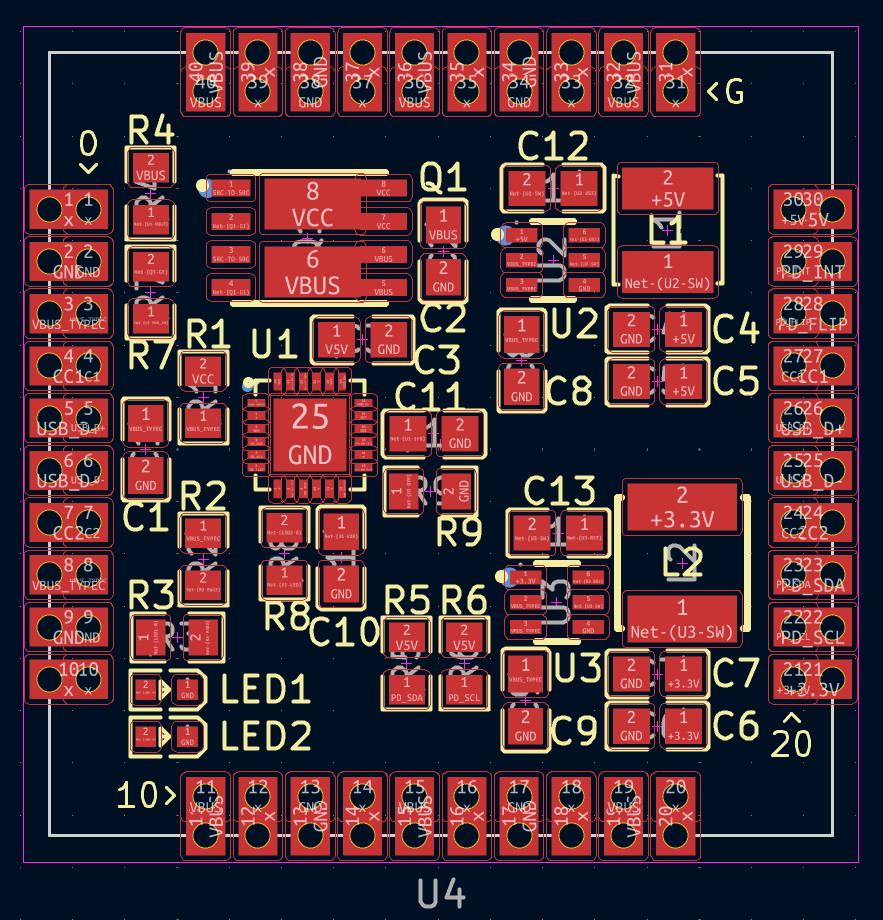
In this log I'll go through my methodology when ordering EVT (Engineering Validation Test) Components and PCBs, reasoning for chosen Component Suppliers and PCB Fab, and some changes to the PCB as a result.
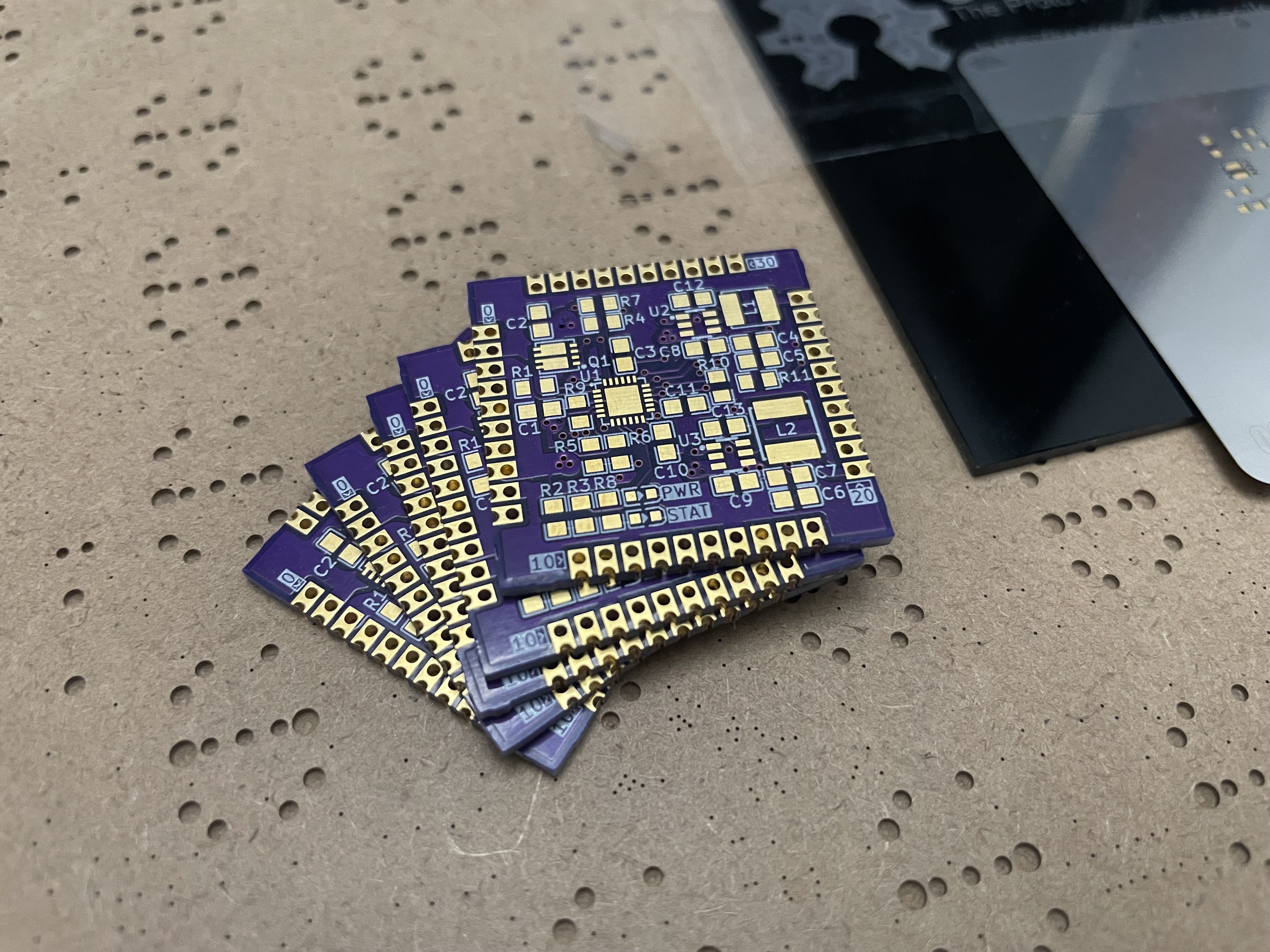
Sneak Preview of the PCBs!
![]()
EVT Decision Methodology
My goal for EVT is to test the PCB and Components to make sure StampPD works correctly. I also want to validate some cost cutting decisions for the PCB that will be explained below. For the EVT iteration I will be hand assembling PCBs to get an understanding of component assembly issues, silkscreen confusion, and to make any necessary PCB fixes easier. My target quantity of StampPD EVT boards is 10 working prototypes but I ordered Components/PCBs for 12 boards to account for mistakes, broken components, and potential destructive testing.
EVT Component Supplier Choice
The conclusions from the "DIY Component Cost Comparison" log have remained the same. I ordered all passive components from LCSC and 4 IC components from Digikey. The total cost of components can be seen below:
- Passive Components - $22
- $10 for components
- $12 for shipping, tariffs, and tax
- IC Components - $48
- $36 for components
- $12 for shipping, tariffs, and tax
- Total Cost for all Components - $70
- $46 for the raw component cost
- $24 for the shipping, tariffs, and tax
EVT PCB Fab Choice
One decision that has changed from past logs is the PCB Fab. Originally I was planning to use JLCPCB or PCBWay as they were the cheapest based on my calculation of x100 PCBs. However, JLCPCB and PCBWay had additional tariffs well over $200 at the time I was ordering PCBs. Instead I used OSHPark as my PCB Fab and OSHStencil as my Stencil Fab since they are an American company and do not have tariffs. OSHPark was originally not considered in the "PCB Fab Cost Comparison" log due to their limited PCB options. The cost increase from the tariffs helped spur on some of the PCB changes below to manufacture the PCB with OSHPark. The total cost of the PCBs can be seen below:
- PCBs - $56
- Free Shipping
- Stencil - $15
- $10 for stencil
- $5 for shipping
- Total Cost for PCBs and Stencil - $71
Total Cost for EVT Prototypes - $141
- Raw Component/PCB Cost - $112
- Shipping, Tariffs, Tax - $29
Copper Weight
In the "PCB Trace/Via Calculations and 2 vs 4 Layer PCB" log I chose 2 oz/ft^2 for the top and bottom layers of the PCB as it allowed for smaller trace widths. OSHPark 4 layer boards only have the option for 1 oz/ft^2 top and bottom copper thickness and 0.5 oz/ft^2 middle layer copper thickness. This increases the Trace Widths of the design!
Trace Width
With the decrease in copper thickness, the Trace Widths on the Top and Bottom layers needed to increase. To facilitate this, I moved the 5A net to Top layer and 4A net to Bottom layer. The 2A traces remained on the Bottom layer like before. This minimized the size impact of these traces and allowed for the PWR layer to be an unbroken plane. Shuffling some components and traces around allowed the PCB to remain the same 30mmx30mm size constraint.
- 2A - 0.3mm -> 0.7mm Trace Width
- 4A - 0.7mm -> 1.5mm Trace Width
- 5A - 1.2mm -> 2mm Trace Width
Via Hole Size
When looking at the manufacturability of the PCB, I realized just how big the 1.2mm Via Hole Size was for the 5A and 4A nets. These holes takes up a lot of space and could cause shorting issues. To resolve this, I replaced the 1.2mm Hole Size with x3 0.4mm hole size. This reduced the number of drill sizes need to 2 and allows for all Vias to be tented at the cost of more drilled holes per PCB. They should be able to carry the same amount of current.
- 4A and 5A Via Hole Size - 1.2mm -> x3 0.4mm
EVT Testing Concerns
As I assemble and test the EVT PCBs, I will be keeping an eye on the PCB thermals. I have concerns about how close some of the components are, traces getting too hot, and the internal PWR layer getting warmer than expected in certain areas due to Vias "pinching" specific sections of copper on the PWR plane.
- Passive Components - $22
-
DIY Component Cost Comparison
12/06/2025 at 20:03 • 0 commentsHi all,
I've put together a DIY component cost comparison for StampPD. My goal was to understand how much per component StampPD would cost, see if there are any optimizations I could make, and figure out where to source parts. This will eventually be contrasted with PCBA services from fabs like JLCPCB.
Cost Calculation Process
Similar to the PCB cost comparison, I have selected 100x PCB's as my target amount for price analysis. This gives us most of the bulk component cost advantages while matching the PCB comparison. I will only show the prices for 100x PCB's. If there is more than one component per PCB, I will buy multiples of 100x for the component (Ex: There are 4x 100nF capacitors in each StampPD so we'll need 400x of them for production runs). If we cannot buy components in the exact amount needed, we'll buy the next largest quantity. I will not be including any replacement components in this calculation to fill for any lost/broken/destroy components that may happen in the production process. Any extra components due to quantity oversizing is not purposeful.
I will be looking at 3 main suppliers: LCSC, Digikey, and Mouser. These were selected as they are 3 that I am most familiar with. Not all parts could be found at all 3 suppliers. I am open to other suppliers so feel free to send a DM if you have suggestions. I use https://octopart.com/ to check for better prices for components as well but generally found better prices were only at suppliers that I did not know or trust.
The last columns also calculate the price by multi-sourcing the cheapest components across suppliers. There are two summary sets of data for each column, the Sum Cost and the Per Board Component Cost. The Per Board Component Cost is the more important value here as it helps to inform the price of the final StampPD boards. There are two variations of these values, one without shipping, tax, and tariffs and one with. The multi-sourcing column estimates the combined shipping, tariffs, and tax from ordering from more than one source.
Summary
- All parts are selected for 100x PCB's
- Suppliers compared are: LCSC, Digikey, and Mouser
- Parts prices for other sites were reviewed on octopart.com
- Final column compares price by multi-sourcing across suppliers
- Per Board Component Cost is the more important value as that informs pricing of StampPD
- Two variations of Component Sums, one with tax, tariffs, and shipping and one without
Cost Comparison as of 11/18/2025
Here is the price comparison for 11/18/2025. Note that prices can and have changed over time
![]()
Observations
- Almost all passive components are cheaper on LCSC, even when accounting for shipping, tariffs, and tax
- Digikey and Mouser do not have great selection for most passive components
- The passives they do have are very expensive
- Possibly due to 0805 package size
- Some components like the inductors are not the same quality or size as the offerings from Digikey or Mouser
- IC based components are mostly cheaper from Digikey than LCSC or Mouser
- Buck Converters are cheaper on LCSC
- Almost half of the component cost is from the AP3377SDKZ
- This component cannot be replaced, it's the main component everything is based around
- A quarter of the cost comes from the BUK7K6R8-40E,115 Power Control MOSFET
- This MOSFET is also out of stock everything and restock estimates peg it over a year out
- 10uF and 22uF capacitors a magnitudes more expensive than the other passive components
- Mouser has expensive tariffs which apply to most parts
Cost Comparison as of 11/26/2025
Since this log is being written a bit late, I've already performed a second pass of the component cost comparison. Some changes below are:
- Removed Mouser from the supplier list
- The tariffs and overall higher component cost made this supplier uncompetitive
- Digikey and LCSC were always cheaper
- Replaced the Power Control MOSFET
- I'm now using a TI CSD87503Q3E which is purpose built for this application
- Reasoning is that it's in stock everywhere and cheaper than the BUK7K6R8-40E,115
- Replaced the 10uF and 22uF capacitors with cheaper variants
- Focused on buying passives from LCSC and IC's from Digikey
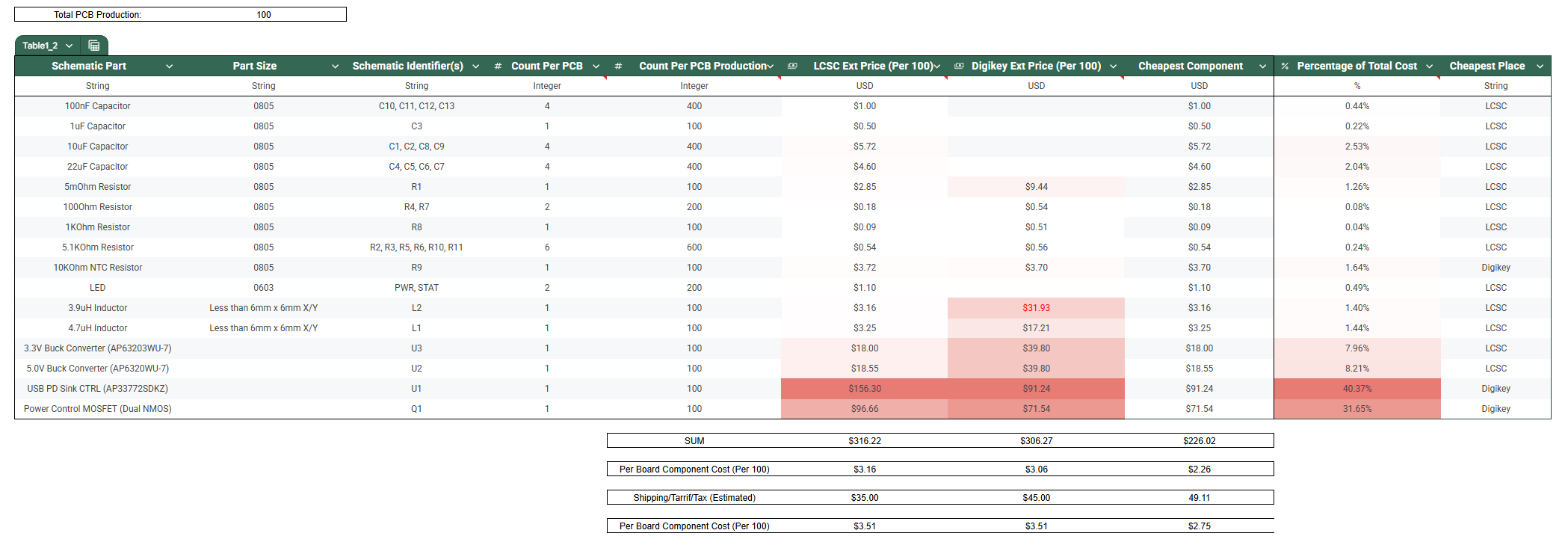
Here is the price comparison for 11/26/2025. Note that prices can and have changed over time
![]()
Observations
- Some slight variability in costs but most things have stayed the same price
- Passives are mostly cheaper on LCSC than Digikey
- Switching to different 10uF and 22uF capacitors has brought their cost more in-line with other passives
- Still more expensive, possibly due to package size
- New Power Control MOSFET is in-stock and about the same cost, if not cheaper, than the old one
- Based on octopart.com, MOSFET may be found cheaper on other suppliers
- Unclear if these are reliable part sources and if prices have tariffs or other costs not included
- IC based components are mostly cheaper from Digikey than LCSC or Mouser
- Buck Converters are cheaper on LCSC
- Almost half of the component cost is from the AP3377SDKZ
- A third of the cost comes from the CSD87503Q3E Power Control MOSFET
- Almost 90% of the cost is concentrated in the 4 IC components
Final Conclusions
- Likely to buy passives and buck convert IC's from LCSC and USB PD Sink Controller and Power Control MOSFET from Digikey
- Even with extra shipping, tariffs, and tax the cost is still lower than using a single supplier
- Finding the cheapest suppliers for the AP3377SDKZ and CSD87503Q3E is the best opportunity to reduce cost
- Final Per Board Component Cost is likely around $2.75
-
PCB Fab Cost Comparison
11/25/2025 at 16:02 • 0 commentsHi all,
In this log I want to go through the cost estimates for a couple PCB fabs. The routing for the PCB is far enough along now that I can put in all the settings we need to get cost estimates. This helps to give me an idea of what costs to expect for the final product.
I am targeting 100 boards as it is an ideal target for hitting cost savings when buying components in bulk and seems like a reasonable amount of boards to make that they wouldn't sell out instantly.
PCB Requirements
StampPD is initially designed around JLCPCB as the PCB manufacturer. This is due to 2 reasons: I have experience with them in the past and I wanted to try JLCPCBA service. If any specs seem a bit arbitrary, it is likely that this is JLCPCB's default capabilities. For some specs like the Copper Weight, please see the last log. For all PCB Fab quotes, I will select the following specifications:
- Size - 30mm x 30mm
- Layers - 4
- Quantity - 100
- Board Type - Single PCB
- Possible that panelizing the PCB's will reduce costs but that is for future me to find out
- Base Material - FR-4
- Outer Copper Weight - 2 oz/ft^2
- Inner Copper Weight - 0.5 oz/ft^2
- 1 oz/ft^2 would give more safety margin for the power layer
- Castellated Holes - Yes, all 4 edges
- Minimum Via/Plated Through Hole (PTH) Copper thickness - 18um
- Minimum Drill Hole Size - 0.3mm (12mil)
- Minimum Trace Spacing - 0.2mm (8mil)
- Minimum Trace Width - 0.16mm (6.5mil)
- Product Number - Location Specified
Any specifications not listed above are not very important to the StampPD design at this time. That means specs such as these will be selected to be as cheap as possible: Surface Finish, Layer Stackup, Via Process/Covering, PCB Thickness, PCB Color, Silk Screen Color, and Board Outline Tolerance.
PCB Fabrication Companies
A website which lists PCB fabs for small batch production can be found at BuildList.org. I filtered this list to Fabs that allowed me to select the above settings. This removed some Fabs, such as OSHPark, as they did not have settings for 2 oz/ft^2 Copper Weight for 4 layer boards or Castellated Holes. I also removed any discounts given as these may not be repeatable on subsequent orders. Note that prices may fluctuate depending on the time and place of your order. This leaves us with the resulting quotes as of 11/25/2025:
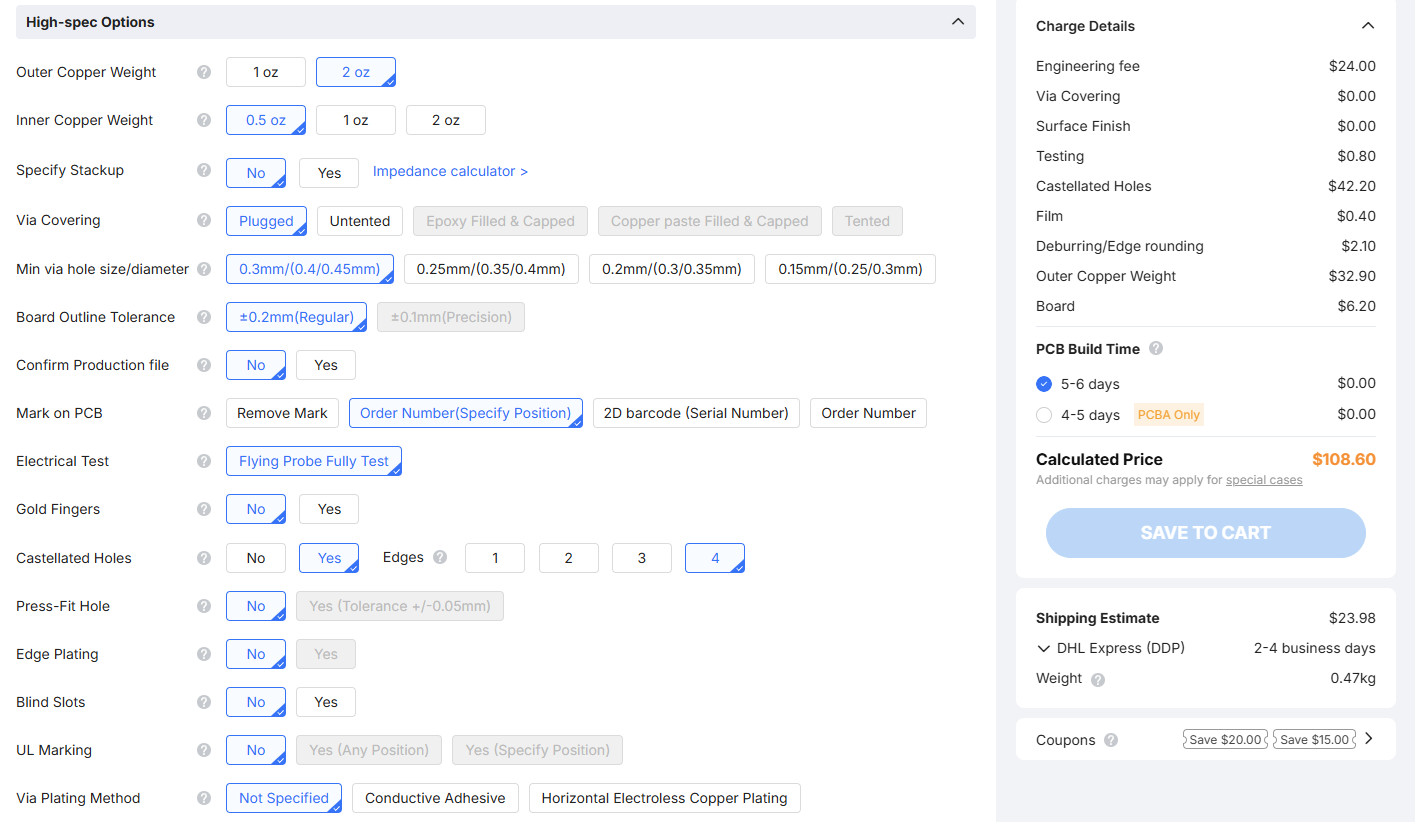
- JLCPCB - $108.60,
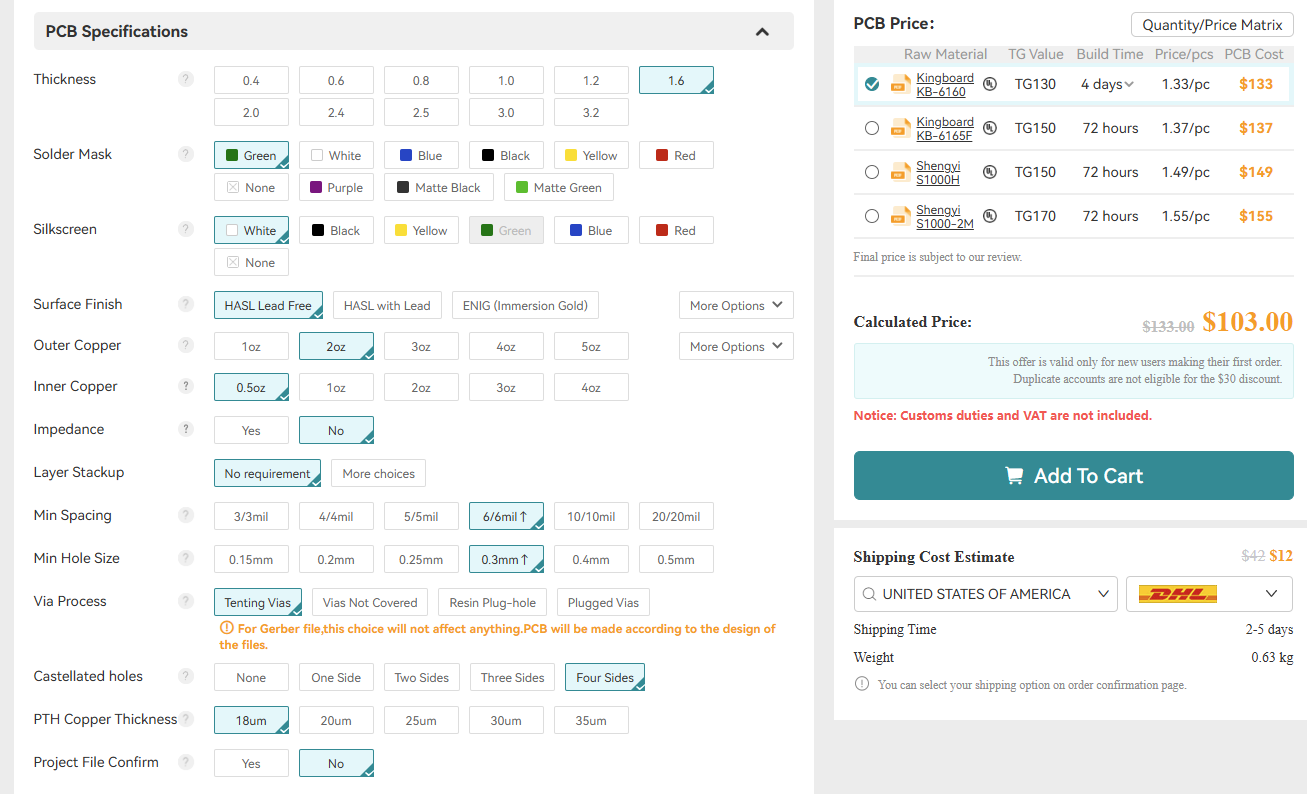
- All PCB - $133.00
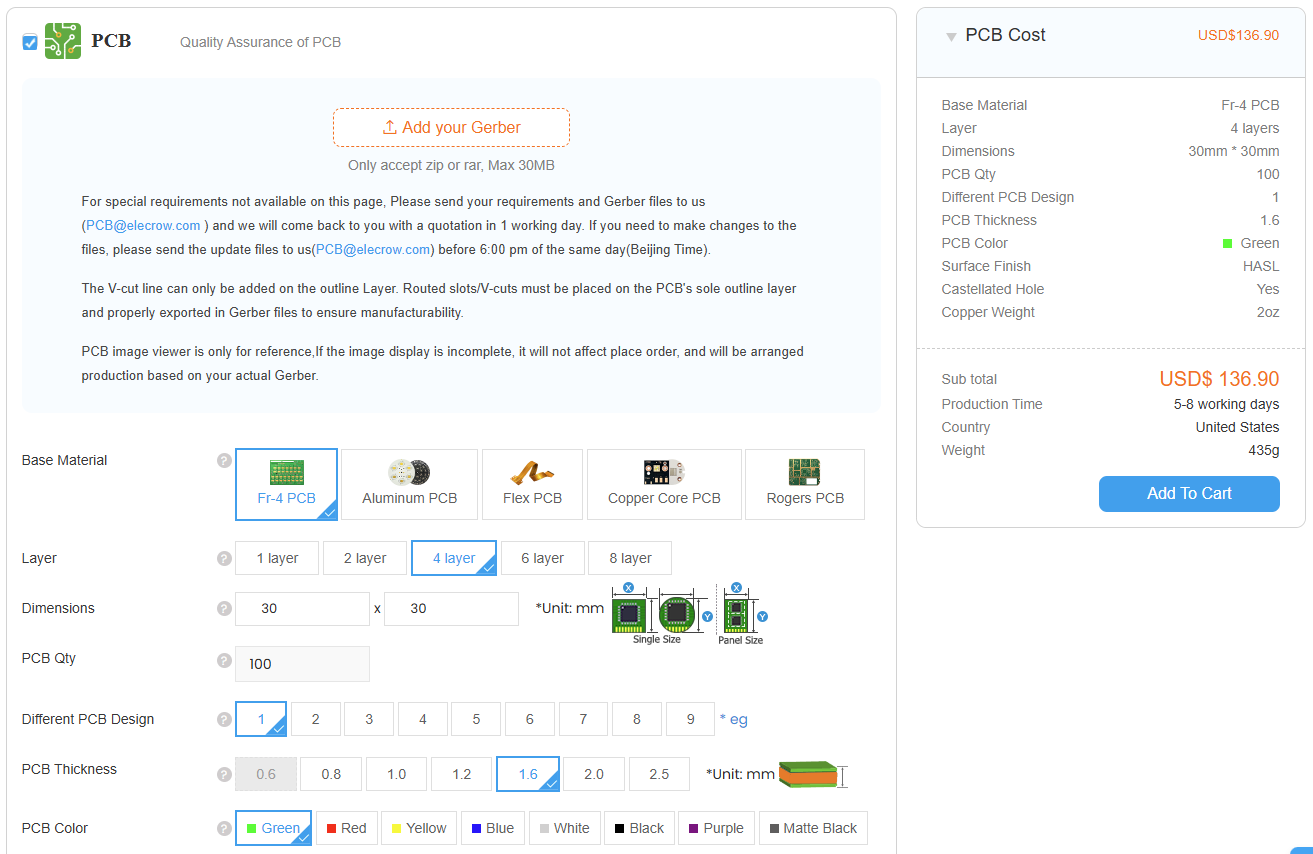
- Elecrow - $136.90
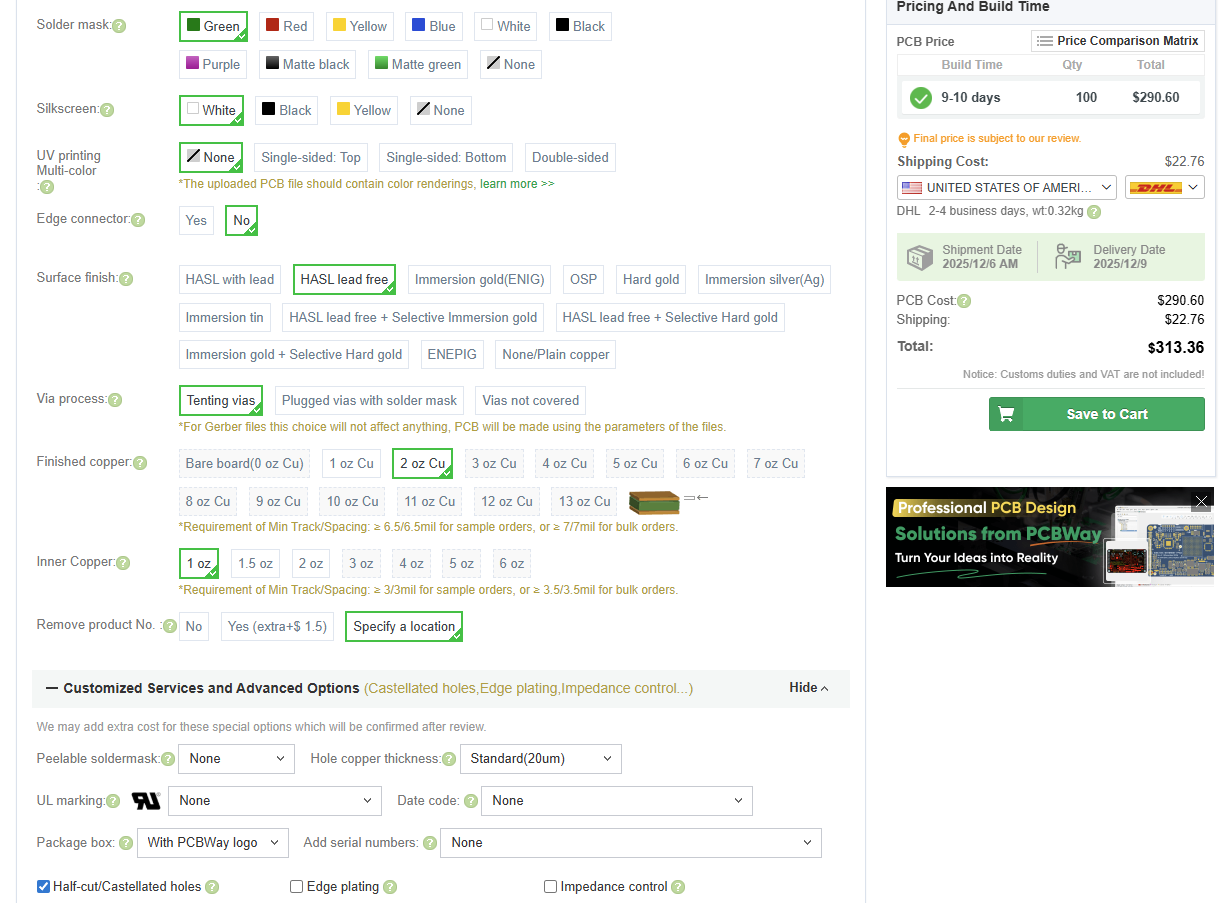
- PCBWay - $290.60
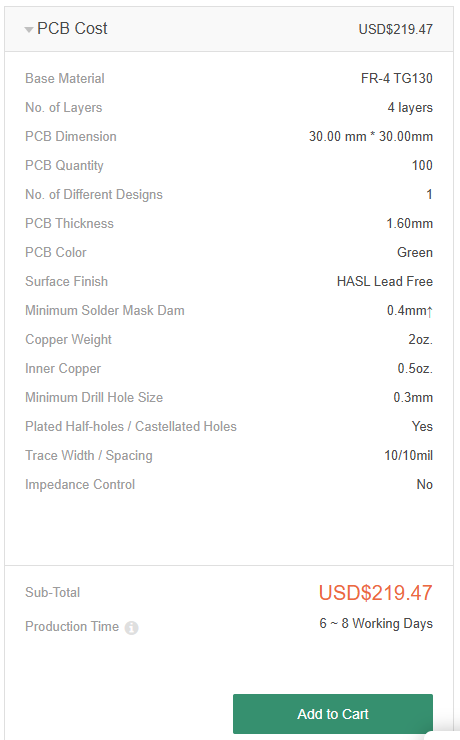
- SEEEDStudio - $219.47
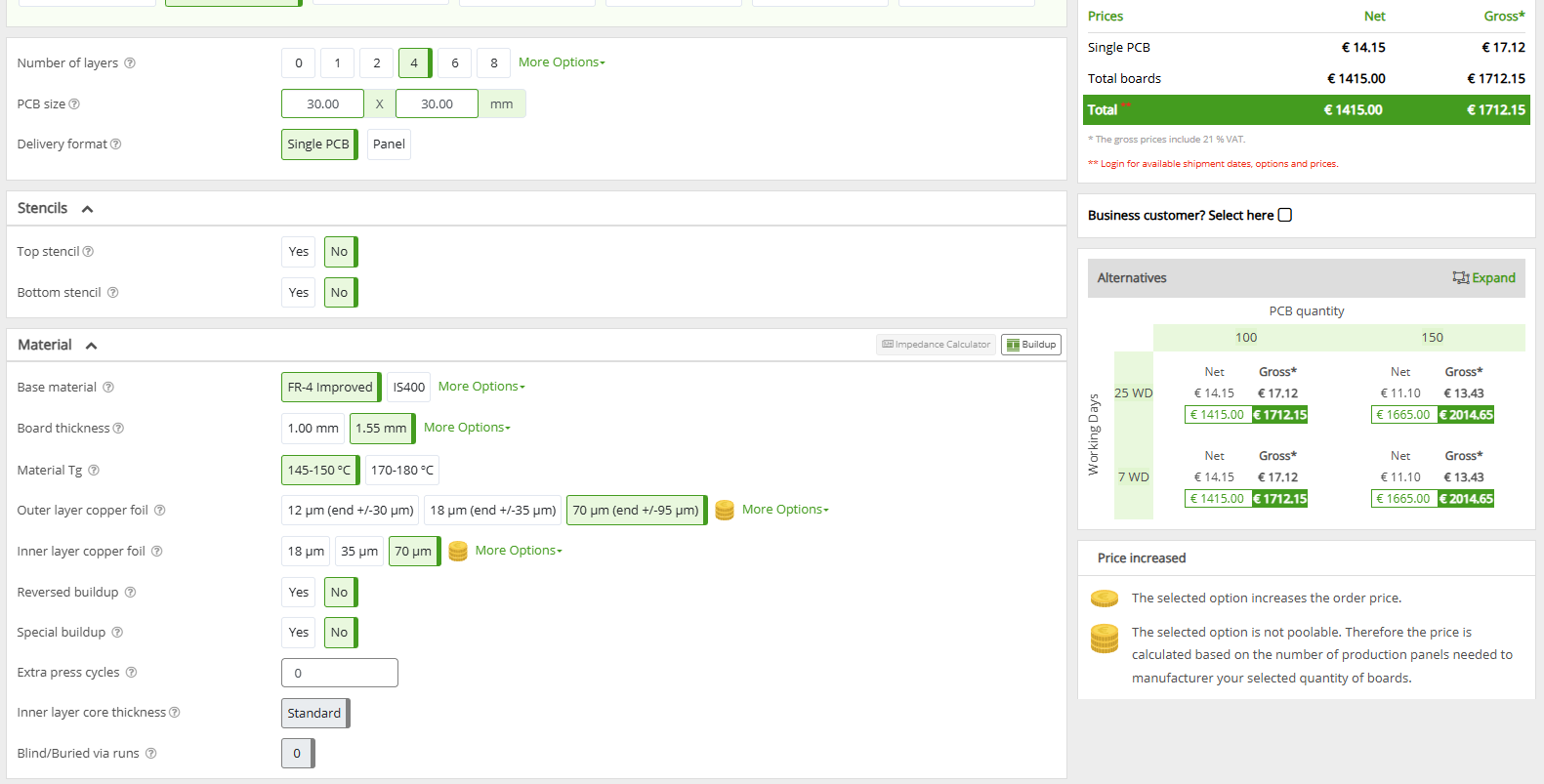
- Eurocircuits - $1,984.74 ( €1712.15 )
As you can see JLC, AllPCB, and Elecrow are the cheapest. PCBWay and SEEEDStudio are more expensive but still somewhat reasonable while Eurociruits is completely unreasonable. For now, I plan to stick with JLC unless prices change drastically.
Below are screenshots of the prices given above:
JLC
![]()
All PCB
![]()
Elecrow
![]()
PCBWay
![]()
SEEEDStudio
![]()
Eurocircuits
![]()
-
PCB Trace/Via Calculations and 2 vs 4 Layer PCB
11/24/2025 at 22:54 • 0 commentsHi all,
This log will go through the calculations required to size the traces and vias for the StampPD PCB as well as the decision to move from a 2 layer board to a 4 layer board.
High Current Domains
We need to calculate what copper weights are required for the PCB based on the max expected current through traces and vias. For StampPD, we have 4 power domains that have significant current. These are:
- USB PD VBUS domain: 5A
- Determined by USB PD spec
- 3.3V Output domain: 2A
- Determined by buck converter max output current
- 5.0V Output domain: 2A
- Determined by buck converter max output current, and
- Input current to combined 3.3V and 5.0V buck converters: 4A
- See calculation below
Buck Converter Input Current Calculation
While the buck converters for 3.3V an 5.0V can output up to 2A of current each, they require a different amount of input current. To calculate each buck converters input current, we multiply its Max Output Voltage by the Max Output Current then divide that by the Minimum Input Voltage times the Efficiency.
The minimum Input Voltage for both buck converters will be 5V as this is the minimum voltage defined by USB. The efficiency can be found in graphs for the AP63200 but no 5.0V input voltage line is given. For now I'm taking the 12V input voltage efficiency at 2A which is around 90% for both buck converters. The actual efficiency is likely higher than this as efficiency in a buck converter increases as the input and output voltages are closer in value. By replacing the equation values and adding both buck converters input current requirements together, we get the below solution:
This gives us 3.7A which I round up to 4A for safety margin.
Trace Width Calculations
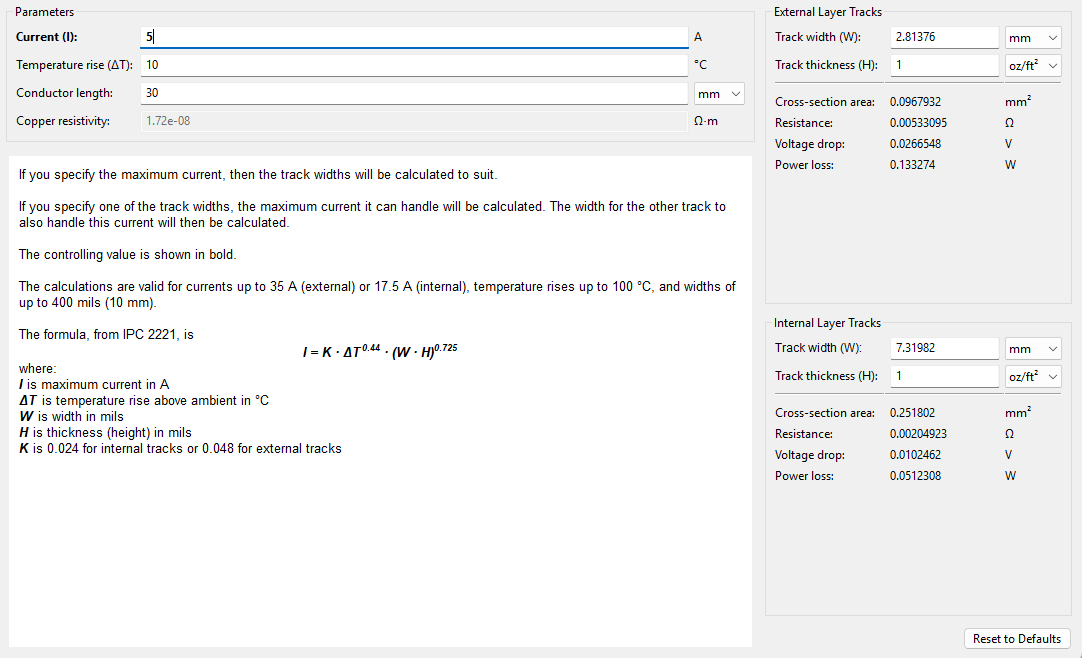
KiCAD has built-in "Track Width" and "Via Size" calculators that I'll show here. To start with, lets look at the 5A domain with default 1oz copper weight at 10C temperature rise for around 30mm conductor length ( length doesn't change track width much here so we'll default to 30mm since this is the length of the PCB ).
![]()
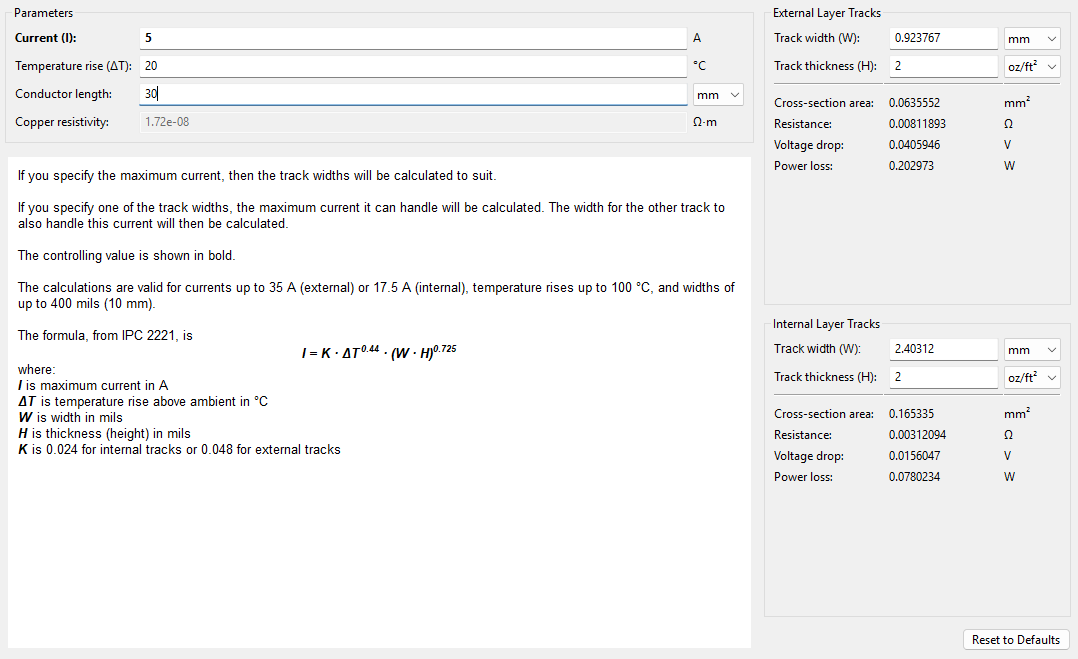
This gives us a 2.81mm trace width for external layers. For a 30mm x 30mm board, this is huge! This trace alone will take 1/10th of our board space in a single axis at a minimum! Reviewing the data sheets for all IC's, we can increase the temperature rise to 20C safely for all of our components with minimal loss in efficiency to get a trace width of 1.85mm. This is still quite large and doesn't provide enough routing flexibility. This leaves one last thing to change which is the Track Thickness, also known as Copper Weight. By changing this from 1 oz/ft^2 to 2 oz/ft^2, we get a track width of 0.92mm.
![]()
Rounding this trace width up to 1mm gives us a bit of a safety margin and is easier to keep track of. Increasing our Copper Weight to 2 oz/ft^2 will increase the price of the PCB but there isn't much choice if we want to support 5A. Note that a 1mm wide trace width for 5A is only valid for PCB layers that are external ( top and bottom layers ). Internal layers will need much thicker traces as they usually have lower Copper Weight, usually 0.5 oz/ft^2, and can't remove heat as easily.
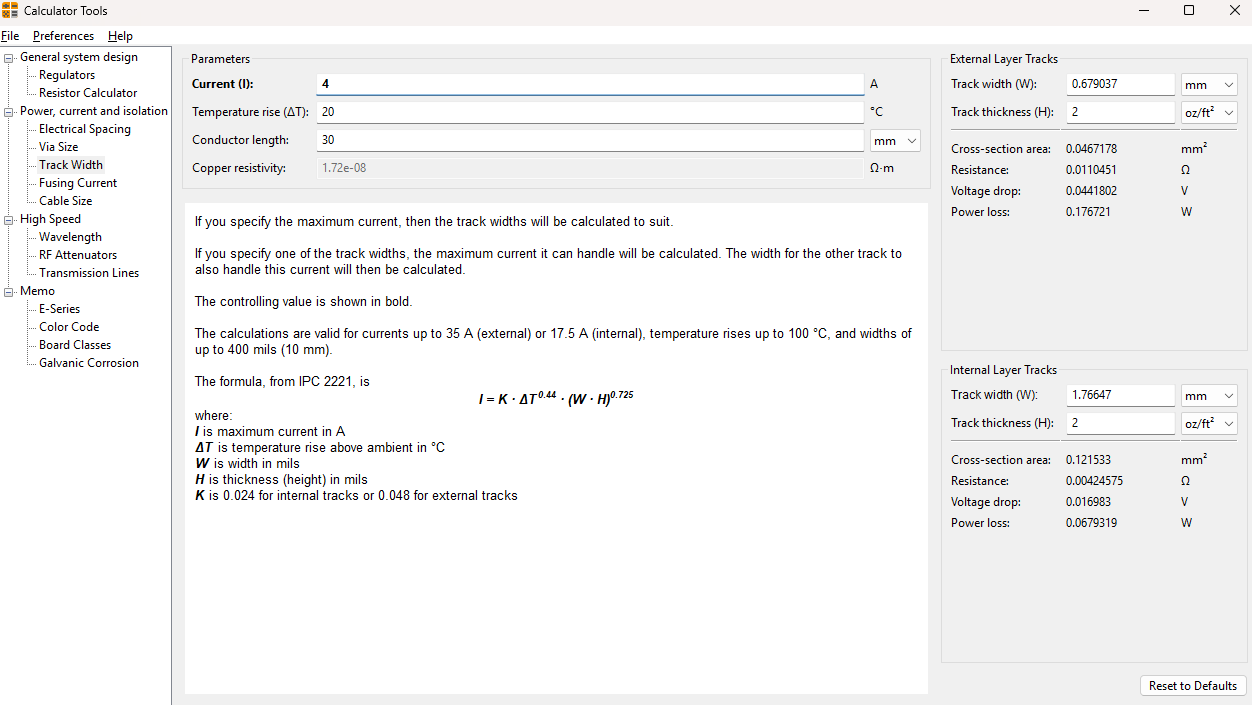
Since the temperature rise and copper weight are set by our 5A traces, we can calculate the trace widths needed for 4A and 2A as 0.7mm and 0.3mm as seen below:
![]()
![]()
Via Size Calculations
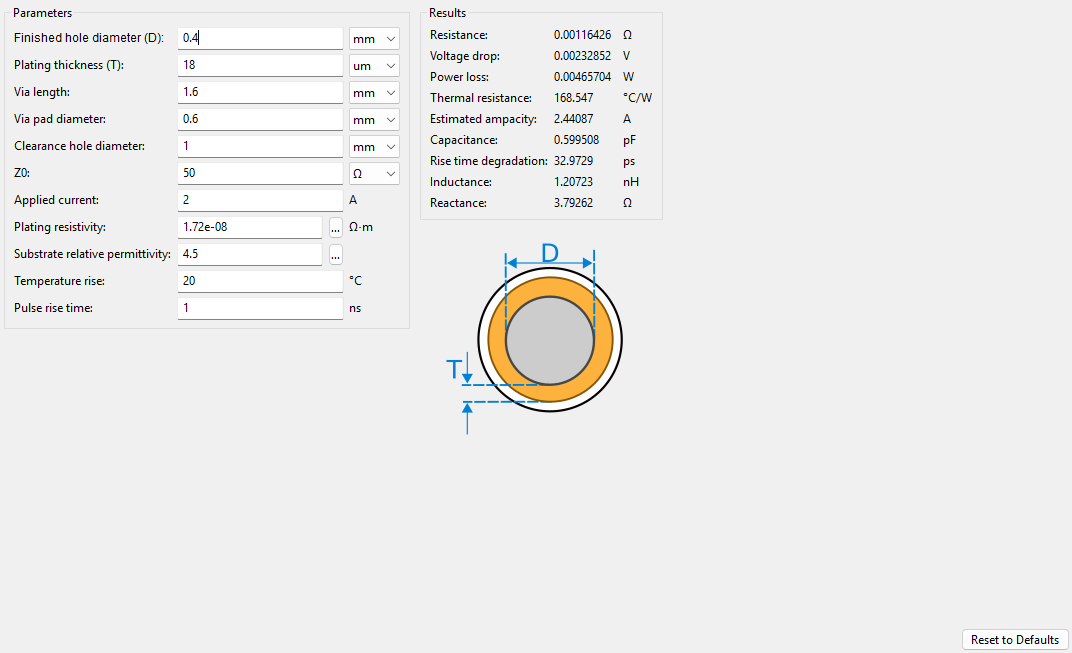
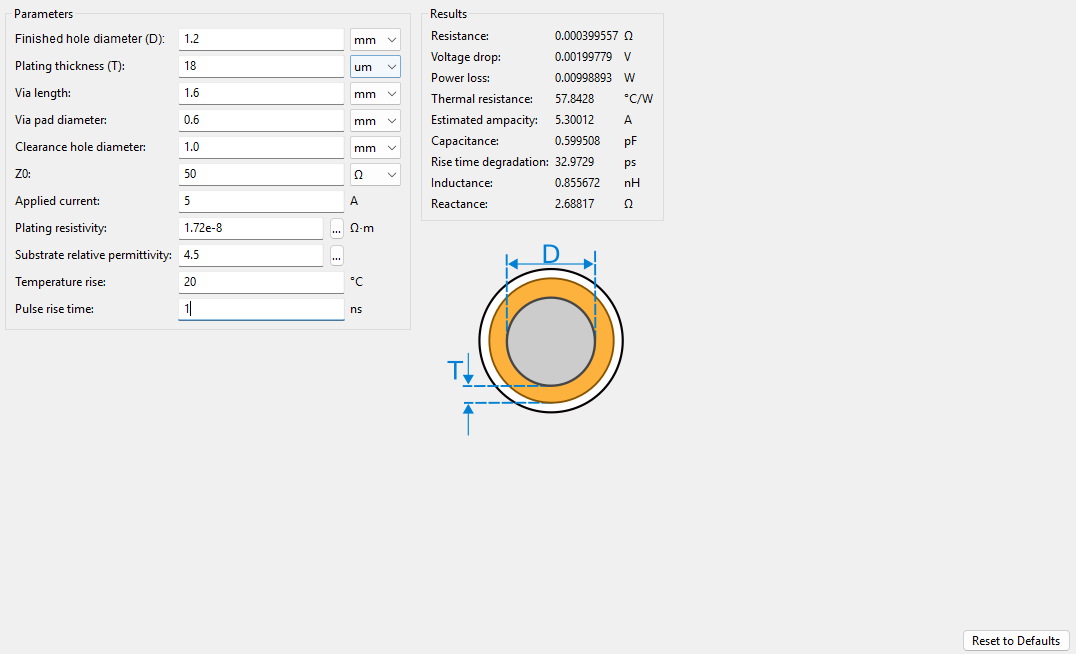
When calculating the Via Size, we can use the 20C temperature rise from the above calculations. We should be careful to not confuse the 2 oz/ft^2 copper weight with the plating thickness of the Via. Using JLCPCB's default capabilities, we can see that the "Average Hole Plating Thickness" is 18um. Keeping all other parameters default in KiCAD, including the default Via Hole Size of 0.4mm, gives us a Via that can support up to 2.4A:
![]()
While this will be sufficient for the buck converter 3.3V and 5.0V 2A output domains, the VBUS 5A domain will need larger Vias. Going up by 0.1mm steps, we can arrive at a 1.2mm Via Hole Size which is the minimum Via Hole Size that supports over 5A with a max rating of 5.3A:
![]()
Going forward, we'll use 1.2mm Via Hole Size for both the 4A and 5A Via's to make PCB manufacturing simpler by only having two Via Hole Sizes ( 0.4mm and 1.2mm ).
2 Layers vs 4 Layers
When first starting this project, my goal was to stick to a 2 layer board to reduce cost. However, as I have been attempting the routing, 2 layers has become an unreasonable ask. The main reason for this is due to the size of the board and the widths of the traces. As you can see from above, there isn't much wiggle room left to reduce trace width. We could increase the size of the board, but I want StampPD to be as small as possible. This allows it to be used in as many projects as possible. At 30mm x 30mm, we can fit all of the necessary components on the top of the board so trace routing is the only limiting factor. Trace routing is especially difficult when routing the VBUS output from the back-to-back MOSFET. Since the PCB pin out interface has VBUS output pins on the top and bottom ( image top and bottom, NOT top and bottom layers of the PCB ), the 1.2mm 5A traces intersect with many other traces such as USB D+/- and CC1/2. You can see this below by imagining wires connecting the PCB VBUS pins ( pins 11, 15, 19, 32, 36, 40 ) and the MOSFET ( Q1 ) VBUS pins ( pin 6 ):
![]()
To solve this issue, StampPD will be a 4 layer board with dedicated ground and VBUS power layers, stacked from top to bottom as: Top Component Layer -> Ground Layer -> VBUS Layer -> Ground/Signal Layer. The dedicated VBUS layer will connect the output of the back-to-back MOSFET to all VBUS output pins. Since the internal layers of a PCB are usually 0.5 oz/ft^2 and have less ability to dissipate heat, the VBUS layer should be as free of traces as possible. Using the KiCAD Trace Width Calculator with 5A, 20C temperature rise, and 0.5 oz/ft^2 give us a trace width of 9.6mm for internal traces. Since there will be dedicated copper across almost all of the 30mm x 30mm VBUS power layer instead of direct traces, a dedicated VBUS power layer seems reasonable. Note that we will still need to route 5A traces for VBUS input to the VBUS_TypeC Input Domain and MOSFET VCC input on the top/bottom layers so all of the calculations above are relevant.
Summary
Traces
All Traces assume 20C Delta with 2 oz/ft^2 copper thickness for Top/Bottom Layers:
- 2A - 0.3mm Trace Width
- 4A - 0.7mm Trace Width
- 5A - 1.2mm Trace Width
Vias
All Vias assume 20C Delta, 18um Plating Thickness:
- 2A - 0.4mm Hole Size (Diameter)
- 4A and 5A - 1.2mm Hole Size (Diameter)
- Combine 4A and 5A Via sizes to reduce number of Via Holes Sizes needed ( cheaper! )
PCB Layers
- Top Component Layer ( 2 oz/ft^2 )
- Ground Layer ( 0.5 oz/ft^2 )
- VBUS Power Layer ( 0.5 oz/ft^2 )
- Bottom Signal/Ground Layer ( 2 oz/ft^2 )
- USB PD VBUS domain: 5A
-
Hackaday Supercon Presentation
11/05/2025 at 01:33 • 0 commentsHi all,
I was at Hackaday Supercon 2025 and did a quick 7 minute lightning talk about this project! You can watch it here, timestamp is exactly 1 hour into the video!
I'm continuing to finish the routing and have a couple of logs that will be forthcoming:
- Stamp Pinout Design Methodology
- Routing Methodology
- PCB Fabs Cost Comparison
- PCBA Fabs vs DIY Cost Comparison
- Prototype Board Manufacturing Decision
- Prototype Testing Process
I'm planning for logs past these such as prototype feedback and software library implementation but those are further out. Once I order prototypes I plan to release the initial Gerber, Step, and BOM files for JLCPCB.
Note that I will be busier as the year comes to a close so this project will slow down until January 2026. I hope to order the prototypes before 2026 but that is up in the air.
-
PCB Pinout Interface Methodology
10/28/2025 at 03:32 • 0 commentsHi all,
This log will describe what pins we need to define for the PCB package. Below is a list of all inputs and outputs:
- Input
- Power
- USB-C Port Power Input (VBUS_TYPEC)
- Ground (GND)
- Logic
- Channel Configuration 1 (CC1)
- Channel Configuration 2 (CC2)
- USB Data + (USB_D+)
- USB Data - (USB_D-)
- Power
- Output
- Power
- USB-C Port Power Output (VBUS)
- 5.0V, 2A Power Output (+5V)
- 3.3V, 2A Power Output (+3.3V)
- Ground (GND)
- Logic
- Channel Configuration 1 (CC1)
- Channel Configuration 2 (CC2)
- USB Data + (USB_D+)
- USB Data - (USB_D-)
- USB PD Serial Data (SDA)
- USB PD Serial Clock (SCL)
- USB PD Interrupt (INT)
- USB PD Port Flip Orientation (FLIP)
- Power
Pin Orientation
The logic used to determine which side of the PCB pins should be on is to go from left-to-right when looking at the PCB from top down. The logic/power input is on the left side while the logic and 5.0V/3.3V power output is on the right side. The variable USB-C Power output is on the top and bottom. You can see this in the schematic diagram below:
![]()
Pinout Reasoning
Input Pins (Left Side)
As this stamp will use USB-C for power and data input, the most logical pin input routing should match the expected pinout for a USB-C Female Receptacle. Based on the image below, you can see that this leads to ground on the outside, then power (VBUS), CC Pins, and finally USB D+/- .
![]()
Output Pins (Right Side)
The right side output pins on the stamp do not have a likely output order like the left side Input Pins do. As such, they are organized based on ease of routing and part placement. The 5.0V and 3.3V power output pins flank the top and bottom due to the placement of the buck converters for the associated voltages. Next are the communication pins for SDA and SCL and the PD Controller INT and FLIP logic pins. The SDA/SCL pins were placed on the top due to their necessary components needed for the SDA/SCL pins being located on the top while the INT and FLIP pins were closest to the bottom side of the PD Controller. Finally, the CC and USB D pins simply route from left to right across the PCB.
Output Pins (Top/Bottom Sides)
The top and bottom pin placement alternates between power output and ground pins, separated by a No Connect (NC) pin in-between. The NC pin was included to make it more unlikely that the power output pins and ground pins could be accidentally shorted when soldering StampPD. Its unclear if this is an optimal power pinout setup and would love feedback on this design choice.
- Input
-
USB PD Controller Component Choice
09/25/2025 at 03:08 • 0 commentsHi all,
In this log I'll go over the specific component selection for the USB PD Controller.
USB PD Controller Sink Selection
A USB PD Controller Sink is an IC that communicates with the USB PD standard to set a voltage and current from a USB PD source for downstream devices. The selected USB PD Controller for StampPD is the AP33772S. This IC comes in two variants , the AP33771C and the AP33772S. The C variant is a version which uses resistors to select the desired current and voltage while the S variant uses I2C to communicate with a microcontroller to select the voltage and current. In StampPD, we will use the S variant for its ability to change and request different voltages and currents. The controller selection was inspired by controller in the PicoPD which used an older version called the AP33772. This controller is Not Recommended for New Design (NRND) by the manufacturer, Diodes, and is only compatible with the USD PD3.0 standard. The AP33772S is compatible with the newer USB PD3.1 standard. I compared a couple differences between these two controllers in the Design Objectives log if you wish to see why this version was chosen. I attempted to research USB PD3.2 controllers that were similar to the AP33772S but was not able to find any, likely due to the standard being more recently released. Some reasons I've selected the AP33772S were:
- Evaluation Board (EVB) User Guide
- Direct reference on how to implement the AP33772S on a PCB
- Known components and component values to start from
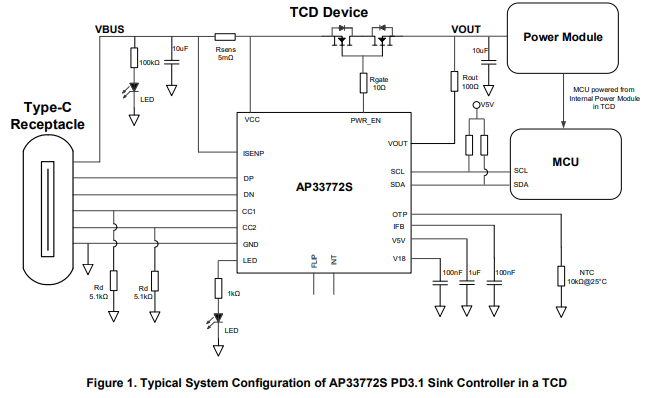
- Detailed Reference Circuit Diagram ( image below )
- Decent Datasheet Documentation
- Explains all pins and their functions
- Functional Descriptions of all features
- Missing PWR_EN pin voltage / current abilities ( more details below )
- Small Package Size
- While the side pins are likely hand solderable, it's unclear how one would solder the bottom exposed pad for thermal dissipation
- Lots of built in safety features
- Support for many types of PD (EPR, AVS, SPR, PPS)
- Wide Voltage and Current Control up to 140W (28V, 5A)
- No 240W support :(
- Easy I2C control
Recommended Components
Below, an example circuit, called Figure 1, shows what an implementation of the AP33772S should look like with some specified component values. A table called Pin Descriptions describe the functions and voltage / current for pins of the AP333772S. Since the circuit diagram + table gives us a good idea of what to implement for this IC, I'll describe the more important/complicated components and only put component values in a list for the others.
![]()
![]()
Input Current Sense Resistor
This resistor sits between ISENP (Current Sense Pin) and VCC. It is used by the AP33772S to determine the amount of IR drop through VBUS for overcurrent protection. Since VBUS supports 5A and the recommended resistance is 5mOhm, this resistor needs to support at least 5A^2 * 5mOhm = 0.125W ( P = I^2 * R ). We'll want to give around a 50% power margin here so our target resistor power rating is 0.125W * 1.5 = 0.1875W. We should also limit the resistance tolerance to within 1% to reduce variability and power loss.
IC LED
This pin is described as outputting up to 5.33V, 2mA. If we use the suggested 1000Ohm resistance value, we should look for a LED with a Forward Voltage (Vf ) = Voltage Source - Resistor * Forward Current. Vf = 5.33V - 1000Ohms * 2mA = 3.33V. This means if we keep the suggested 1000Ohm resistor and assume 2mA of Forward Current, we should look for a LED with a Forward Voltage of 3.33V. This will likely be a blue or white colored LED.
Over Temperature Protection (OTP)
This resistor is used to detect the temperature around the IC. When NTC resistors heat up, their resistance decreases. This can be detected to determine overheating conditions. For this IC, it's calibrated for a NTC resistor that has a resistance of 10KOhm when the temperature is 25C.
VBUS LED and Resistors
For the VBUS LED and Resistors, I'm ignoring the values suggested in the circuit diagram. Instead, I am reusing the LED from the IC LED. This means this LED will have a Forward Voltage of 3.33V and a Forward Current of 2mA. Since the max VBUS voltage possible here should be 28V, we can calculate the resistor values as R = ( Voltage Source - Forward Voltage ) / Forward Current or R = ( 28V - 3.33V ) / 2mA = 12,335Ohms. Since I am trying to reuse components here, We can put two 5.1KOhm resistors in series and get 10,200Ohms which is close enough to our 12,335Ohms needed. Note that the LED will be fairly dim when our voltage is lower, such as at 5V. I'm ok with this since we have the IC LED as well so there is some redundancy.
Power Enable Switch
The Power Enable Switch components are some of the most important for the AP33772S. This is because the PWR_EN pin turns on and off the power, including automatic shut off of the safety features. One issue with the AP33772S is that the PWR_EN pin not well defined. The best definition is in the Absolute Maximum Ratings table ( see below ) where it specifies that there can be a range of -30V to 4V between VCC and PWR_EN pins. I think that this is implying that PWR_EN should have a voltage ~4V more than VCC when turning the MOSFET on, no matter what voltage VCC is at, but it is not defined directly as such. I've sent a message to the company that makes the AP33772S, Diodes, to clarify this functionality but haven't heard back from them. Assuming a PWR_EN voltage of 4V as compared to VCC, we need back-to-back NMOS MOSFETS that support Gate-to-Source Voltage ( Vgs ) of 4V, Drain-to-Source Voltage ( Vdss ) of at least 28V, Continuous Current ( Id ) of at least 5A, and ideally less than 10mOhm Resistance across Drain-to-Source ( Rds ) due to power loss ( 10mOhm * 5A^2 = 0.25W max power lost across the MOSFET ). Taking into account a 50% voltage margin and a 30% current margin, Vdss is recommended at 28V*1.5 = 42V and Id is recommended at 5A*1.3 = 6.5A.
![]()
Diode for ESD
In past posts I had mentioned using the TPD4E05U06DQAR for ESD protection. I've decided to not use this component due to cost, it being hard to hand solder, and limited board space. This means StampPD will be more susceptible to ESD but the AP33772S does have an ESD rating of up to 750V as show in the Absolute Maximum Ratings table above, so I'm not too worried
Component Summary
Input Current Sense Resistor
- 1x 5mOhm Resistor
- At least >= 0.125W, recommended >= 0.1875W
- Resistance Tolerance <= 1%
SDA and SCL Pull Up Resistors
- 2x 5.1kOhm Resistors
IC LED
- 1x 1kOhm Resistor
- 1x LED
- Around 3.33V Forward Voltage
- Around 2mA Forward Current
Power Supply 1.8V
- 1x 100nF Capacitor
Over Temperature Protection (OTP)
- 1x NTC Resistor
- 10kOhm@25C
Current Feedback (IFB)
- 1x 100nF Capacitor
CC1 and CC2 Pull Down Resistors
- 2x 5.1kOhm Resistors
Power Supply 5.0V
- 1x 1uF Capacitor
VBUS Input Capacitor
- 1x 10uF Capacitor
VBUS LED and Resistors
- 2x 5.1kOhm Resistors
- 1x LED (Duplicated from IC LED)
- Around 3.33V Forward Voltage
- Around 2mA Forward Current
VOUT Output Capacitor
- 1x 10uF Capacitor
- 1x 100Ohm Resistor
Power Enable Switch
- 1x 100Ohm Resistor
- 1x NMOS Array (BUK7K6R8-40E)
- Vgs at least <= 4V
- Vdss at least >= 28V, recommended >= 42V
- Id at least >= 5A, recommended >= 6.5A
- Rds <= 10mOhm
- Evaluation Board (EVB) User Guide
-
5.0V and 3.3V Buck Converter Component Choice
09/15/2025 at 03:08 • 0 commentsHello all,
In this log I'll go over the specific component selection for the 5.0V and 3.3V Buck Converters. Since I am using the same IC for both 5.0V and 3.3V, most of the components will be duplicated between the IC's. Only the inductors will be different between the two implementations.
Buck Converter IC Selection
The main buck converter IC is the AP6300. This IC comes in a couple different flavors including a 3.3V ( AP63203 ) and a 5.0V ( AP63205 ) version which I've selected for StampPD. Some reasons I've selected this IC were:
- Supports input voltage between 3.8V to 32V as StampPD will support between 5.0V and 28V input
- Continuous Output Current of up to 2A which is likely overkill but I want to be able to use StampPD in almost any project
- Allows for 100% Duty Cycle Operation and should allow for close to 5.0V output when there is 5.0V input, similar to an LDO!
- Decently efficient ( >85% ) for a range of output currents in both 3.3V and 5.0V
- Two different fixed voltage versions means I can duplicate some of the work designing the circuits since they are similar
- Fixed voltage versions means I can remove resistors that would be used to define the output voltage and save PCB area
- TSOT23-6 package is reasonable small yet still hand solderable
- Relatively cheap on Digikey ( ~$0.71 ) and JLCPCB ( ~$0.36 )
- Enough quantity on Digikey ( >12,000 ) and JLCPCB ( >30,000 ) to not worry about supply
- Thorough documentation including efficiency curves, an example circuit, PCB layout recommendations, and recommended component values and calculations.
Efficiency and Output Voltage
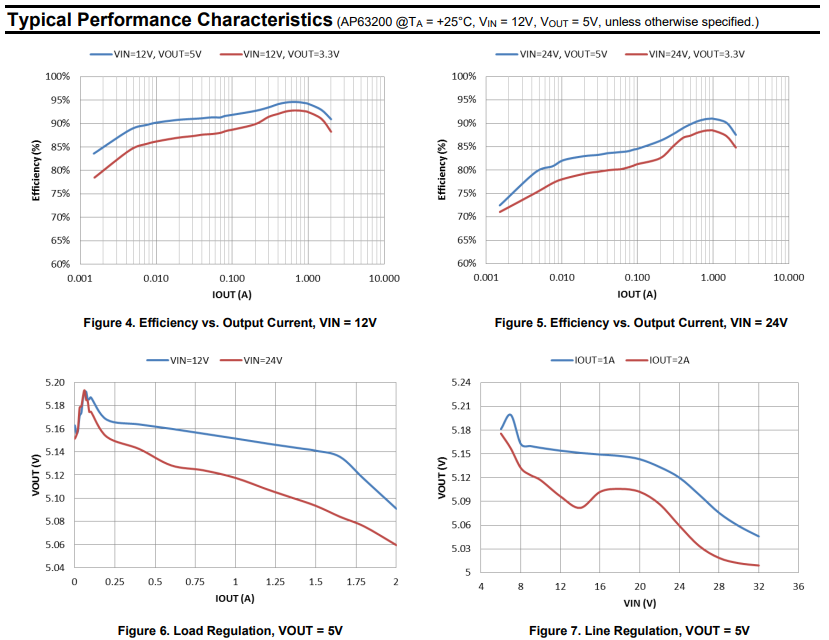
Below are the efficiency, load, and line regulation curves for the AP6300. Figure 4 shows the efficiency at different output current for 12V, Figure 5 shows the efficiency at different output currents at 24V. The blue line is 5.0V output, the red line is 3.3V output. Figure 6 shows the expected output voltage at different currents. The blue line is input voltage of 12V, the red line is input voltage of 24V. Figure 7 shows the expected output voltage with different input voltages. The blue line is output current of 1A, the red line is output current of 2A. From these we can take away a couple things:
- Ideal current draw is between 0.2A and 2A for >85% efficiency
- This is true for both 12V and 24V input and 3.3V and 5.0V output
- I expect most applications of StampPD to be within this range
- Output voltage for 5.0V will likely be between 5.06V and 5.19V for different output currents
- There will be lower output voltage as output current increases
- Trend between the lines shows that likely closer to 5.19V at lower output currents and voltages
- No data for 3.3V
- Output voltage for 5.0V will likely be between 5.03V and 5.20V for different input voltages
- There will be lower output voltage as input voltage increases
- Trend between the lines shows that likely closer to 5.20V at lower input voltages
- No data for 3.3V
![]()
I expect that for the 5.0V AP63205 I should see around 5.20V at low input voltage and low output current. As the input voltage and output current increase, I expect the output voltage to drop to just above 5.0V.
Using the efficiency trends in Figure 4 and Figure 5, I will guess that voltage for the 3.3V AP63203 will likely be worse (higher voltage at lower output currents and input voltages). Using the efficiency percentage difference of around 5% in Figures 4 and 5, and the voltage difference of around 0.2V from Figures 6 and 7, assuming this IC outputs 3.3V at around 2A 32V input, I calculate an output voltage around 3.3V + 0.2V * 1.05% = 3.51V.
I expect that for the 3.3V AP63203 I should see around 3.51V at low input voltage and low output current. As the input voltage and output current increase, I expect the output voltage to drop to just above 3.3V.
Recommended Components
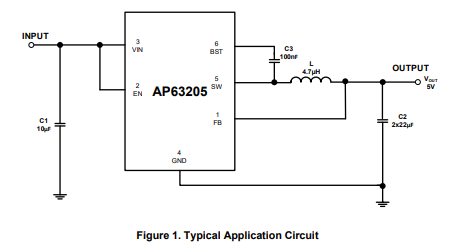
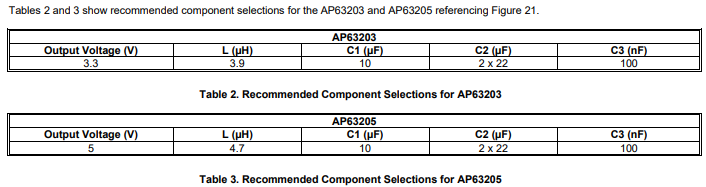
Below, an example circuit, called Figure 1, shows what an implementation of the AP63205 should look like. Two tables, called Table 2 and Table 3, show recommended component values. Table 2 show the components for the AP63203 while Table 3 is for the AP63205.
![]()
![]()
As you can see from the Table 2 and Table 3, the capacitors for both AP63203 and AP63205 have the same recommended capacitance. Only the the inductors have different inductance values. This means we can use the same capacitors between both implementations and only change the inductor.
Capacitor Specifications
For the AP6300 we have 3 different types of capacitors: Input ( C1, 10uF ), Output ( C2, 22uF ), and Bypass ( C3, 0.1uF). The input capacitor stabilizes input voltage and suppresses high frequency noise, the output capacitor stabilizes output voltage and reduces ripple current, and the bypass capacitor stabilizes voltage and suppresses high frequency noise for the AP6300's internal circuitry.
Since all capacitors here are being used for high frequency application, Multi-Layer Ceramic Capacitors ( MLCC ) with X7R or X5R dielectric are a good choice. MLCC's have a low Equivalent Series Resistance ( ESR ) , ie the amount of resistance a capacitor has.
For the input capacitor of 10uF, this capacitor is expected to see at least 28V from the USB-PD circuit. Using a voltage rating rule of thumb of >=1.5x expected voltage, we should choose a voltage rating 28V * 1.5 = 42V. Most capacitors won't have voltage rating of this exact number so I round up to >=50V.
For the two output capacitors of 22uF, these capacitor is expected to see at least 3.3V or 5.0V from the output of the AP6300. Using a voltage rating rule of thumb of >=1.5x expected voltage, we should choose a voltage rating 5.0V * 1.5 = 7.5V. Most capacitors won't have voltage rating of this exact number so I round up to >=10.0V. Note that we're using two 22uF capacitors here as that increases the capacitance and reduces the ESR at the cost of an additional component and board space. Capacitance in parallel is additional ( Ex: Ctotal = Ca + Cb ) while resistance decreases by the reciprocal of the sum ( 1/Rtotal = 1/Ra + 1/Rb ).
For the bypass capacitor of 0.1uF, this capacitor is between two pins on the AP6300, SW and BST. SW has a voltage (Vsw) between -1.0V and Vin + 0.3V. BST has an voltage (Vbst) of Vsw - 0.3V to Vsw + 6.0V. Since this capacitor is between these two pins and not ground, we only care about the maximum difference in the voltage between SW and BST. Since Vbst is always related to Vsw, we know that the maximum voltage difference is 6.0V, even if the voltage difference to ground may have a maximum value of Vin ( 28V ) + 0.3V + 6.0V = 34.3V. Using a voltage rating rule of thumb of >=1.5x expected voltage, we should choose a voltage rating 6V * 1.5 = 9V. Most capacitors won't have voltage rating of this exact number so I round up to >=10V. The bypass capacitor is particularly important here as drops in voltage or current can cause glitches and instability in the AP6300.
Inductor Specifications
There are two different Inductors needed for the different IC's, 3.9uH for the AP63203 and 4.7uH for the AP63205. The inductor for the AP6300 in this circuit stores and releases energy to help smooth the voltage and current load. These inductors will likely be the largest components on the board.
Since we're implementing two of these on a single PCB close together and it's unknown what other circuits StampPD will be used with, we will want shielded inductors. This contains the magnetic field of the inductor and reduces electromagnetic interference between the other inductor as well as any other devices around them.
Inductors have two different current ratings: A saturation current ( Isat ) and a RMS current rating ( Irms ).
The Isat is the maximum current the inductor can handle before its magnetic material is saturated and it can't store energy efficiently. If we send this amount of current through the inductor, we will have reduced efficiency compared to the curves we looked at above due to reaching the limits of the magnetism of the inductor. Based on the maximum peak current ( Ipeak_limit ) in the Electrical Characteristics of the AP6300, we will see a Ipeak_limit of 3.1A. Using a rule of thumb of 30% safety margin for inductor current, we should choose a saturation current of 3.1A * 1.3 = 4.03A. For simplicity, I round down to 4A
The Irms is the maximum current the inductor can handle before it passes a thermal degradation limit. If this amount of current is reached, the inductor will start to degrade due to heat melting parts of it. To calculate the Irms, we can use the equation:
Irms and output current will be in amps while inductor ripple current will be in volts.
We know the Output Current is 2A but we need to calculate the Peak-to-Peak Ripple Current ( Irpl ) using the equation:
Irpl, output voltage, and input voltage will be in volts, inductance in henry, and switching frequency in hertz.
With this, we can see we need to calculate two different Irpl for the AP63203 and AP63205 as we have different output voltages and inductance values.
For the AP62303 we have a 3.3V output voltage, 28V maximum input voltage, 3.9uH inductance, and 1.1MHz switching frequency. This gives us a Irpl = 0.67857142857A:
Using the Irms equation with 2A output load current and Irpl of 0.67857142857A, we get an Irms of 2.00957000342A:
For the AP62305 we have a 5.0V output voltage, 28V maximum input voltage, 4.7uH inductance, and 1.1MHz switching frequency. This gives us a Irpl = 0.79441834761A:
Using the Irms equation with 2A output load current and Irpl of 0.79441834761A, we get an Irms of 2.01310499211A:
With the Irms calculated, we can now apply the 30% safety margin for inductor current and round down for a AP63203 Irms of 2.00957000342A * 1.3 = 2.6A and AP63205 Irms of 2.01310499211A * 1.3 = 2.6A. These values happen to round out to the same which means we only need to look for a difference in inductance between our inductors!
Component Summary
5.0V Buck Converter
- 1x AP62305
- WU-7 version is ok, QWU-7 is automotive grade
- 1x 10uF Capacitor
- Ceramic MLCC
- X7R or X5R Dielectric
- At least >=28V, recommended >=50V
- 2x 22uF Capacitors
- Ceramic MLCC
- X7R or X5R Dielectric
- At least >=5V, recommended >=10V
- 1x 100nF Capacitor
- Ceramic MLCC
- X7R or X5R Dielectric
- At least >=9V, recommended >=10V
- 1x 4.7 uH Inductor
- Shielded Inductor
- At least >=3.1A saturation current, recommended >=4A
- At least >=2A RMS current rating, recommended >=2.6A
3.3V Buck Converter
- 1x AP62303
- WU-7 version is ok, QWU-7 is automotive grade
- 1x 10uF Capacitor
- Ceramic MLCC
- X7R or X5R Dielectric
- At least >=28V, recommended >=50V
- 2x 22uF Capacitors
- Ceramic MLCC
- X7R or X5R Dielectric
- At least >=5V, recommended >=10V
- 1x 100nF Capacitor
- Ceramic MLCC
- X7R or X5R Dielectric
- At least >=9V, recommended >=10V
- 1x 3.9 uH Inductor
- Shielded Inductor
- At least >=3.1A saturation current, recommended >=4A
- At least >=2A RMS current rating, recommended >=2.6A
-
Component Choice Methodology
09/12/2025 at 21:29 • 0 commentsHi all!
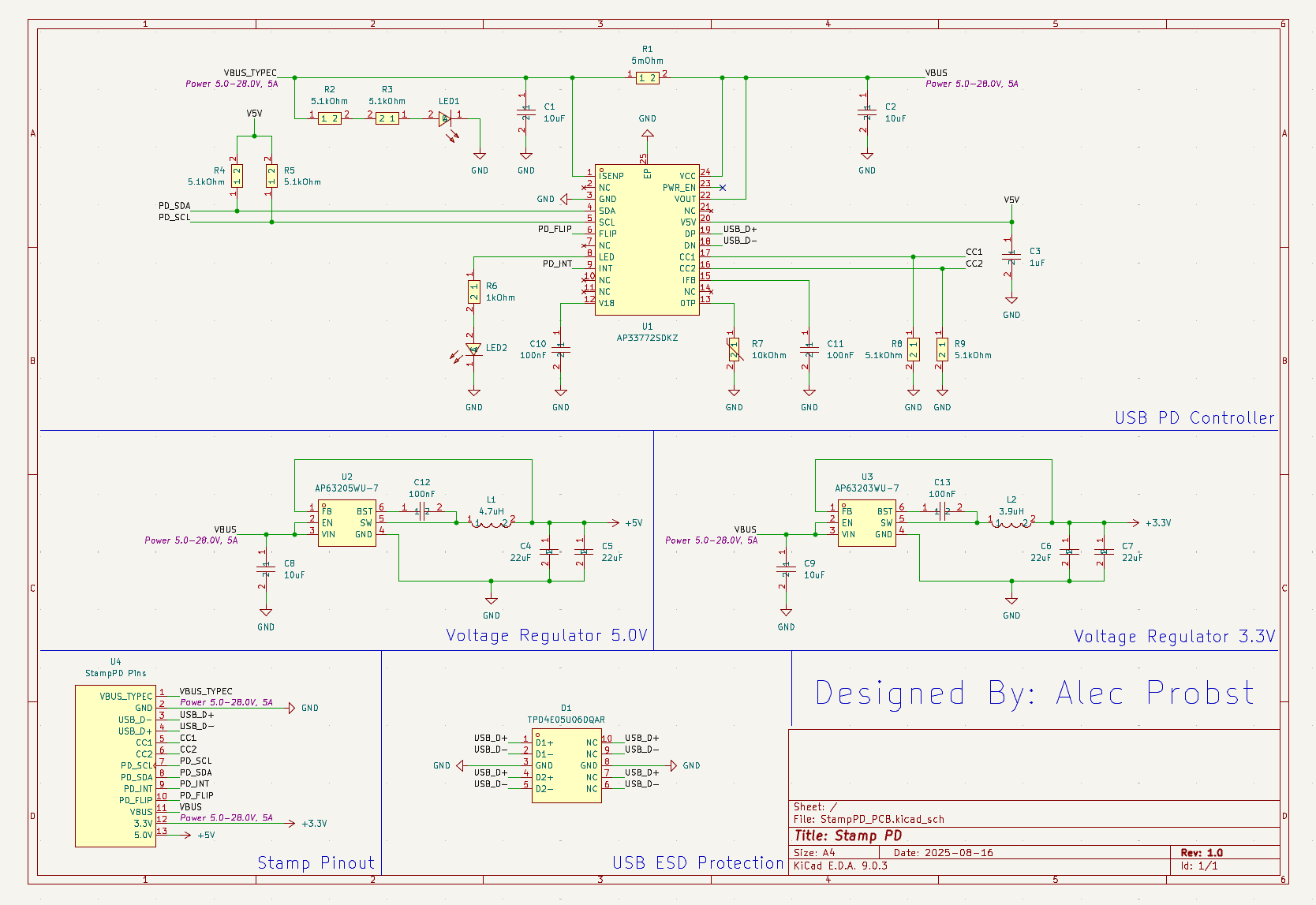
In this log I'm going to go over my methodology for component selection. I will explain what subsystems I want to include on StampPD, component requirements, other influencing factors, and a summary of component restrictions. In the next couple logs I will go over each sub-system of the board component by component to explain my part choices. I hope to show how I went about component selection to give new PCB designers an idea of how I approached this this design as well as receive feedback from more experienced designers. I have minimal experience with power design so I'm sure I've made mistakes somewhere here!
Board Subsystems
There are 5 main parts of StampPD:
- PCB Stamp
- USB PD Controller
- USB ESD Protection
- 5.0V Regulator
- 3.3V Regulator
These 5 parts are combined together to create the stamp. Only two of these sub-systems are absolutely necessary, the PCB and the USB PD Controller. The USB ESD Protection is nice to have but is optional. Being only a single component (TPD4E5U06DQAR) it would be easy to remove. The 5.0V and 3.3V Regulators are also nice to have but could be removed if needed.
Part Requirements
There are a couple requirements I've put on the design that influence what parts I want to select:
- Hand Solderability
- I want to be able hand solder the parts if possible. This means that I need to put a limit on the smallest parts can be
- While some parts like the USB PD Controller (AP33772S) are not very hand solder friendly, I think it should still be possible
- This needs to be balanced with the size of the PCB itself
- The smallest size I feel comfortable hand soldering is a 0603 so that is my designated minimum component size
- Cost
- In my design objectives, I stated that I don't want to spend more than $20 for 5 boards. This means that parts for the boards should be less than $20/5 = $4 a board.
- I am not including the cost of the PCB
- I am not including any reduction in part cost when buying parts in bulk
- Castellated Holes
- Since this is a solderable stamp, the PCB will need to have Castellated Holes on the edges
- Castellated Holes are through whole vias that have been cut horizontally in half through edge cuts on the sides of the PCB. This exposes the inner copper of the via, making it easier to solder to a pad
- This will increase PCB cost. JLCPCB shows an additional cost of $39.30 for 5x 100mmx100mm for 4 edges without a gerber file. Changing the number of edges does not change the cost very much ( < $2).
Other Influencing Factors
I have some personal external factors that also limit my part selection:
- JLCPCB PCB Assembly (PCBA) service
- I've wanted to try using JLCPCB's PCBA service and thought this board would be good to try it on
- This limits my component selection to JLCPCB's catalog of components as well as using JLCPCB PCB's
- This may influence component cost as there will be fewer choices
- If this service proves to be too expensive then I will assemble the PCB's myself
- Reduction in unique components
- I want to have the fewest number of unique components possible. This will help reduce complexity, component sourcing, and component confusion, especially if I hand assemble boards
- Availability of components
- I want to make sure that JLCPCB has enough components in stock to not worry about running out of components
- This makes it easier for others to manufacture my design directly through JLCPCB like how I have without any changes
- Power LED's
- I want to make sure that users know when the StampPD is connected and on
- I will be adding an LED for power from the USB PD lines directly as well as power from the USB PD Controller
- This should help identify if power is flowing through the USB PD lines and to the USB PD Controller with just at a glance
Summary of Component Restriction Decisions
Here is a summary of the restrictions that I have put on component selection:
- Minimum component size of 0603
- Less than $4 per board in component cost
- PCB must have Castellated Holes
- Components must be available through JLCPCB's PCBA catalog
- Unique components must be minimized
- All components must have significant quantities available
- At least two LED's must be on the design
Finally, here's the latest Schematic of the StampPD. In the next log I'll go over the 5.0V and 3.3V Voltage Regulator part selection on a component by component basis to explain how each component was chosen.
![]()
-
5V and 3.3V Regulator Design Pt. 2
08/20/2025 at 02:57 • 0 commentsHello everyone!
This is a quick update about my decision on the 5V and 3.3V regulators.
Recap
Last time I mentioned a couple methods for regulating the 5V and 3.3V which were:
- LDO's
- Inefficient and doesn't work for 5V
- Buck Converters
- Efficient but lower than 5V for 5V
- Buck and Boost Converters
- Two options: Combined Buck-Boost of 5V or Boosting 3.3V after using a buck converter
- Buck-Boost Converters are the most efficient but are expensive!
- Boosting 3.3V to 5V is reasonable but inefficient!
I mentioned last time that I was planning to go with one of the Buck Booster options. However, I've changed my mind! Instead I'm going to just use Buck Converters
Reasoning
After thinking about these solutions for a while, I realized that the drop in voltage on the 5V pin when the input voltage is 5V is ok with my design choice for now. The reasons for this are:
- Design Simplicity
- It is much easier to design around two bucks of the same type with different voltages
- Cost
- It is much much cheaper to just accept the lower voltage when you compare the cost difference
- A combined Buck-Boost converter that has acceptable voltage range and amperage for what I want is close to $16!
- Current Buck solution costs less than $0.50
- Efficiency
- The dual Buck design is the most efficient conversion solution of the ones I listed
- Less wasted power here means more for the other voltages we want to play around with!
- Flexibility
- If I'm not happy with the lower than 5V Buck voltage, I will redesign it with a additional Boost converter to bring it up to a constant 5V
Conclusion
For now I think simplicity and cost are more important than sacrificing a little bit of voltage here. I plan to test the 5V rail to see how much voltage drop we get and am leaving the door open on adding a Boost converter later. As a little bit of a sneak peak for next time, here's where the current KiCAD design stands!
![]()
- LDO's
StampPD - Up to 28V, 5A USB-C Power in a PCB Stamp
A PCB stamp to add 140W Power Delivery 3.1 (PD3.1) to any I2C capable microcontroller!