Close
0%
0%

Isetta TTL computer

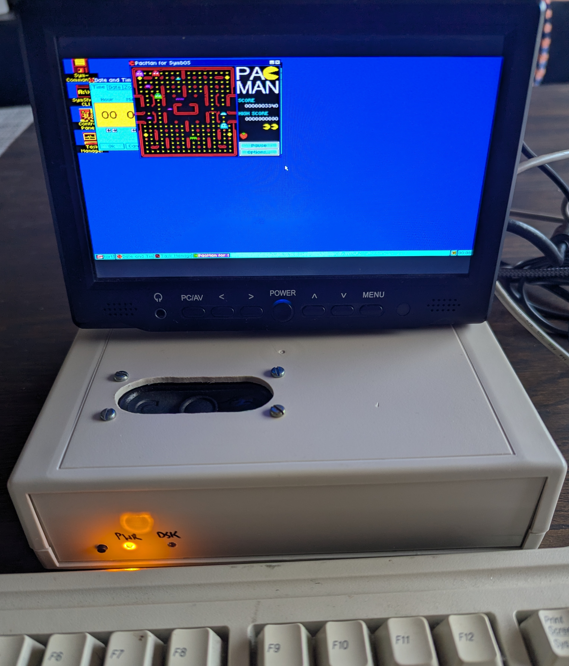
TTL Retro computer runs 6502 and Z80 code. Has video, sound and filesystem. Runs a Windows-like OS. No microprocessor or FPGA.

Similar projects worth following
This computer is built from simple TTL circuits. There is no microprocessor, microcontroller or FPGA. It can execute 6502 instructions and can on-the-fly switch to Z80 instructions and back.
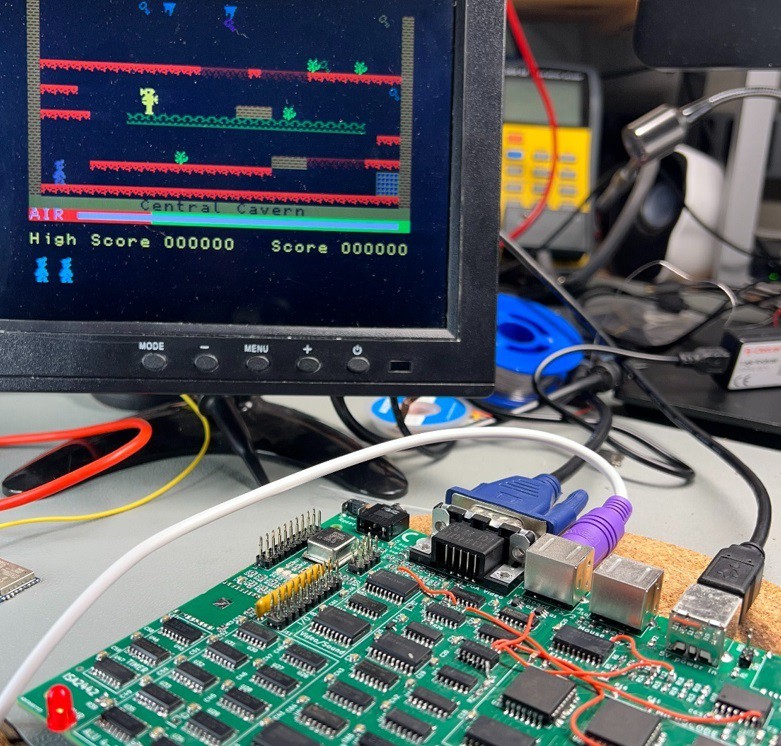
The video has max. 640 x 400 pixel graphics with several colors. It also has on-board file system and sound generator. It runs ZX Spectrum games, 6502 BASIC, and the SymbOS operating system. The project is finished.

SELLING KITS

Now, there is a KIT available, to build your own Isetta ! 

You can order your kit at the new Envionic website ! (No HTTPS yet)

The first kit was successfully built by Vadim. 

(If you want a complete Isetta, without soldering it yourself, contact me. If there is enough interest, I want to supply fully built Isetta computers, expected for around 200 euros.)

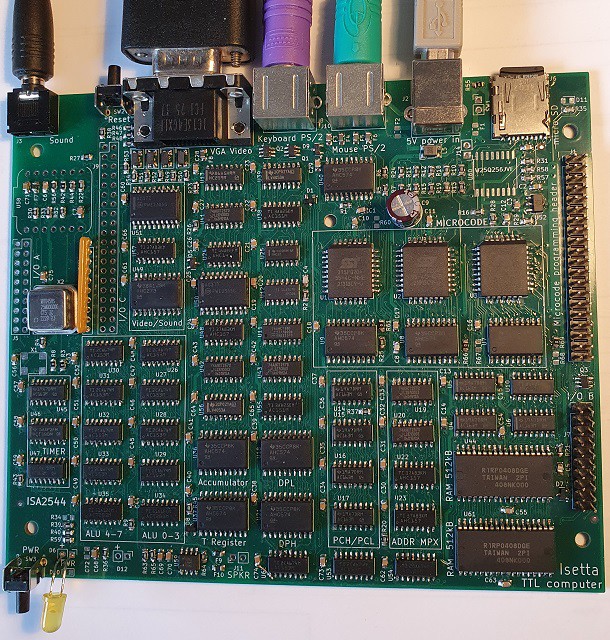
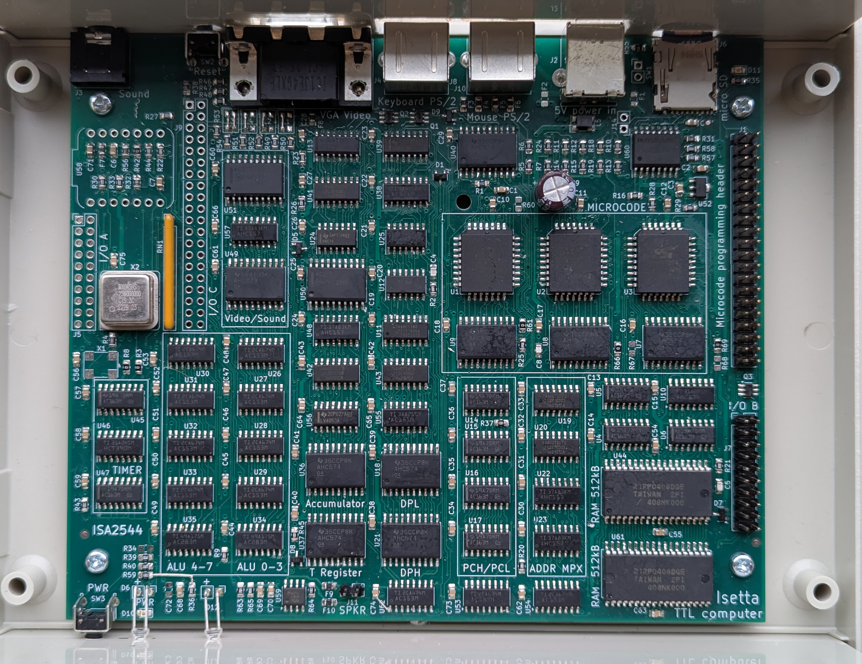
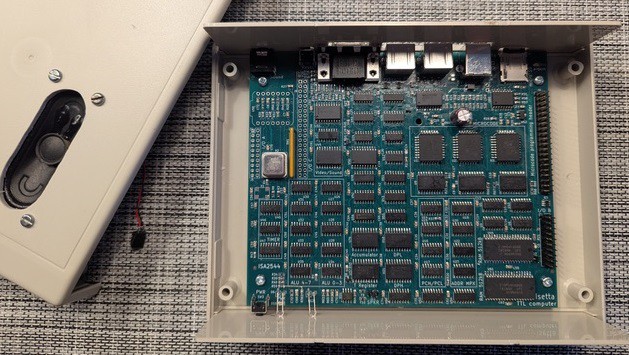
HOW DOES IT LOOK
SPECIFICATIONS

 CPU:
    - Runs Z80 and 6502 code
    - Speed 12.5 MHz (80 nS cycle time)
    - Memory 1024 kByte RAM (with bankswitching)
    - programmable/upgradeable microcode (3 flash chips)   
    - 42 integrated TTL circuits. No microprocessor or FPGA.

 I/O:
    - video VGA 320 x 200 (64 colors), or 640 x 400 (16 colors)
    - keyboard and mouse (both PS/2)
    - sound generator (AY-3-8910 compatible)
    - real time clock
    - microcoded video processor, sound processor, I/O processor
    - 9 integrated TTL circuits for the I/O

 Storage:
    - micro-SD card (removeable)

 Connectivity:
    - WiFi on-board (future)
    - Bluetooth BLE (future)
    - LoRaWan (future)

Applications:
- SymbOS operating system
- Runs CP/M (as SymbOS application)
- Runs ZX Spectrum games
- Runs several BASICs (Apple I, Altair, TRS80)

 Other:
    - pcb 152 x 127.5  (6 x 5 inch), 4 layers.
    - powered by 5V USB

 Principles for the design:

 - No microprocessor, microcontroller, SOC, FPGA, CPLD, GAL, PAL or 74181
 - All components have good availability at the big distributors
 - Low number of components
 - No fine-pitch devices that are difficult to solder (resistors, capacitors are all 0805 types)

DISCUSSION

For questions or tips/remarks you can use the discussion section at the end of the main page.  Or you can send a PM, join the discussion at the RetrocomputingForum / Isetta, or use the email address at the contact page of envionic.com.

BTW, where do you come from ?

Flag Counter

IDEA

The idea for this design was born at the end of januari (2023). 

The heart of a computer is the CPU. In most computers, the CPU is a single integrated circuit (a Microprocessor). But it is also possible to build your own CPU from parts that perform simple functions. I wanted to build the CPU from parts of the TTL family. That are integrated circuits, that can perform elementary logic functions. They were first used in the 60's of the previous age. I use a modern version of these circuits, that use less power.

There are many homebuilt CPU's, and most of them have their own, unique instruction set. But when such a computer is built, you must make all software yourself ! It would be nice if existing software could run on the homebuilt CPU.

Therefore, I decided that for this project the CPU would use an existing instruction set. 

So which instruction set to use ? The CPU inside your laptop or cellphone is much, much too complex to build. But it is possible to use an older CPU from the time when microprocessors just became available. There were two processors that can be regarded as the Beetle and the Deux Cheveaux of the beginning of the homecomputer age.

These processors are the MOS Technology 6502 and the Zilog Z80

The 6502 is famous because it was the heart of the Apple 1, the Apple ] [, the Commodore 64, the Nintendo NES and many others. The Z80 is well known because it was used in the TRS-80, the ZX Spectrum and the MSX computers, and it was widely used to run the CP/M Operating system, see also this Z80 introduction video.

So now, I had to decide whether to use the instruction set of the 6502 or that of the Z80. But then I thought... why not build...

Read more »
sw_pack260212.zip

If you already have a SymbOS SD card, replace all the SD card files. And use the new microcode.

Zip Archive - 41.90 MB - 02/12/2026 at 21:10

Download

sw_pack251227.zip

Zip Archive - 41.78 MB - 12/27/2025 at 14:54

Download

sw_pack251119.zip

Zip Archive - 13.72 MB - 11/19/2025 at 10:24

Download

assy dwg ISA2532 upper half components.png

Portable Network Graphics (PNG) - 173.04 kB - 10/03/2025 at 15:16

Preview

assy dwg ISA2532 upper half capacitors.png

Portable Network Graphics (PNG) - 128.17 kB - 10/03/2025 at 15:16

Preview

View all 28 files

  • Project Finished !

    roelh3 days ago 0 comments

    New software pack

    In the file section, you find a new software pack sw_pack260212.zip. I has the beta version of SymbOS version 4.1 for the Isetta, and a new microcode version.
    This software fully supports: 
      - the 1024kB Isetta, but also the 512kB version
      - several languages (English, Dutch, German, Spanish, Turkish and Japanese)
      - several character pages, the main one is based on CP-1252

    It supports PS/2 keyboard layouts for Brazil, France, Germany, Greece, Hungary, Italy, Japan, Netherlands, Poland, Portugal, Spain, Turkey, Ukraine, United Kingdom and USA.

    The Isetta project can now be regarded as finished, although I expect that there will be a few software enhancements.

    Isetta at MSX fair Nijmegen

    On march 28th you can come to Beuningen-NL (near Nijmegen) to see Isetta ! Isetta will be at the SymbOS booth at the MSX fair (free entrance).
    Jörn Mika (creator of SymbOS) and I will also be there.
    See this link: https://manuel.msxnet.org/msx/beurs/?lang=en

    Isetta built by Walter Belgers

    And here you see a very nice Isetta built by Walter Belgers from the Netherlands. 

     
    Perhaps not clearly mentioned before, Isetta can directly drive a speaker (but you can also use the 3.5 mm sound output).

  • SymbOS has the full one Megabyte !

    roelh01/27/2026 at 08:34 0 comments

    Since a few days, the SymbOS operating system can use the full megabyte of memory on Isetta. The adaption was done by Prodatron, the genius that designed and programmed SymbOS.

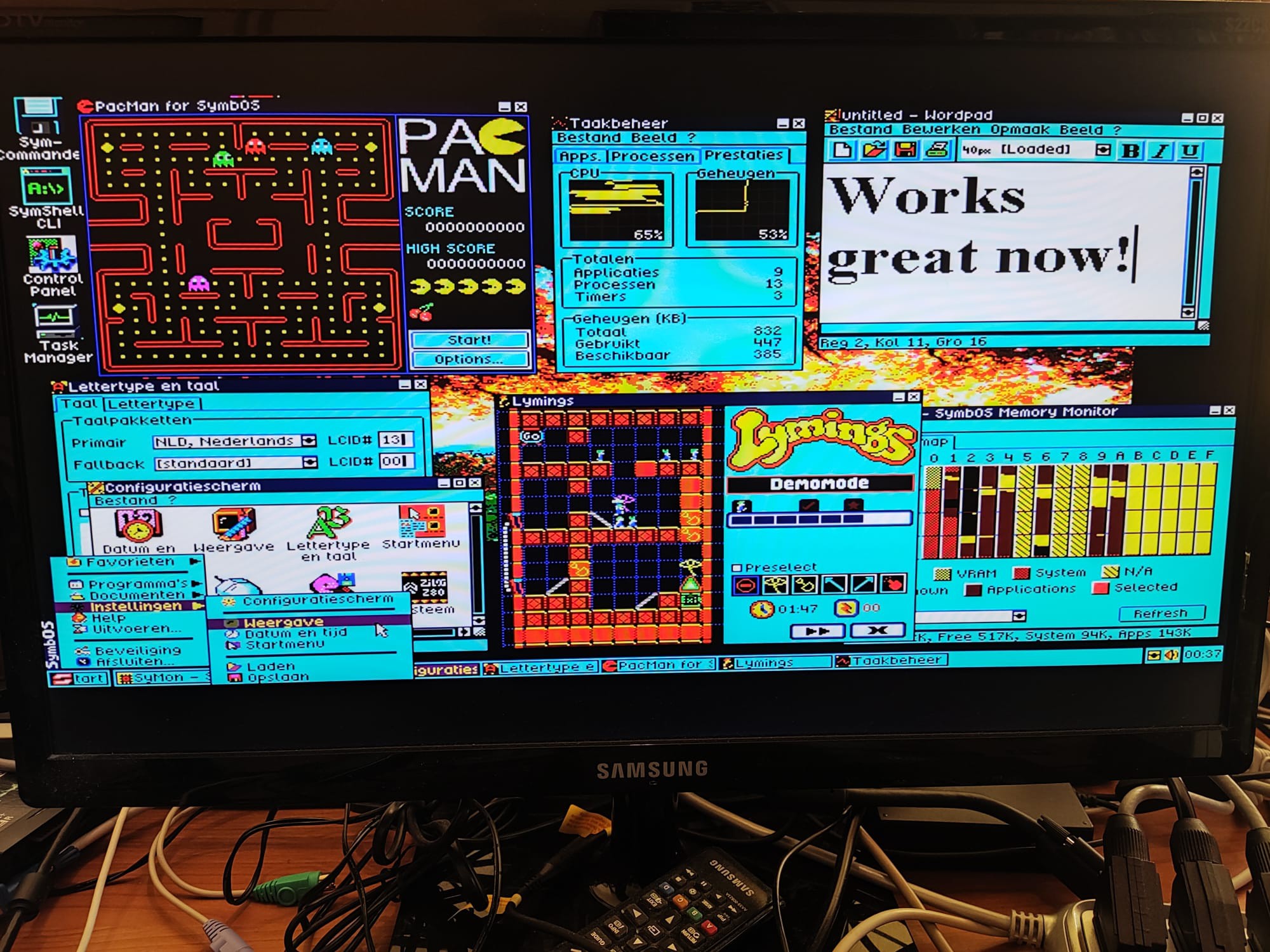
    Here is a screenshot of the 1 MB system. At the lower right side you see the memory map, the numbers 0 - F are the sixteen 64K memory banks. The yellow banks from B - F are still available !

    One megabyte is the maximum amount of memory that SymbOS can handle. This means that the Isetta version is now just as capable as the SymbOS versions for all other platforms.

    If you take a close look, you will see that many of the menu items and texts are now in Dutch ! Symbos will soon have a new feature, the support for several languages other than English. It will then also work with PS/2 keyboards for those languages. The first supported languages are Dutch, German, Spanish, Turkish and Japanese (really). French, Italian and Greek will be the next ones.

  • A Detective Story

    roelh12/27/2025 at 15:40 0 comments

    "Just another day at the Sam Cruise Detective Agency. I hear the staccato rattle of Daisy at the old typewriter in the outer office: the band in my head starts to tune up. I reach for a strong coffee. Pulling up the blind I look out of the grimy window into the street below. Ordinary people going about their ordinary business, unaware of the intrigues on their doorsteps. What do they know of the Fat Man, or the mysterious goings on at No.19?. Luscious Lana wiggles past, a sly smile playing across her ruby red lips. A gust of wind disturbs the garbage on the sidewalk.

    And then the phone rings...  "

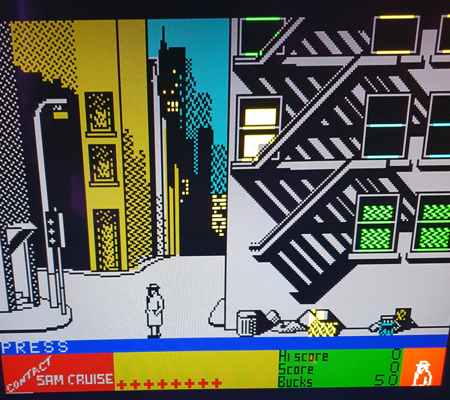
    Since a few days, a new (old) game is running on Isetta: Contact Sam Cruise (CSC)

    It's a ZX Spectrum game from 1986. You are the detective who has to solve a murder case. Very nice graphics.

    Running ZX Spectrum games

    Since a few months, Isetta boots the SymbOS operating system directly. That implied that there was no fast way to run Spectrum games from internal serial flash, as before, when also SymbOS had to be started from this flash chip.
    But I now have a new way to start Spectrum games from the SD card. And I added the Sam Cruise game.

    While Manic Miner and The Great Escape directly approached the hardware through I/O ports, the Sam Cruise game relies on interrupt handling by the spectrum ROM. When a frame interrupt occurs, the ROM software increments a frame counter at 5C78 (that is used by CSC to start drawing a new frame), and it reads the keyboard matrix, converts to ascii and put that on location 5C08, where CSC reads it to decide which command you entered.

    The games can be entered in assembly , and can then be assembled with WinApe (Amstrad simulator and assembler) on a PC, resulting in a ".com" file. I made a special include file "zx_incl.asm" for this, that is a software layer that lets Isetta behave as a ZX Spectrum. 
    It switches the screen to ZX Spectrum mode, converts ps/2 keyboard signals to ascii, and handles an interrupt as described above. For games that read the keyboard matrix directly through an INPUT port, it simulates the ZX keyboard matrix.
    Note that on Isetta, IN and OUT instructions do not simply transfer bytes on the databus. They call a sequence of microinstructions that can do almost anything.

    In general, ZX programs run without modification. But Manic Miner ran a lot too fast, due to the fast LDIR that Isetta has. I created a second LDIR (opcode ED B4) that has the same speed as on a real Z80 and used that. Now, Manic Miner has normal speed. And in a few games I disabled the automatic joystick detection.

    More spectrum games (in assembly) can be found here: https://gitlab.com/z80-source-code-software/other-systems/

    How to run a Spectrum game

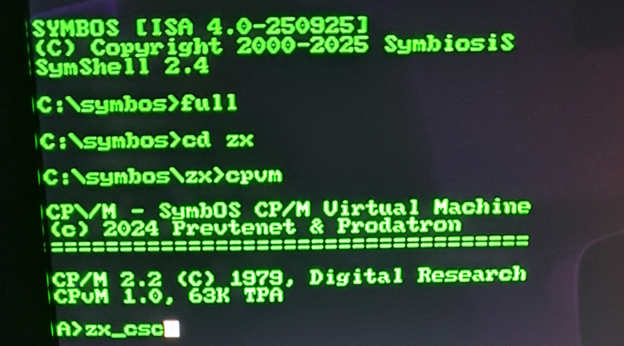
    On the Isetta computer, start the SymShell by double clicking on it's icon.
    If you like, select a full screen with the "full" command.

    Change the directory (with CD command) to the ZX directory where the .com file and cpvm.com are.

    Then type "cpvm" to start the CP/M operating system,

    and in CP/M, type the name of the .com file (you can omit the .com part), to start it.

    The following games are available:

    zx_mm.com     // Manic Miner
    zx_tge.com     // The Great Escape
    zx_csc.com     // Contact Sam Cruise

    Also, the full assembly code of these games is provided. It includes the software adaption layer that lets Isetta behave as a ZX spectrum (Video, keyboard and sound). This will also enable you to run other ZX Spectrum programs.

    New software pack in file section

    Today I uploaded a new software pack to the file section of this project, sw_pack251227.zip.
    It has several new things:

    Symisa.pak     // An improved SymbOS version that starts programs faster
    Symbos.ini      // Was missing in previous pack, causing programs that refused to start
    isetta_rpi         // Improved automatic test 
    zx         ...

    Read more »

  • One Megabyte !

    roelh11/29/2025 at 21:20 0 comments

    The SymbOS operating system runs fine on Isetta. But when you have several programs open, and use a few of it's advanced options, the 384kByte available memory on a 512kB system is in many cases not enough.

    Therefore, I added another 512 kByte RAM to Isetta. The bankswitching system got an extra chip to handle the extra address bit, and a quick pcb redesign was done. The pcb was built, and a low-level memory test proved that the extra RAM  was working.

    Work to let SymbOS use the extra RAM is still in progress, and hopefully can be finished soon.

    If you order a kit, you will get the 1024 kByte version from now on.

  • More documentation online

    roelh10/05/2025 at 07:57 0 comments


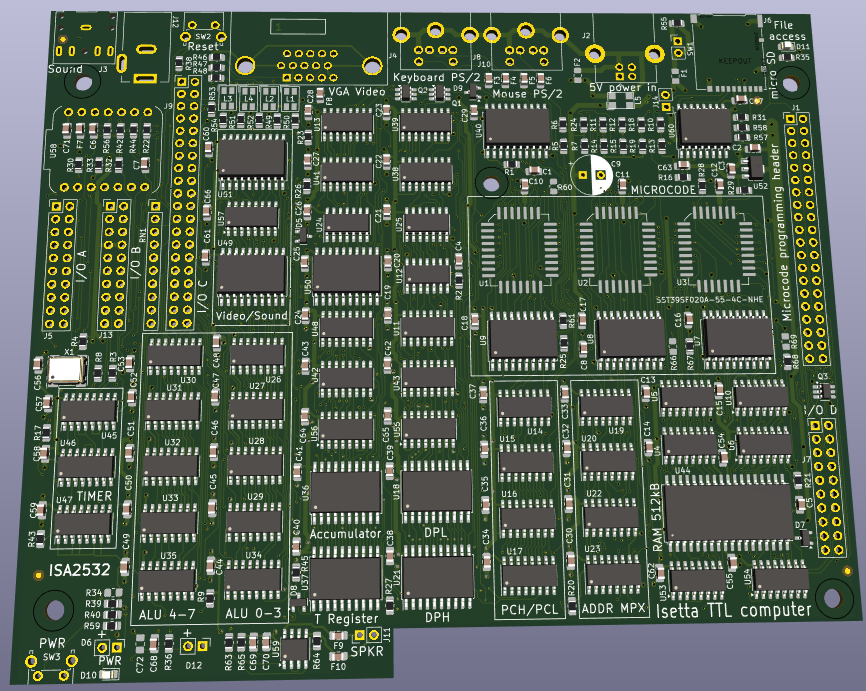
    In the Hackaday file section, I now placed the almost-latest version of the schematic, and 3 assembly drawings that will make it easy to find the components on the pcb when you build it. For convenience, the typenumbers of the IC's are printed on the pcb.


    The new pcb's (ISA2532) have arrived from my sponsor PcbWay. As always, the quality is very good and they deliver quite fast.
    Builders of the KIT will now receive this pcb, so there is no need any more for the modifications with all the wires. The pcb was tested by building an Isetta with it, and it works perfectly.

    The SymbOS version for Isetta is now practically bug-free.

    SymbOS has a shutdown command, that switches VGA screen and the power LED off. After pressing the button at the front, it will start-up again.

    The real-time clock/calendar is now also working. It keeps running during shutdown, and during ZX-Spectrum or other applications.

    On october 11th/12th, Isetta will be at the SymbOS stand in the Nixdorf Museum in Paderborn (Germany):
    https://www.hnf.de/veranstaltungen/events/date/2025/10/11/cal/event/tx_cal_phpicalendar/retro-computer-festival-1.html

    For all of you who want to build one, I sell pcb's on my new Envionic website (not a HTTPS connection possible yet).

  • Third PCB design finished

    roelh07/30/2025 at 08:40 0 comments

    The new pcb design was finished. I did not send it yet for production, because experience says, that within ten minutes of the final submit for production, I think of something that I forgot in the design. So I just wait a few days before ordering.


    What changed (w.r.t. ISA2442 version):

    - The wire modifications, as on prev version, are no longer needed
    - slightly changed form factor, to better fit in the housing
    - Have a 1.5 W sound amplifier on board, can now directly connect a speaker. The 
        output for an amplifier is also still on board.
    - Due to speaker dimensions, a bigger housing is used, RM2055M (instead of RM2055S)
    - Have a 'wakeup' button at the front. (A SymbOs command can put Isetta asleep). The power
         LED will be off while Isetta is asleep.
    - Several changes to improve EMC behaviour
    - Amount of Microcode flash ROM can be doubled, now 32 instead of 16 microcode pages.
        (The option to use 8-cycle instructions was removed for this.)
    - Max number of consecutive microcode cycles is now 512 (was 256). Now it is easier
        to display 640 pixels per line (two pixels per cycle, so 320 consecutive cycles)
    - The selection between 640 or 320 pixels per line is simpler now (uses ctl_upd_n)
    - The 4 blinkenlights were removed
    - Added a LED to indicate file read/write
    - Changed the optional WiFi module to XIAO ESP32S3 (WiFi + Bluetooth BLE)
    - The WiFi module has an option to add LoRaWan
    - One extra IC used. And one for the sound amplifier.

    New Option connectors:
    - I/O A: 20 pin connector. Bus for parallel input/output. Has 8 datalines, 3 address lines.
    - I/O B: 20 pin connector. Supports 4 input and 4 output bits. Also useable for alternative power
                                supply (and battery backup). This option can also select a lower CPU speed
                                for less power consumption. 
    - I/O C: 40 pin connector. A board to give more video modes can be connected here.

    - I/O D: 20 pin connector. Connects to RPi. This was "I/O C" on prev version. Removed some unused signals.

    This is the 3D impression of KiCad:

  • We have Sound !!

    roelh06/10/2025 at 09:24 2 comments

    Finally, the PSG (Programmable Sound Generator AY-3-8910) is coming to life. It was harder than I thought. But it now has the 3 channels for tone or noise, with independent frequency and volume control. Only the the envelope generator is not present yet [edit: a month later, envelope was also working]. The sound is generated by microcode, no actual AY-3-8910 is used, but the sound is controlled in the same way as on a real sound chip.

    It generates the typical sound of the eighties computer games.

    It can now provide sound for the SymbOs operating system !  And here you see the first Youtube video of Isetta running SymbOs (made by Prodatron):


    (The start-up screen of Isetta will have to be modified, it's quite a mess at the moment.)

    A new version of the Isetta programming manual is now in the file section. It includes the commands to control the sound generator.

    OPERATION

    There are four 1 kB sound buffers, one for each of the three channels, and a fourth one for noise.

    The squarewave sounds are generated in an unrolled loop. So if a wave has 5 samples 'high' and 5 samples 'low', to generate one period there will be two sequences that each put samples in the buffer, with each having five "(pc++) <- T" micro-instructions in a row. (Note the program counter is used as auto-incrementing pointer to the buffer).

    The value in T is the required amplitude for this sound (positive value for high samples, negative value for low samples). So there is no separate volume-control stage, like the real PSG has.

    At each scanline interrupt, a byte-sized sample is taken from each of the four buffers, the four samples are added and sent to the D/A converter (resistor array RN1). So the sample frequency is the same as the VGA line frequency, 31.25 kHz.

    To control this, there are two Z80-output ports. One to select a AY-3-8910 register, and another one to write a byte to that register. The Z80 output ports can also be used by the 6502 processor.

    EFFICIENCY

    For each channel, producing samples takes around 3 cycles per sample. (The unrolled loop produces 8 samples on average, single cycle per sample, with also 16 cycles overhead).
    For a full 525-line frame, this is 1575 cycles per channel. Noise has it's own channel, so there are 4 channels, together taking 6300 cycles each frame.


    In each frame, 120 lines are for the CPU, minus interrupt it's around 350 usable cycles per line. Per frame, this is 120 * 350 = 42000 available cycles. So the sound takes 15% of the CPU time. For frequencies higher than 1kHz, there are just a few samples produced in each loop, so there is more overhead.

    LINKS

    There are several very nice articles about sound generation.

    Want to know everything about synthesizers:

    https://www.soundonsound.com/series/synth-secrets-sound-sound

    Building the AY-3-8910 fully from TTL chips:

    https://github.com/mengstr/Discrete-AY-3-8910

    Very good description of the AY-3-8910:

    https://www.cpcwiki.eu/index.php/PSG

    Article about Linear-feedback shift registers, used to generate noise:

    https://en.wikipedia.org/wiki/Linear-feedback_shift_register

    The Isetta noise generator comes from this article. It's a 16-bit Galois type, quite simple:

           unsigned msb = (int16_t) lfsr < 0;   /* Get MSB (i.e., the output bit). */
            lfsr <<= 1;                          /* Shift register */
            if (msb)                             /* If the output bit is 1, */
                lfsr ^= 0x002Du;                 /*  apply toggle mask. */


    Sound generation in the Novasaur TTL computer:

    https://hackaday.io/project/164212-novasaur-cpm-ttl-retrocomputer/log/184708-roll-your-own-sid-chip

    Interactive demo, shows harmonics...

    Read more »

  • Do-It-Yourself KIT available

    roelh05/21/2025 at 17:45 0 comments

    KIT Available

    The first Isetta kit was successfully built by Vadim (see picture):

    And the second kit was built by Hans-Jürgen in Germany.

    In [this log] you can see all ins and outs of the kit. Of course, with the kit, you will receive the latest schematics and software versions. [ edit: You can order your kit at the new Envionic website. ]

    On the first pcb, a few modifications had to be done (the wires that you see on the pictures). But there is now a new pcb design where these modifications are not needed.

    SymbOS

    Good progress was made on the SymbOS implementation. The most serious bugs are fixed now. Currently I am working on the microcode for a sound generator, that will work similar to the AY-3-8910, and that can also be controlled by SymbOS. 

  • Come and see Isetta running Symbos

    roelh04/27/2025 at 20:23 0 comments

    On may, 10th you can see Isetta running SymbOs !

    Isetta will be at the "MSX Vriendenclub Mariënberg", together with Prodatron (designer of SymbOs), and myself.

    https://raymondmsx.nl/home_mvm_eng.html   English
    https://m-v-m.lookpages.nl/home/  Dutch

    Place:
    Buurtgebouw de Grendel
    Wicher Hentostraat 17
    7692 AL Mariënberg

    Time: may, 10th 2025, from 10 a.m. till 4 p.m.

    As a first time visitor, the meeting is free. 

    It would be nice if you send me a reply or PM if you want to come.

  • Programming manual, microcode and Blitter

    roelh03/12/2025 at 12:10 0 comments

    PROGRAMMING MANUAL

    An Isetta Programming Manual was made, that describes all features that are available to the assembly program.
    You can find it in the File Section.

    It describes most of the I/O ports. 
    It also describes the video system, bankswitching, ports used for the Blitter, and describes a debugger that I made.

    MICROCODE INTRO

    One of my plans was, to have some microcode support for writing to the screen. 

    Writing to the screen, in Z80 (or 6502) assembly language, can be very tedious. The screen is pixel based. There are several complications:

      - in 640x400 mode, there are two pixels per byte
      - we might have graphics encoded as 2 bits per pixel (4 colors), this must be converted to 4 bits per pixel
      - We might have transparent pixels (for sprites). So sometimes, in a byte, one nibble must be written but the other stays the same.
      - the upper and lower half of the screen are in different memory banks
      - perhaps the 4-bit color pixels must be converted to another 4-bit color code

    A Z80 assembly program to do this will be difficult to write, especially because it should be quite fast (to get the screen written in an acceptable time).

    MICROCODE FEATURES

    To get a good performance, it would be better to write screen handling in microcode. On Isetta, programming in microcode has the following features:

      - A microcode instruction is 24 bits, and is totally different from a Z80 or 6502 instruction.
      - While the main purpose of the microcode is, to implement Z80 or 6502 instructions, it can also be used to do other functions.
      - A 24-bit micro-instruction can be fetched from microcode flash memory while a data byte is transferred to/from data memory (Harvard style). A micro-instruction always executes in a single cycle (80 nS).
      - The 24-bit instructions are addressed by the instruction register (8 bit), a step counter (4 bit), a page register (4 bit), and the flag F (1 bit).
      - The micro-instructions can read and write flags, and have conditional execution, that lets the F flag choose between two micro-instructions.
      - During execution of a Z80/6502 instruction, when the required steps are done, a micro-instruction will load the instruction register (IR) from an address that is in the program counter (PC++), reset the step counter to 0, and might set the page register to a new value.
      - If, at the end of the 16 steps, the instruction register (IR) is not loaded again, the IR will automatically increment, because the lower 4 bits of the instruction register is also a counter. So a sequence of micro-instructions can be 256 cycles long. If IR is still not loaded, it will go back to the first of these 256 steps. 
      - If the instruction register is loaded, it does not have to be loaded from the PC address. It can also be loaded with a constant (to jump to a fixed next instruction), or can be loaded from a register in memory. It is possible to write simple programs without using the program counter.

    MICROCODE DETAILS

    What do the micro-instructions do, more in detail ?

      1) Read the next 24-bit micro-instruction (pipelined), from one of two 'tracks' chosen by the F flag.
      2) Determine memory address and memory bank. Memory address can come from:
          - the data pointer (DPH/DPL), or
          - the program counter (PC) with optional auto-increment, or
          - a small fixed value (included in the 24-bit instruction). This is divided in two ranges (selected by microcode):
               - A) A fixed range of 64 bytes
               - B) A selection between two other ranges of 64 bytes. Selection is done by the output bit EXX. The BC, DE and HL registers of the Z80 are stored in this range.

         There is an option to set the lowest address bit to 1. This is useful to read the MSB of a word, without having to increment...

    Read more »

View all 41 project logs

Enjoy this project?

Share

Discussions

Paul Driver wrote 08/31/2024 at 21:41 point

Dr Matt Regan on YouTube has an entire series on microcoded TTL computers, and has done 6205 emulation, culminating in an Apple II clone) as well as the Z80, culminating in both Sinclair ZX80+ and Spectrum clones.

https://youtube.com/@drmattregan?si=3HBWGR9niP8KzCvZ

  Are you sure? yes | no

Eric Hertz wrote 09/01/2024 at 02:03 point

Dr. Phil might have something to say about someone who has to spam every corner of another's creation...

The one in the "On The Cover of Hack A Day" log-entry really takes the cake.

  Are you sure? yes | no

roelh wrote 09/01/2024 at 07:26 point

Hi Paul, in his video https://www.youtube.com/watch?v=y04AH5Q3Z3I  Dr Matt Regan shows his Z80 TTL system working. But he only implemented a (small?) part of the instruction set. It's not clear which instructions he implemented and which he left out. But his demo can only show the copyright message at the start of a ZX81. This could be done with less than 10 different opcodes. Isetta can handle more than 650 different opcodes for its Z80 mode.

His Sinclair Spectrum clone uses a regular Z80 cpu (https://www.youtube.com/watch?v=N36iWYcXBAE) and not a Z80 built from TTL.

  Are you sure? yes | no

Con Cunningham wrote 04/21/2023 at 21:11 point

Just  been reading your square inch TTL CPU - great work. Did you publish your microcode, or is that proprietary ? Curious how you managed such a rich ISA with so few control signals!

  Are you sure? yes | no

roelh wrote 04/22/2023 at 18:08 point

Hi Con, the microcode can be seen when you scroll down on the simulator page: 

http://www.enscope.nl/simas_nac/

Did you read the logs ? If you also look at the schematic,  ( https://hackaday.io/project/161251-1-square-inch-ttl-cpu/log/154913-schematic-of-the-cpu ) you should be able to understand how it works.

  Are you sure? yes | no

Con Cunningham wrote 04/21/2023 at 20:51 point

I honestly don't know - perhaps when I get to wire-wrap some of it, and it starts to operate I might do so. Yes indeed, I use the 74181 as a 16 bit address incrementer, and of course, for all of the other 6502 arithmetic and logical ops.  Keep up the good work.

  Are you sure? yes | no

Con Cunningham wrote 04/20/2023 at 21:03 point

An ambitious project. I know this because I have been working on something similar (When work allows) for some months. I am on my 3rd iteration. This time I have based my design roughly on Tanenbaum's "Structured Computer Organisation" , see https://csc-knu.github.io/sys-prog/books/Andrew%20S.%20Tanenbaum%20-%20Structured%20Computer%20Organization.pdf

I am using 74LS TTL, and have opted to make life easy by using 4 x 74181 as a 16 but ALU. I hope to implement all of the 6502 ISA, with the exception of Decimal Mode.

Have you begun to use a simulator, such as Logisim or Digital yet?

I wish you the very best of luck with your project, keep the updates coming!

Con

  Are you sure? yes | no

roelh wrote 04/21/2023 at 20:03 point

Thanks Con !  I'm curious about your project. Will you publish it on Hackaday ? I suppose you will use the 4 x 74181 as address incrementer ? Yes I will soon start simulating.

  Are you sure? yes | no

Similar Projects

Does this project spark your interest?

Become a member to follow this project and never miss any updates