



 davedarko
 Arya
Arya Tindie
 Aleksandar Bradic
 Richard Hogben
 alpha_ninja
-
Tina's Display
01/10/2026 at 20:11 • 0 commentsChips:
(2x) 9x OKI MSM5260 4412(2x) 4x upside down?
1x LA6324
GEB-2294V-0 S (seems to be on a lot of boards)
proably 5V
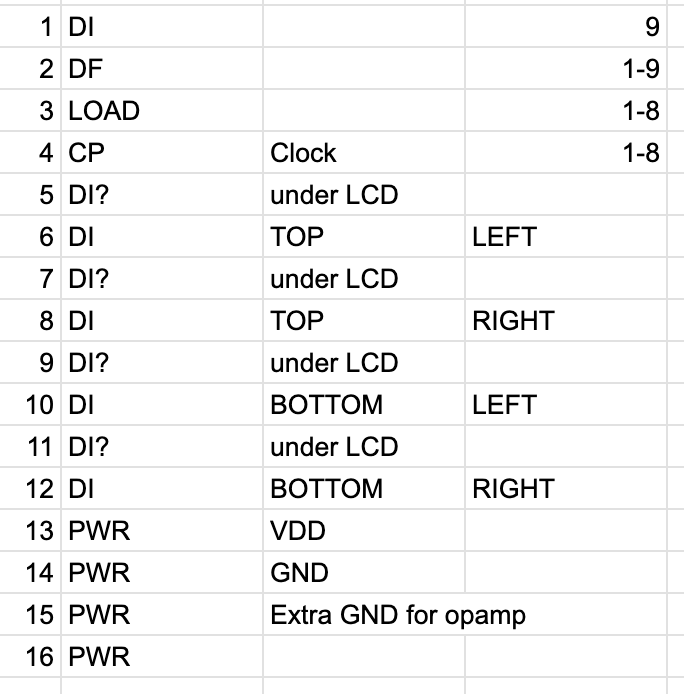
1 Serial in, one clock and load
one handles 80 bit, so it's 160 * 640 pixel?
could also be 200x640, looking at a HTM640200-31W for exampled
![]()
-
Simple Add-ons lightning talk at supercon
09/26/2025 at 13:57 • 0 commentsThought it would be nice to have a separate video of my lightning talk at supercon about simple add-ons, so it's easier to find and point at.
-
Playing with the I2C SAO Petal for Supercon 8
11/07/2024 at 23:55 • 0 commentsMy first tripup was that GPIO1 was not soldered on the badge, glad I caught it!
I also soldered an LED leg as a jumper for the programming pin on the SAO to be always connected to GPIO1.
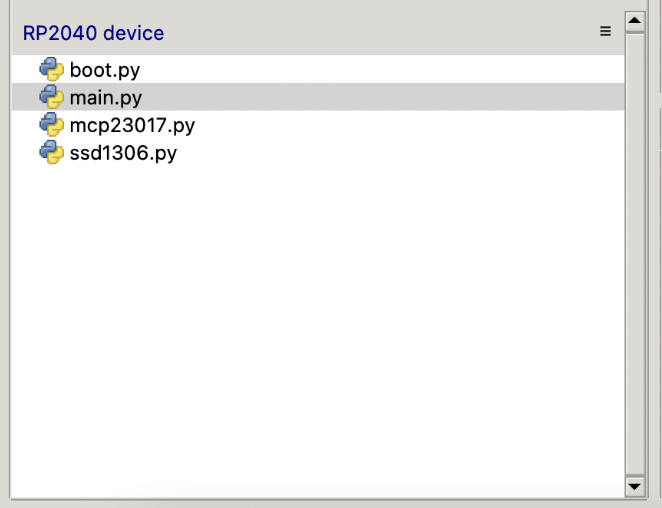
It seems like there's a little issue with the Supercon image and getting the programmer to run, but the programmer works with the vanilla RP2040 PICOW image. These are the files that are on the image to start with.
![]()
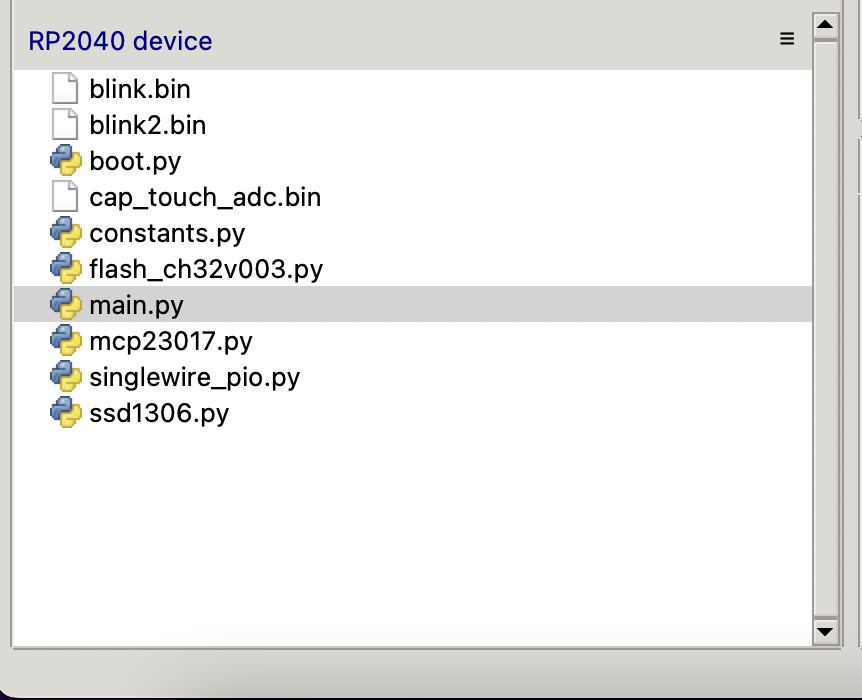
Followed by this file tree, when I upload the programmer onto the badge as well.
![]()
I create another file and copy in the example that is written in flash_ch32v003.py - note here that I have to comment out the "or" in between the example.
>>> %Run -c $EDITOR_CONTENT
Traceback (most recent call last):
  File "<stdin>", line 2, in <module>
  File "flash_ch32v003.py", line 35, in __init__
ValueError: StateMachine claimed by external resource
>>>
This is something that others have noticed before - by changing the used statemachine from 4 to 3, this error went away. When I run the program now, I get this output, but it is still blinking, instead of putting out touch values.
>>> %Run -c $EDITOR_CONTENT
Time spent: 545482
0x0 0x0
0x1 0x0
0x2 0x0
0x3 0x0
>>>
With the vanilla Micropython from https://micropython.org/download/RPI_PICO/ I also just copy the files onto the badge and run the code from REPL and it works. Therefore I doubt that it is a hardware issue and must have something to do with the supercon image.
It seems like just changing the state machine number in the "StateMachine" function is not enough, you also have to change the "unavoidable bit-twiddling" bit, If you want to use a statemachine smaller than zero, then you have to change the PI1_BASE value to PI0_BASE and add the correct state machine SM1_EXECCTRL. It seems like I2C on the PICO W leads to a different state machine being used, which then breaks the flasher.
Here's my pull request on github with the changes:
My Projects
Projects I Contribute To
My Pages
Things I've Built
Tampermonkey scripts for hackaday.io
Some annoying things like the feedback button and design stuff. https://gist.github.com/davedarko/f6ef86c89c4d1df4cd36
Batman LED caps
Put a cap on a strawhat LED and you will get a small batman projector.
IKEA Expedit LED plug
Throw in some WS2812 LEDs and snap it on the crossings.
PiMac
3D printed case for the raspberry pi in a not so common but very known shape. Inspired by http://hackaday.com/2014/01/16/hackintosh-mac-pro-replica-using-a-trash-can/
Fubarino Contest: Game Boy Printer
A little library for the gameboy printer for an easy intergation into arduino sketches. Cross the serial streams (watchout Egon) on startup, it will print the had url. http://hackaday.com/2013/12/17/fubarino-contest-game-boy-printer/
Projects I Like & Follow
 Apollo Timbers
 b.sverdlyuk
 Julius Curt
 Armin Bindzus
 jeremy.geppert
 Arnov Sharma
 makeTVee
 Leo5593
 Gordon
 b.kainka
 danjovic
 davidmpride
 Aaron
Aaron Andrea Ricci
Share this profile
ShareBits


ha thanks for the kind words :) most of my projects I see as not finished (yet?)

Thank you for liking my #PERSEUS-9 homemade mobile 6502 computer!

Thanks for liking my #Pi Pedalboard: Live/Recording Rig project matey!

Aw, thank you for the follow on my project!
I hope to make it one of the more professionally manufactured items on my list.
In that regard, did you ever work with an assembly service?
Some of your projects look like they were, and this is my first try at automated assembly ^^
You had me on the hook with the 29th century holo emitter technology, but the screenshot of the sensor array (sounds so trekkie too) got me :)
I have worked with aisler.net a bit, but have not yet done anything with JLCPCB. Heard lots of good things about makerfabs, since @deʃhipu , @arturo182 and @Brian Lough have worked with them and still do so. None of my projects here have been assembled by anyone other than me :3

it's a great project, always a fan of different fonts and concepts for clocks :)

Thank you for liking and following my #Roomba RPi project!

It has all the things a good project needs: repurposed parts, 3D printed things, mechanical keys and an intriguing case :)

Hi Dave, thanks for liking my new #PoE-FeatherWing project!

[this comment has been deleted]
Sure thing! I just spotted two nice boards from a competitor in the contest and had to hit like :)
Hey Dave, thanks for following dude. :-)
I havent seen you in HC in a long time, hope everythings cool...
must have unclicked you and clicked again :D I'm always super busy with the videos for "element14 presents" and joined a hackerspace some months ago.. hope you get along as well!

Thanks for the follow of Light Brakes (https://hackaday.io/project/168007-light-brakes). Glad you like it!

Hey, thanks for taking a look at my project #DIYTIL311 !

totally unexpected and uncalled for, all that pcb art on that eurorack panel - nice work :D #Mutable Instruments Clouds PCB Panel


it's the onboarding process, where they ask if you like certain projects and don't mind auto following people.
Thank you for following my StereoPi project!
(https://hackaday.io/project/162954-stereopi-diy-stereoscopic-camera-with-raspberry)
Hey Dave ;-) Thanks for #Five Cubed dude, much appreciated.
Man was that tough not copying your #Skeleton Attiny85 Handheld , I had to breakout the old copper tape. ;-D
it's weird, some people on twitter came with analog heroes who used the technic, others said I'm copying someone else who wasn't the first one to do it :D I feel weird that people applaud me while attiny85 + OLED handhelds aren't new... just do what you want to do, don't get distracted by the noise like I was the last 3-4 days :D
Good luck with the contest and may the force be with you. It's almost Christmas, so I'm in a Star Wars mood.
very nice projects :)
Will definitely take time to read more about you