 Ken Yap
-
Developing supporting code for an ia-16 x86 SBC
09/07/2026 at 06:53 • 0 commentsAlthough the story is about a CPU that's older than many readers, the steps are still relevant to anybody wanting to bring up a GNU gcc toolchain on a fresh MCU architecture. Sometimes the ld script directives are issued as command line arguments, for example if you peer behind the scenes at the linker step in the command line history on the Arduino IDE.
OUTPUT_FORMAT(elf32-i386)

MEMORY {
        ram (!rx) : o = 0x0, l = 32k
        rom (rx) : o = 0x8000, l = 32k
        }

REGION_ALIAS("region_ivt", ram);
REGION_ALIAS("region_data", ram);
REGION_ALIAS("region_bss", ram);
REGION_ALIAS("region_text", rom);
REGION_ALIAS("region_rodata", rom);
REGION_ALIAS("region_bootvec", rom);

SECTIONS {

        .text : {
                _rom_begin = .;
                crt0.o(.text*) *(.text*)
        } >region_text =0xFF
        .rodata : {
                *(.rodata)
                rodata_end = .;
        } >region_rodata
        .bootvec 0xFFF0 : {
                crt0.o(.bootvec)
                FILL(0xFF)
                . = ALIGN(16);
        } >region_bootvec

        .ivt 0x0000 : {
                KEEP(*(.ivt))
                . = . + 0x400;
        } >region_ivt
        .data : AT(rodata_end) {
                data_start = .;
                *(.data)
                data_end = .;
        } >region_data
        data_load_start = LOADADDR(.data);
        .bss : {
                bss_begin = .;
                *(.bss)
                *(COMMON)
                bss_end = .;
        } >region_bss

        /DISCARD/ : {
                *(.comment)
        }

}
Right, so I thought I'd scare you off with a bit of GNU ld scripting.
I found myself a little indisposed this week so I thought I'd turn to a software project for a change. One of my round tuits is to make an SBC for the 8088s I have lying around. Not to run DOS or play games but as a general purpose MCU board. It's a bit both exhilarating and depressing how it's actually cheaper to buy a modern MCU dev board that can outperform the heart of a PC or XT computer, and even emulate at the same or higher speed. And no need for peripheral chips either. Still I can't stand seeing those chips idle so some time back I got TK Chia's ia-16 gcc for the 16-bit x86 CPUs working in a couple of ways: converting a Ubuntu DEB package to RPM, and building a Flatpak.
But to run bare silicon embedded programs on an SBC, we need a C runtime startup routine, written in assembler and usually called crt0, as well as a linker script to put all the program regions in the right memory areas.
First off the linker script. My SBC design has 32 kB RAM at the bottom and 32 kB ROM at the top of the 16-bit address space. (No segments, 64 kB should be enough for me 😉.) ROM is at the top because of the boot vector.
The order of the ROM segments from 0x8000 onwards is: code, read-only data (initialised constant data), initialisation data for writable data, e.g. the initialiser for char string[10] = "0123456789" which has to be copied from ROM to RAM, then lots of unused ROM bits until the boot vector at 0xFFF0 at the top.
The order of the RAM segments is: interrupt vectors up to 0x400 per 8086 architecture, writable data as above, BSS area which has to be zeroed before main(), the heap growing upwards from there, and the stack growing downwards from 0x7FFF.
You can actually ask AI to explain the ld script to you. The explanation was very good and it was a useful check that I had grokked ld script language.
As for the startup routine, here it is:
// Startup code

        .code16
        .text

        .global _rom_begin
_rom_begin:

        cli

        // Setup segment registers in tiny memory model

        xor     %ax,%ax
        mov     %ax,%ds
        mov     %ax,%es

        // Stack at end of RAM

        mov     %ax,%ss
        mov     $0x7fff,%sp

        // Copy .data from ROM to RAM (writable initialised data)
        // Const initialised data is in .rodata

        mov     $data_load_start,%si
        mov     $data_start,%di
        mov     $data_end,%cx
        sub     %di,%cx
        cld
        rep     movsb

        // Zero BSS for zero or uninitialised global variables

        mov     $bss_begin,%di
        mov     $bss_end,%cx
        sub     %di,%cx
        xor     %al,%al
        rep     stosb

        sti

        // Main C function

        call    main

        // If main() returns, halt

1:      hlt
        jmp     1b


        .section        .bootvec,"axT"
        .intel_syntax
        jmp     0x0000:_rom_begin
It follows the specification of the ld script.
Finally a Makefile that builds a test program. Notice the use of srec_cat from srecord...
Read more » -
Installing JLCPCB's JLCONE desktop app on an RPM system
08/23/2026 at 01:46 • 0 comments![]()
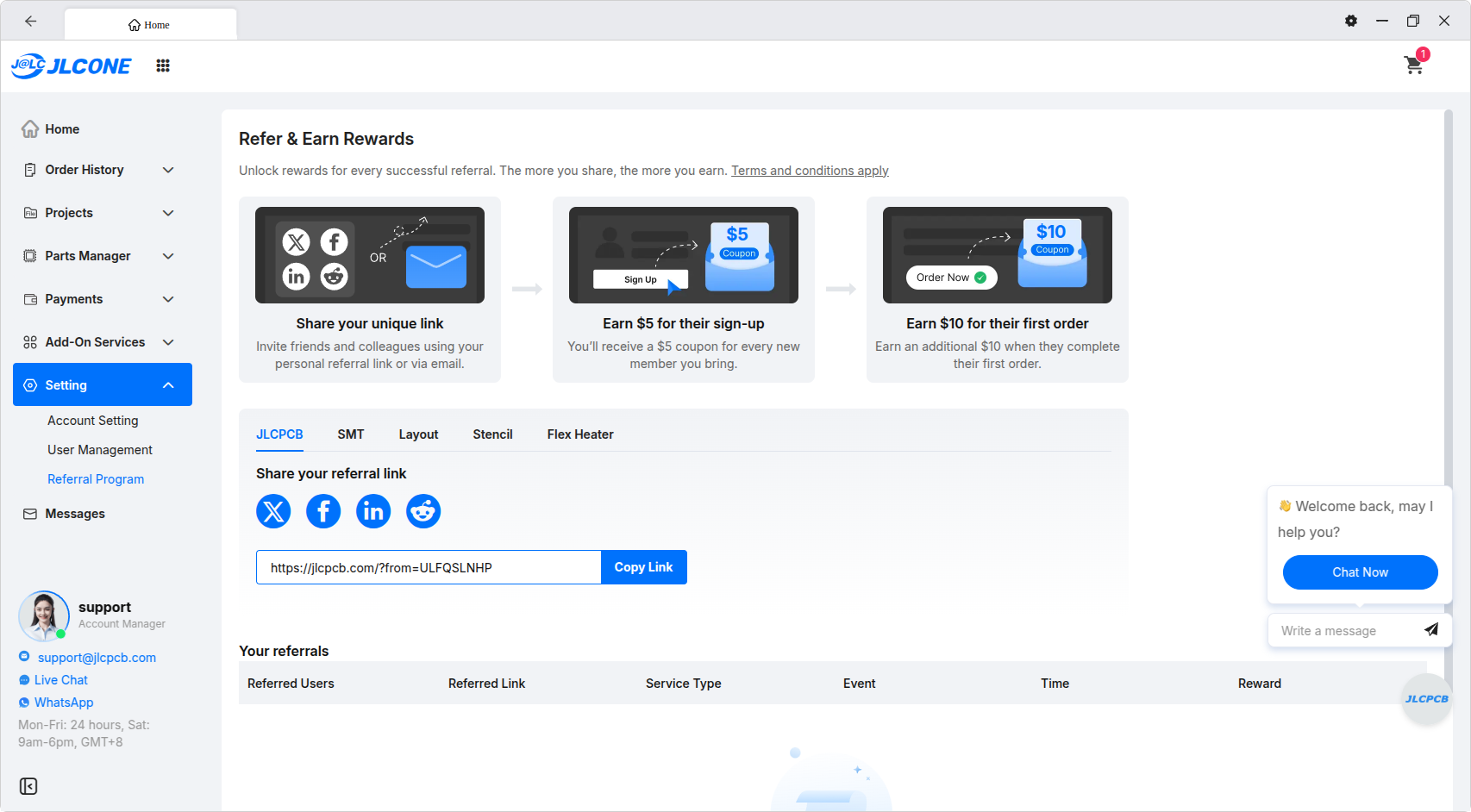
(In the above screenshot showing a successful conversion I won't show the Home page because I don't want to show my orders, but feel free to use my referral link above. 😉)
Update 2026-08-24: JLCPCB has announced that their $2 for 5 signature offer and cheap shipping rates are now only available from the JLCONE desktop app, so it's timely that I found a way to install it on my RPM system. When I looked recently cheap shipping wasn't available on the web page any more.
JLCPCB promises coupons and discounts if you submit orders via the desktop app instead of their webpage. When I went to look for the download, I saw that Windows, Mac (two flavours), and Linux are supported, but the Linux app is a DEB package. I have a RPM based system. I asked JLC if they were planning a RPM package, or perhaps a Flatpak or Appimage for wider coverage. They replied: We're thinking about it. In the meantime I decided to take things into my own hands.
I turned to alien, a converter between Linux package formats which I have used in the past. In what follows adjust the version number to be the current one.
I did:
# alien -r -k -c jlcone-1.0.70.deb-r means to RPM, -k means keep version, -c means also convert {pre,post}{inst,rm} shell scripts. You should first check that the scripts are safe by doing dpkg -e jlcone-1.0.70.deb
After some churning, a jlcone-1.0.70-1.x86_64.rpm was generated. When you install this you have to accept that it has no signing key. Fortunately there were no additional dependencies for the package.
Most files were installed in /opt/JLCONE. Here is the list of files:
# rpm -ql jlcone
/opt/JLCONE
/opt/JLCONE/LICENSE.electron.txt
/opt/JLCONE/LICENSES.chromium.html
/opt/JLCONE/chrome-sandbox
/opt/JLCONE/chrome_100_percent.pak
/opt/JLCONE/chrome_200_percent.pak
/opt/JLCONE/chrome_crashpad_handler
/opt/JLCONE/icudtl.dat
/opt/JLCONE/jlcone
/opt/JLCONE/libEGL.so
/opt/JLCONE/libGLESv2.so
/opt/JLCONE/libffmpeg.so
/opt/JLCONE/libvk_swiftshader.so
/opt/JLCONE/libvulkan.so.1
/opt/JLCONE/locales
/opt/JLCONE/locales/af.pak
/opt/JLCONE/locales/am.pak
/opt/JLCONE/locales/ar.pak
/opt/JLCONE/locales/bg.pak
/opt/JLCONE/locales/bn.pak
/opt/JLCONE/locales/ca.pak
/opt/JLCONE/locales/cs.pak
/opt/JLCONE/locales/da.pak
/opt/JLCONE/locales/de.pak
/opt/JLCONE/locales/el.pak
/opt/JLCONE/locales/en-GB.pak
/opt/JLCONE/locales/en-US.pak
/opt/JLCONE/locales/es-419.pak
/opt/JLCONE/locales/es.pak
/opt/JLCONE/locales/et.pak
/opt/JLCONE/locales/fa.pak
/opt/JLCONE/locales/fi.pak
/opt/JLCONE/locales/fil.pak
/opt/JLCONE/locales/fr.pak
/opt/JLCONE/locales/gu.pak
/opt/JLCONE/locales/he.pak
/opt/JLCONE/locales/hi.pak
/opt/JLCONE/locales/hr.pak
/opt/JLCONE/locales/hu.pak
/opt/JLCONE/locales/id.pak
/opt/JLCONE/locales/it.pak
/opt/JLCONE/locales/ja.pak
/opt/JLCONE/locales/kn.pak
/opt/JLCONE/locales/ko.pak
/opt/JLCONE/locales/lt.pak
/opt/JLCONE/locales/lv.pak
/opt/JLCONE/locales/ml.pak
/opt/JLCONE/locales/mr.pak
/opt/JLCONE/locales/ms.pak
/opt/JLCONE/locales/nb.pak
/opt/JLCONE/locales/nl.pak
/opt/JLCONE/locales/pl.pak
/opt/JLCONE/locales/pt-BR.pak
/opt/JLCONE/locales/pt-PT.pak
/opt/JLCONE/locales/ro.pak
/opt/JLCONE/locales/ru.pak
/opt/JLCONE/locales/sk.pak
/opt/JLCONE/locales/sl.pak
/opt/JLCONE/locales/sr.pak
/opt/JLCONE/locales/sv.pak
/opt/JLCONE/locales/sw.pak
/opt/JLCONE/locales/ta.pak
/opt/JLCONE/locales/te.pak
/opt/JLCONE/locales/th.pak
/opt/JLCONE/locales/tr.pak
/opt/JLCONE/locales/uk.pak
/opt/JLCONE/locales/ur.pak
/opt/JLCONE/locales/vi.pak
/opt/JLCONE/locales/zh-CN.pak
/opt/JLCONE/locales/zh-TW.pak
/opt/JLCONE/resources
/opt/JLCONE/resources.pak
/opt/JLCONE/resources/app-update.yml
/opt/JLCONE/resources/app.asar
/opt/JLCONE/resources/apparmor-profile
/opt/JLCONE/resources/default_app.asar
/opt/JLCONE/resources/package-type
/opt/JLCONE/snapshot_blob.bin
/opt/JLCONE/v8_context_snapshot.bin
/opt/JLCONE/version
/opt/JLCONE/vk_swiftshader_icd.json
/usr/share/applications
/usr/share/applications/jlcone.desktop
/usr/share/doc/jlcone
/usr/share/doc/jlcone/changelog.gz
...
Read more » -
Large round LED displays
06/15/2026 at 01:44 • 0 comments![]()
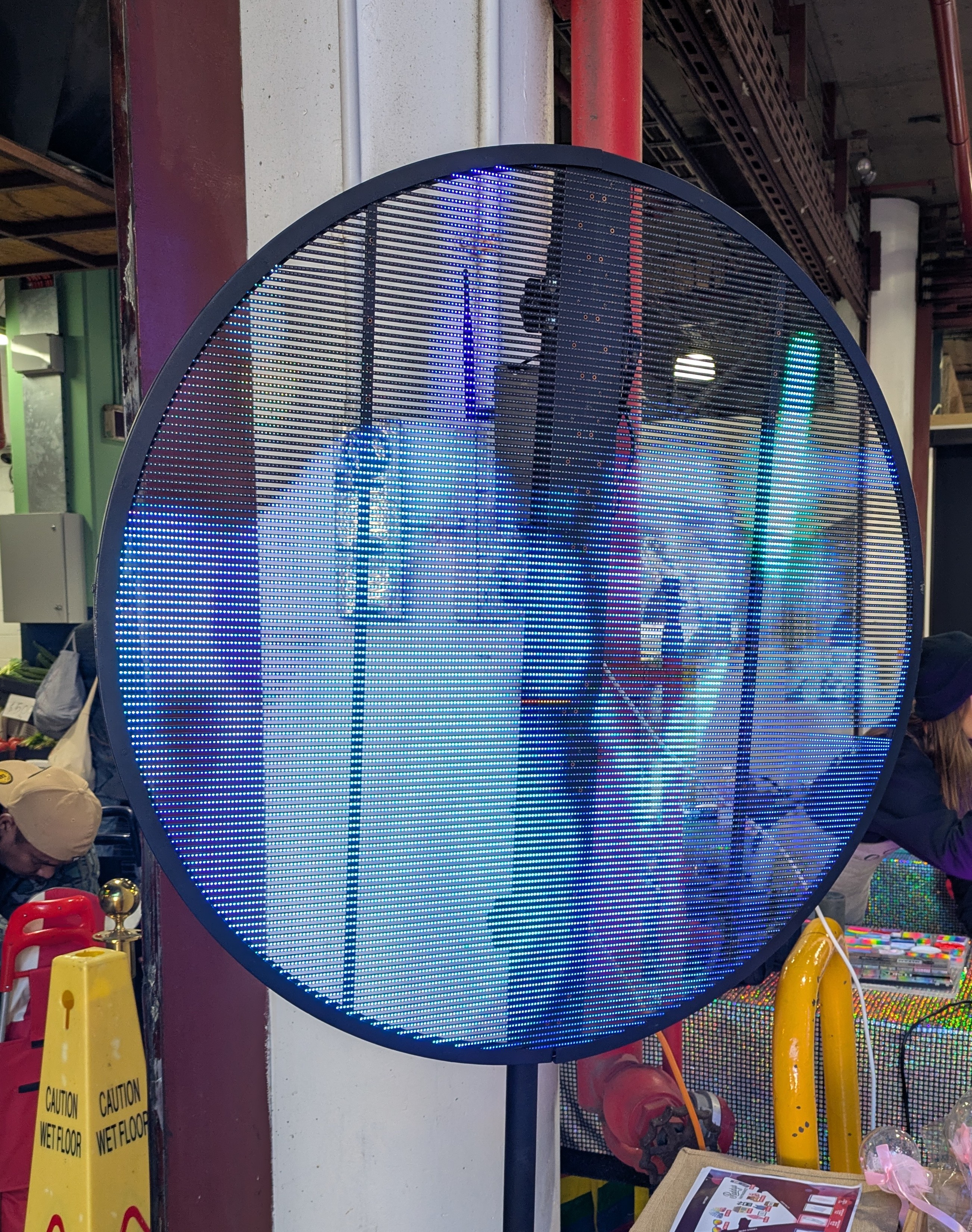
Large displays are of interest to me so I was intrigued by a large display I recently saw in public. It was a round screen about a metre in diameter with horizontal strips of RGB LEDs. It was translucent because of gaps between the "lines". One advantage is that it would be less susceptible to wind as it lets air through. It also allows you to see what's behind it. I don't think it folds; it looks rigid. Here it's used to attract attention with a live video feed. A search readily finds manufacturers and prices are in the order of hundreds of $.
My Pages
Projects I Like & Follow
 Ian Dunn
 Alex Xia
 CanHobby.ca
 BlackIoT SAGL
 Joren Heit
 Michael
 Michael Wessel
 Adam Wakelin
 Alan Boris
 supermarioprof
 Markus Loeffler
 mircemk
 Dave
Dave twodogstar
 Bohan Xu
 Wouter Minjauw
 Silica Gel
 Rasmus L.
Share this profile
ShareBits




Thank you for liking and following my #Prehistory of my homemade PERSEUS computers !

Thank you for following my Sol-20 Reproduction project Ken.

Hi Ken, thanks for the like for my TD4.
As far as a CPU it is pretty useless but it makes a great demo because of the flashing LEDs.
This seems to be a Japanese trait. When I was in Japan even the vending machines had animations. The TD4 book is half electronics and half anime imagery.
I am looking a more powerful 4 bit CPU in the same style as the TD4 (but for the prototype, using an IC PROM rather than a diode PROM). Only pencil drawings on graph paper at the moment.
Regards AlanX
A CPU with 11 TTL packages is interesting because I probably have all the parts needed but pity it doesn't do much more than flash LEDs. Looking forward to seeing your design.
Hi Ken,
I had a re-look at the TD4 and I had design a Paged version (https://cdn.hackaday.io/images/1250221502460302068.png) that increased the program space to 256x8. An ALU can be mapped in RAM space (16x4) but I did not pursue that option further (I could see better options).
Also an ALU (say an 181) could be connected to the A and B registers as inputs and the output directed to the "Zero Port". That is, replace "Move A,Z+Imm" with "Move A,ALU+Imm" etc. The Page register could be used as a function register for the ALU. The ALU would need to output Zero upon reset and to return to Zero under program control. Such is the problem with 4 bits is that you need more OpCode space.
Finally you could replace the original adder with an ALU and control the function with the Page register. You would need to be careful to be able to recover the CPU from a lock state. It was at this point I decided to build a new 4 Bit CPU from scratch.
Regards AlanX
Hi Ken,
I completely forgot, I have a redesigned TD4B version of the board (based on the one shown in my project posts: https://cdn.hackaday.io/images/5564921527557781106.png) but without the RAM and tidied up. It has not been tested (one day I will assemble it) but it should work. PM me if you want one.
AlanX
Thanks @agp.cooper
I'll think start small, with a zero bit CPU, just like I started learning juggling with zero balls. TBH I haven't progressed beyond that point. 🤣
Thank you for your comment to my #PERSEUS-8 homemade 6502 computer !
Thank you for liking my #Homemade Operational Amplifier and your comment !

Hi Ken, thanks for the like!
You've got a couple of nice projects, and I like your motto. Tinkering with electronics can be meditation.
Hello Ken, thanks for liking and following my new project, the Kobold computer, https://hackaday.io/project/164897-kobold-retro-ttl-computer !
Yes, obviously like me you appreciated the cleverness of the PDP-11 instruction set where the PC being R7, load immediate becomes load indirect R7 with autoincrement.
Just thought I'd drop in and say thanks for all of the BS spammers you've reported. Keeping the site clean!